
TCP Wrapper 特殊使用
更多,更好内容请参见: http://www.ibm.com/developerworks/cn/aix/library/au-tcpwrapper/
一. 用处和用法
没有符合hosts.allow,hosts.deny中的配置的主机,用ssh登陆到我的系统的时候,我希望记录下他的动作,以便用于查询认证只用,这个时候就可以用到TCP Wrappers 的特殊功能。 但是要确定安装tcp_wrappers软件才能使用: " yum install tcp_wrappers"。 这时,就会有更加详细的操作:
spawn : 可以利用后续的shell进行额外的工作,并且可以使用变量:
%h: hostname
%a: address
%d: daemon
twist: 立刻一后续的命令进行,且执行完后终止此次连接
二. 简单范例
1. spawn的使用:
1.1 设置hosts.allow,hosts.deny. 加入相应的spawn配置。
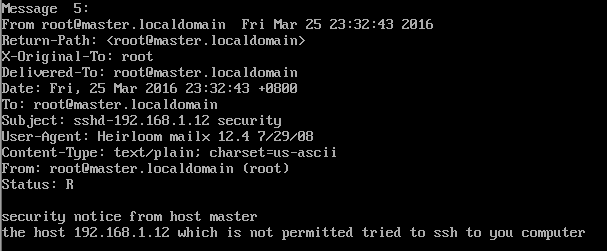
达到的目标: 如果是未经允许的网段登录到我的主机时,就向root账户发送一条mail,mail的内容形式为:
security notice from host ****
the host **** which is not permitted tried to ssh to you computer
hosts.allow
#

# hosts.allow    This file contains access rules which are used to

#        allow or deny connections to network services that

#        either use the tcp_wrappers library or that have been

#        started through a tcp_wrappers-enabled xinetd.

#

#        See 'man 5 hosts_options' and 'man 5 hosts_access'

#        for information on rule syntax.

#        See 'man tcpd' for information on tcp_wrappers

#

sshd:    192.168.1.2,192.168.1.1: allow
hosts.deny
#

# hosts.deny    This file contains access rules which are used to

#        deny connections to network services that either use

#        the tcp_wrappers library or that have been

#        started through a tcp_wrappers-enabled xinetd.

#

#        The rules in this file can also be set up in

#        /etc/hosts.allow with a 'deny' option instead.

#

#        See 'man 5 hosts_options' and 'man 5 hosts_access'

#        for information on rule syntax.

#        See 'man tcpd' for information on tcp_wrappers

#

sshd:    ALL    :spawn ( echo "security notice from host $(/bin/hostname)"; \
          echo "the host %h which is not permitted tried to ssh to you computer"; echo;) | \

             /bin/mail -s "%d-%h security" root
1.2 用不在允许范围的主机192.168.1.12尝试用ssh登陆到这台主机(192.168.1.11)
主机拒绝登陆

1.3 在主机(192.168.1.11)查看收到的新mai,内容如下:
 l
l
2.twist用法
在hosts.deny文件后边加上设置:
#

# hosts.deny    This file contains access rules which are used to

#        deny connections to network services that either use

#        the tcp_wrappers library or that have been

#        started through a tcp_wrappers-enabled xinetd.

#

#        The rules in this file can also be set up in

#        /etc/hosts.allow with a 'deny' option instead.

#

#        See 'man 5 hosts_options' and 'man 5 hosts_access'

#        for information on rule syntax.

#        See 'man tcpd' for information on tcp_wrappers

#

sshd:    ALL    :spawn ( echo "security notice from host $(/bin/hostname)"; \
          echo "the host %h which is not permitted tried to ssh to you computer"; echo;) | \

             /bin/mail -s "%d-%h security" root & \

             :twist (/bin/echo "YOU ARE NOT ALLOWED TO ENTER THE COMPUTER")
在192.168.1.12上用ssh登陆到192.168.1.11上时,并没有出现YOU ARE NOT ALLOWED TO ENTER THE COMPUTER。 查找了很长时间的问题,但是依然没有解决。
这样 sshd: ALL :twist (/bin/echo "YOU ARE NOT ALLOWED TO ENTER THE COMPUTER"),也不行。
求高手解答
TCP Wrapper 特殊使用的更多相关文章
- Linux中TCP wrapper的使用
Linux中TCP wrapper的使用 tcpwrapper的目的是对那些访问控制功能较弱的服务提供访问控制功能要想了解访问控制就必须先知道服务监听的概念: 服务监听的两种方式: listen ...
- linux TCP Wrappers
1. TCP Wrapper简介 (出处:http://www.softpanorama.org/Net/Network_security/TCP_wrappers/) (维基百科)TCP Wrapp ...
- Linux 防火墙之TCP Wrappers
1.TCPWrappers 原理 Telnet.SSH.FTP.POP和SMTP等很多网络服务都会用到TCPWrapper,它被设计为一个介于外来服务请求和系统服务回应的中间处理软件. ...
- Linux服务器安全配置
众所周知,网络安全是一个非常重要的课题,而服务器是网络安全中最关键的环节.Linux被认为是一个比较安全的Internet服务器,作为一种开放源代码操作系统,一旦Linux系统中发现有安全漏洞,Int ...
- VsFtpd服务配置简明笔记
Ftp服务是最常用的文件传输方式,把配置步骤记录下来,以备将来使用. 1.用YUM安装VsFtpd服务:[root@Redis usr]# yum install vsftpd 2.安装完成后启动Vs ...
- VsFtpd配置文件详解
1.默认配置:1>允许匿名用户和本地用户登陆. anonymous_enable=YES local_enable=YES2>匿名用户使用的登陆名为ftp或anonymou ...
- vsftp 搭建及虚拟账号配置
安装vsftpd yum -y install vsftpd chkconfig vsftpd on 修改主配置文件 vi /etc/vsftpd/vsftpd.conf # 允许匿名用户登陆,登陆时 ...
- 详解Linux目录(目录树详细解释)
给大家一篇关于Linux目录 方面的详细说明,好好读一下! Linux目录详解(RHEL5.4) linux有四种基本文件系统类型:--普通文件:如文本文件.c语言源代码.shell脚本等,可以用ca ...
- /etc/xinetd.conf 和 /etc/xinetd.d/*【新网络服务配置】
http://blog.csdn.net/kelven2004/article/details/1701930 xinetd 是 inetd 的安全加强版,它内置了自己的 TCP wrapper, 可 ...
随机推荐
- 编译QtAV工程库
去https://github.com/wang-bin/QtAV下载源代码 去https://sourceforge.net/projects/qtav/files/depends/QtAV-dep ...
- 第K 小数
[问题描述]有两个正整数数列,元素个数分别为N和M.从两个数列中分别任取一个数相乘,这样一共可以得到N*M个数,询问这N*M个数中第K小数是多少.[输入格式]输入文件名为number.in.输入文件包 ...
- 七牛:关于图片 EXIF 信息中旋转参数 Orientation 的理解
EXIF(Exchangeable Image File)是 “可交换图像文件” 的缩写,当中包含了专门为数码相机的照片而定制的元数据,可以记录数码照片的拍摄参数.缩略图及其他属性信息,简单来说,Ex ...
- IE文档版本和文档流模式
使用X-UA-Compatible来设置IE浏览器兼容模式 文件兼容性用于定义让IE如何编译你的网页.此文件解释文件兼容性,如何指定你网站的文件兼容性模式以及如何判断一个网页该使用的文件模式. < ...
- oracle sql rank dense_rank row_number fisrt last
測試表emp
- hdu 5289 rmp+二分+枚举后界 or单调队列 ****
好题~~ 给你n个数和k,求有多少的区间使得区间内部任意两个数的差值小于k,输出符合要求的区间个数,枚举后界~~ 又是一种没见过的方法,太弱了/(ㄒoㄒ)/~~ #include <cstdio ...
- hdu 4411 2012杭州赛区网络赛 最小费用最大流 ***
题意: 有 n+1 个城市编号 0..n,有 m 条无向边,在 0 城市有个警察总部,最多可以派出 k 个逮捕队伍,在1..n 每个城市有一个犯罪团伙, 每个逮捕队伍在每个城市可以选 ...
- C++ 中 char 与 int 转换问题
itoa 功 能:把一整数转换为字符串 函 数:char *itoa(int value, char *string, int radix); 解 释:itoa 是英文integer to ar ...
- 转一篇dudu大人的文章:程序员,用NuGet管理好你的包包
每个女人都有很多包包:其实男人也有,但只有会写程序的男人才有 —— 代码世界中的大“包”小“包”.这些大包小包,有花钱买的,有从开源市场淘的,也有自己或同事亲手制作的. 包包有个特点:容易坏,更新快, ...
- Understanding Execution Governors and Limits
在编写Salesforce后台代码的时候,如果数据量比较大,或者需要与数据库的交互比较频繁的话,那么会抛出一些限制的异常,来提示你让你做进一步的修改. 有这些限制实质上是跟Salesforce是一个云 ...