
mono ios莫名其妙闪退的解决方法
使用mono进行ios开发也有一年了,一直有个头疼的问题是闪退,而且闪退的时候并没有抛出明确的错误。
前两天在调试一个bug的时候,在序列化的时候又莫名其妙的闪退,后来在一位大神(博客地址)的指导下,发现了解决方案!
遇到这种闪退,一般在Application output中输出错误如下:
……………………
    0x01e394ac monoeg_g_log + 208 6 TrackAboutIOS

    0x01d11664 get_numerous_trampoline + 160 7 TrackAboutIOS

    ……………………

    =================================================================

          Got a SIGSEGV while executing native code. This usually indicates

           a fatal error in the mono runtime or one of the native libraries

          used by your application.

   =================================================================
而且这种错误是随机的,有时候正常运行,有时候不正常,在上文输出错误内容里我们看到trampoline这个单词,而第一句monoeg_g_log 这句话是说系统在尝试记录错误到错误日志,基于这种情况下,我们可以判定这是mono的默认蹦床(trampoline)数小于了你应用需要的蹦床数。
关于蹦床数的解释,这里Rolf Bjarne Kvinge给了相应的解释:相应链接
On device we generate all the necessary code at build time in a process known as Ahead of Time compilation (similar to Microsoft's ngen), because we're not allowed to jit code on devices. Unfortunately there are a few things that cannot be determined statically - for instance generic interfaces might need different vtables depending on which type the interface is instantiated with. (For this case it is technically possible to determine the maximum number of vtables, but the number would be potentially enormous - multiply the number of generic interfaces times the number of types in your app...). We cannot allocate memory for these vtables dynamically at runtime, so we've picked a reasonable default and allow the user to increase this value if they run into issues. This is the basic theory for the trampolines (the exact problem is a bit different, depending on the type of trampolines, but that's not really important).

So you can add as many trampolines as you want, but memory usage will increase. That's also all there is to it: the app will not get slower (unless if the increased memory usage causes it to run slower, due to out-of-memory warnings, etc). It also means that you only have to increase the number of trampolines of the type you're actually having problems with, if you increase the others you'll increase the size of your executable needlessly.
大体意思是(英语不大好,尽力翻译了):
因为mono不允许在苹果设备上即时编译代码,所以在编译的时候mono会通过AOT编译技术直接编译为ARM汇编代码。但在编译的时候仍有一些无法静态确定的事情:例如泛型接口可能需要不同的虚拟表(运行时存放执行方法的集合),这取决于接口被实例化时的类型。(对于这种情况,从技术上讲确定虚拟表的最大数量是可能的,但是这数量可能会是庞大的--即泛型接口数乘以应用中类型数)……我们无法为这些虚拟表在运行时动态的分配内存,所以我们指定了一个合理的默认值并且允许用户在运行时出现问题的情况下增加默认值。这就是蹦床的基本理论(实际情况略微不同,这依赖于蹦床数的类型,但这并不重要)

所以你可以按你的需要尽可能的增加蹦床数,但是内存的使用会增加。 应用一般不会变慢(除非内存的使用增多导致了内存不足,从而引起运行变慢)。这也同时意味着你只仅仅需要增加发生问题那块对应的蹦床类型的数目。如果你增加了其他蹦床类型的数目,你也会不必要的增多了执行的体积。
看完这个,我想你对蹦床数有了一定了解,那如何设置呢!
打开xamarin studio ,在项目文件上右键option,展开下图,在arguments参数的地方,输入:-aot "nrgctx-trampolines=4096" -aot "nimt-trampolines=4096" -aot "ntrampolines=4096"
请看下图:
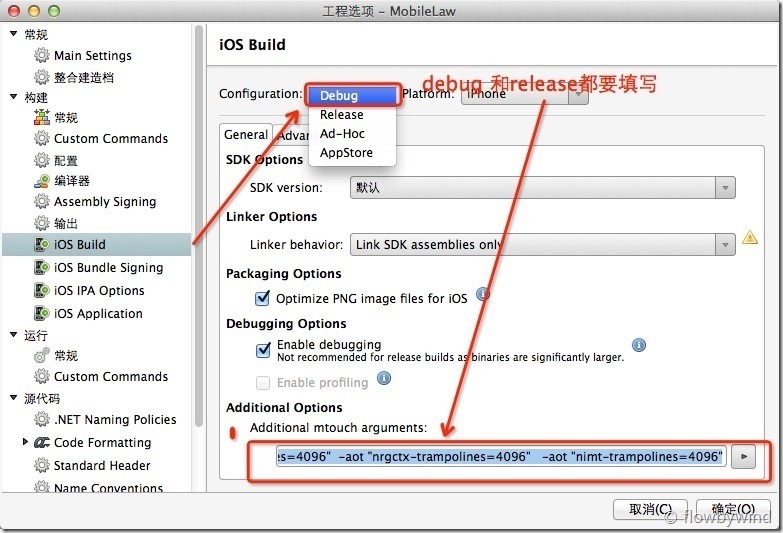
我们在上面看到了-aot "nrgctx-trampolines=4096" -aot "nimt-trampolines=4096" -aot "ntrampolines=4096"这几个输入参数,那这几个参数相对应的意思是什么呢?
这里官网给了我们解释:链接地址
Ran out of trampolines of type 0

If you get this message while running device,  You can create more type 0 trampolines (type SPECIFIC) by modifying your project options "iPhone Build" section.  You want to add extra arguments for the Device build targets:

-aot "ntrampolines=2048"

The default number of trampolines is 1024.  Try increasing this number until you have enough for your application.

Ran out of trampolines of type 1

If you make heavy use of recursive generics, you may get this message on device.  You can create more type 1 trampolines (type RGCTX) by modifying your project options "iPhone Build" section.  You want to add extra arguments for the Device build targets:

-aot "nrgctx-trampolines=2048"

The default number of trampolines is 1024.  Try increasing this number until you have enough for your usage of generics.

Ran out of trampolines of type 2

If you make heavy use interfaces, you may get this message on device.  You can create more type 2 trampolines (type IMT Thunks) by modifying your project options "iPhone Build" section.  You want to add extra arguments for the Device build targets:

-aot "nimt-trampolines=512"

The default number of IMT Thunk trampolines is 128.  Try increasing this number until you have enough for your usage of interfaces.
下面进行翻译一下:
Ran out of trampolines of type 0
如果你再运行时,输出这个错误,你可以在项目option--iphone build处添加额外的参数-aot "ntrampolines=2048"
这个参数默认值为1024,试着增加这个值直到满足你的应用的需求。
Ran out of trampolines of type 1
如果你使用了过多的泛型嵌套,如List<T>中还有List<T>成员,你可以同上通过添加额外的参数-aot "nrgctx-trampolines=2048" 来解决。
蹦床类型1的默认值为1024.
Ran out of trampolines of type 2
如果你界面操作频繁,你可以通过添加额外的参数-aot "nimt-trampolines=512" 来解决。
这里的默认值为128.
mono ios莫名其妙闪退的解决方法的更多相关文章
- iOS开发-闪退问题-解决之前上架的 App 在 iOS 9 会闪退问题
最新更新:(2015.10.02) 开发环境: Delphi 10 Seattle OS X El Capitan v10.11 需使用下列 HotfixID: 30398, PAServer Hot ...
- 神秘代码让iPhone微信闪退的解决方法
14号晚,很多人的微信朋友圈中出现了这样几句话“听说苹果手机点全文就会闪退”,下方有好几行空白,需要点击“全文”才能看到,但是一旦你是在iPhone手机微信上点击“原文”后就直接闪退了,而用Andro ...
- 〖Android〗从Android Studio转为Eclipse开发项目运行程序闪退的解决方法
很久没有撸Android App开发了- 最近把一个月前通过反编译.二次修改的Android SSHD项目进行简单修改一下: 突然发现迁移项目时,报了一个错误,同时还出现了闪退情况: - ::): t ...
- 【OS_Windows】Win10应用商店闪退和点击Cortana搜索框闪退的解决方法
Windows10用户遇到了打开应用商店时闪退和点击Cortana小娜搜索框闪退的问题,并且在微软社区求助,得到了一种可行的解决方法,那就是查看Network List Service(网络列表服务) ...
- Android 开发之异常处理篇(一):SDK Manager 闪退的解决方法
这个问题困扰了我很久,之前没解决,就放一放.后来我又专门拿了一个下午来找解决方法,终于搞定! 我的解决方法是修改 android.bat,直接指定java.exe所在位置,不用去调用find_java ...
- Windows 7 x64环境下SDK Manager闪退的解决方法
1.下载并解压:http://dl.google.com/android/adt/adt-bundle-windows-x86_64-20140702.zip 2.安装JDK,否则SDK Manage ...
- 记一次MyEclipse闪退的解决方法
http://www.th7.cn/Program/java/201408/262487.shtml ———————————————————————————————————————————————— ...
- MySQL:输入密码后闪退的解决方法
原因:MySQL服务没有启动 解决方法:在 "服务" 中启动MySQL
- VS2017创建控制台应用后,编写完代码调试正常,使用exe文件直接执行出现闪退情况解决方法。
这是因为代码中包含的相对路径的原因. 解决办法:把项目中包含的所有相对路径修改为绝对路径. (个人觉得因为直接执行exe文件,默认打开在C盘的用户目录下.) 例如: std::string DATA_ ...
随机推荐
- [C#] C# 基础回顾 - 匿名方法
C# 基础回顾 - 匿名方法 目录 简介 匿名方法的参数使用范围 委托示例 简介 在 C# 2.0 之前的版本中,我们创建委托的唯一形式 -- 命名方法. 而 C# 2.0 -- 引进了匿名方法,在 ...
- WebSocket - ( 一.概述 )
说到 WebSocket,不得不提 HTML5,作为近年来Web技术领域最大的改进与变化,包含CSS3.离线与存储.多媒体.连接性( Connectivity )等一系列领域,而即将介绍的 WebSo ...
- maven 中snapshot版本和release版本的区别
maven中的仓库分为两种,snapshot快照仓库和release发布仓库.snapshot快照仓库用于保存开发过程中的不稳定版本,release正式仓库则是用来保存稳定的发行版本.定义一个组件/模 ...
- Linux杀死进程,查看进程
http://blog.csdn.net/wojiaopanpan/article/details/7286430/
- Android studio使用git教程
①下载Git工具,配置到Android studio中 http://git-scm.com/downloads ------------------------------------------- ...
- 数据分布转换:非正态 -> 正态
来源:丁香园论坛:SPSS上的把非正态分布数据转换为正态分布数据 一楼 可以应用变量变换的方法,将不服从正态分布的资料转化为非正态分布或近似正态分布.常用的变量变换方法有对数变换.平方根变换.倒数变换 ...
- 使用EntityFramework6连接MySql数据库(code first方式)
demo托管地址:http://git.oschina.net/uustudy/ASP.NET-CodeFirst-MySQL-Demo.git 之前的是db first(地址:http://www. ...
- 一个标签的72变,打造一个纯CSS图标库
每次要用到图标的时候都会到 icono 去copypaste,但每次用到的时候尺寸都各不一样,总是要调整参数,巨烦.当然你可以会想到用zoom.scale来做缩放,但是这样的缩放会使得线宽也变粗了,不 ...
- Vue.js——基于$.ajax实现数据的跨域增删查改
概述 之前我们学习了Vue.js的一些基础知识,以及如何开发一个组件,然而那些示例的数据都是local的.在实际的应用中,几乎90%的数据是来源于服务端的,前端和服务端之间的数据交互一般是通过ajax ...
- 企业IT管理员IE11升级指南【16】—— 使用Compat Inspector快速定位IE兼容性问题
企业IT管理员IE11升级指南 系列: [1]—— Internet Explorer 11增强保护模式 (EPM) 介绍 [2]—— Internet Explorer 11 对Adobe Flas ...