
俄罗斯方块(三):"流动"的方块
问题的提出:
俄罗斯方块允许90度的坡,是不是有点不够科学#(滑稽)
想办法加一种会“滑坡”的方块
本文两大部分:
详细的描绘是怎样的“流动”
写代码,并整合进游戏
本文基于我写的
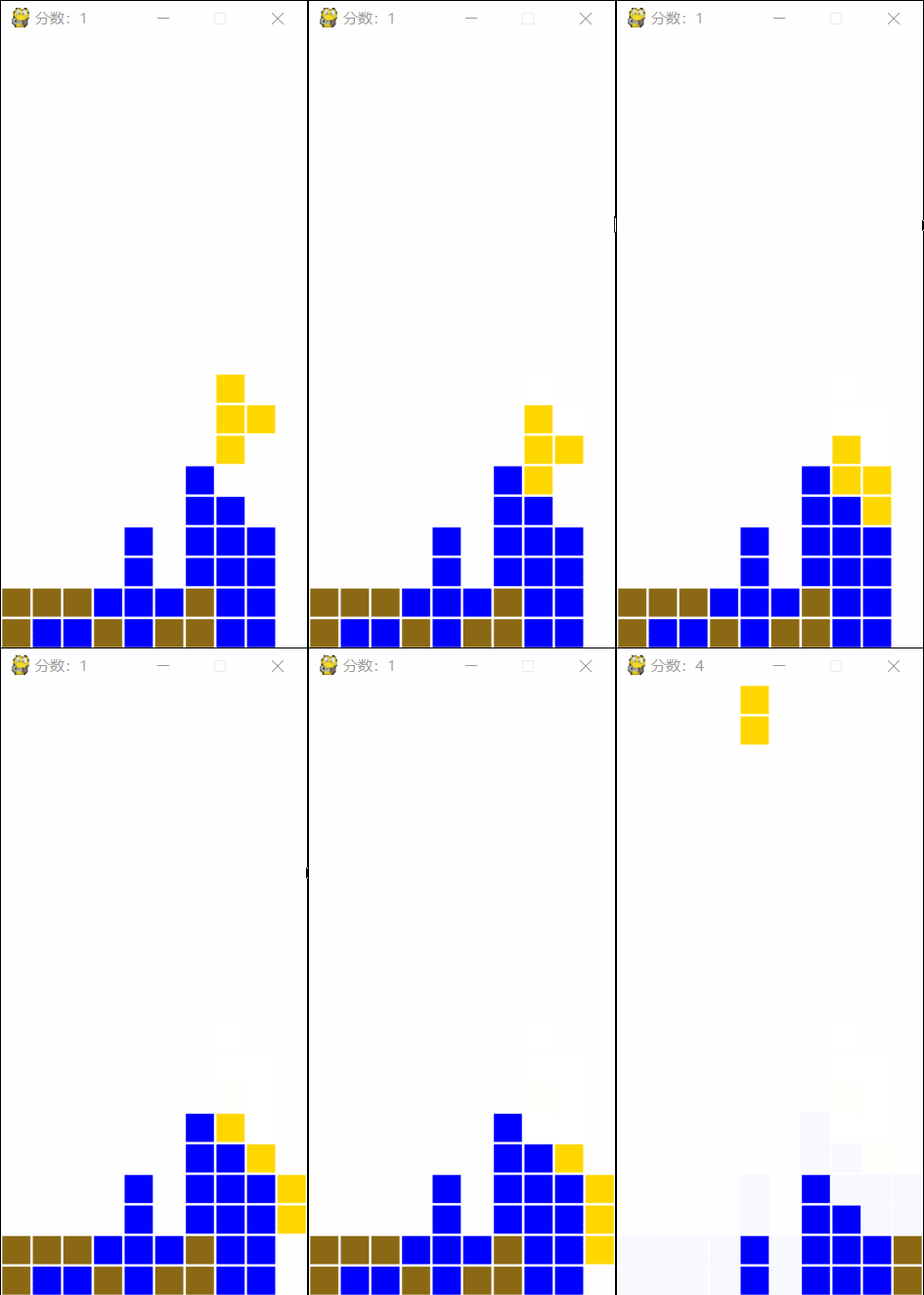
事先上两个动图, 说明下我想做什么

第一部分
首先是假象图

这是一个长条逐渐“瘫软”的过程
归纳规律,其实只有两种移动
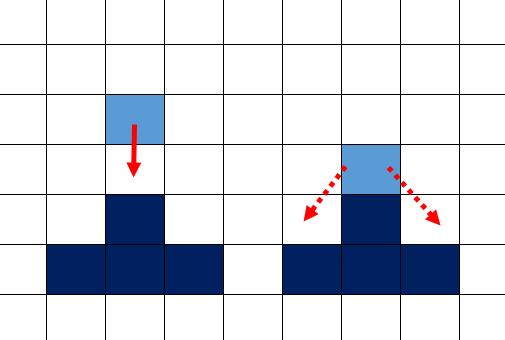
1下方没有方块时:向下方滑落
2下方有方块时:向左下或者右下滑落
但是这两条是不够的
下面展示一种例外
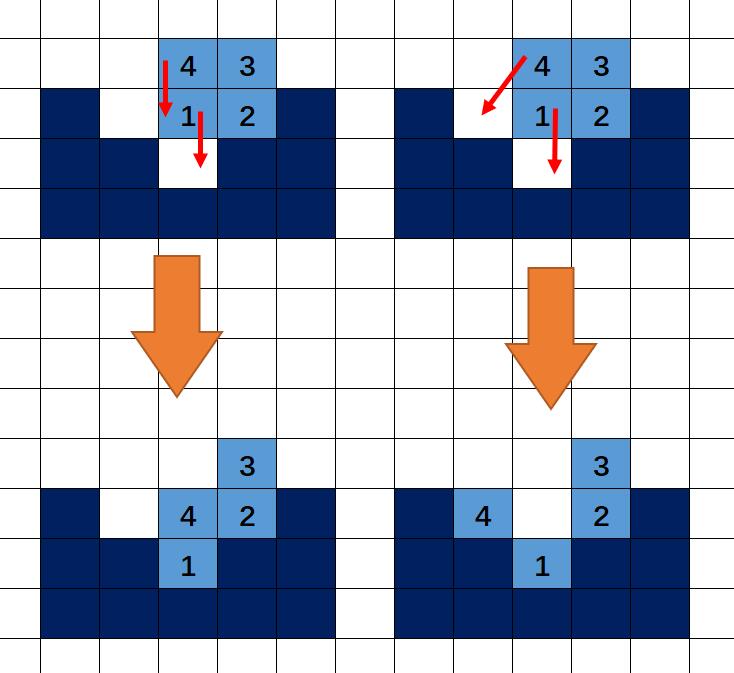
左边的比右边“更科学”
显然,需要再加一条规则“规则三:下方的方块先行动”
但是,这个规则还不够,我又找到两个“不科学的”例子

左边的比右边“更科学”
不同行之间需要区分次序,同一行的也要区分次序!!!
行内从左向右,和从右向左都无法从根本解决问题,那就只能调整两种移动的优先级
再加一条规则“规则四:同一行的,下落移动的优先”
接下来还有一个“不科学”
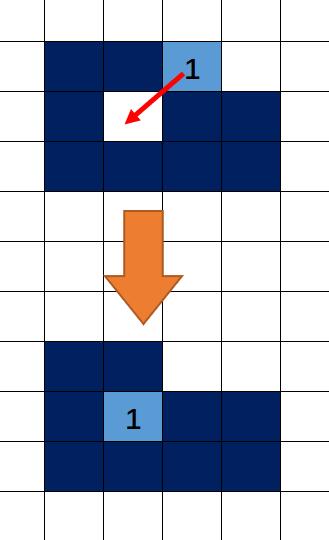
进去了。。。这是最不科学的一个。。
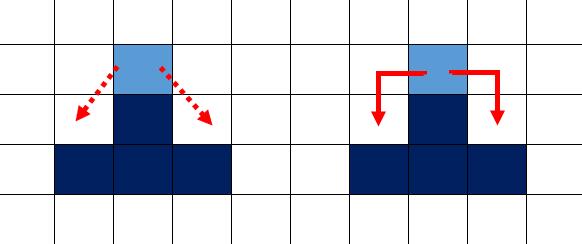
添加一条斜向移动的限制“左右有方块不可斜向移动”
然后我发现,规则四没用了!!!

说明:1号方块的斜向移动被2号阻止了,上面的情况变成“不可能发生”
它们解决的是同一个问题,水平相邻方块之间的次序问题
只是限制斜向移动的方法更为彻底!
规则汇总:
1下方没有方块时:向下方滑落
2下方有方块且左下右下为空时且无阻碍时:向左下或者右下滑落
3多个方块,行数小的方块先行动
我已经尽力的考虑每一种“例外”了,如有疏漏欢迎指出
第二部分
代码的问题无非两个:
怎么写
什么时候执行
先说第二个问题
什么时候执行
讲流程,原来的“方块落地-->清算分数-->下一个方块” 新的 "方块落地-->开始流动-->清算分数-->下一个方块"
可是一次流动结束就太没趣了 一次只流动一步
之前的下落过程的流程图
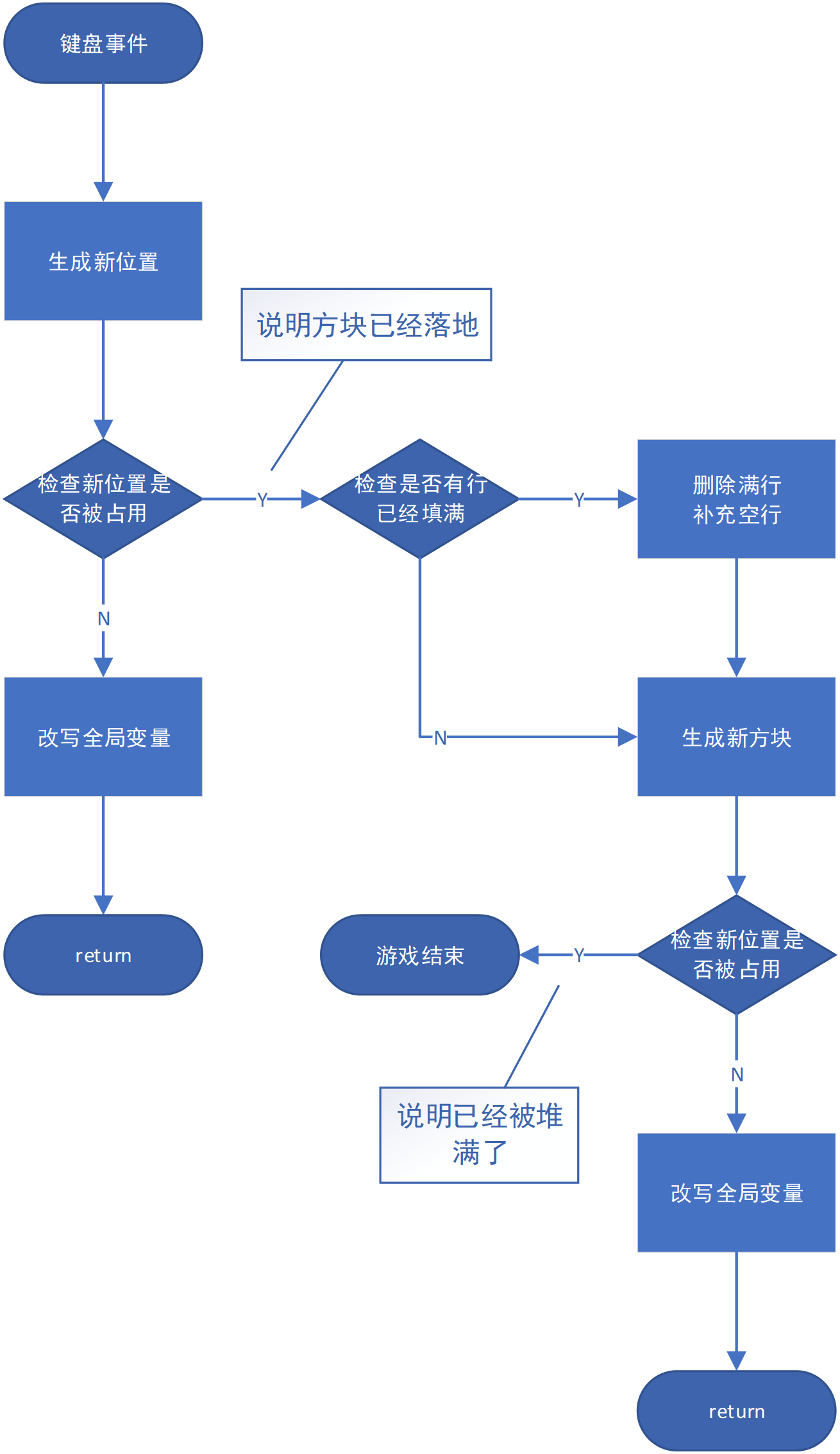
新的
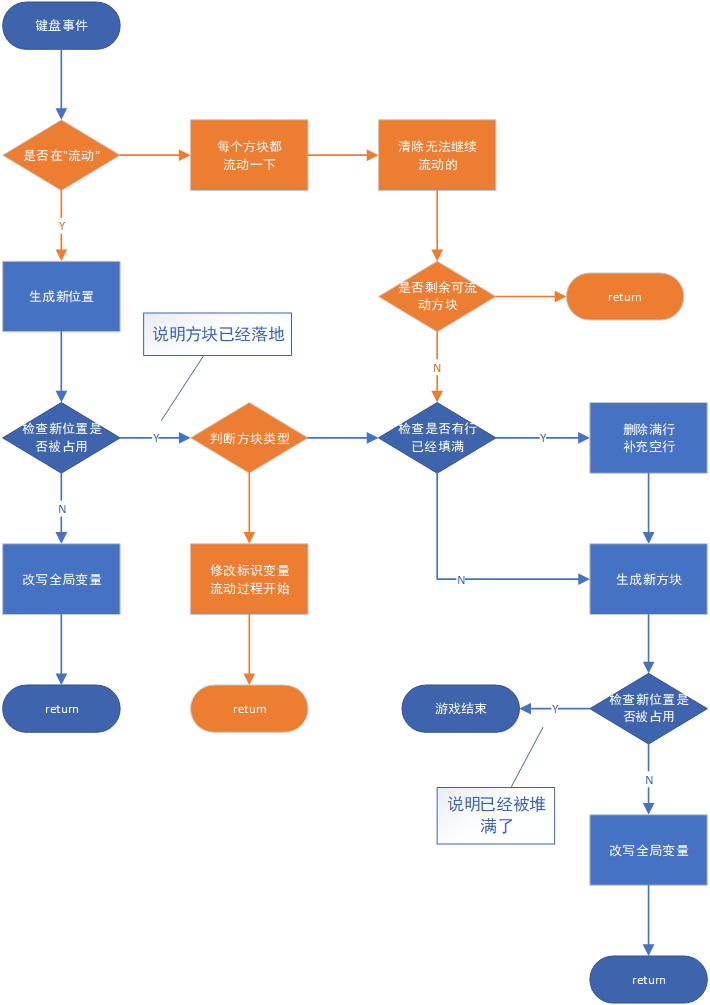
代码重整
# flows list 全局变量 储存"正在流动的方块"

# block_type list 全局变量 决定活动方块能否流动

def move_down():

    if flows:

        # ---------流动过程---------

        pass

        # ==========================

    else:

        # 下面是常规的流程

        x, y = centre

        x -= 1

        for i, j in active:

            i += x

            j += y

            if background[i][j]:

                break

        else:

            centre.clear()

            centre.extend([x, y])

            return

        # ----------落地后-------

        # 如果方块状态 为 流动 则写入flows

        if block_type[0] == 2:

            x, y = centre

            for i, j in active:

                flows.append((x + i, y + j))

                # === 将方块信息 转入 待流动列表

            active.clear()

            return

            # 结束函数,防止进入下方"清算环节"

        # - 否则走常规流程

        else:

            x, y = centre

            for i, j in active:

                background[x + i][y + j] = 1

    # -----检查是否满行-----

    l = []

    for i in range(1, 20):

        if 0 not in background[i]:

            l.append(i)

    l.sort(reverse=True)

    for i in l:

        background.pop(i)

        background.append([0 for j in range(10)])

    score[0] += scores_f(len(l))

    pygame.display.set_caption("分数:%d" % (score[0]))

    active.clear()

    new = list(random.choice(all_block)) if random.randint(1, 10) >= 4 else list(random.choice(all_block_plus))

    active.extend(new)

    block_type[0] = 1 if random.randint(1, 10) >= 5 else 2

    # 取个随机数,决定下个方块的类型 1为普通方块 2为流动方块

    centre.clear()

    centre.extend([20, 4])

    x, y = centre

    for i, j in active:

        i += x

        j += y

        if background[i][j]:

            break

    else:

        return

    alive.append(1)
下面是流动的详细内容:

PS:从流动列表移除的同时 , 应该写入 background "固化"成为背景
流动过程代码(在最后有 红色代码额外的说明)
        # 基于"遍历过程中避免修改遍历对象"的原则

        # 故遍历 flows的 拷贝

        flows_copy = flows.copy()

        # - 流动原则三,行数小的先动,  故遍历前先排序

        flows_copy.sort()

        for i, j in flows_copy:

            flows.remove((i, j)) # 1

            # '抹去'旧方块位置信息

            if background[i - 1][j] or ((i - 1, j) in flows):

            # 如果下方有方块(背景方块,流动中的方块都算) # 2

                num = 0

                # 如果左侧没有方块(背景方块,流动中的方块都算)num += 1

                if j >= 1 and (not background[i][j - 1]) and (not background[i - 1][j - 1]) \

                        and ((i, j - 1) not in flows) and ((i - 1, j - 1) not in flows): # (3)

                    num += 1

                # 如果右侧没有方块(背景方块,流动中的方块都算)num += 2

                if j <= 8 and (not background[i][j + 1]) and (not background[i - 1][j + 1]) \

                        and ((i, j + 1) not in flows) and ((i - 1, j + 1) not in flows):

                    num += 2

                #num可能的情况    0           1         2          3

                #对应          左右均不通   仅通左路  仅通右路   左右均通

                #如果左右均通 左右两路随机选一个

                if num == 3:

                    num = random.randint(1, 2)

                # 根据num取值 做出相应的移动

                if num == 0:

                    # 这里与 流程图 不一致 后面会说明原因 (4)

                    if (background[i - 1][j]) and (j <= 0 or background[i][j - 1] or background[i - 1][j - 1]) and \

                            (j >= 9 or background[i][j + 1] or background[i - 1][j + 1]):

                        background[i][j] = 3

                        #如果 三个方向 被背景方块 堵死

                        #就"固化/停止流动/移出flows/写入background"

                    else:

                        flows.append((i, j))

                elif num == 1:

                    flows.append((i - 1, j - 1))

                elif num == 2:

                    flows.append((i - 1, j + 1))

            else:

                # 否则就将算出 下方的坐标 添回flows

                flows.append((i - 1, j))

        # 如果flows仍有方块存在

        # return 结束函数, 防止

        if flows:

            return
额外的说明:
1, 移动就是, 从flows除去旧的位置,添入新位置,,,为避免代码重复出现,循环第一步就移除旧位置
2,至此,方块有两种,background的背景方块 flows的流动方块 一个位置是否有方块 需要查阅两次 另外画面绘制部分需要 遍历 flows 绘制方块
3,为避免 越界错误 ,索引background前 加个判断
4流程图未考虑到一个特殊情况
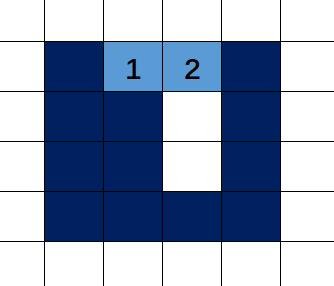
理想状态下 两个流动方块应该 填上洞 但是按流程图 1 号方块三路堵死 固化
所以 因流动方块 阻碍 造成的"假死"不用固化 / 单纯被 背景堵死 才固化
完整代码
import pygame, sys, random, time

def new_draw():

    screen.fill(white)

    for i in range(1, 21):

        for j in range(10):

            bolck = background[i][j]

            if bolck:

                pygame.draw.rect(screen, colors[bolck], (j * 25 + 1, 500 - i * 25 + 1, 23, 23))

    x, y = centre

    for i, j in active:

        i += x

        j += y

        pygame.draw.rect(screen, colors[block_type[0]], (j * 25 + 1, 500 - i * 25 + 1, 23, 23))

    for i, j in flows:

        pygame.draw.rect(screen, yellow, (j * 25 + 1, 500 - i * 25 + 1, 23, 23))

    pygame.display.update()

def move_LR(n):

    """n=-1代表向左,n=1代表向右"""

    x, y = centre

    y += n

    for i, j in active:

        i += x

        j += y

        if j < 0 or j > 9 or background[i][j]:

            break

    else:

        centre.clear()

        centre.extend([x, y])

def rotate():

    x, y = centre

    l = [(-j, i) for i, j in active]

    for i, j in l:

        i += x

        j += y

        if j < 0 or j > 9 or background[i][j]:

            break

    else:

        active.clear()

        active.extend(l)

def move_down():

    if flows:

        flows_copy = flows.copy()

        flows_copy.sort()

        for i, j in flows_copy:

            flows.remove((i, j))

            if background[i - 1][j] or ((i - 1, j) in flows):

                num = 0

                if j >= 1 and (not background[i][j - 1]) and (not background[i - 1][j - 1]) \

                        and ((i, j - 1) not in flows) and ((i - 1, j - 1) not in flows):

                    num += 1

                if j <= 8 and (not background[i][j + 1]) and (not background[i - 1][j + 1]) \

                        and ((i, j + 1) not in flows) and ((i - 1, j + 1) not in flows):

                    num += 2

                if num == 3:

                    num = random.randint(1, 2)

                if num == 0:

                    if (background[i - 1][j]) and (j <= 0 or background[i][j - 1] or background[i - 1][j - 1]) and \

                            (j >= 9 or background[i][j + 1] or background[i - 1][j + 1]):

                        background[i][j] = 3

                    else:

                        flows.append((i, j))

                if num == 1:

                    flows.append((i - 1, j - 1))

                if num == 2:

                    flows.append((i - 1, j + 1))

            else:

                flows.append((i - 1, j))

        if flows:

            return

    else:

        x, y = centre

        x -= 1

        for i, j in active:

            i += x

            j += y

            if background[i][j]:

                break

        else:

            centre.clear()

            centre.extend([x, y])

            return

        if block_type[0] == 2:

            x, y = centre

            for i, j in active:

                flows.append((x + i, y + j))

            active.clear()

            return

        else:

            x, y = centre

            for i, j in active:

                background[x + i][y + j] = 1

    l = []

    for i in range(1, 20):

        if 0 not in background[i]:

            l.append(i)

    l.sort(reverse=True)

    for i in l:

        background.pop(i)

        background.append([0 for j in range(10)])

    score[0] += scores_f(len(l))

    pygame.display.set_caption("分数:%d" % (score[0]))

    active.clear()

    new = list(random.choice(all_block)) if random.randint(1, 10) >= 4 else list(random.choice(all_block_plus))

    active.extend(new)

    block_type[0] = 1 if random.randint(1, 10) >= 5 else 2

    centre.clear()

    centre.extend([20, 4])

    x, y = centre

    for i, j in active:

        i += x

        j += y

        if background[i][j]:

            break

    else:

        return

    alive.append(1)

def scores_f(n):

    if n in scores:

        return scores[n]

    else:

        return scores_f(n-4)

pygame.init()

screen = pygame.display.set_mode((250, 500))

pygame.display.set_caption("俄罗斯方块")

fclock = pygame.time.Clock()

all_block = (((0, 0), (0, -1), (0, 1), (0, 2)),

             ((0, 0), (0, 1), (-1, 0), (-1, 1)),

             ((0, 0), (0, -1), (-1, 0), (-1, 1)),

             ((0, 0), (0, 1), (-1, -1), (-1, 0)),

             ((0, 0), (0, 1), (1, 0), (0, -1)),

             ((0, 0), (1, 0), (-1, 0), (1, -1)),

             ((0, 0), (1, 0), (-1, 0), (1, 1)))

all_block_plus = (((-1, -1), (-1, 0), (-1, 1), (0, -1), (0, 0), (0, 1), (1, -1), (1, 0), (1, 1),),

                  ((-1, 0), (0, -1), (0, 0), (0, 1), (1, 0)),

                  ((-1, 0), (0, -1), (0, 0), (0, 1), (1, 0), (-2, 0)),

                  ((0, -1), (0, 0), (0, 1), (1, -1), (1, 1)),

                  ((-1, 1), (0, -1), (0, 0), (0, 1), (1, -1)),

                  ((-1, -1), (0, -1), (0, 0), (0, 1), (1, 1)),

                  ((-1, -1), (-1, 1), (0, 0), (1, -1), (1, 1)),

                  ((-1, -1), (-1, 1), (0, -1), (0, 0), (0, 1), (1, -1), (1, 1)),

                  ((-1, -1), (0, -1), (0, 0), (0, 1), (1, -1))

                  )

'''3x3,十,十,凹,2,5,X,H,T'''

scores = {0: 0, 1: 1, 2: 3, 3: 6, 4: 10}

background = [[0 for i in range(10)] for j in range(24)]

background[0] = [1 for i in range(10)]

active = list(random.choice(all_block))

centre = [20, 4]

score = [0]

flows = []

block_type = [1]

black = 0, 0, 0

white = 255, 255, 255

blue = 0, 0, 255

yellow = 255, 215, 0

colors = {1: blue, 2: yellow, 3: (139, 105, 20)}

times = 0

alive = []

press = False

while True:

    for event in pygame.event.get():

        if event.type == pygame.QUIT:

            sys.exit()

        elif event.type == pygame.KEYDOWN:

            if event.key == pygame.K_LEFT:

                move_LR(-1)

            elif event.key == pygame.K_RIGHT:

                move_LR(1)

            elif event.key == pygame.K_UP:

                rotate()

            elif event.key == pygame.K_DOWN:

                press = True

        elif event.type == pygame.KEYUP:

            if event.key == pygame.K_DOWN:

                press = False

    if press:

        times += 20

    if times >= 100:

        move_down()

        times = 0

    else:

        times += 1

    if alive:

        pygame.display.set_caption("over %d分" % (score[0]))

        time.sleep(3)

        break

    new_draw()

    fclock.tick(100)
PS : 标红的是一些细枝末节 有需要的话我再解释
流动方块降低了难度,,所以加入了一些 特殊形状的 方块增加难度
这篇急于发表 毕竟写了一个月了...有问题有空再更新
#
俄罗斯方块(三):"流动"的方块的更多相关文章
- 浅谈脚本化css(三)之方块运动函数
我们可以写一个让小方块运动的函数: div#demo { width: 100px; ; position: absolute; ; ; } var div = document.getElement ...
- 教你看懂网上流传的60行JavaScript代码俄罗斯方块游戏
早就听说网上有人仅仅用60行JavaScript代码写出了一个俄罗斯方块游戏,最近看了看,今天在这篇文章里面我把我做的分析整理一下(主要是以注释的形式). 我用C写一个功能基本齐全的俄罗斯方块的话,大 ...
- Java---俄罗斯方块小游戏
去年就已经学了这个技术了,一直没去写,现在抽个时间写了个俄罗斯方块游戏. 只有简单的新游戏,暂停,继续,积分功能.简单的实现了俄罗斯的经典功能. 不介绍了,有兴趣的自己运行一下,后面贴出了图片. 代码 ...
- 俄罗斯方块游戏JavaScript代码
JavaScript代码俄罗斯方块游戏 早就听说网上有人仅仅用60行JavaScript代码写出了一个俄罗斯方块游戏,最近看了看,今天在这篇文章里面我把我做的分析整理一下(主要是以注释的形式). 我用 ...
- canvas实现俄罗斯方块
好久没使用canvas了,于是通过写小游戏"俄罗斯方块"再次熟悉下canvas,如果有一定的canvas基础,要实现还是不难的.实际完成的Demo请看:canvas俄罗斯方块 . ...
- Qt5图形视图框架的“俄罗斯方块”(使用了QGraphicsView)
Qt5 图形视图框架QGraphicsView 1.图形视图框架包含三大类:场景类(QGraphicsScene),视图类(QGraphicsView),图元类(QGraphicsItem): 2.对 ...
- 60行JavaScript代码俄罗斯方块
教你看懂网上流传的60行JavaScript代码俄罗斯方块游戏 早就听说网上有人仅仅用60行JavaScript代码写出了一个俄罗斯方块游戏,最近看了看,今天在这篇文章里面我把我做的分析整理一下( ...
- 【C语言程序设计】小游戏之俄罗斯方块(一)!适合初学者上手、练手!
俄罗斯方块的核心玩法非常简单,所以制作起来并不是很复杂,我准备先用2篇文字的篇幅详细讲解一下俄罗斯方块的制作方法. 今天咱们算是第一篇,主要讲解俄罗斯方块中如何定义方块,以及如何实现方块的移动.旋转. ...
- 用纯JS做俄罗斯方块 - 简要思路介绍(1)
大家都知道俄罗斯方块是一款大众化的游戏了,我很小的时候就玩过,今年已经25岁了,可以说俄罗斯方块确实是历史悠久,做俄罗斯方块是我上个星期开始的想法.也许是由于自己从来没有写过这种东西吧,所以有生疏.代 ...
随机推荐
- vue打包遇到的坑
1.-webkie-box-orient:vertical没大打包上,解决方案 /* ! autoprefixer: off */ -webkit-box-orient: vertical; /* a ...
- CSS --记录
CSS3与文字渐变光影流动动画效果实现 by zhangxinxu from http://www.zhangxinxu.com 本文地址:http://www.zhangxinxu.com/word ...
- eclipse导入maven时,pom文件的project一直报错(Failure to transfer org.apache.maven.plugins:maven-surefire-plugin:pom:2.12.)
这里有两种解决办法. 一:右键项目->maven->update project勾选上Force Update of Snapshots/Releases然后ok就可以了. 二:如果第一种 ...
- 主席树套树状数组——带修区间第k大zoj2112
主席树带修第k大 https://www.cnblogs.com/Empress/p/4659824.html 讲的非常好的博客 首先按静态第k大建立起一组权值线段树(主席树) 然后现在要将第i个值从 ...
- MySQL 远程连接问题
使用Workbench 无法远程连接Mysql服务器提示如下错误: 查找原因: 显示只能localhost 访问. 解决方法:修改授权远程访问 create user 'root'@'%' ident ...
- maven 导包报错
作为初学者本应当是持之以恒的但是很长时间没有冒泡了这次冒个泡写maven项目的时候遇到了很多的bug,今天给大家分享一下解决的办法(常见的错误就是导不进来自己想要的包)要么就是导包报错以下是解决方法 ...
- 使用rsync备份与同步文件
在数字化时代的今天,随着个人拥有的数据量急剧增加,对其中的重要数据进行备份以保证其安全性.正确性变得越来越重要.同时,由于在公司.实验室.家里.外出等不同环境下往往使用不同的电脑设备(如台式机.笔记本 ...
- XMLHttpRequest中常用的方法
a.) abort() 停止当前请求b.) getAllResponseHeaders() 把HTTP请求的所有响应首部作为键值对返回c.) open("method", &quo ...
- Windows环境下应用Java代码操作Linux资源
>>>>>>>>>>>>>>>>>>>>>>>>> ...
- Unity UGUI实现鼠标拖动图片
using System.Collections; using System.Collections.Generic; using UnityEngine; using UnityEngine.UI; ...