
Django的admin管理系统写入中文出错的解决方法/1267 Illegal mix of collations (latin1_swedish_ci,IMPLICIT) and (utf8_general_ci,COERCIBLE) for operation ‘locate’
Django的admin管理系统写入中文出错的解决方法
解决错误:
1267 Illegal mix of collations (latin1_swedish_ci,IMPLICIT) and (utf8_general_ci,COERCIBLE) for operation ‘locate’
一、修必my.ini文件
要找到my.ini,要先去找到ProgramData,(这里要先打开显示隐藏文件的设置),那么要怎么找到ProgramData呢,输入%ProgramData%就OK。
my.ini文件修改,红色为增加的,一定在蓝字下增加,修改完后重启mqsql。
[client]
default-character-set=utf8
[mysqld]
character-set-server=utf8
修改后的my.ini文件
# Other default tuning values

# MySQL Server Instance Configuration File

# ----------------------------------------------------------------------

# Generated by the MySQL Server Instance Configuration Wizard

#

#

# Installation Instructions

# ----------------------------------------------------------------------

#

# On Linux you can copy this file to /etc/my.cnf to set global options,

# mysql-data-dir/my.cnf to set server-specific options

# (@localstatedir@ for this installation) or to

# ~/.my.cnf to set user-specific options.

#

# On Windows you should keep this file in the installation directory

# of your server (e.g. C:\Program Files\MySQL\MySQL Server X.Y). To

# make sure the server reads the config file use the startup option

# "--defaults-file".

#

# To run the server from the command line, execute this in a

# command line shell, e.g.

# mysqld --defaults-file="C:\Program Files\MySQL\MySQL Server X.Y\my.ini"

#

# To install the server as a Windows service manually, execute this in a

# command line shell, e.g.

# mysqld --install MySQLXY --defaults-file="C:\Program Files\MySQL\MySQL Server X.Y\my.ini"

#

# And then execute this in a command line shell to start the server, e.g.

# net start MySQLXY

#

#

# Guidelines for editing this file

# ----------------------------------------------------------------------

#

# In this file, you can use all long options that the program supports.

# If you want to know the options a program supports, start the program

# with the "--help" option.

#

# More detailed information about the individual options can also be

# found in the manual.

#

# For advice on how to change settings please see

# http://dev.mysql.com/doc/refman/5.7/en/server-configuration-defaults.html

#

#

# CLIENT SECTION

# ----------------------------------------------------------------------

#

# The following options will be read by MySQL client applications.

# Note that only client applications shipped by MySQL are guaranteed

# to read this section. If you want your own MySQL client program to

# honor these values, you need to specify it as an option during the

# MySQL client library initialization.

#

[client]

default-character-set=utf8

# pipe=

# socket=MYSQL

port=3306

[mysql]

no-beep

# default-character-set=utf8

# SERVER SECTION

# ----------------------------------------------------------------------

#

# The following options will be read by the MySQL Server. Make sure that

# you have installed the server correctly (see above) so it reads this

# file.

#

# server_type=3

[mysqld]

character-set-server=utf8

# The next three options are mutually exclusive to SERVER_PORT below.

# skip-networking

# enable-named-pipe

# shared-memory

# shared-memory-base-name=MYSQL

# The Pipe the MySQL Server will use

# socket=MYSQL

# The TCP/IP Port the MySQL Server will listen on

port=3306

# Path to installation directory. All paths are usually resolved relative to this.

# basedir="C:/Program Files/MySQL/MySQL Server 5.7/"

# Path to the database root

datadir=C:/ProgramData/MySQL/MySQL Server 5.7/Data

# The default character set that will be used when a new schema or table is

# created and no character set is defined

# character-set-server=utf8

# The default storage engine that will be used when create new tables when

default-storage-engine=INNODB

# Set the SQL mode to strict

sql-mode="STRICT_TRANS_TABLES,NO_AUTO_CREATE_USER,NO_ENGINE_SUBSTITUTION"

# General and Slow logging.

log-output=FILE

general-log=0

general_log_file="PG2R1T5TDBJB7Y0.log"

slow-query-log=1

slow_query_log_file="PG2R1T5TDBJB7Y0-slow.log"

long_query_time=10

# Binary Logging.

# log-bin

# Error Logging.

log-error="PG2R1T5TDBJB7Y0.err"

# Server Id.

server-id=1

# Specifies the on how table names are stored in the metadata.

# If set to 0, will throw an error on case-insensitive operative systems

# If set to 1, table names are stored in lowercase on disk and comparisons are not case sensitive.

# If set to 2, table names are stored as given but compared in lowercase.

# This option also applies to database names and table aliases.

lower_case_table_names=1

# Secure File Priv.

secure-file-priv="C:/ProgramData/MySQL/MySQL Server 5.7/Uploads"

# The maximum amount of concurrent sessions the MySQL server will

# allow. One of these connections will be reserved for a user with

# SUPER privileges to allow the administrator to login even if the

# connection limit has been reached.

max_connections=151

# The number of open tables for all threads. Increasing this value

# increases the number of file descriptors that mysqld requires.

# Therefore you have to make sure to set the amount of open files

# allowed to at least 4096 in the variable "open-files-limit" in

# section [mysqld_safe]

table_open_cache=2000

# Maximum size for internal (in-memory) temporary tables. If a table

# grows larger than this value, it is automatically converted to disk

# based table This limitation is for a single table. There can be many

# of them.

tmp_table_size=50M

# How many threads we should keep in a cache for reuse. When a client

# disconnects, the client's threads are put in the cache if there aren't

# more than thread_cache_size threads from before. This greatly reduces

# the amount of thread creations needed if you have a lot of new

# connections. (Normally this doesn't give a notable performance

# improvement if you have a good thread implementation.)

thread_cache_size=10

#*** MyISAM Specific options

# The maximum size of the temporary file MySQL is allowed to use while

# recreating the index (during REPAIR, ALTER TABLE or LOAD DATA INFILE.

# If the file-size would be bigger than this, the index will be created

# through the key cache (which is slower).

myisam_max_sort_file_size=100G

# If the temporary file used for fast index creation would be bigger

# than using the key cache by the amount specified here, then prefer the

# key cache method. This is mainly used to force long character keys in

# large tables to use the slower key cache method to create the index.

myisam_sort_buffer_size=92M

# Size of the Key Buffer, used to cache index blocks for MyISAM tables.

# Do not set it larger than 30% of your available memory, as some memory

# is also required by the OS to cache rows. Even if you're not using

# MyISAM tables, you should still set it to 8-64M as it will also be

# used for internal temporary disk tables.

key_buffer_size=8M

# Size of the buffer used for doing full table scans of MyISAM tables.

# Allocated per thread, if a full scan is needed.

read_buffer_size=64K

read_rnd_buffer_size=256K

#*** INNODB Specific options ***

# innodb_data_home_dir=

# Use this option if you have a MySQL server with InnoDB support enabled

# but you do not plan to use it. This will save memory and disk space

# and speed up some things.

# skip-innodb

# If set to 1, InnoDB will flush (fsync) the transaction logs to the

# disk at each commit, which offers full ACID behavior. If you are

# willing to compromise this safety, and you are running small

# transactions, you may set this to 0 or 2 to reduce disk I/O to the

# logs. Value 0 means that the log is only written to the log file and

# the log file flushed to disk approximately once per second. Value 2

# means the log is written to the log file at each commit, but the log

# file is only flushed to disk approximately once per second.

innodb_flush_log_at_trx_commit=1

# The size of the buffer InnoDB uses for buffering log data. As soon as

# it is full, InnoDB will have to flush it to disk. As it is flushed

# once per second anyway, it does not make sense to have it very large

# (even with long transactions).

innodb_log_buffer_size=1M

# InnoDB, unlike MyISAM, uses a buffer pool to cache both indexes and

# row data. The bigger you set this the less disk I/O is needed to

# access data in tables. On a dedicated database server you may set this

# parameter up to 80% of the machine physical memory size. Do not set it

# too large, though, because competition of the physical memory may

# cause paging in the operating system. Note that on 32bit systems you

# might be limited to 2-3.5G of user level memory per process, so do not

# set it too high.

innodb_buffer_pool_size=8M

# Size of each log file in a log group. You should set the combined size

# of log files to about 25%-100% of your buffer pool size to avoid

# unneeded buffer pool flush activity on log file overwrite. However,

# note that a larger logfile size will increase the time needed for the

# recovery process.

innodb_log_file_size=48M

# Number of threads allowed inside the InnoDB kernel. The optimal value

# depends highly on the application, hardware as well as the OS

# scheduler properties. A too high value may lead to thread thrashing.

innodb_thread_concurrency=9

# The increment size (in MB) for extending the size of an auto-extend InnoDB system tablespace file when it becomes full.

innodb_autoextend_increment=64

# The number of regions that the InnoDB buffer pool is divided into.

# For systems with buffer pools in the multi-gigabyte range, dividing the buffer pool into separate instances can improve concurrency,

# by reducing contention as different threads read and write to cached pages.

innodb_buffer_pool_instances=8

# Determines the number of threads that can enter InnoDB concurrently.

innodb_concurrency_tickets=5000

# Specifies how long in milliseconds (ms) a block inserted into the old sublist must stay there after its first access before

# it can be moved to the new sublist.

innodb_old_blocks_time=1000

# It specifies the maximum number of .ibd files that MySQL can keep open at one time. The minimum value is 10.

innodb_open_files=300

# When this variable is enabled, InnoDB updates statistics during metadata statements.

innodb_stats_on_metadata=0

# When innodb_file_per_table is enabled (the default in 5.6.6 and higher), InnoDB stores the data and indexes for each newly created table

# in a separate .ibd file, rather than in the system tablespace.

innodb_file_per_table=1

# Use the following list of values: 0 for crc32, 1 for strict_crc32, 2 for innodb, 3 for strict_innodb, 4 for none, 5 for strict_none.

innodb_checksum_algorithm=0

# The number of outstanding connection requests MySQL can have.

# This option is useful when the main MySQL thread gets many connection requests in a very short time.

# It then takes some time (although very little) for the main thread to check the connection and start a new thread.

# The back_log value indicates how many requests can be stacked during this short time before MySQL momentarily

# stops answering new requests.

# You need to increase this only if you expect a large number of connections in a short period of time.

back_log=80

# If this is set to a nonzero value, all tables are closed every flush_time seconds to free up resources and

# synchronize unflushed data to disk.

# This option is best used only on systems with minimal resources.

flush_time=0

# The minimum size of the buffer that is used for plain index scans, range index scans, and joins that do not use

# indexes and thus perform full table scans.

join_buffer_size=256K

# The maximum size of one packet or any generated or intermediate string, or any parameter sent by the

# mysql_stmt_send_long_data() C API function.

max_allowed_packet=4M

# If more than this many successive connection requests from a host are interrupted without a successful connection,

# the server blocks that host from performing further connections.

max_connect_errors=100

# Changes the number of file descriptors available to mysqld.

# You should try increasing the value of this option if mysqld gives you the error "Too many open files".

open_files_limit=4161

# If you see many sort_merge_passes per second in SHOW GLOBAL STATUS output, you can consider increasing the

# sort_buffer_size value to speed up ORDER BY or GROUP BY operations that cannot be improved with query optimization

# or improved indexing.

sort_buffer_size=256K

# The number of table definitions (from .frm files) that can be stored in the definition cache.

# If you use a large number of tables, you can create a large table definition cache to speed up opening of tables.

# The table definition cache takes less space and does not use file descriptors, unlike the normal table cache.

# The minimum and default values are both 400.

table_definition_cache=1400

# Specify the maximum size of a row-based binary log event, in bytes.

# Rows are grouped into events smaller than this size if possible. The value should be a multiple of 256.

binlog_row_event_max_size=8K

# If the value of this variable is greater than 0, a replication slave synchronizes its master.info file to disk.

# (using fdatasync()) after every sync_master_info events.

sync_master_info=10000

# If the value of this variable is greater than 0, the MySQL server synchronizes its relay log to disk.

# (using fdatasync()) after every sync_relay_log writes to the relay log.

sync_relay_log=10000

# If the value of this variable is greater than 0, a replication slave synchronizes its relay-log.info file to disk.

# (using fdatasync()) after every sync_relay_log_info transactions.

sync_relay_log_info=10000

# Load mysql plugins at start."plugin_x ; plugin_y".

# plugin_load

# The TCP/IP Port the MySQL Server X Protocol will listen on.

# loose_mysqlx_port=33060
二、直接利用终端登录mysql进行查看
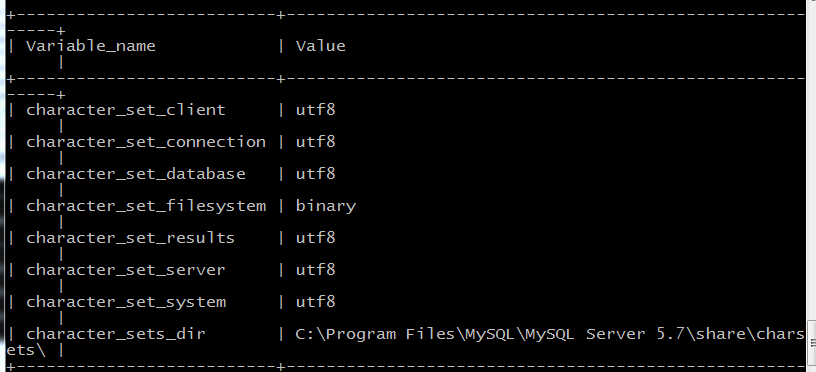
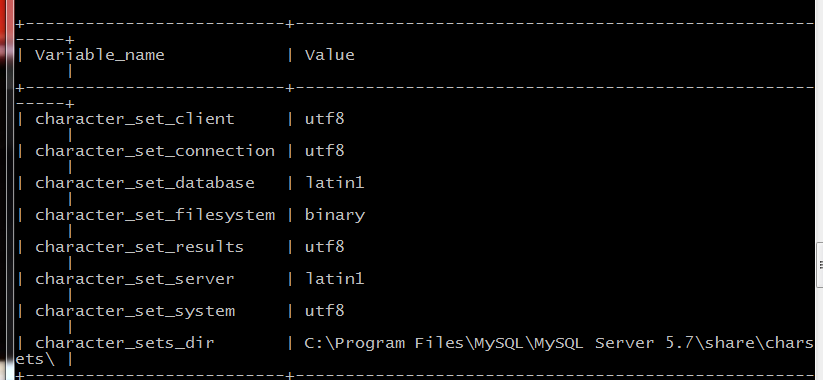
利用代码:show variables like'%char%'
查看Mysql配置的编码(正确的配置应为下图):
未修改前配置大概如下:
三、删除之前的数据库
drop table 数据库名
四、重新创建一个UTF-8编码的数据库
CREATE DATABASE <数据库名称> DEFAULT CHARACTER SET utf8 COLLATE utf8_general_ci;
五、同步数据库
python3 manage.py makemigrations
python3 manage.py migrate
六、Django命令行创建超级用户(Django管理)
>>python manage.py createsuperuser
接下来输入用户名称:
>>Username(leave bkank to use 'administrator'): root
然后是输入邮箱(QQemail等都可以):
>>Email address:(输入你的邮箱账号)
输入密码(输入密码时不会显示出来,并且长度必须超过八位才行):
>>Password:********
>>Password(again):********
当两次密码输入相同且超过八位的时候,就会提示创建超级用户成功:
>>Superuser created successfully.
再次运行你的服务,输入账号和密码就可以成功登陆了:
>>python manage.py runserver
整理并实际测试后的结果,感谢网上所有的网友!
Django的admin管理系统写入中文出错的解决方法/1267 Illegal mix of collations (latin1_swedish_ci,IMPLICIT) and (utf8_general_ci,COERCIBLE) for operation ‘locate’的更多相关文章
- aaalogo写入中文出错的解决方法
一.软件名称: 二.软件用途: 制作小logo 三.问题: aaalog软件不能支持中文输入. 简单的说该软件不能使用中文纯粹是因为字体不支持的原因, 只要导入相应字体就可以 不知道其他人使用aaal ...
- JAVA常见中文问题的解决方法(转)
JAVA常见中文问题的解决方法 http://www.java-cn.com/club/article-5876-1.html 以下解决方案是笔者在日常生活中遇到的,希望能对你解决JAVA中文问题有所 ...
- mysql5.x升级至mysql5.7后导入之前数据库date出错的解决方法!
mysql5.x升级至mysql5.7后导入之前数据库date出错的解决方法! 修改mysql5.7的配置文件即可解决,方法如下: linux版:找到mysql的安装路径进入默认的为/usr/shar ...
- php 使用phpmailer 发送邮件(附带中文乱码的解决方法)
下载phpmailer ,在程序里包含class.phpmailer.php 类 ,这里有中文乱码的解决方法 实例代码如下 <html> <head> <title&g ...
- VS 2013 professional版在win10上安装出错的解决方法
VS 2013 professional版在win10上安装出错的解决方法 win10上安装完VS 2012 professional和VS 2017 professional后,由于项目的需要,要在 ...
- JMeter 查看结果树监听器响应数据中文显示乱码解决方法
查看结果树监听器响应数据中文显示乱码解决方法 by:授客 QQ:1033553122 问题描述 使用监听器-查看结果树(View Results Tree Listener)过程中发现,响应数据面 ...
- xShell终端中文乱码完全解决方法
xShell终端中文乱码完全解决方法 xShell(xShell5)以及其他终端中文乱码的原因无非有三种:(1)Linux系统的编码问题:(2)xShell终端的编码问题: (3)两端的语言编码不一致 ...
- MVC4升级MVC5导致原项目出错的解决方法
原文:MVC4升级MVC5导致原项目出错的解决方法 出现安全透明方法"WebMatrix.WebData.PreApplicationStartCode.Start()"尝试访问安 ...
- c#写入Mysql中文显示乱码 解决方法
如题,mysql字符集utf8,c#写入中文后,全部显示成?,一个汉字对应一个?解决方法:在数据库连接字符串中增加字符集的说明,Charset=utf8,如 MySQLConnection con = ...
随机推荐
- java @Override 报错解决
有时候Java的Eclipse工程换一台电脑后编译总是@override报错,把@override去掉就好了,但不能从根本上解决问题,因为有时候有@override的地方超级多. 这是jdk的问题,@ ...
- 关于ajaxFileUpload图片上传,success和error都触发的情况
最近做到项目使用JQuery的插件ajaxFileUpload~~~ 遇到了非常领人匪夷所思的事情,当图片上传成功之后呢(success),它的error事件也被触发了,情况就是: 后端数据正确返回 ...
- Laravel安装redis扩展
Laravel安装redis扩展 1.使用命令行,执行(当然要先安装composer) composer require predis/predis 2.执行完就安装好了,redis相关配置可以到.e ...
- Java Base64 加解密
public class base64EncryAndDecry { public static final String CODES = "ABCDEFGHIJKLMNOPQRSTUVWX ...
- __x__(7)0905第二天__HTML的发展
HTML的发展 浏览器各个厂商有不同的标准,一个网页的兼容性非常差. 于是,W3C出来了,作为公益组织定义了HTML标准. 在 1993.6 实现并发布了第一个 HTML. 在 1995.11 开始创 ...
- Android makefile
LOCAL_PATH := $(call my-dir) { call函数:根据不同的参数和函数得到不同的值my-dir函数: 获取当前含有.mk的路径LOCAL_PATH: 定位源文件的位置 } # ...
- python语法_str_eval
dict1 = {} a = str(dict1) type(a) = 字符串 b = eval(a) type(b) = 字典
- SPFA找最大比例环
SPFA找最大比例环 ans=Σ点权/Σ边权 所以 可以变式为 Σ边权*ans-Σ点权=0 要找出最大的ans 可以二分 边权值变为 目的地点权-ans*边权 检查是否有负环 有则可以更优 #incl ...
- js 第三期 小肩膀 第一段
var 时间戳 = new.Date().getTime();//系统引擎 var 时间戳 = Date.now(); //V8引擎 数据类型 false = underfuned =null = ...
- 安装Office2010出现MSXML版本6.10.1129.0错误
在键盘上按“win+R”组合键出现图图示界面后,输入“regsvr32 /u msxml6.dll”,点击“确定”. 出现图示显示后,点击“确定”,并同时去试试office是否能够安装了. 如果上 ...