
王之泰201771010131《面向对象程序设计(java)》第十三周学习总结
第一部分:理论知识学习部分
第11章 事件处理
11.1 事件处理基础
a)事件源(event source):能够产生事件的对象都可 以成为事件源,如文本框、按钮等。一个事件源是一个 能够注册监听器并向监听器发送事件对象的对象。
b) 事件监听器(event listener):事件监听器对象接 收事件源发送的通告(事件对象),并对发生的事件作 出响应。一个监听器对象就是一个实现了专门监听器接 口的类实例,该类必须实现接口中的方法,这些方法当 事件发生时,被自动执行。
c) 事件对象(event object):Java将事件的相关信息 封装在一个事件对象中,所有的事件对象都最终派生于 java.util.EventObject类。不同的事件源可以产生不 同类别的事件。
11.2 动作
a) 激活一个命令可以有多种方式,如用户可以通过 菜单、击键或工具栏上的按钮选择特定的功能。
b) 在AWT事件模型中,无论是通过哪种方式下达命 令(如:点击按钮、菜单选项、按下键盘),其 操作动作都是一样的。
11.3 鼠标事件
a)鼠标事件 – MouseEvent
b)鼠标监听器接口 – MouseListener – MouseMotionListener
c) 鼠标监听器适配器 – MouseAdapter – MouseMotionAdapter
11.4 AWT事件继承层次
a) 所有的事件都是由java.util包中的EventObject 类扩展而来。
b) AWTEevent 是所有AWT 事件类的父类, 也是 EventObject的直接子类。
c) 有些Swing组件生成其他类型的事件对象,一般直 接 扩 展 于 EventObject, 而不是AWTEvent,位于 javax.swing.event.*。
d) 事件对象封装了事件源与监听器彼此通信的事件 信息。在必要的时候,可以对传递给监听器对象的 事件对象进行分析。
第二部分:实验部分——图形界面事件处理技术
实验时间 2018-11-22
1、实验目的与要求
(1) 掌握事件处理的基本原理,理解其用途;
(2) 掌握AWT事件模型的工作机制;
(3) 掌握事件处理的基本编程模型;
(4) 了解GUI界面组件观感设置方法;
(5) 掌握WindowAdapter类、AbstractAction类的用法;
(6) 掌握GUI程序中鼠标事件处理技术。
2、实验内容和步骤
实验1: 导入第11章示例程序,测试程序并进行代码注释。
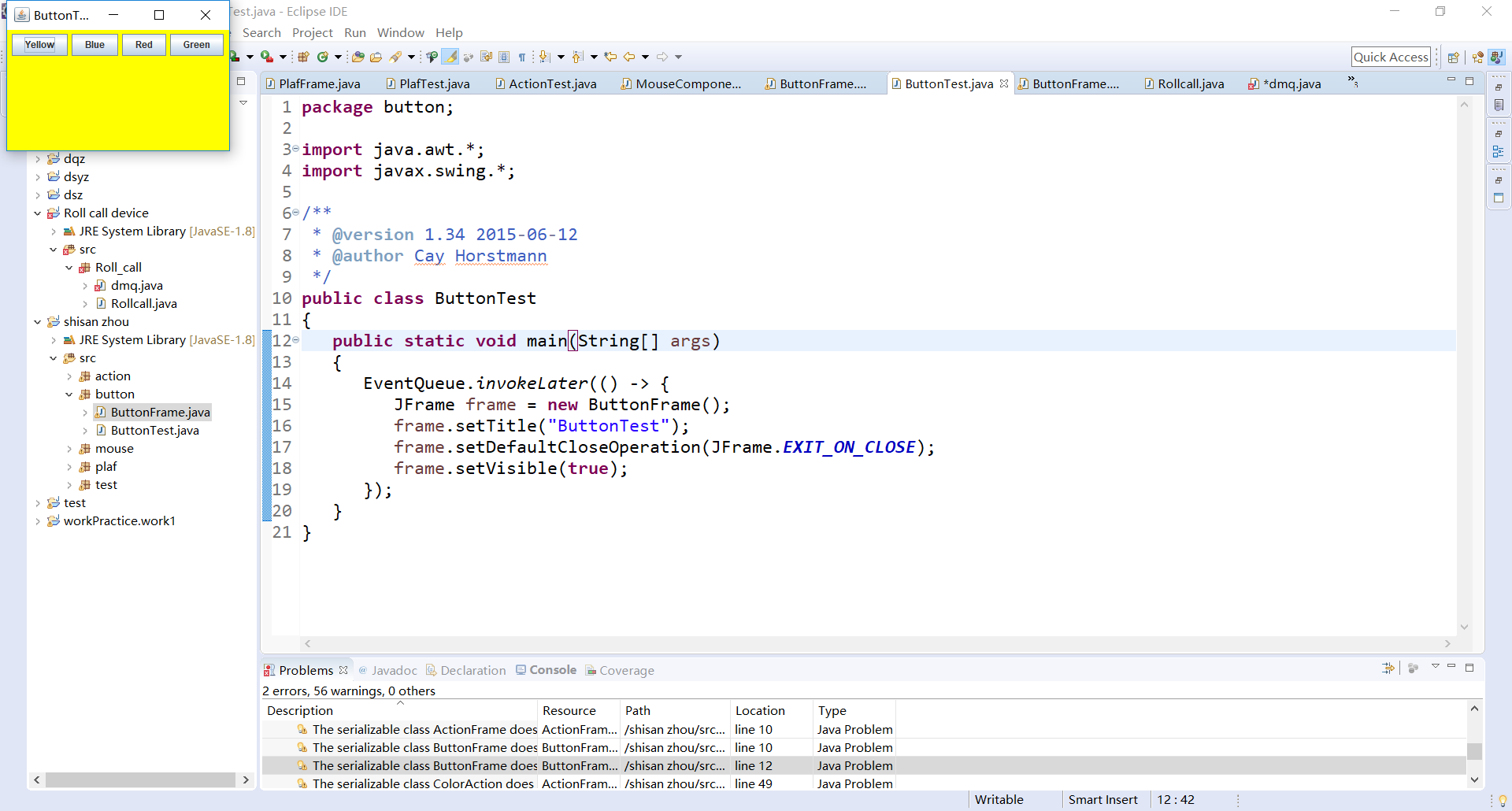
测试程序1:
1.在elipse IDE中调试运行教材443页-444页程序11-1,结合程序运行结果理解程序;
2.在事件处理相关代码处添加注释;
3.用lambda表达式简化程序;
4.掌握JButton组件的基本API;
5.掌握Java中事件处理的基本编程模型。
 package test;

 import java.awt.*;

 import java.awt.event.*;

 import javax.swing.*;

 /**

  * 带按钮面板的框架

  */

 public class ButtonFrame extends JFrame

 {

    private JPanel buttonPanel;

    private static final int DEFAULT_WIDTH = 500;

    private static final int DEFAULT_HEIGHT = 600;

    public ButtonFrame()

    {

       setSize(DEFAULT_WIDTH, DEFAULT_HEIGHT);

       // 创建三个按钮

 //      JButton yellowButton = new JButton("Yellow");

 //      JButton blueButton = new JButton("Blue");

 //      JButton redButton = new JButton("Red");

       buttonPanel = new JPanel();

        // 向面板添加按钮

 //      buttonPanel.add(yellowButton);

 //      buttonPanel.add(blueButton);

 //      buttonPanel.add(redButton);

       // 将面板添加到帧

       add(buttonPanel);

 //       创建按钮动作

 //      ColorAction yellowAction = new ColorAction(Color.YELLOW);

 //      ColorAction blueAction = new ColorAction(Color.BLUE);

 //      ColorAction redAction = new ColorAction(Color.RED);

 //

 //       用按钮关联动作

 //      yellowButton.addActionListener(yellowAction);

 //      blueButton.addActionListener(blueAction);

 //      redButton.addActionListener(redAction);

    MakeButton("黄色",Color.yellow);

    MakeButton("蓝色",Color.blue);

    MakeButton("红色",Color.red);

    }

    public void MakeButton(String name , Color backgroundColor)

    {

        JButton button=new JButton(name);

        buttonPanel.add(button);

 //       ColorAction action=new ColorAction(backgroundColor);

 //       button.addActionListener(action);

        button.addActionListener(new ActionListener()

        {

            public void actionPerformed(ActionEvent event)

            {

                buttonPanel.setBackground(backgroundColor);

                }

            });

    }

    /**

     * 设置面板背景颜色的动作侦听器

     */

    private class ColorAction implements ActionListener

    {

       private Color backgroundColor;

       public ColorAction(Color c)

       {

          backgroundColor = c;

       }

       public void actionPerformed(ActionEvent event)

       {

          buttonPanel.setBackground(backgroundColor);

       }

    }

 }
 package button;

 import java.awt.*;

 import javax.swing.*;

 /**

  * @version 1.34 2015-06-12

  * @author Cay Horstmann

  */

 public class ButtonTest

 {

    public static void main(String[] args)

    {

       EventQueue.invokeLater(() -> {

          JFrame frame = new ButtonFrame();

          frame.setTitle("ButtonTest");

          frame.setDefaultCloseOperation(JFrame.EXIT_ON_CLOSE);

          frame.setVisible(true);

       });

    }

 }
测试程序2:
1.在elipse IDE中调试运行教材449页程序11-2,结合程序运行结果理解程序;
2.在组件观感设置代码处添加注释;
3.了解GUI程序中观感的设置方法。
 package plaf;

 import javax.swing.JButton;

 import javax.swing.JFrame;

 import javax.swing.JPanel;

 import javax.swing.SwingUtilities;

 import javax.swing.UIManager;

 /**

  * 带有按钮面板的框架,用于改变外观和感觉

  */

 public class PlafFrame extends JFrame

 {

    private JPanel buttonPanel;

    public PlafFrame()

    {

       buttonPanel = new JPanel();

       UIManager.LookAndFeelInfo[] infos = UIManager.getInstalledLookAndFeels();

       for (UIManager.LookAndFeelInfo info : infos)

          makeButton(info.getName(), info.getClassName());

       add(buttonPanel);

       pack();

    }

    /**

     * 制作一个按钮来改变可插拔的外观和感觉.

     * @param 命名按钮名称

     * @param 类名:外观类的名称

     */

    private void makeButton(String name, String className)

    {

       // 向面板添加按钮

       JButton button = new JButton(name);

       buttonPanel.add(button);

       // 设置按钮动作

       button.addActionListener(event -> {

          //按钮动作:切换到新的外观和感觉

          try

          {

             UIManager.setLookAndFeel(className);

             SwingUtilities.updateComponentTreeUI(this);

             pack();

          }

          catch (Exception e)

          {

             e.printStackTrace();

          }

       });

    }

 }
 package plaf;

 import java.awt.*;

 import javax.swing.*;

 /**

  * @version 1.32 2015-06-1222222222222222222222222222

  * @author Cay Horstmann

  */

 public class PlafTest

 {

    public static void main(String[] args)

    {

       EventQueue.invokeLater(() -> {

          JFrame frame = new PlafFrame();

          frame.setTitle("PlafTest");

          frame.setDefaultCloseOperation(JFrame.EXIT_ON_CLOSE);

          frame.setVisible(true);

       });

    }

 }

测试程序3:
1.在elipse IDE中调试运行教材457页-458页程序11-3,结合程序运行结果理解程序;
2.掌握AbstractAction类及其动作对象;
3.掌握GUI程序中按钮、键盘动作映射到动作对象的方法。
 package action;

 import java.awt.*;

 import javax.swing.*;

 /**

  * @version 1.34 2015-06-1233333333333333333333333333

  * @author Cay Horstmann

  */

 public class ActionTest

 {

    public static void main(String[] args)

    {

       EventQueue.invokeLater(() -> {

          JFrame frame = new ActionFrame();

          frame.setTitle("ActionTest");

          frame.setDefaultCloseOperation(JFrame.EXIT_ON_CLOSE);

          frame.setVisible(true);

       });

    }

 }
 package action;

 import java.awt.*;

 import java.awt.event.*;

 import javax.swing.*;

 /**

  * 具有显示颜色变化动作的面板的框架

  */

 public class ActionFrame extends JFrame

 {

    private JPanel buttonPanel;

    private static final int DEFAULT_WIDTH = 300;

    private static final int DEFAULT_HEIGHT = 200;

    public ActionFrame()

    {

       setSize(DEFAULT_WIDTH, DEFAULT_HEIGHT);

       buttonPanel = new JPanel();

       // 定义动作

       Action yellowAction = new ColorAction("Yellow", new ImageIcon("yellow-ball.gif"),

             Color.YELLOW);

       Action blueAction = new ColorAction("Blue", new ImageIcon("blue-ball.gif"), Color.BLUE);

       Action redAction = new ColorAction("Red", new ImageIcon("red-ball.gif"), Color.RED);

       // 为这些操作添加按钮

       buttonPanel.add(new JButton(yellowAction));

       buttonPanel.add(new JButton(blueAction));

       buttonPanel.add(new JButton(redAction));

       // 将面板添加到帧

       add(buttonPanel);

       // 将Y、B和R键与名称关联

       InputMap imap = buttonPanel.getInputMap(JComponent.WHEN_ANCESTOR_OF_FOCUSED_COMPONENT);

       imap.put(KeyStroke.getKeyStroke("ctrl Y"), "panel.yellow");

       imap.put(KeyStroke.getKeyStroke("ctrl B"), "panel.blue");

       imap.put(KeyStroke.getKeyStroke("ctrl R"), "panel.red");

       // 把名字和动作联系起来

       ActionMap amap = buttonPanel.getActionMap();

       amap.put("panel.yellow", yellowAction);

       amap.put("panel.blue", blueAction);

       amap.put("panel.red", redAction);

    }

    public class ColorAction extends AbstractAction

    {

       /**

        * 构造颜色动作。

        * @param 在按钮上显示要显示的名称

        * @param 图标按钮上显示的图标

        * @param 背景颜色

        */

       public ColorAction(String name, Icon icon, Color c)

       {

          putValue(Action.NAME, name);

          putValue(Action.SMALL_ICON, icon);

          putValue(Action.SHORT_DESCRIPTION, "Set panel color to " + name.toLowerCase());

          putValue("color", c);

       }

       public void actionPerformed(ActionEvent event)

       {

          Color c = (Color) getValue("color");

          buttonPanel.setBackground(c);

       }

    }

 }
测试程序4:
1.在elipse IDE中调试运行教材462页程序11-4、11-5,结合程序运行结果理解程序;
2.掌握GUI程序中鼠标事件处理技术。
 package mouse;

 import java.awt.*;

 import javax.swing.*;

 /**

  * @version 1.34 2015-06-12

  * @author Cay Horstmann

  */

 public class MouseTest

 {

    public static void main(String[] args)

    {

       EventQueue.invokeLater(() -> {

          JFrame frame = new MouseFrame();

          frame.setTitle("MouseTest");

          frame.setDefaultCloseOperation(JFrame.EXIT_ON_CLOSE);

          frame.setVisible(true);

       });

    }

 }
 package mouse;

 import javax.swing.*;

 /**

  * 包含用于测试鼠标操作的面板的框架

  */

 public class MouseFrame extends JFrame

 {

    public MouseFrame()

    {

       add(new MouseComponent());

       pack();

    }

 }
 package mouse;

 import java.awt.*;

 import java.awt.event.*;

 import java.awt.geom.*;

 import java.util.*;

 import javax.swing.*;

 /**

  *一个带有鼠标操作的用于添加和删除正方形的组件。

  */

 public class MouseComponent extends JComponent

 {

    private static final int DEFAULT_WIDTH = 300;

    private static final int DEFAULT_HEIGHT = 200;

    private static final int SIDELENGTH = 10;

    private ArrayList<Rectangle2D> squares;

    private Rectangle2D current; // 包含鼠标光标的正方形

    public MouseComponent()

    {

       squares = new ArrayList<>();

       current = null;

       addMouseListener(new MouseHandler());

       addMouseMotionListener(new MouseMotionHandler());

    }

    public Dimension getPreferredSize() { return new Dimension(DEFAULT_WIDTH, DEFAULT_HEIGHT); }

    public void paintComponent(Graphics g)

    {

       Graphics2D g2 = (Graphics2D) g;

       // 绘制所有正方形

       for (Rectangle2D r : squares)

          g2.draw(r);

    }

    /**

     * 找到包含一个点的第一个方块。

     * @param P—A点

     * @return 包含P的第一个正方形

     */

    public Rectangle2D find(Point2D p)

    {

       for (Rectangle2D r : squares)

       {

          if (r.contains(p)) return r;

       }

       return null;

    }

    /**

     * 向集合中添加正方形。

     * @param 新闻中心

     */

    public void add(Point2D p)

    {

       double x = p.getX();

       double y = p.getY();

       current = new Rectangle2D.Double(x - SIDELENGTH / 2, y - SIDELENGTH / 2, SIDELENGTH,

             SIDELENGTH);

       squares.add(current);

       repaint();

    }

    /**

     * 从集合中移除正方形。

     * @param S方移除

     */

    public void remove(Rectangle2D s)

    {

       if (s == null) return;

       if (s == current) current = null;

       squares.remove(s);

       repaint();

    }

    private class MouseHandler extends MouseAdapter

    {

       public void mousePressed(MouseEvent event)

       {

          // 如果光标不在正方形中,则添加一个新的正方形

          current = find(event.getPoint());

          if (current == null) add(event.getPoint());

       }

       public void mouseClicked(MouseEvent event)

       {

          // 如果双击,则移除当前正方形

          current = find(event.getPoint());

          if (current != null && event.getClickCount() >= 2) remove(current);

       }

    }

    private class MouseMotionHandler implements MouseMotionListener

    {

       public void mouseMoved(MouseEvent event)

       {

          // 设置鼠标光标,如果里面是交叉头发

          // 矩形

          if (find(event.getPoint()) == null) setCursor(Cursor.getDefaultCursor());

          else setCursor(Cursor.getPredefinedCursor(Cursor.CROSSHAIR_CURSOR));

       }

       public void mouseDragged(MouseEvent event)

       {

          if (current != null)

          {

             int x = event.getX();

             int y = event.getY();

             // 拖动当前矩形将其置于(x,y)中心

             current.setFrame(x - SIDELENGTH / 2, y - SIDELENGTH / 2, SIDELENGTH, SIDELENGTH);

             repaint();

          }

       }

    }

 }

实验2:结对编程练习
利用班级名单文件、文本框和按钮组件,设计一个有界面的点名器,要求用户点击开始按钮后在文本输入框随机显示2017级网络与信息安全班同学姓名,点击停止按钮后,文本输入框不再变换同学姓名,此同学则是被点到的同学姓名。
 package Roll_call_device;

 import java.awt.Color;

 import java.awt.FlowLayout;

 import java.awt.Label;

 import java.awt.event.ActionEvent;

 import java.awt.event.ActionListener;

 import java.io.BufferedReader;

 import java.io.File;

 import java.io.FileInputStream;

 import java.io.IOException;

 import java.io.InputStreamReader;

 import java.util.ArrayList;

 import javax.swing.JButton;

 import javax.swing.JFrame;

 import javax.swing.Timer;

 public class Rollcall

 {

     public static void main(String args[])

     {

         try {

             Dmq dmq = new Dmq();

             dmq.lab.setText("随机点名器");

             dmq.setTitle("点名器");

         } catch (IOException e)

         {

             // TODO Auto-generated catch block

             e.printStackTrace();

         }

     }

 }

 class Dmq extends JFrame

 {

     final Label lab = new Label();

     ArrayList<String> namelist = new ArrayList<String>();

     public Dmq() throws IOException

     {

         File file = new File("src/studentnamelist.txt");

         FileInputStream fis = new FileInputStream(file);

         InputStreamReader isr = new InputStreamReader(fis, "GBK");

         BufferedReader br = new BufferedReader(isr);

         String line = "";

         while ((line = br.readLine()) != null)

         {

             if (line.lastIndexOf("---") < 0)

             {

                 namelist.add(line);

             }

         }

         setBounds(550, 270, 200, 150);

         final Timer timer = new Timer(50, new ActionListener()

         {

             public void actionPerformed(ActionEvent e)

             {

                 lab.setText(namelist.get((int) (Math.random() * namelist.size())));

             }

         });

         JButton jbutton = new JButton("开始");

         jbutton.addActionListener(new ActionListener()

         {

             public void actionPerformed(ActionEvent e)

             {

                 JButton jbutton = (JButton) e.getSource();

                 if (jbutton.getText().equals("开始"))

                 {

                     jbutton.setText("停止");

                     timer.start();

                 } else if (jbutton.getText().equals("停止"))

                 {

                     jbutton.setText("开始");

                     timer.stop();

                 }

             }

         });

         jbutton.setBounds(30, 30, 30, 30);

         lab.setBackground(new Color(255, 255, 255));

         this.setLayout(new FlowLayout());

         this.add(lab);

         this.add(jbutton);

         this.setSize(300, 200);

         this.setVisible(true);

         this.setDefaultCloseOperation(EXIT_ON_CLOSE);

         br.close();

     }

 }

第三部分:总结
通过本周的学习,我掌握了事件处理的基本原理,理解了用途;并了解学习了以下几点。AWT事件模型的工作机制;事件处理的基本编程模型;了解了GUI界面组件观感设置方法;WindowAdapter类、AbstractAction类的用法;GUI程序中鼠标事件处理技术。并且在看了助教学长的教学视频和同学的帮助下,学会了如何设计一个小型界面,受益颇多!
王之泰201771010131《面向对象程序设计(java)》第十三周学习总结的更多相关文章
- 201871010124 王生涛《面向对象程序设计JAVA》第一周学习总结
项目 内容 这个作业属于哪个课程 https://www.cnblogs.com/nwnu-daizh/ 这个作业的要求在哪里 https://edu.cnblogs.com/campus/xbsf/ ...
- 201771010134杨其菊《面向对象程序设计java》第九周学习总结
第九周学习总结 第一部分:理论知识 异常.断言和调试.日志 1.捕获 ...
- 201871010132-张潇潇《面向对象程序设计(java)》第一周学习总结
面向对象程序设计(Java) 博文正文开头 项目 内容 这个作业属于哪个课程 https://www.cnblogs.com/nwnu-daizh/ 这个作业的要求在哪里 https://www.cn ...
- 扎西平措 201571030332《面向对象程序设计 Java 》第一周学习总结
<面向对象程序设计(java)>第一周学习总结 正文开头: 项目 内容 这个作业属于哪个课程 https://www.cnblogs.com/nwnu-daizh/ 这个作业的要求在哪里 ...
- 杨其菊201771010134《面向对象程序设计Java》第二周学习总结
第三章 Java基本程序设计结构 第一部分:(理论知识部分) 本章主要学习:基本内容:数据类型:变量:运算符:类型转换,字符串,输入输出,控制流程,大数值以及数组. 1.基本概念: 1)标识符:由字母 ...
- 201871010115——马北《面向对象程序设计JAVA》第二周学习总结
项目 内容 这个作业属于哪个课程 https://www.cnblogs.com/nwnu-daizh/ 这个作业的要求在哪里 https://www.cnblogs.com/nwnu-daizh/p ...
- 201777010217-金云馨《面向对象程序设计(Java)》第二周学习总结
项目 内容 这个作业属于哪个课程 https://www.cnblogs.com/nwnu-daizh/ 这个作业的要求在哪里 https://www.cnblogs.com/nwnu-daizh/p ...
- 201871010132——张潇潇《面向对象程序设计JAVA》第二周学习总结
项目 内容 这个作业属于哪个课程 https://www.cnblogs.com/nwnu-daizh/ 这个作业的要求在哪里 https://www.cnblogs.com/nwnu-daizh/p ...
- 201771010123汪慧和《面向对象程序设计Java》第二周学习总结
一.理论知识部分 1.标识符由字母.下划线.美元符号和数字组成, 且第一个符号不能为数字.标识符可用作: 类名.变量名.方法名.数组名.文件名等.第二部分:理论知识学习部分 2.关键字就是Java语言 ...
- 201521123061 《Java程序设计》第十三周学习总结
201521123061 <Java程序设计>第十三周学习总结 1. 本周学习总结 2. 书面作业 1. 网络基础 1.1 比较ping www.baidu.com与ping cec.jm ...
随机推荐
- 一个人工智能教程,教案接地气、限制级。 http://www.captainbed.net
一个人工智能教程,教案接地气.限制级. http://www.captainbed.net https://open.weibo.com/
- Machine Learning, Homework 9, Neural Nets
Machine Learning, Homework 9, Neural NetsApril 15, 2019ContentsBoston Housing with a Single Layer an ...
- 《PHP内核剖析 - FPM》
一:概述 - FPM 定义 - FPM(FastCGI Process Manager)是PHP FastCGI运行模式的一个进程管理器. - FastCGI - Web服务器(如:Nginx. ...
- win10下配置默认软件(转)
add by zhj: 以配置默认浏览器为例说明,配置其它程序类似 原文:https://blog.csdn.net/u013246898/article/details/52032567 第一步:在 ...
- LINUX 配置定时任务,每天凌晨1点定时备份数据库
一.安装定时任务如果本地没有安装包,在能够连网的情况下可以在线安装 yum install vixie-cronyum install crontabs 查看crond服务是否运行: pgrep cr ...
- ASA failover
Active-Standby 1.作用:提供设备冗余 2.物理概念:primary 和 secondary ,需要命令敲得,角色不会切换, 3.虚拟概念:active和standby ,需要选举,角色 ...
- C语言扫盲及深化学习
c语言特点: (1)效率高 (2)控制性强 (3)硬件亲和性好 (4)可移植性高 一.关于注释 c语言中注释不能嵌套,因此注释代码时一定要注意源代码中是否已经存在注释.要从逻辑上删除一段代码,利用预编 ...
- MATLAB程序控制语句
Matlab中的程序控制语句包括条件控制(Conditional Control).循环(Loop Control).异常处理(Error Control)和程序返回(Program Terminat ...
- CF830A Office Keys(贪心)
CF830A Office Keys [题目链接]CF830A Office Keys [题目类型]贪心 &题意: 有n个人,k个钥匙,一个目的地,求让n个人都回到目的地的最短时间,每个人都要 ...
- Centos7 关于防火墙的一些简单配置
近期安装了linux系统Centos7,接触下来发现了与原来的Centos6.5有一些差别,这里主要记录下来我的一些关于Centos7防火墙的了解. 一.firewall简介 CentOS 7中防火墙 ...