
[ipsec][strongswan] 使用wireshark查看strongswan ipsec esp ikev1 ikev2的加密内容
姊妹篇:[https][tls] 如何使用wireshark查看tls/https加密消息
一,编译,启用strongswan的save-keys plugin
./configure --prefix=/root/OUTPUT --exec-prefix=/root/OUTPUT --enable-save-keys CFLAGS="-g -O0"
运行之前验证一下,是否加载了这个插件
[root@T9 OUTPUT]# ./sbin/swanctl --stat |grep save

loaded plugins: charon aes save-keys des rc2 sha2 sha1 md5 mgf1 random nonce x509 revocation constraints pubkey
 pkcs1 pkcs7 pkcs8 pkcs12 pgp dnskey sshkey pem fips-prf gmp curve25519 xcbc cmac hmac attr kernel-netlink
resolve socket-default stroke vici updown xauth-generic counters
二,增加如下配置
charon {

        load_modular = yes

        plugins {

                include strongswan.d/charon/*.conf

                save-keys {

                        esp = yes

                        ike = yes

                        load = yes

                        wireshark_keys = /root/OUTPUT/etc/keys

                }

        }
详细的解释,可以查man手册
       charon.plugins.save-keys.esp [no]

              Whether to save ESP keys.

       charon.plugins.save-keys.ike [no]

              Whether to save IKE keys.

       charon.plugins.save-keys.load [no]

              Whether to load the plugin.

       charon.plugins.save-keys.wireshark_keys []

              Directory  where  the  keys  are  stored  in the format supported by Wireshark. IKEv1 keys are stored in the ikev1_decryption_table file.
              IKEv2 keys are stored in the ikev2_decryption_table file.
              Keys for ESP CHILD_SAs are stored in the esp_sa file.
三,正常运行之后,这个目录下,就会存着key了,同时把包抓下来
./sbin/swanctl --load-all

./sbin/ipsec up net-net
查看保存的key
[root@T9 OUTPUT]# ll etc/keys/

total

-rw-r--r--  root root  Dec  : esp_sa

-rw-r--r--  root root  Dec  : ikev2_decryption_table
四,配置wireshark
IKE:
edit->preferences->protocols->ISAKMP->IKEv2 Decryption Table->Edit
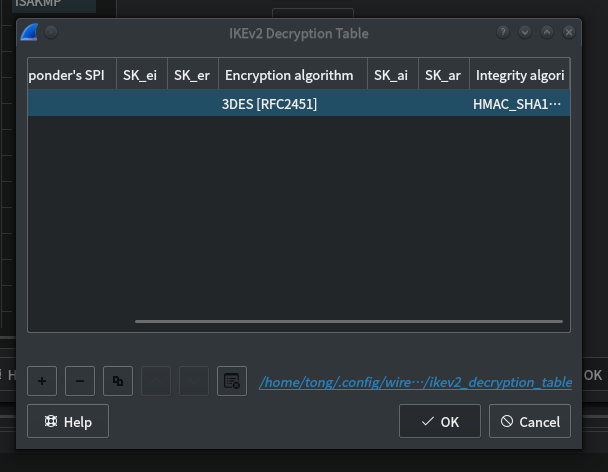
如图,看见这后边有个蓝色的文件名。
用前边获得的那个文件覆盖它。
cp ikev2_decryption_table /home/tong/.config/wireshark/ikev2_decryption_table
ESP:
edit->preferences->protocols->ESP->Edit
然后点加号,编辑
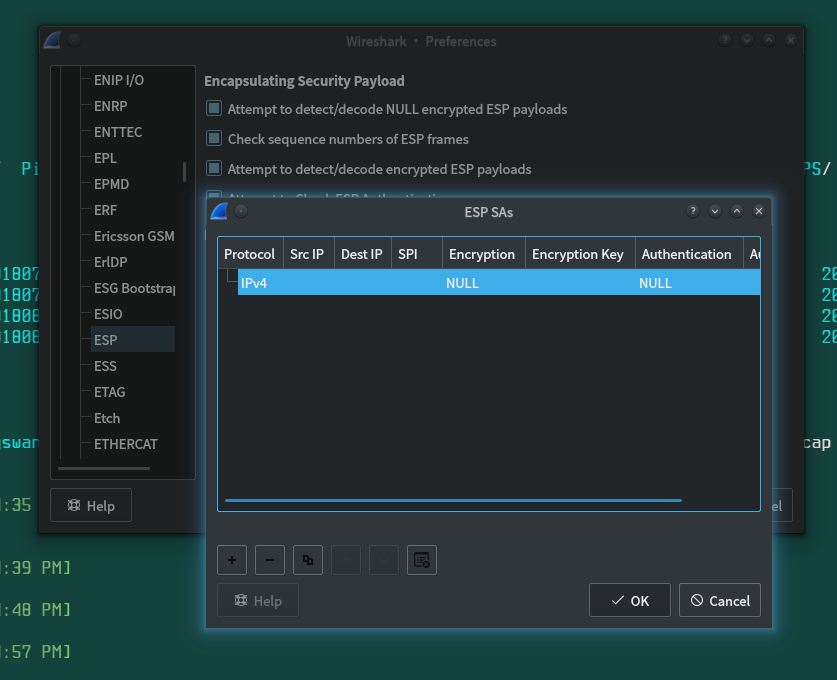
或者。直接cp进去到配置目录
cp esp_sa /home/tong/.config/wireshark/
五。用wirshark再次打开之前抓到的pcap包。
好了。现在的IKEV2和ESP都是解密过的了。

[ipsec][strongswan] 使用wireshark查看strongswan ipsec esp ikev1 ikev2的加密内容的更多相关文章
- [https][tls] 如何使用wireshark查看tls/https加密消息--使用keylog
姊妹篇: [ipsec][strongswan] 使用wireshark查看strongswan ipsec esp ikev1 ikev2的加密内容 [https][tls] 如何使用wiresha ...
- tcpdump抓包和scp导出以及wireshark查看
[命令和工具] tcpdump scp wireshark (1)tcpdump sudo tcpdump -i eth0 -w /home/tcpdump/1.pcap host 10.214.1 ...
- [https][tls] 如何使用wireshark查看tls/https加密消息--使用私钥
之前总结了使用keylog进行https流量分析的方法: [https][tls] 如何使用wireshark查看tls/https加密消息--使用keylog 今天总结一下使用服务器端证书私钥进行h ...
- Wireshark 查看指定进程的网络包
Wireshark 查看指定进程的网络包 打开任务管理器,右键筛选列,选中PID(进程标识符): 找到该进程对应的PID,如1200: 在cmd中执行netstat -ano|findstr 1200 ...
- SQL点点滴滴_查看所有存储过程或视图的位置及内容
代码:select a.name,a.[type],b.[definition] from sys.all_objects a,sys.sql_modules b where a.is_ms_ship ...
- Visual Studio Code 帮助查看器,指定的用于安装帮助内容的位置无效,或者您无权访问该位置
今天有个C# 类库文件里面的属性想要了解下,想到了Vs的帮助文档,其实也就是微软的MSDN:提示帮助查看器,指定的用于安装帮助内容的位置无效,或者您无权访问该位置: 最近两天vs也没有更新,并且也没有 ...
- 下面哪些命令可以查看file1文件的第300-500行的内容?
下面哪些命令可以查看file1文件的第300-500行的内容? cat file1 | tail -n +300 | head -n 200 cat file1| head -n 500 | tail ...
- [ipsec] 特别硬核的ike/ipsec NAT穿越机制分析
〇 前言 这怕是最后一篇关于IKE,IPSEC的文字了,因为不能没完没了. 所以,我一直在想这个标题该叫什么.总的来说可以将其概括为:IKE NAT穿越机制的分析. 但是,同时它也回答了以下问题: ( ...
- Wireshark查看https的通讯
如果有服务端的证书,那我们可以分析web下https的通讯情况,在特别的场景下有一定的用处,如外部审计 如下是在wireshark或tshark中配置查看https的设置 wireshark验证 ts ...
随机推荐
- EDID:识别和解决常见问题指南
随着 HDMI.DVI 和 DisplayPort 的迅速采用,专业视音频行业正继续从模拟向数字视频技术转换.虽然在很大程度上取得了成功,但在向最终用户提供稳定.无故障的视频系统时,这种转变仍带来了诸 ...
- Flask开发微电影网站(七)
1.后台管理之电影管理 1.1 定义电影表单 在app的admin目录的forms.py文件中,定义电影表单 # 电影表单 class MovieForm(FlaskForm): title = St ...
- 学习笔记: MD5/DES/RSA三类加密,SSL协议解析
1. 不对称可逆加密的 的2种用法 (1)保证信息不被篡改 (2) 保证信息只能被我看到 2. CA证书的基本原理 流程如下: 百度公司 向CA机构报备 持有者姓名, 有效期, 要发布的公钥 , 扩 ...
- Cesium 动态更换模型贴图方法
参考资料 github 讨论地址 示例代码地址 示例代码 var viewer = new Cesium.Viewer('cesiumContainer'); var scene = viewer.s ...
- 【转】GB2312、GBK和UTF-8三种编码的简要说明
原文地址:http://www.cnblogs.com/hust-yingjie/p/5481966.htmlGB2312.GBK和UTF-8都是一种字符编码,除此之外,还有好多字符编码.只是对于我们 ...
- maya cmds pymel undoInfo chunk 撤销束
maya cmds pymel undoInfo chunk 撤销束 cmds.undoInfo(openChunk = 1) # your code cmds.undoInfo(closeChunk ...
- 调试webpack配置文件
webpack运行在nodejs上,调试webpack就相当于调试nodejs程序.下面介绍一种通用的办法. 1.配置package.json,加一个debug. { 'scripts': { 'de ...
- BZOJ.2823.[AHOI2012]信号塔(最小圆覆盖 随机增量法)
BZOJ 洛谷 一个经典的随机增量法,具体可以看这里,只记一下大体流程. 一个定理:如果一个点\(p\)不在点集\(S\)的最小覆盖圆内,那么它一定在\(S\bigcup p\)的最小覆盖圆上. 所以 ...
- Python退火算法在高次方程的应用
一,简介 退火算法不言而喻,就是钢铁在淬炼过程中失温而成稳定态时的过程,热力学上温度(内能)越高原子态越不稳定,而温度有一个向低温区辐射降温的物理过程,当物质内能不再降低时候该物质原子态逐渐成为稳定有 ...
- [是男人就过8题——Pony.ai]Perfect N-P Arrays
[是男人就过8题--Pony.ai]Perfect N-P Arrays 题目大意: 一棵\(n(\sum n\le5\times10^6)\)个结点的树,每个结点都有一个括号.求树上一个合法的括号序 ...