
setFeatureInt、android 自定义标题栏
Android 自带的toolbar 往往不能很好的的满足我们的个性化要求。因此我们经常使用自定的的标题栏。而Android系统本身也允许我们自定以标题栏。
记录一下,自定义标题栏常遇到的问题。先上效果图:
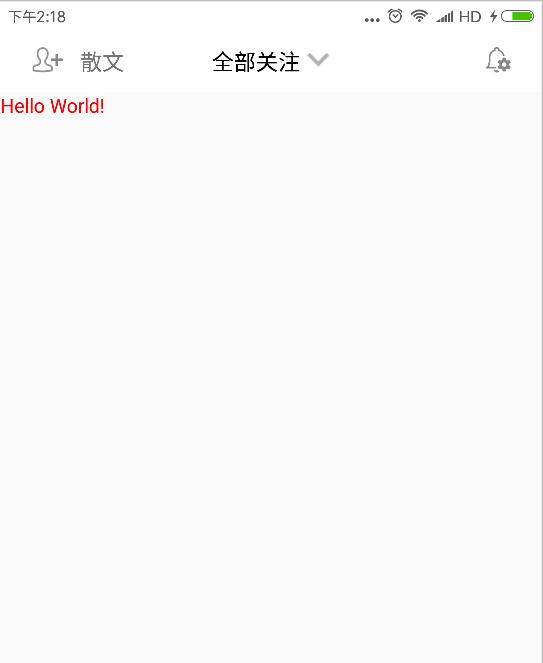
实现起来也很简单。在Activity 的 setContentView方法前添加
requestWindowFeature(Window.FEATURE_CUSTOM_TITLE);
其含义是允许用户自定义标题栏。
然后再在setContentView后添加
getWindow().setFeatureInt(Window.FEATURE_CUSTOM_TITLE, R.layout.custom_navigation_bar);
其中 R.layout.custom_navigation_bar 为我们自定义的标题栏样式,
 <?xml version="1.0" encoding="utf-8"?>

 <LinearLayout xmlns:android="http://schemas.android.com/apk/res/android"

     xmlns:tools="http://schemas.android.com/tools"

     android:layout_width="match_parent"

     android:layout_height="44dp"

     android:orientation="vertical"

     tools:context=".BaseActivity">

     <LinearLayout

         android:layout_width="match_parent"

         android:layout_height="match_parent"

         android:layout_weight="1"

         android:orientation="horizontal"

         android:padding="10dp">

         <LinearLayout

             android:layout_width="0dp"

             android:layout_height="match_parent"

             android:layout_weight="1"

             android:gravity="left|center_vertical"

             android:paddingBottom="2dp"

             android:paddingTop="2dp">

             <ImageView

                 android:id="@+id/navigation_left"

                 android:layout_width="wrap_content"

                 android:layout_height="match_parent"

                 android:src="@mipmap/rt_tianjiaguanzhu" />

             <TextView

                 android:id="@+id/navigation_left_text"

                 android:layout_width="wrap_content"

                 android:layout_height="wrap_content"

                 android:text="散文"

                 android:textSize="16sp" />

         </LinearLayout>

         <LinearLayout

             android:layout_width="wrap_content"

             android:layout_height="match_parent"

             android:gravity="center"

             android:paddingBottom="2dp"

             android:paddingTop="2dp">

             <TextView

                 android:id="@+id/navigation_center"

                 android:layout_width="wrap_content"

                 android:layout_height="wrap_content"

                 android:layout_gravity="center"

                 android:layout_marginRight="5dp"

                 android:text="全部关注"

                 android:textAlignment="center"

                 android:textColor="@color/black"

                 android:textSize="16sp" />

             <ImageView

                 android:layout_width="wrap_content"

                 android:layout_height="wrap_content"

                 android:src="@mipmap/icon_down" />

         </LinearLayout>

         <LinearLayout

             android:layout_width="0dp"

             android:layout_height="match_parent"

             android:layout_weight="1"

             android:gravity="right|center_vertical"

             android:paddingBottom="2dp"

             android:paddingTop="2dp">

             <ImageView

                 android:id="@+id/navigation_right"

                 android:layout_width="wrap_content"

                 android:layout_height="match_parent"

                 android:layout_gravity="center_vertical"

                 android:src="@mipmap/settings" />

         </LinearLayout>

     </LinearLayout>

     <View

         android:layout_width="match_parent"

         android:layout_height="0.5dp"

         android:background="@color/lightgray" />

 </LinearLayout>
最后设置主题,也只最容易出错的地方。对使用该方式添加标题栏的Activity 添加主题样式。
这是我的主题样式 应继承 android:Theme.Light 主题否则会报错。
     <!-- 标题栏样式 -->

     <style name="WindowTitleBackground" >

         <item name="android:background">@color/colordarkgray</item>

     </style>

     <style name="MyTheme" parent="android:Theme.Light">

         <item name="android:windowTitleSize">45dp</item>

         <item name="android:windowTitleBackgroundStyle">@style/WindowTitleBackground</item>

     </style>
Activity 引用代码如下。
android:theme="@style/MyTheme"

这样就可以实现自定义的效果了。

补充:上面说主题不继承 android:Theme.Light 会报错。查了一下是标题栏冲突的原因。
    我们只需要在继承的主题里添加如下属性就可以了。
    <item name="android:windowActionBar">false</item>
    <item name="android:windowNoTitle">false</item>
这样我们就可以继承别的主题使用一些高大上的效果了。如 Theme.AppCompat主题等。

有朋友问我,显示这个标题的时候同时也显示了系统自带的标题是什么原因,查看代码后发现他的Activity继承了AppCompatActivity 这里我们应继承Activity 就好了。
setFeatureInt、android 自定义标题栏的更多相关文章
- [置顶]
xamarin android自定义标题栏(自定义属性、回调事件)
自定义控件的基本要求 这篇文章就当是自定义控件入门,看了几篇android关于自定义控件的文章,了解了一下,android自定义控件主要有3种方式: 自绘控件:继承View类,所展示的内容在OnDra ...
- Android 自定义标题栏
开发 Android APP 经常会用到自定义标题栏,而有多级页面的情况下还需要给自定义标题栏传递数据. 本文要点: 自定义标题填充不完整 自定义标题栏返回按钮的点击事件 一.代码 这里先介绍一下流程 ...
- Android -- 自定义标题栏,背景颜色填充满
设置标题栏背景 1> 准备背景图片: background_pix.png 注:用背景图片比用颜色好处,可以让背景看起来有凹凸感. 2> drawable文件夹下放xml文件 bitmap ...
- (转)Android 自定义标题栏(title栏)
转:http://blog.csdn.net/jamin0107/article/details/6715678 第一步,向实现自定义标题栏,需要在onCreate方法里这样写 requestWind ...
- android 自定义标题栏 titleBar自定义
在value文件夹下添加style.xml <?xml version="1.0" encoding="utf-8"?> <resources ...
- Android—自定义标题栏的实现及遇见的问题解决
开发者设计界面时候往往不会使用系统自带的标题栏,因为不美观,所以需要自己设置标题栏. 1.根据需求在xml文件中设置标题布局 <?xml version="1.0" enco ...
- Android自定义标题栏
预览一下效果: 素材: 新建一个布局title_bar.xml,代码如下: <?xml version="1.0" encoding="utf-8"?&g ...
- Android开发-取消程序标题栏或自定义标题栏
注:本文由Colin撰写,版权所有!转载请注明原文地址,谢谢合作! 在Android开发中,跟据需要我们有时候需要自定义应用程序的标题栏或者取消程序的标题栏,下面本菜鸟在此记录与分享一下自己使用的方法 ...
- Android应用开发基础篇(14)-----自定义标题栏
一.概述 每一个应用程序默认的标题栏(注意与状态栏的区别)只有一行文字(新建工程时的名字),而且颜色.大小等都是固定的,给人的感觉比较单调.但当程序需要美化的时候,那么修改标题栏是就是其中一项内容,虽 ...
随机推荐
- 解决 502、504 Gateway Time-out(nginx)
一.504 Gateway Time-out问题常见于使用nginx作为web server的服务器的网站 我遇到这个问题是在升级discuz论坛的时候遇到的 一般看来, 这种情况可能是由于nginx ...
- LeetCode() Binary Tree Level Order Traversal
感觉我这个思路好 先记录上一层有几个节点 /** * Definition for a binary tree node. * struct TreeNode { * int val; * TreeN ...
- [NOIP2015] 斗地主(搜索)
题目描述 牛牛最近迷上了一种叫斗地主的扑克游戏.斗地主是一种使用黑桃.红心.梅花.方片的A到K加上大小王的共54张牌来进行的扑克牌游戏.在斗地主中,牌的大小关系根据牌的数码表示如下:3<4< ...
- Exchange的AutoDiscover服务
最近工作中涉及到Exchange的AutoDiscover服务,最初想学习后输出一个博客文章.但是最后是找到一篇中文博客文章已经非常清楚的解释了这个问题,如下: http://didda.blog.5 ...
- Hibernate的save()和persist()的区别
hibernate之所以提供与save()功能几乎完全类似的persist()方法,一方面是为了照顾JPA的用法习惯.另一方面,save()和 persist()方法还有一个区别:使用 save() ...
- VPS/服务器优化网络、加速方法总结与参考
在国外的服务器上因为受各种因素影响,即使国外的服务器都是百兆共享或者G口到国内下载速度都不是很让人满意,大部分人购买国外服务器是用作存储下载或者扶墙,速度慢的所以话影响我们的使用体验.所以就搞出了很多 ...
- [Linux] - Virtualbox-CentOS动态增加分区空间方法
VirtualBox使用中,有时会因为当初分配空间不足导致出问题,可以使用如下方式增加分区空间: 一.VirtualBox设置: 1)到VirtualBox的安装目录下找到这个命令exe文件:vbox ...
- JS跨域解决iframe高度自适应(IE8/Firefox/Chrome适用)
参考园友的js跨越实现,有提到三种方式: 1. 中间页代理方式,利用iframe的location.hash 参见:http://www.5icool.org/a/201203/a1129.html ...
- Delphi_OD_代码_调试_Delphi反调试技术(以OD为例附核心原代码) (转)
1.程序窗口[chuang kou]句柄[ju bing]检测原理:用FindWindow函数[han shu]查找[cha zhao]具有相同窗口[chuang kou]类名和标题的窗口[chuan ...
- winform基本控件的使用2(用户登录界面的设计)
首先还是通过例子来讲解,这次的实验主要是使用messageBox的使用方法,关于messageBox的使用方法在我的博客里面有相关的转载,请自己查看,下面说一下实验要求. 功能要求:模拟一个用户登陆的 ...