
C# 使用ffmpeg.exe进行音频转换完整demo-asp.net转换代码
C# 使用ffmpeg.exe进行音频转换完整demo-asp.net转换代码
上一篇说了在winform下进行调用cmd.exe执行ffmpeg.exe进行音频转换完整demo.后来我又需要移植这个方式到asp.net中,但是asp.net和winform程序有很多不同。
需要修改WavConvertToAmr的方法,支持asp.net
1、WavConvertToAmr修改执行权限:如果在windows server中可能会遇到权限问题,需要配置IIS权限:
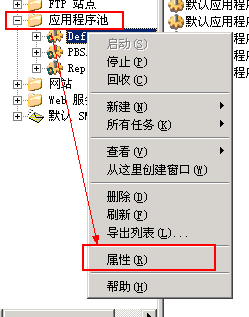
先从IIS中找到你的网站,在右键--【属性】中看看使用的应用程序池是哪个,然后【在应用程序池】目录下找到它,右键---【属性】
找到【标识】选项卡,再找到【预定义账户】,在后边的下拉菜单中选择“本地系统”就可以了!
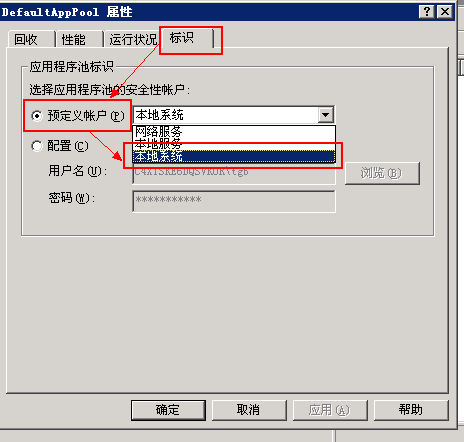
这样一来,你的网站就可以随心所欲的执行cmd命令了,其实不仅仅是执行cmd命令,简直是至高无上的权限!
提醒一下,这样更改的是应用程序池权限,因此所有使用这个应用程序池的网站都有很高的权限,这是相当危险的,还须谨慎使用!!
这个方法存在危险,也通过设置执行的用户名和密码来设置:
|
1
2
3
4
5
6
7
8
9
10
11
12
13
14
15
16
17
18
19
20
21
22
23
24
25
26
27
28
29
30
31
32
33
34
35
36
37
38
39
40
41
42
|
/// <summary> /// 执行Cmd命令 /// </summary> private string Cmd(string c) { try { System.Diagnostics.Process process = new System.Diagnostics.Process(); process.StartInfo.FileName = "cmd.exe"; process.StartInfo.UseShellExecute = false; process.StartInfo.CreateNoWindow = true; process.StartInfo.UserName = "user"; //构造用户密码,假定密码为123,必须一个字符一个字符的添加 System.Security.SecureString password = new System.Security.SecureString(); password.AppendChar('p'); password.AppendChar('a'); password.AppendChar('s'); password.AppendChar('s'); process.StartInfo.Password = password; process.StartInfo.RedirectStandardInput = true; process.StartInfo.RedirectStandardOutput = true; process.StartInfo.RedirectStandardError = true; process.Start(); process.StandardInput.WriteLine(c); process.StandardInput.AutoFlush = true; Thread.Sleep(1000); process.StandardInput.WriteLine("exit"); process.WaitForExit(); //StreamReader reader = process.StandardOutput;//截取输出流 string outStr = process.StandardOutput.ReadToEnd(); process.Close(); return outStr; } catch (Exception ex) { return "error"+ex.Message; } } |
注意:构造用户密码,假定密码为123,必须一个字符一个字符的添加 !
2、在asp.net中调用方式:
|
1
2
3
4
5
6
7
8
|
protected void Button1_Click(object sender, EventArgs e) { string fileName = "d:\\2222.amr"; string targetFileName = "d:\\2222.mp3"; WavConvertAmr.WavConvertToAmr toamr = new WavConvertAmr.WavConvertToAmr(); string remsg = toamr.ConvertToAmr(Server.MapPath("./ffmpeg/"), fileName, targetFileName); } |
将ffmpeg.exe放在网站的目录ffmpeg的下面

在asp.net要注意ffmepg的路径:
|
1
2
3
4
5
6
7
8
9
10
11
12
13
|
./当前目录/网站主目录../上层目录~/网站虚拟目录 如果当前的网站目录为E:\wwwroot 应用程序虚拟目录为E:\wwwroot\company 浏览的页面路径为E:\wwwroot\company\news\show.asp在show.asp页面中使用Server.MapPath("./") 返回路径为:E:\wwwroot\company\news Server.MapPath("/") 返回路径为:E:\wwwroot Server.MapPath("../") 返回路径为:E:\wwwroot\company Server.MapPath("~/") 返回路径为:E:\wwwroot\company server.MapPath(request.ServerVariables("Path_Info")) Request.ServerVariables("Path_Translated") 上面两种方式返回路径为 D:\wwwroot\company\news\show.asp
|
转载网址:
http://www. suxxxxxxxxchso.com/projecteactual/csharp-ffmpeg-demo-mp3-amr-mp4-asp.net.html
C# 使用ffmpeg.exe进行音频转换完整demo-asp.net转换代码的更多相关文章
- C# 使用ffmpeg.exe进行音频转换完整demo
今天在处理微信的开发接口时候,发现微信多媒体上传接口中返回的音频格式是amr.坑人的是现在大部分的web 播放器,不支持amr的格式播放.试了很多方法都不行. 没办法,只要找一个妥协的解决方案:将am ...
- .net 使用ffmpeg.exe进行音频转码
#region 音频转换 private int AudioIntervalTime = 100, iAudio = 0; private string strPath = "D:\\web ...
- C++调用ffmpeg.exe提取视频帧
有时候,我们获得一段视频,需要将其中的每一帧都提取出来,来进行一些相关的处理,这时候我们就可以需要用到ffmpeg.exe来进行视频帧的提取. ffmpeg简介:FFmpeg是一套可以用来记录.转换数 ...
- FFmpeg命令行工具学习(三):媒体文件转换工具ffmpeg
一.简述 ffmpeg是一个非常强大的工具,它可以转换任何格式的媒体文件,并且还可以用自己的AudioFilter以及VideoFilter进行处理和编辑.有了它,我们就可以对媒体文件做很多我们想做的 ...
- 使用ffmpeg.exe进行转码参数说明
使用ffmpeg.exe进行转码参数说明 摘自:https://blog.csdn.net/coloriy/article/details/47337641 2015年08月07日 13:04:32 ...
- ffmpeg.exe dos下怎么用 放在哪里
系统:windows 7 1.先看dos界面,win7下这里输入cmd, 看路径 2.把下载的ffmpeg.exe复制到这个路径下 3.这就可以用命令了 1.mp4说明这个文件是跟ffmpeg.ex ...
- 最简单的基于FFMPEG+SDL的音频播放器 ver2 (采用SDL2.0)
===================================================== 最简单的基于FFmpeg的音频播放器系列文章列表: <最简单的基于FFMPEG+SDL ...
- 最简单的基于FFMPEG+SDL的音频播放器 ver2 (採用SDL2.0)
===================================================== 最简单的基于FFmpeg的音频播放器系列文章列表: <最简单的基于FFMPEG+SDL ...
- [原]通过配合ffmpeg.exe获取视频文件时长
import subprocess import os import time def getTime(flvpath,fid): #file_str = '1.flv' file_str = flv ...
随机推荐
- tabhost使用
Tabhost用法 使用方法一:使用同一个布局文件 在xml中如此定义tabhost: <RelativeLayout xmlns:android="http://schemas.an ...
- 【LeetCode OJ】Construct Binary Tree from Preorder and Inorder Traversal
Problem Link: https://oj.leetcode.com/problems/construct-binary-tree-from-preorder-and-inorder-trave ...
- iOS—图片编辑,文字下落动画的Demo
仿照Mac上的截图编辑功能做的一个图片编辑的Demo,功能有画矩形,圆形,箭头,手写,输入文字和分享. 做的时候看到一个大神的帖子写的一个文字动画的教程,故顺带学习做了一个类似的文字下落动画. 有兴趣 ...
- Microsoft Visual C++
Microsoft Visual C++ Visual C++ 1.0 1992 Visual C++ 1.5 Visual C++ 2.0 (备注) Visual C++ 4.0 Visual C+ ...
- 将对象序列化,反序列化到XML
using System; using System.Collections.Generic; using System.IO; using System.Linq; using System.Tex ...
- destoon二次开发 操作数据库可运行示例
<?phpdefine('IN_DESTOON', true);$userid= $_REQUEST["userid"];//$basepath=$_SERVER['PHP_ ...
- Runtime Complexity of .NET Generic Collection
Runtime Complexity of .NET Generic Collection I had to implement some data structures for my compu ...
- Mongodb在Windows 7下的安装及配置
第一步 下载MongoDB: 下载mongodb的windows版本,有32位和64位版本,根据操作系统情况下载,下载地址:http://www.mongodb.org/downloads 解压缩至指 ...
- 初识Linux-4
1,文件系统,从/开始的树状结构 2,绝对路径:/打头,相对路径:从当前目录下开始的 3,usename,passwd,uid,gid,home,shell(都是管理员指定的,这些信息都在passwd ...
- php部分---PDO;
PDO数据访问抽象层 PDO的三个功能: 1.操作其它数据库2.事务功能3.防止SQL注入攻击 操作数据库: 造PDO对象 //$dsn = "mysql:dbname=mydb;host= ...