
C#压缩库SharpZipLib的应用
         /// <summary>

         /// 压缩多个文件/文件夹

         /// </summary>

         /// <param name="sourceList">源文件/文件夹路径列表</param>

         /// <param name="zipFilePath">压缩文件路径</param>

         /// <param name="comment">注释信息</param>

         /// <param name="password">压缩密码</param>

         /// <param name="compressionLevel">压缩等级,范围从0到9,可选,默认为6</param>

         /// <returns></returns>

         public static bool CompressFile(IEnumerable<string> sourceList, string zipFilePath,

              string comment = null, string password = null, int compressionLevel = )

         {

             bool result = false;

             try

             {

                 //检测目标文件所属的文件夹是否存在,如果不存在则建立

                 string zipFileDirectory = Path.GetDirectoryName(zipFilePath);

                 if (!Directory.Exists(zipFileDirectory))

                 {

                     Directory.CreateDirectory(zipFileDirectory);

                 }

                 Dictionary<string, string> dictionaryList = PrepareFileSystementities(sourceList);

                 using (ZipOutputStream zipStream = new ZipOutputStream(File.Create(zipFilePath)))

                 {

                     zipStream.Password = password;//设置密码

                     zipStream.SetComment(comment);//添加注释

                     zipStream.SetLevel(CheckCompressionLevel(compressionLevel));//设置压缩等级

                     foreach (string key in dictionaryList.Keys)//从字典取文件添加到压缩文件

                     {

                         if (File.Exists(key))//判断是文件还是文件夹

                         {

                             FileInfo fileItem = new FileInfo(key);

                             using (FileStream readStream = fileItem.Open(FileMode.Open,

                                 FileAccess.Read, FileShare.Read))

                             {

                                 ZipEntry zipEntry = new ZipEntry(dictionaryList[key]);

                                 zipEntry.DateTime = fileItem.LastWriteTime;

                                 zipEntry.Size = readStream.Length;

                                 zipStream.PutNextEntry(zipEntry);

                                 int readLength = ;

                                 byte[] buffer = new byte[BufferSize];

                                 do

                                 {

                                     readLength = readStream.Read(buffer, , BufferSize);

                                     zipStream.Write(buffer, , readLength);

                                 } while (readLength == BufferSize);

                                 readStream.Close();

                             }

                         }

                         else//对文件夹的处理

                         {

                             ZipEntry zipEntry = new ZipEntry(dictionaryList[key] + "/");

                             zipStream.PutNextEntry(zipEntry);

                         }

                     }

                     zipStream.Flush();

                     zipStream.Finish();

                     zipStream.Close();

                 }

                 result = true;

             }

             catch (System.Exception ex)

             {

                 throw new Exception("压缩文件失败", ex);

             }

             return result;

         }

         /// <summary>

         /// 解压文件到指定文件夹

         /// </summary>

         /// <param name="sourceFile">压缩文件</param>

         /// <param name="destinationDirectory">目标文件夹,如果为空则解压到当前文件夹下</param>

         /// <param name="password">密码</param>

         /// <returns></returns>

         public static bool DecomparessFile(string sourceFile, string destinationDirectory = null, string password = null)

         {

             bool result = false;

             if (!File.Exists(sourceFile))

             {

                 throw new FileNotFoundException("要解压的文件不存在", sourceFile);

             }

             if (string.IsNullOrWhiteSpace(destinationDirectory))

             {

                 destinationDirectory = Path.GetDirectoryName(sourceFile);

             }

             try

             {

                 if (!Directory.Exists(destinationDirectory))

                 {

                     Directory.CreateDirectory(destinationDirectory);

                 }

                 using (ZipInputStream zipStream = new ZipInputStream(File.Open(sourceFile, FileMode.Open,

                     FileAccess.Read, FileShare.Read)))

                 {

                     zipStream.Password = password;

                     ZipEntry zipEntry = zipStream.GetNextEntry();

                     while (zipEntry != null)

                     {

                         if (zipEntry.IsDirectory)//如果是文件夹则创建

                         {

                             Directory.CreateDirectory(Path.Combine(destinationDirectory,

                                 Path.GetDirectoryName(zipEntry.Name)));

                         }

                         else

                         {

                             string fileName = Path.GetFileName(zipEntry.Name);

                             if (!string.IsNullOrEmpty(fileName) && fileName.Trim().Length > )

                             {

                                 FileInfo fileItem = new FileInfo(Path.Combine(destinationDirectory, zipEntry.Name));

                                 using (FileStream writeStream = fileItem.Create())

                                 {

                                     byte[] buffer = new byte[BufferSize];

                                     int readLength = ;

                                     do

                                     {

                                         readLength = zipStream.Read(buffer, , BufferSize);

                                         writeStream.Write(buffer, , readLength);

                                     } while (readLength == BufferSize);

                                     writeStream.Flush();

                                     writeStream.Close();

                                 }

                                 fileItem.LastWriteTime = zipEntry.DateTime;

                             }

                         }

                         zipEntry = zipStream.GetNextEntry();//获取下一个文件

                     }

                     zipStream.Close();

                 }

                 result = true;

             }

             catch (System.Exception ex)

             {

                 throw new Exception("文件解压发生错误", ex);

             }

             return result;

         }
         /// <summary>

         /// 为压缩准备文件系统对象

         /// </summary>

         /// <param name="sourceFileEntityPathList"></param>

         /// <returns></returns>

         private static Dictionary<string, string> PrepareFileSystementities(IEnumerable<string> sourceFileEntityPathList)

         {

             Dictionary<string, string> fileEntityDictionary = new Dictionary<string, string>();//文件字典

             string parentDirectoryPath = "";

             foreach (string fileEntityPath in sourceFileEntityPathList)

             {

                 string path = fileEntityPath;

                 //保证传入的文件夹也被压缩进文件

                 if (path.EndsWith(@"\"))

                 {

                     path = path.Remove(path.LastIndexOf(@"\"));

                 }

                 parentDirectoryPath = Path.GetDirectoryName(path) + @"\";

                 if (parentDirectoryPath.EndsWith(@":\\"))//防止根目录下把盘符压入的错误

                 {

                     parentDirectoryPath = parentDirectoryPath.Replace(@"\\", @"\");

                 }

                 //获取目录中所有的文件系统对象

                 Dictionary<string, string> subDictionary = GetAllFileSystemEntities(path, parentDirectoryPath);

                 //将文件系统对象添加到总的文件字典中

                 foreach (string key in subDictionary.Keys)

                 {

                     if (!fileEntityDictionary.ContainsKey(key))//检测重复项

                     {

                         fileEntityDictionary.Add(key, subDictionary[key]);

                     }

                 }

             }

             return fileEntityDictionary;

         }

         /// <summary>

         /// 获取所有文件系统对象

         /// </summary>

         /// <param name="source">源路径</param>

         /// <param name="topDirectory">顶级文件夹</param>

         /// <returns>字典中Key为完整路径,Value为文件(夹)名称</returns>

         private static Dictionary<string, string> GetAllFileSystemEntities(string source, string topDirectory)

         {

             Dictionary<string, string> entitiesDictionary = new Dictionary<string, string>();

             entitiesDictionary.Add(source, source.Replace(topDirectory, ""));

             if (Directory.Exists(source))

             {

                 //一次性获取下级所有目录,避免递归

                 string[] directories = Directory.GetDirectories(source, "*.*", SearchOption.AllDirectories);

                 foreach (string directory in directories)

                 {

                     entitiesDictionary.Add(directory, directory.Replace(topDirectory, ""));

                 }

                 string[] files = Directory.GetFiles(source, "*.*", SearchOption.AllDirectories);

                 foreach (string file in files)

                 {

                     entitiesDictionary.Add(file, file.Replace(topDirectory, ""));

                 }

             }

             return entitiesDictionary;

         }
除了支持文件和文件夹压缩解压,还提供了对字节的压缩解压方法:
         /// <summary>

         /// 压缩字节数组

         /// </summary>

         /// <param name="sourceBytes">源字节数组</param>

         /// <param name="compressionLevel">压缩等级</param>

         /// <param name="password">密码</param>

         /// <returns>压缩后的字节数组</returns>

         public static byte[] CompressBytes(byte[] sourceBytes, string password = null, int compressionLevel = )

         {

             byte[] result = new byte[] { };

             if (sourceBytes.Length > )

             {

                 try

                 {

                     using (MemoryStream tempStream = new MemoryStream())

                     {

                         using (MemoryStream readStream = new MemoryStream(sourceBytes))

                         {

                             using (ZipOutputStream zipStream = new ZipOutputStream(tempStream))

                             {

                                 zipStream.Password = password;//设置密码

                                 zipStream.SetLevel(CheckCompressionLevel(compressionLevel));//设置压缩等级

                                 ZipEntry zipEntry = new ZipEntry("ZipBytes");

                                 zipEntry.DateTime = DateTime.Now;

                                 zipEntry.Size = sourceBytes.Length;

                                 zipStream.PutNextEntry(zipEntry);

                                 int readLength = ;

                                 byte[] buffer = new byte[BufferSize];

                                 do

                                 {

                                     readLength = readStream.Read(buffer, , BufferSize);

                                     zipStream.Write(buffer, , readLength);

                                 } while (readLength == BufferSize);

                                 readStream.Close();

                                 zipStream.Flush();

                                 zipStream.Finish();

                                 result = tempStream.ToArray();

                                 zipStream.Close();

                             }

                         }

                     }

                 }

                 catch (System.Exception ex)

                 {

                     throw new Exception("压缩字节数组发生错误", ex);

                 }

             }

             return result;

         }

         /// <summary>

         /// 解压字节数组

         /// </summary>

         /// <param name="sourceBytes">源字节数组</param>

         /// <param name="password">密码</param>

         /// <returns>解压后的字节数组</returns>

         public static byte[] DecompressBytes(byte[] sourceBytes, string password = null)

         {

             byte[] result = new byte[] { };

             if (sourceBytes.Length > )

             {

                 try

                 {

                     using (MemoryStream tempStream = new MemoryStream(sourceBytes))

                     {

                         using (MemoryStream writeStream = new MemoryStream())

                         {

                             using (ZipInputStream zipStream = new ZipInputStream(tempStream))

                             {

                                 zipStream.Password = password;

                                 ZipEntry zipEntry = zipStream.GetNextEntry();

                                 if (zipEntry != null)

                                 {

                                     byte[] buffer = new byte[BufferSize];

                                     int readLength = ;

                                     do

                                     {

                                         readLength = zipStream.Read(buffer, , BufferSize);

                                         writeStream.Write(buffer, , readLength);

                                     } while (readLength == BufferSize);

                                     writeStream.Flush();

                                     result = writeStream.ToArray();

                                     writeStream.Close();

                                 }

                                 zipStream.Close();

                             }

                         }

                     }

                 }

                 catch (System.Exception ex)

                 {

                     throw new Exception("解压字节数组发生错误", ex);

                 }

             }

             return result;

         }
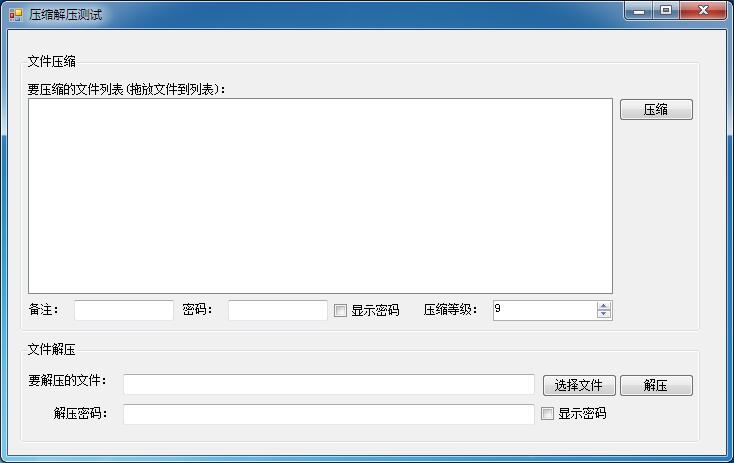
为了测试该类,我写了一个WinForm程序,界面如下:
程序源代码下载:http://files.cnblogs.com/files/conexpress/SharpZipTest.zip
C#压缩库SharpZipLib的应用的更多相关文章
- ICSharpCode.SharpZipLib 开源压缩库使用示例
官方网站:http://www.icsharpcode.net/OpenSource/SharpZipLib/Default.aspx 插件描述: ICSharpCode.SharpZipLib.dl ...
- [转]Snappy压缩库安装和使用之一
Snappy压缩库安装和使用之一 原文地址:http://blog.csdn.net/luo6620378xu/article/details/8521223 近日需要在毕业设计中引入一个压缩库,要求 ...
- 3D文件压缩库——Draco简析
3D文件压缩库——Draco简析 今年1月份时,google发布了名为“Draco”的3D图形开源压缩库,下载了其代码来看了下,感觉虽然暂时用不到,但还是有前途的,故简单做下分析. 注:Draco 代 ...
- 【神经网络与深度学习】Google Snappy - 一个高速压缩库
Snappy已经被Google开源,作为一个压缩库,它可以利用单颗Intel Corei7处理器内核处理至少每秒250MB~500MB的数据流. Snappy的前身是Zippy.虽然只是一个数据压缩库 ...
- Intel发布神经网络压缩库Distiller:快速利用前沿算法压缩PyTorch模型——AttributeError: module ‘tensorboard' has no attribute 'lazy'
转载自:CSDN Nine-days 近日,Intel 开源了一个用于神经网络压缩的开源 Python 软件包 Distiller,它可以减少深度神经网络的内存占用.加快推断速度及节省能耗.Dis ...
- 【转载】C# 开源库大全非常好
原文地址:http://m.blog.csdn.net/woddle/article/details/37311877 C#开源大全 商业协作和项目管理平台-TeamLab 网络视频会议软件-VMuk ...
- C#开源
商业协作和项目管理平台-TeamLab 网络视频会议软件-VMukti 驰骋工作流程引擎-ccflow [免费]正则表达式测试工具-Regex-Tester Windows-Phone-7-SDK E ...
- C# 开源项目一
商业协作和项目管理平台-TeamLab 网络视频会议软件-VMukti 驰骋工作流程引擎-ccflow [免费]正则表达式测试工具-Regex-Tester Windows-Phone-7-SDK E ...
- C#开源大全--汇总(转)
商业协作和项目管理平台-TeamLab 网络视频会议软件-VMukti 驰骋工作流程引擎-ccflow [免费]正则表达式测试工具-Regex-Tester Windows-Phone-7-SDK E ...
随机推荐
- osg矩阵变换节点-----平移旋转缩放
osg矩阵变换节点-----平移旋转缩放 转自:http://www.cnblogs.com/ylwn817/articles/1973396.html 平移旋转缩放这个三个是osg矩阵操作中,最常见 ...
- *HDU1800字典树
Flying to the Mars Time Limit: 5000/1000 MS (Java/Others) Memory Limit: 32768/32768 K (Java/Other ...
- Apache配置过程
要在一台主机上搭建多个网站,最简单的办法就是给不同的网站分配不一样的端口.下面我以Ubuntu 14.04 + Apache 2.4.7为例说一下在搭建过程中的一些注意事项. 1. 主配置文件是/et ...
- python -socket -client
socket client 发起连接. 流程为: 创建接口 发起连接 创建接口参数同socket server相同 发起连接的函数为socket.connect(ip,port) 这个地方的ip与po ...
- 常用数据库的驱动程序及JDBC URL:
Oracle数据库: 驱动程序包名:ojdbc14.jar 驱动类的名字:oracle.jdbc.driver.OracleDriver JDBC URL:jdbc:oracle:thin:@dbip ...
- 判断浏览器类型用 document.documentMode方式,
if ( document.documentMode && document.documentMode < 9 ){ document.write( '<script sr ...
- jquery in confluence.
https://confluence.atlassian.com/confkb/how-to-use-javascript-in-confluence-313458839.html https://a ...
- macOS sierra 10.12 Cocoapods 私有库
使用Cocoapods创建私有podspec 见文章:http://www.cocoachina.com/ios/20150228/11206.html 或http://blog.wtlucky.co ...
- Magento table rates表运费设置
在magento中集成了Table rate表运费,这种运输方式.表运费就是我们自己写个运费表,根据距离和商品重量设置运费,制做成一张csv格式的表,导入到magento中,来实现运费的控制. 在我的 ...
- 使用PowerShell解三道测试开发笔试题
在网上看到了三道测试开发的笔试题,答案是用Python解的.这段时间正好在学PowerShell,练习一下:) 1. 验证邮箱格式 2. 获取URL的后缀名 3. 获取前一天时间或前一秒 我的解法是: ...