
2.使用JDK开发webService
使用jdk开发webService需要注意:jdk版本必须1.6以及1.6以上!
以下webService的组成部分:
server端和client端,通过服务器端(server)webService发布,使用客户端调用。
说明:开发中也许只做server端也许只做client端,以下只是模拟程序。
开发步骤:
1.开发server端:
1.1编写webService编码:
1.1.1创建一个接口(SEI,webService终端接口,该接口方法供client端调用)
/**SEI及其实现类必须添加@WebService注解*/

@WebService

public interface HelloWS {

    /**SEI方法添加@WebMethod注解*/

    @WebMethod

    public String sayHello(String name);

}
1.1.2定义HelloWebService接口的实现类
/**SEI实现类添加@WebService注解*/

@WebService

public class HelloWSImpl implements HelloWS {

    /**该方法用于暴露出去,目的是让客户端来调用*/

    /**

     * @param name由客户端传入

     * return String由服务器返回给客户端

     */

    @Override

    public String sayHello(String name) {

        return "hello: "+name;

    }

}
1.2发布webService,将以上定义暴露出去以便供客户端调用
public class RealeaseWS {

    public static void main(String[] args) {

        /**address是发布的地址,只要端口不占用,任意端口*/

        /**端口后可以跟工程名等等,可以随便写*/

        String address = "http://localhost:8989/WebService_Server";

        /**

         * 使用由Endpoint来发布,这里有两个参数:

         * 参数一为发布地址,参数二为SEI接口的实现类对象

         */

        Endpoint.publish(address, new HelloWSImpl());

        /**如果发布成功,打印*/

        System.out.println("webService发布成功!");

    }

}
执行程序:
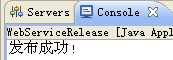
2.开发client端:
新建WebService_Client工程
2.1借助jdk的wsimort.exe工具生成客户端代码
注意:客户端代码生成到client工程下,跟server端是不一样的工程
2.1.1使用jdk提供的wsimport生成客户端代码
2.1.1.1开始,运行,输入cmd打开控制台窗口;
2.1.1.2定位到客户端src目录(客户端代码要生成在这里):
比如我的src目录为:
D:\developUtil\workspace\WebService_Client\src,
那么就是cd D:\developUtil\workspace\WebService_Client\src
2.1.1.3借助wsimport生成客户端代码
在控制台输入:wsimport -keep http://localhost:8989/WebService_Server?wsdl(该路径为服务端发布的address)
生成后,结构图:
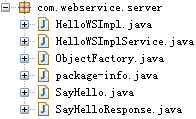
注意:由于我没有创建包,所以包是由eclipse帮我创建的
2.2测试程序
测试之前,先看wsdl文档(注意图中粗体、红色、字体较大部分):
<?xml version="1.0" encoding="UTF-8"?><!-- Published by JAX-WS RI at http://jax-ws.dev.java.net. RI's version is JAX-WS RI 2.2.4-b01. --><!-- Generated by JAX-WS RI at http://jax-ws.dev.java.net. RI's version is JAX-WS RI 2.2.4-b01. --><definitions xmlns:wsu="http://docs.oasis-open.org/wss/2004/01/oasis-200401-wss-wssecurity-utility-1.0.xsd" xmlns:wsp="http://www.w3.org/ns/ws-policy" xmlns:wsp1_2="http://schemas.xmlsoap.org/ws/2004/09/policy" xmlns:wsam="http://www.w3.org/2007/05/addressing/metadata" xmlns:soap="http://schemas.xmlsoap.org/wsdl/soap/" xmlns:tns="http://server.webService.com/" xmlns:xsd="http://www.w3.org/2001/XMLSchema" xmlns="http://schemas.xmlsoap.org/wsdl/" targetNamespace="http://server.webService.com/" name="HelloWSImplService">

<types>

<xsd:schema>

<xsd:import namespace="http://server.webService.com/" schemaLocation="http://localhost:8989/WebService_Server?xsd=1"></xsd:import>

</xsd:schema>

</types>

<message name="sayHello">

<part name="parameters" element="tns:sayHello"></part>

</message>

<message name="sayHelloResponse">

<part name="parameters" element="tns:sayHelloResponse"></part>

</message>

<portType name="HelloWSImpl">

<operation name="sayHello">

<input wsam:Action="http://server.webService.com/HelloWSImpl/sayHelloRequest" message="tns:sayHello"></input>

<output wsam:Action="http://server.webService.com/HelloWSImpl/sayHelloResponse" message="tns:sayHelloResponse"></output>

</operation>

</portType>

<binding name="HelloWSImplPortBinding" type="tns:HelloWSImpl">

<soap:binding transport="http://schemas.xmlsoap.org/soap/http" style="document"></soap:binding>

<operation name="sayHello">

<soap:operation soapAction=""></soap:operation>

<input>

<soap:body use="literal"></soap:body>

</input>

<output>

<soap:body use="literal"></soap:body>

</output>

</operation>

</binding>

<service name="HelloWSImplService">

<port name="HelloWSImplPort" binding="tns:HelloWSImplPortBinding">

<soap:address location="http://localhost:8989/WebService_Server"></soap:address>

</port>

</service>

</definitions>
以上三个特殊的粗体部分,分别是:
<portType name="HelloWSImpl">

<service name="HelloWSImplService">

<port name="HelloWSImplPort"
说明:
HelloWSImpl就是服务端的SEI即接口;
HelloWSImplService就是服务端的SEI接口实现类;
HelloWSImplPort方法通过HelloWSImplService对象调用,返回一个HelloWSImpl代理对象,最后通过代理对象调用服务端暴露的方法。
public class TestWebService {

    public static void main(String[] args) {

        HelloWSImplService factory = new HelloWSImplService();

        HelloWSImpl helloWSImpl = factory.getHelloWSImplPort();

        String result = helloWSImpl.sayHello("webService");

        System.out.println(result);

    }

}
2.使用JDK开发webService的更多相关文章
- 使用JDK开发WebService
一.WebService的开发手段 使用Java开发WebService时可以使用以下两种开发手段 1. 使用JDK开发(1.6及以上版本) 2.使用CXF框架开发(工作中) 二.使用JDK开发Web ...
- WebService学习总结(三)——使用JDK开发WebService
一.WebService的开发手段 使用Java开发WebService时可以使用以下两种开发手段 1. 使用JDK开发(1.6及以上版本) 2.使用CXF框架开发(工作中) 二.使用JDK开发Web ...
- WebService-使用JDK开发WebService
一.使用JDK开发WebService 2.1.开发WebService服务器端 1.定义一个interface,使用@WebService注解标注接口,使用@WebMethod注解标注接口中定义的所 ...
- WebService学习--(三)使用JDK开发WebService
一.WebService的开发手段 使用Java开发WebService时可以使用以下两种开发手段 1. 使用JDK开发(1.6及以上版本) 2.使用CXF框架开发(工作中) 二.使用JDK开发Web ...
- 【WebService】使用JDK开发WebService(二)
WebService的开发手段 1.使用JDK开发(1.6及以上版本) 2.使用CXF框架开发(工作中) WebService的组成 1.服务器端 2.客户端 使用JDK开发WebService a. ...
- WEBSERVICE之JDK开发webservice
转自:https://www.cnblogs.com/w-essay/p/7357262.html 一.开发工具与环境 1. jdk1.6版本以上(jdk1.6.0_21及以上版本) 2 .eclip ...
- [置顶]
WebService学习总结(3)——使用java JDK开发WebService
一.WebService的开发手段 使用Java开发WebService时可以使用以下两种开发手段 1. 使用JDK开发(1.6及以上版本) 2.使用CXF框架开发(工作中) 二.使用JDK开发Web ...
- WebService学习总结(三)——使用JDK开发WebService(转)
一.WebService的开发手段 使用Java开发WebService时可以使用以下两种开发手段 1. 使用JDK开发(1.6及以上版本) 2.使用CXF框架开发(工作中) 二.使用JDK开发Web ...
- WebService学习总结(二)--使用JDK开发WebService
一.WebService的开发方法 使用java的WebService时可以使用一下两种开发手段 使用jdk开发(1.6及以上版本) 使用CXF框架开发(工作中) 二.使用JDK开发WebServic ...
随机推荐
- 在Windows下编译扩展OpenCV 3.1.0 + opencv_contrib
为什么要CMake,这里我陈述自己的想法,作为一个刚使用opencv库的小白来说,有以下大概三点内容 1.由于在学习图像处理滤波器中,需要用到各种边缘保护滤波器(EPS)算法,但是这些算法在OpenC ...
- Flash Builder 调试器无法连接到正在运行的应用程序(57%)
Flash Builder 调试器无法连接到正在运行的应用程序(57%),可能原因: 1,flashplayer不是debug版. 2,调试器(用debug版flashplayer随便 ...
- Js制作的文字游戏
自己制作的文字游戏.(: <!DOCTYPE html><html lang="en"><head> <meta charset=& ...
- [go语言学习指南]
内部分享,根据自己的经验,收集汇总的go语言学习指南. 适合新手入门. 可以通过这里进行下载.
- CDN系统对网站的性能有极大的提升
CDN系统对网站的性能有极大的提升 打开一个网站 我们只是请求了一个页面.单个页面,实际上所有文件都是一个新的请求.以新浪为例一共发起了35个请求. 这35个请求中.只有一个动态内容.其它均为静态.这 ...
- Abp项目中的领域模型实体类访问仓储的方法
首先声明,不推荐使用这种方法.实体访问仓储是不被推荐的! 1.简单粗暴的方法 Abp.Dependency.IocManager.Instance.Resolve>(); 2.绕个弯子的方法 首 ...
- 一次诡异的TOMCAT启动故障的解决
该系统采用TOMCAT+SSH+Linux+Proxool连接池, 以前数据库是本地连接. 后换数据库远端连接,最近老是启动不了. 1.怀疑是proxool连接池没有自动断开后恢复.尝试解决,不是这个 ...
- 以太坊只能合约摸索——第一关,ubuntu开发环境部署
1. 安装“eth”命令行工具 sudo add-apt-repository ppa:ethereum/ethereum-qt sudo add-apt-repository ppa:ethereu ...
- [修改后]html+css 做成一个可浏览的表格
现在表格内容需要显示的要求如下: 1, 表格很大,界面放不小,需要放到div中. 2, 在div中可以用scroll滑动查看. 3, td中的内容保持在一行中. 4, 可以点击tr,然后可以选中并了解 ...
- iOS Sonar 集成流程
https://gold.xitu.io/entry/5781e6872e958a0054c93368 作者:advancer_chen,原文链接:http://my.oschina.net/Chen ...