
802.11X
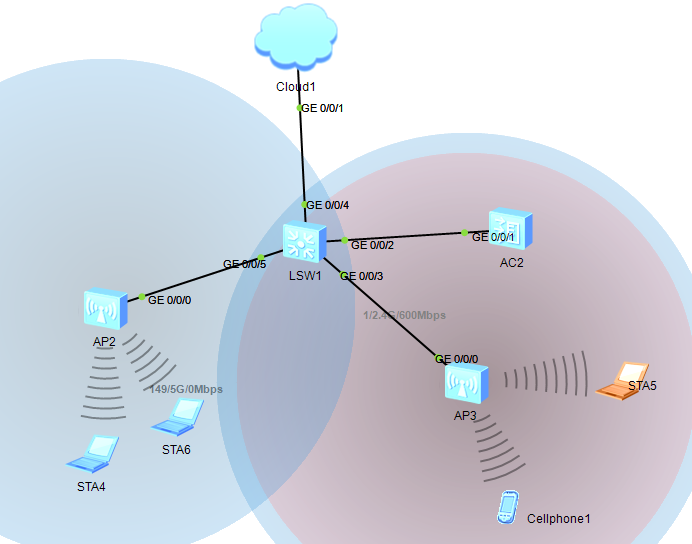
LSW1;
interface Vlanif100
ip address 192.168.121.2 255.255.255.0连接云的地址
interface GigabitEthernet0/0/2
port link-type trunk
port trunk allow-pass vlan 2 to 4094
#
interface GigabitEthernet0/0/3
port link-type trunk
port trunk pvid vlan 100
port trunk allow-pass vlan 2 to 4094
#
interface GigabitEthernet0/0/4
port link-type access
port default vlan 100
#
interface GigabitEthernet0/0/5
port link-type trunk
port trunk pvid vlan 100
port trunk allow-pass vlan 2 to 4094
#
AC2:
dhcp enable
interface Vlanif100
ip address 192.168.121.254 255.255.255.0 AC的地址
dhcp select interface
#
i
interface GigabitEthernet0/0/1
port link-type trunk
port trunk allow-pass vlan 2 to 4094
capwap source interface vlanif100
ap auth-mode no-auth
此时AP上线:
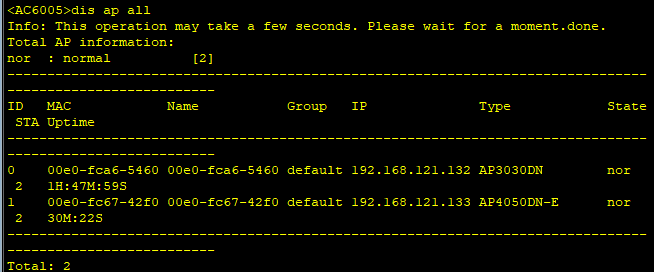
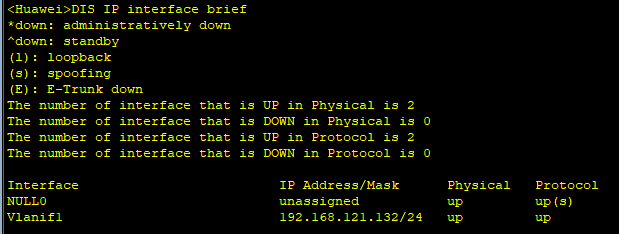
AP2和AP3获取到地址:
AP3:

AP2:
创建模板,以及调用模板:
wlan
ssid-profile name wlan-net
ssid vlan101
security-profile name wlan-net
security wpa2 dot1x aes
vap-profile name wlan-net
security-profile name wlan-net
ssid-profile name wlan-net
ap-id 0
vap-profile wlan-net wlan 1 radio 0
ap-id 1
vap-profile wlan-net wlan 1 radio 0
vap-profile wlan-net wlan 1 radio 1
此时STA上线,获取到地址
AP4:
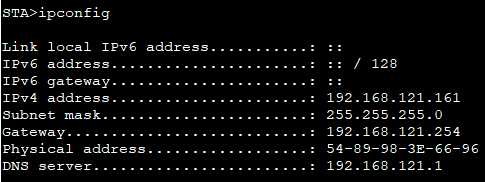 Cellphone1Cellphone1
cellphone1:


(自己感觉后面的步骤没用!!!!!!)
之后在交换机上:
interface Vlanif100
ip address 192.168.121.2 255.255.255.0连云的地址
interface GigabitEthernet0/0/4
port link-type access
port default vlan 100
在winradius:

AC:
radius-server template radius
radius-server shared-key cipher huawei@123
radius-server authentication 192.168.121.1 1812 weight 80
aaa
authentication-scheme radius
authentication-mode radius
//创建radius服务器
在winradius上:
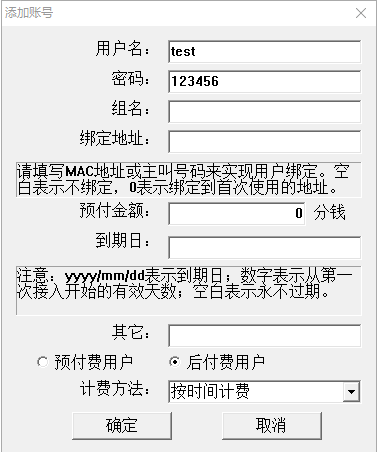

此时会提示认证成功;
接下来是802.1X认证:
dot1x-access-profile name wlan-net
[AC6005-dot1x-access-profile-wlan-net]dot1x authentication-method eap
[AC6005]authentication-profile name wlan-net
[AC6005-authentication-profile-wlan-net]dot1x-access-profile wlan-net
[AC6005-authentication-profile-wlan-net]authentication-scheme radius
[AC6005-authentication-profile-wlan-net]radius-server radius
802.11X的更多相关文章
- 802.11X用户身份验证
静态WEP企图同时解决802.11无线网络安全的两个问题.它即打算提供身份验证以限定拥有特定密钥方能进行网络访问,也想要提供机密性以在数据经过无线链路时予以加密.然而,它在这两方面的表现都不是特别好. ...
- 酒店web认证802.11x+ROS共享NAT上网
网络环境: 维也纳酒店-上网方式 web认证上网(wifi有线) 设备-ROS RB952Ui-5AC2ND一台笔记本电脑一台 web认证的三个特征,我们下面ROS的设置就是为了满足下面三个条件来分布 ...
- 为什么房间的 Wi-Fi 信号这么差
最近把家里主卧整成了个小影院,由于之前房子装修时网线端口与电源插口布置太少,导致家庭网络架设变得麻烦起来,最后终于通过「无线中继」技术达到了全屋满格 Wi-Fi 的效果. 在 Wi-Fi 架设过程中, ...
- 开发OpenWrt路由器上LuCI的模块
[题外话] 学校里最近改造了校园网,要求必须用iNode验证,万幸的是路由器能刷OpenWrt,并且OpenWrt上有好多iNode认证的开源项目,比如njit8021xclient(以下简称njit ...
- WIFI基本知识整理
这里对wifi的802.11协议中比较常见的知识做一个基本的总结和整理,便于后续的学习.因为无线网络中涉及术语很多,并且许多协议都是用英文描述,所以有些地方翻译出来会有歧义,这种情况就直接英文来描述了 ...
- 无线AP和无线路由器区别
无线AP,即Access Point,也就是无线接入点.简单来说就是wifi共享上网中的无线交换机,它是移动终端用户进入有线网络的接入点. AD:51CTO技术沙龙 | 赋予APP不同凡响的交互和体验 ...
- wifi基础知识整理
转自 :http://blog.chinaunix.net/uid-9525959-id-3326047.html WIFI基本知识整理 这里对wifi的802.11协议中比较常见的知识做一个基本的总 ...
- Tuning Radio Resource in an Overlay Cognitive Radio Network for TCP: Greed Isn’t Good
好吧,这是09年七月发布在IEEE Communications Magazine的一篇文章. 核心二个词:overlay cognitive radio network,tcp 讲的是,在认知无线网 ...
- 伪AP检测技术研究
转载自:http://www.whitecell-club.org/?p=310 随着城市无线局域网热点在公共场所大规模的部署,无线局域网安全变得尤为突出和重要,其中伪AP钓鱼攻击是无线网络中严重的安 ...
随机推荐
- Transaction Managament(事务管理一、概念)
什么是事务 对于一个软件系统来说,我们需要相应的数据资源来保存体统状态.在对系统状态所依托的数据资源的时候,为了保证系统始终处于“正确”状态,我们必须对这些访问操作进行一些必要的限定.以保证系统状态的 ...
- Codeforces 442A Borya and Hanabi
有五种花色 外加 五种点数 共25张牌,每次有n张牌,主人知道这n张牌中有哪些牌,并且哪种牌有几张,但是不知道具体是哪张牌,他可以问某种花色,然后知道了哪几张是该花色,也可以问点数,然后就知道了哪几张 ...
- 04 Unity2D
Unity2D系统是Unity引擎进行2D制作时使用的 Sprite精灵:在Unity2D制作中将图片称作精灵(Sprite),为了提高游戏效率,降低对GPU的损耗,通常将一类的图片拼接成一张大图来使 ...
- @EnableAutoConfiguration激活自动装配
给予上个例子,将WebConfiguration类上的@SpringBootApplication换成@EnableAutoConfiguration.启动并运行http://localhost:80 ...
- Day 12:枚举值、枚举类
jdk1.5新特性之-----枚举 问题:某些方法所接收的数据必须是在固定范围之内的, 解决方案: 这时候我们的解决方案就是自定义一个类,然后是私有化构造函数,在自定义类中创建本类的对象对外使用. ...
- SpringMVC的配置文件说明
<?xml version="1.0" encoding="UTF-8"?> <beans xmlns="http://www.sp ...
- java 简单的冒泡
import java.util.Arrays; public class mao { public static void main(String[] args) { int [] array={1 ...
- xv6的启动过程
bootloader 1. bootasm.S : start32 2. bootmain.c : bootmain kernel 3. main.c : main 4. proc.c : useri ...
- 使用log4cxx
在java中有log4j日志模块,使用起来非常方便,在C++中也是有的,log4cxx就是log4j的c++移植版,机缘巧合之下今天想要使用一下这个日志模块,所以记录下自己从一开始下载安装到成功使用的 ...
- Java 14 令人期待的 5 大新特性,打包工具终于要来了
随着新的 Java 发布生命周期的到来,新版本预计将于 2020 年 3 月发布,本文将对其中的 5 个主要特性作些概述. Java 13刚刚发布给开发人员使用不久,最新版本的JDK于2019年9月发 ...