
Robot Framework -003 在Windows10 安装Eclipse作为编辑器,安装 RED 插件。
本文采用Eclipse及其对应的插件来编辑、管理、运行Robot Framework.
https://www.eclipse.org/downloads/ 本文安装 Eclipse IDE 2020‑03 64bit
下载得到文件: eclipse-inst-win64.exe 在windows上双击运行。 具体的安装过程略。
安装Eclipse的插件
可参考文档:https://github.com/NitorCreations/RobotFramework-EclipseIDE/wiki/Installation
Installing using update site
- Start Eclipse, then select Help > Install New Software.
- Click Add, in the top-right corner. In the Add Repository dialog that appears, enter "RobotFramework-EclipseIDE" for the Name and the following URL for the Location: http://sourceforge.net/projects/robotide/files/stable/
- Click OK.
- In the Available Software dialog, select the checkbox next to Robot Framework Eclipse IDE and click Next.
- In the next window, you'll see a list of the tools to be downloaded. Click Next.
- Read and accept the license agreements, then click Finish.
- When the installation completes, restart Eclipse.
- See usage for more information about configuring and using the plugin.
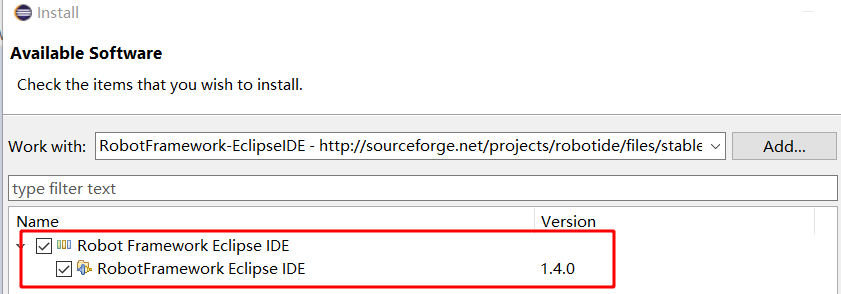
接受协议,安装之后,需要重新启动。
安装 RED - Robot Editor
Install from Marketplace/Update Site
Marketplace: Click Help -> Eclipse Marketplace -> and type into Find field "RED" Update Site: Click Help -> Install New Software -> Add and set address in Location to:
http://master.dl.sourceforge.net/project/red-robot-editor/repository
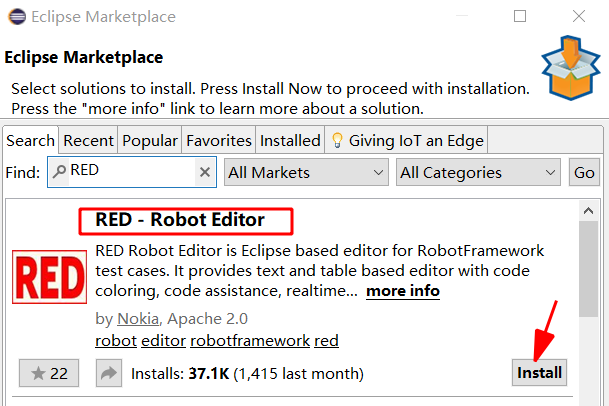
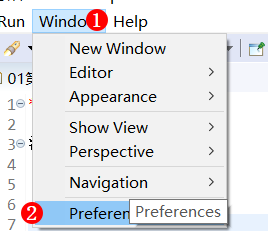
由于Robot使用UTF-8编码格式,因此需要设置Eclipse默认使用UTF-8格式。

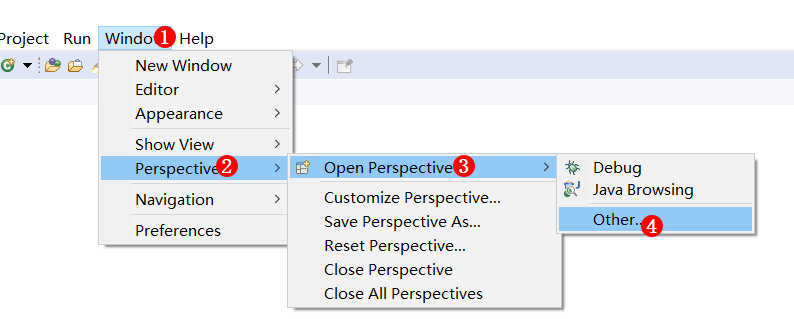
重启Eclipse之后,设置Robot视图。

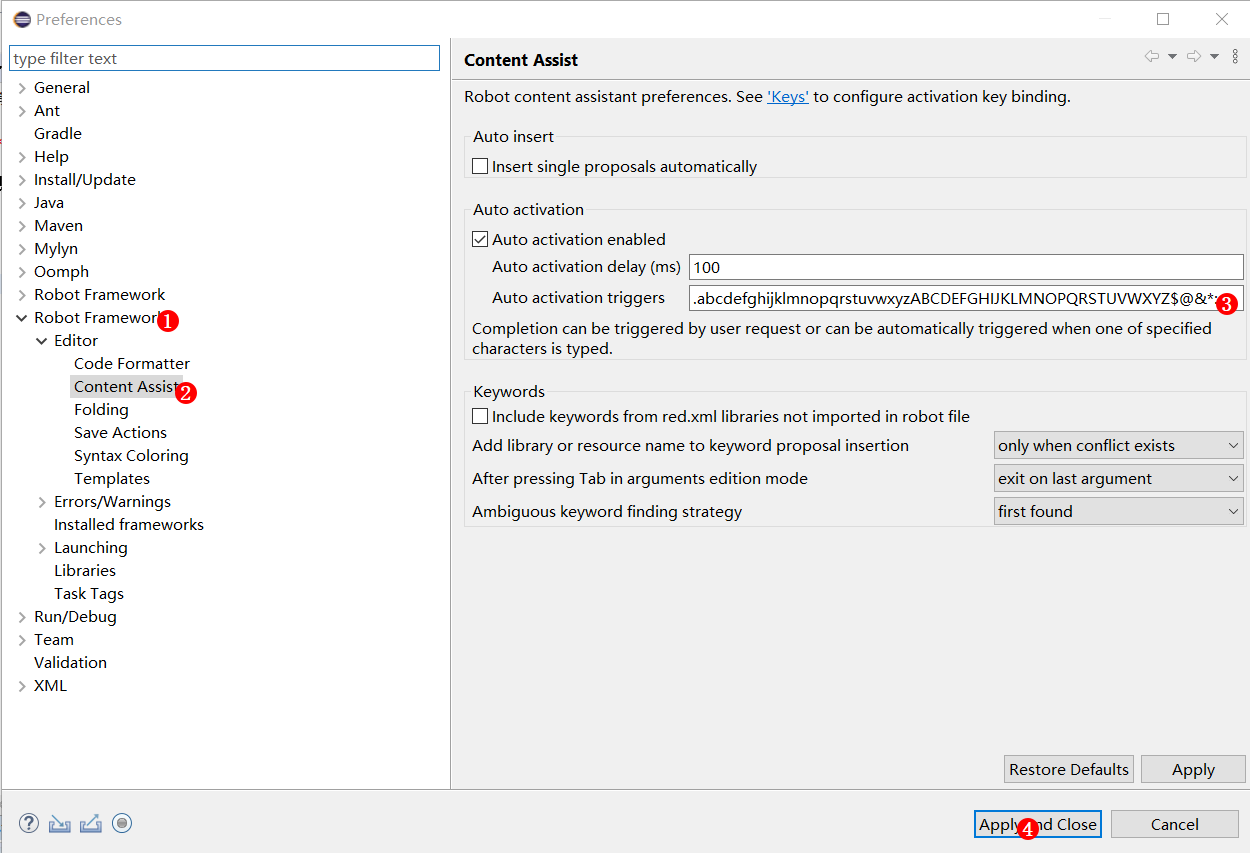
设置代码内容自动辅助,代码自动补齐
Window -> Preferences -> Robot Framework -> Editor -> Content Assist.
.abcdefghijklmnopqrstuvwxyzABCDEFGHIJKLMNOPQRSTUVWXYZ$@&*:
下面就可以创建Robot的工程了。
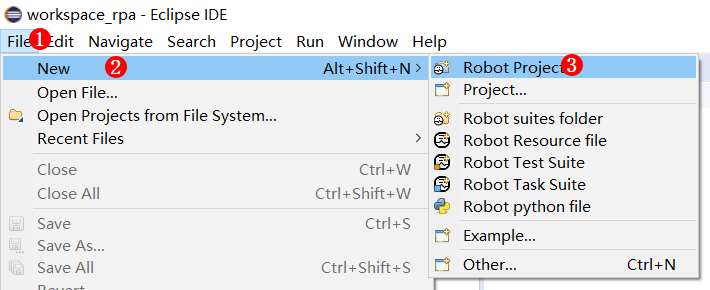
建立第一个Robot工程
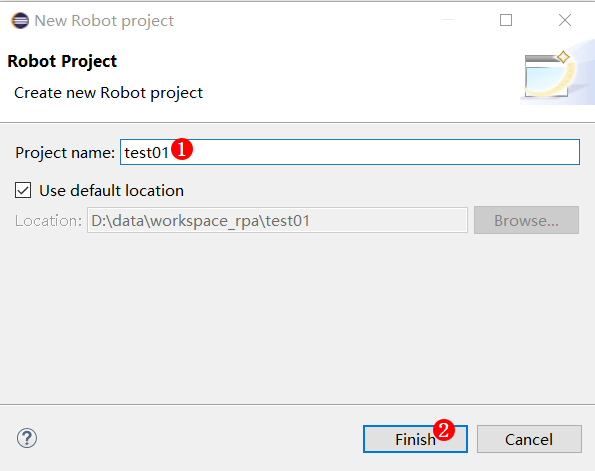
工程文件结构如下:

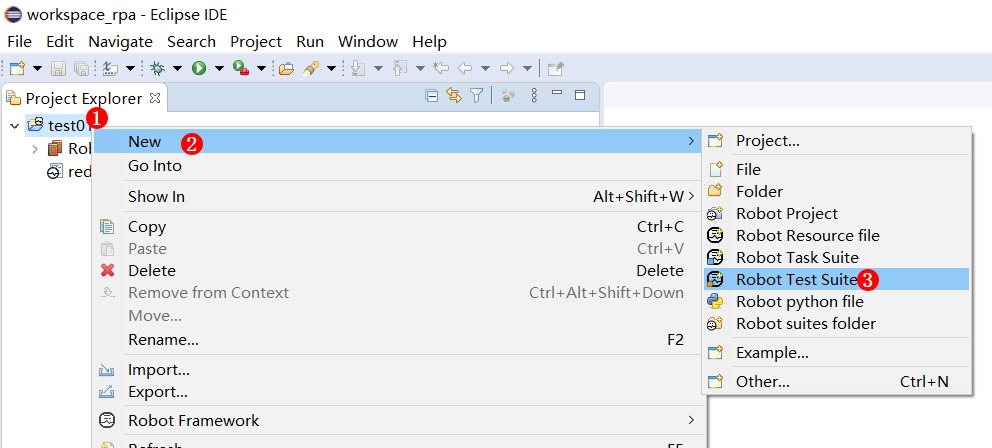
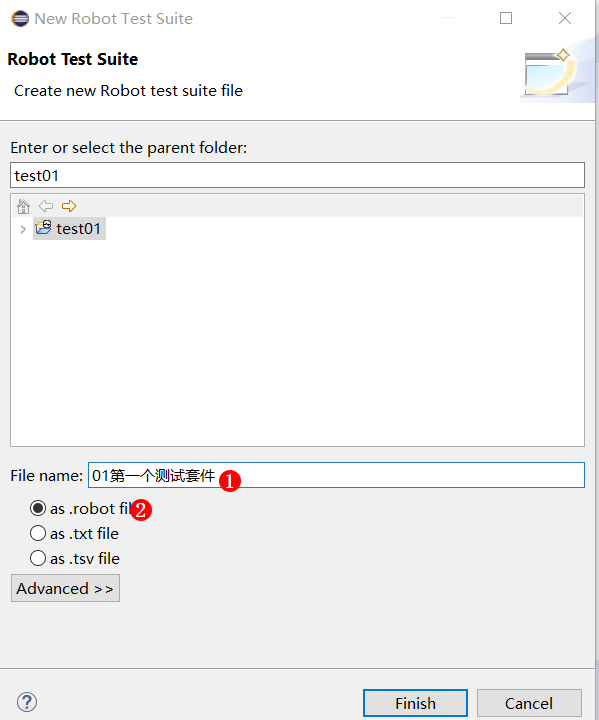
新建第一个测试套件,在工程test01鼠标右键弹出如下菜单
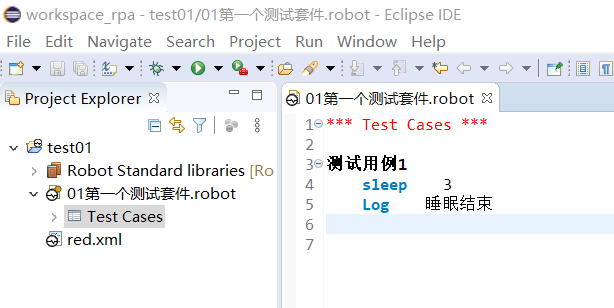
在测试套件里写一个测试用例: 测试用例1
运行测试用例

运行结果如下:
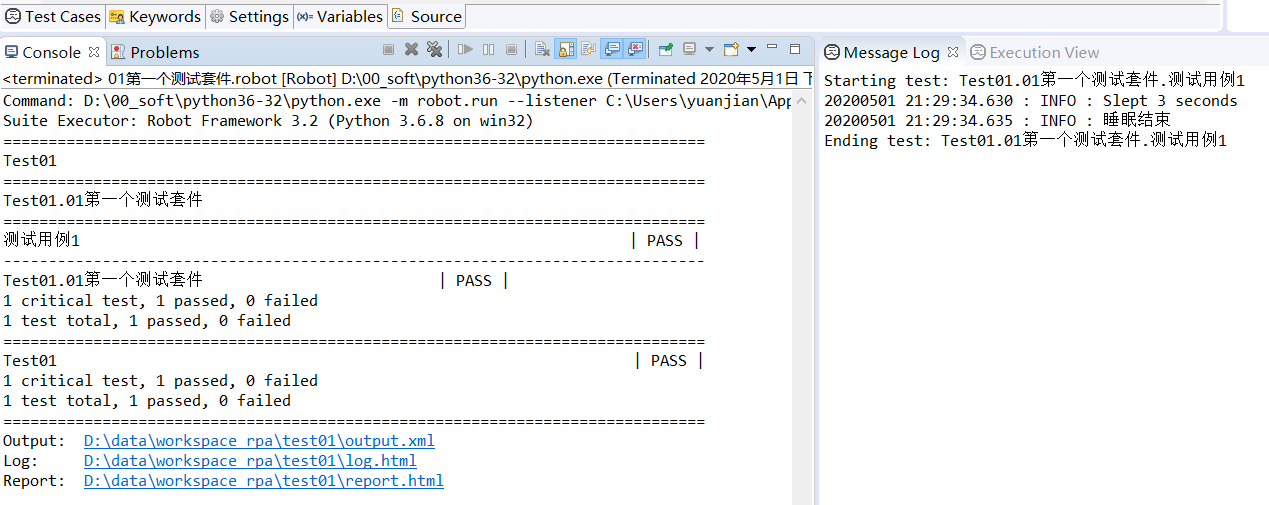
上面显示全部测试通过。
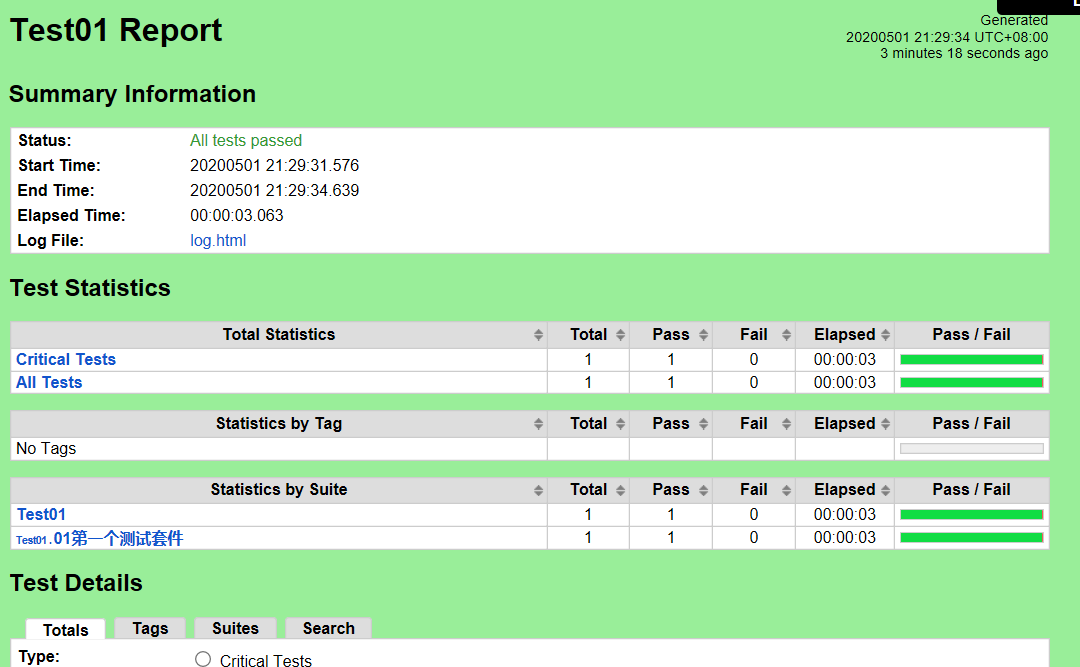
还可以点击上面的链接查看 report.html
Robot Framework -003 在Windows10 安装Eclipse作为编辑器,安装 RED 插件。的更多相关文章
- eclipse中jsp文档无语法着色,安装Eclipse Java Web Developer Tools插件
一.安装Eclipse Java Web Developer Tools插件 1.eclipse菜单:help/install New Software,打开Available Software窗体: ...
- Robot Framework -002 在Windows10上的安装
机器人框架是使用Python实现的,并且还支持Jython(JVM),IronPython(.NET)和PyPy. 在安装框架之前,一个明显的前提条件是至少安装这些解释器之一. 下面列出了安装Robo ...
- 配置Robot Framework 环境时如何查看wxPython是否成功安装
配置Robot Framework,win10系统,安装版本分别如下:
- Robot Framework中经常用的第三方库的安装方法
pip升级:python -m pip install --upgrade pip 一.安装robotframework-selenium2library,相当于python中的selenium ...
- 如何安装 Sublime text 编辑器相关的插件
Sublime是一个伟大的编辑器,具有可靠的基础功能,使编写代码变得愉快.您可以安装一个包管理器,以便于安装插件和添加新功能. 为什么使用包管理器(package manager) 包管理器可以方便地 ...
- Robot framework的介绍
Robot framework是基于Python语言编写的功能自动化测试框架.使用简单,不懂编码的测试人员也能像编程一样写测试用例,支持关键字驱动测试并且可以开发系统关键字.还有丰富的第三方库,比如S ...
- robot framework 安装配置
robot framework 是一款专门用作自动化测试的框架,提供了丰富的内置库,与第三方库,也支持用户自己编写的库,robot framework +library 可以 用来做ui的自动化测试, ...
- Robot Framework安装
Robot Framework(中文站/社交化知识社区,源码)是一款Python编写的通用开源功能测试自动化框架,以作验收测试和验收测试驱动开发(ATDD),它是一种使用表格测试数据语法的关键字驱动的 ...
- Python3+Robot Framework+RIDE安装使用教程
一.说明 Python3----网上很多文章都是用Python2,Robot Framework的部分文档没更新也直接写着不支持Python3(如RIDE does not yet support P ...
随机推荐
- 如何基于layui的laytpl实现数据绑定
想了半天才想起自己园子的登录密码.可想而知,多长时间没登录了 正文一开始用layui做了几个管理系统,所以用起来觉得确实很容易上手,管理后台最常用的就是form和table以及弹窗类.layui提供的 ...
- 001_Three.js中的跨域问题
001_Three.js中的跨域问题 [情景描述]: 在初始化模型,引入字体和纹理皮肤图片的时候,由于跨域问题,出现了以下提示: Access to image at 'file:///F:/User ...
- Linux命令后面加 & 的作用
在命令的后面加一个 & 的作用是,将这个任务放到后台执行.看下面的例子. 输入gedit回车,可以看到,打开了Linux的文本编辑器,但是命令窗口执行不了其他命令了,只有退出文本编辑器才能继续 ...
- PTA | 1029 旧键盘 (20分)
旧键盘上坏了几个键,于是在敲一段文字的时候,对应的字符就不会出现.现在给出应该输入的一段文字.以及实际被输入的文字,请你列出肯定坏掉的那些键. 输入格式: 输入在 2 行中分别给出应该输入的文字.以及 ...
- ESLint如何配置
1.简介 通过用 ESLint 来检查一些规则,我们可以: 统一代码风格规则,如:代码缩进用几个空格:是否用驼峰命名法来命名变量和函数名等. 减少错误, 如:相等比较必须用 === ,变量在使用前必须 ...
- 正则表达式 regex
正则表达式存在于String api下的matches方法 常用正常表达式: 字符 x 字符 x \\ 反斜线字符 字符类 [abc] a.b 或 c(简单类) [^abc] 任何字符,除了 a.b ...
- app扫描二维码登陆
先说明一下实现原理: 如同微信扫描登陆一样,就是一种pc的自动登陆授权.在网站首页得有切换登陆的选项:密码登陆 扫码登陆 当用户切换到扫码登陆时,向服务器请求一次获得一个唯一的uukey 利用这个uu ...
- 刨根问底系列(1)——虚假唤醒(spurious wakeups)的原因以及在pthread_cond_wait、pthread_cond_singal中使用while的必要性
刨根问底之虚假唤醒 1. 概要 将会以下方式展开介绍: 什么是虚假唤醒 什么原因会导致虚假唤醒(两种原因) 为什么系统内核不从根本上解决虚假唤醒这个"bug"(两个原因) 开发者如 ...
- windows 环境下dos 命令符下进D盘(非c盘系统盘)根目录
怎么进? 先 cd D: 然后 直接 D: 即可到D盘根目录,至于为啥要输入2遍D 才进D盘根目录,这就是windows的规定
- AJ学IOS(40)UI之核心动画_抖动效果_CAKeyframeAnimation
AJ分享,必须精品 效果: 效果一: 效果二: 代码: // // NYViewController.m // 图片抖动 // // Created by apple on 15-5-8. // Co ...