
附014.Kubernetes Prometheus+Grafana+EFK+Kibana+Glusterfs整合性方案
一 glusterfs存储集群部署
1.1 架构示意
1.2 相关规划
|
主机
|
IP
|
磁盘
|
备注
|
|
k8smaster01
|
172.24.8.71
|
——
|
Kubernetes Master节点
Heketi主机
|
|
k8smaster02
|
172.24.8.72
|
——
|
Kubernetes Master节点
Heketi主机
|
|
k8smaster03
|
172.24.8.73
|
——
|
Kubernetes Master节点
Heketi主机
|
|
k8snode01
|
172.24.8.74
|
sdb
|
Kubernetes Worker节点
glusterfs 01节点
|
|
k8snode02
|
172.24.8.75
|
sdb
|
Kubernetes Worker节点
glusterfs 02节点
|
|
k8snode03
|
172.24.8.76
|
sdb
|
Kubernetes Worker节点
glusterfs 03节点
|
1.3 安装glusterfs
1.4 添加信任池
1.5 安装heketi
1.6 配置heketi
 {

   "_port_comment": "Heketi Server Port Number",

   "port": "",

   "_use_auth": "Enable JWT authorization. Please enable for deployment",

   "use_auth": true,

   "_jwt": "Private keys for access",

   "jwt": {

     "_admin": "Admin has access to all APIs",

     "admin": {

       "key": "admin123"

     },

     "_user": "User only has access to /volumes endpoint",

     "user": {

       "key": "xianghy"

     }

   },

   "_glusterfs_comment": "GlusterFS Configuration",

   "glusterfs": {

     "_executor_comment": [

       "Execute plugin. Possible choices: mock, ssh",

       "mock: This setting is used for testing and development.",

       "      It will not send commands to any node.",

       "ssh:  This setting will notify Heketi to ssh to the nodes.",

       "      It will need the values in sshexec to be configured.",

       "kubernetes: Communicate with GlusterFS containers over",

       "            Kubernetes exec api."

     ],

     "executor": "ssh",

     "_sshexec_comment": "SSH username and private key file information",

     "sshexec": {

       "keyfile": "/etc/heketi/heketi_key",

       "user": "root",

       "port": "",

       "fstab": "/etc/fstab"

     },

     "_db_comment": "Database file name",

     "db": "/var/lib/heketi/heketi.db",

     "_loglevel_comment": [

       "Set log level. Choices are:",

       "  none, critical, error, warning, info, debug",

       "Default is warning"

     ],

     "loglevel" : "warning"

   }

 }
1.7 配置免秘钥
1.8 启动heketi
1.9 配置Heketi拓扑
 {

   "clusters": [

     {

       "nodes": [

         {

           "node": {

             "hostnames": {

               "manage": [

                 "k8snode01"

               ],

               "storage": [

                 "172.24.8.74"

               ]

             },

             "zone": 1

           },

           "devices": [

             "/dev/sdb"

           ]

         },

         {

           "node": {

             "hostnames": {

               "manage": [

                 "k8snode02"

               ],

               "storage": [

                 "172.24.8.75"

               ]

             },

             "zone": 1

           },

           "devices": [

             "/dev/sdb"

           ]

         },

         {

           "node": {

             "hostnames": {

               "manage": [

                 "k8snode03"

               ],

               "storage": [

                 "172.24.8.76"

               ]

             },

             "zone": 1

           },

           "devices": [

             "/dev/sdb"

           ]

         }

       ]

     }

   ]

 }
1.10 集群管理及测试
1.11 创建StorageClass
 apiVersion: v1

 kind: Secret

 metadata:

   name: heketi-secret

   namespace: heketi

 data:

   key: YWRtaW4xMjM=

 type: kubernetes.io/glusterfs
 apiVersion: storage.k8s.io/v1

 kind: StorageClass

 metadata:

   name: ghstorageclass

 parameters:

   resturl: "http://172.24.8.71:8080"

   clusterid: "ad0f81f75f01d01ebd6a21834a2caa30"

   restauthenabled: "true"

   restuser: "admin"

   secretName: "heketi-secret"

   secretNamespace: "heketi"

   volumetype: "replicate:3"

 provisioner: kubernetes.io/glusterfs

 reclaimPolicy: Delete
二 集群监控Metrics
2.1 开启聚合层
2.2 获取部署文件
 ……

         image: mirrorgooglecontainers/metrics-server-amd64:v0.3.6	#修改为国内源

         command:

         - /metrics-server

         - --metric-resolution=30s

         - --kubelet-insecure-tls

         - --kubelet-preferred-address-types=InternalIP,Hostname,InternalDNS,ExternalDNS,ExternalIP	#添加如上command

 ……
2.3 正式部署
2.4 确认验证
三 Prometheus部署
3.1 获取部署文件
3.2 创建命名空间
 apiVersion: v1

 kind: Namespace

 metadata:

   name: monitoring
3.3 创建RBAC
 apiVersion: rbac.authorization.k8s.io/v1beta1

 kind: ClusterRole

 metadata:

   name: prometheus

 rules:

 - apiGroups: [""]

   resources:

   - nodes

   - nodes/proxy

   - services

   - endpoints

   - pods

   verbs: ["get", "list", "watch"]

 - apiGroups:

   - extensions

   resources:

   - ingresses

   verbs: ["get", "list", "watch"]

 - nonResourceURLs: ["/metrics"]

   verbs: ["get"]

 ---

 apiVersion: v1

 kind: ServiceAccount

 metadata:

   name: prometheus

   namespace: monitoring               #仅需修改命名空间

 ---

 apiVersion: rbac.authorization.k8s.io/v1beta1

 kind: ClusterRoleBinding

 metadata:

   name: prometheus

 roleRef:

   apiGroup: rbac.authorization.k8s.io

   kind: ClusterRole

   name: prometheus

 subjects:

 - kind: ServiceAccount

   name: prometheus

   namespace: monitoring              #仅需修改命名空间
3.4 创建Prometheus ConfigMap
 apiVersion: v1

 kind: ConfigMap

 metadata:

   name: prometheus-server-conf

   labels:

     name: prometheus-server-conf

   namespace: monitoring               #修改命名空间

 ……
3.5 创建持久PVC
 apiVersion: v1

 kind: PersistentVolumeClaim

 metadata:

   name: prometheus-pvc

   namespace: monitoring

   annotations:

     volume.beta.kubernetes.io/storage-class: ghstorageclass

 spec:

   accessModes:

   - ReadWriteMany

   resources:

     requests:

       storage: 5Gi
3.6 Prometheus部署
 apiVersion: apps/v1beta2

 kind: Deployment

 metadata:

   labels:

     name: prometheus-deployment

   name: prometheus-server

   namespace: monitoring

 spec:

   replicas: 1

   selector:

     matchLabels:

       app: prometheus-server

   template:

     metadata:

       labels:

         app: prometheus-server

     spec:

       containers:

         - name: prometheus-server

           image: prom/prometheus:v2.14.0

           command:

           - "/bin/prometheus"

           args:

             - "--config.file=/etc/prometheus/prometheus.yml"

             - "--storage.tsdb.path=/prometheus/"

             - "--storage.tsdb.retention=72h"

           ports:

             - containerPort: 9090

               protocol: TCP

           volumeMounts:

             - name: prometheus-config-volume

               mountPath: /etc/prometheus/

             - name: prometheus-storage-volume

               mountPath: /prometheus/

       serviceAccountName: prometheus

       imagePullSecrets:

         - name: regsecret

       volumes:

         - name: prometheus-config-volume

           configMap:

             defaultMode: 420

             name: prometheus-server-conf

         - name: prometheus-storage-volume

           persistentVolumeClaim:

             claimName: prometheus-pvc
3.7 创建Prometheus Service
 apiVersion: v1

 kind: Service

 metadata:

   labels:

     app: prometheus-service

   name: prometheus-service

   namespace: monitoring

 spec:

   type: NodePort

   selector:

     app: prometheus-server

   ports:

     - port: 9090

       targetPort: 9090

       nodePort: 30001
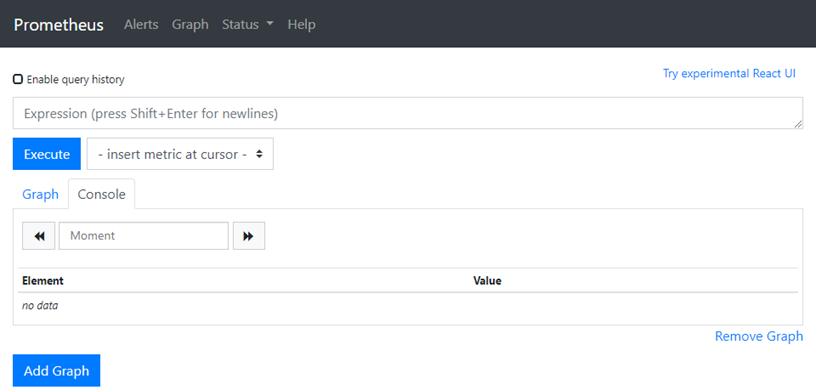
3.8 确认验证Prometheus
四 部署grafana
4.1 获取部署文件
4.2 创建持久PVC
 apiVersion: v1

 kind: PersistentVolumeClaim

 metadata:

   name: grafana-data-pvc

   namespace: monitoring

   annotations:

     volume.beta.kubernetes.io/storage-class: ghstorageclass

 spec:

   accessModes:

   - ReadWriteOnce

   resources:

     requests:

       storage: 5Gi
4.3 grafana部署
 apiVersion: extensions/v1beta1

 kind: Deployment

 metadata:

   name: monitoring-grafana

   namespace: monitoring

 spec:

   replicas: 1

   template:

     metadata:

       labels:

         task: monitoring

         k8s-app: grafana

     spec:

       containers:

       - name: grafana

         image: grafana/grafana:6.5.0

         imagePullPolicy: IfNotPresent

         ports:

         - containerPort: 3000

           protocol: TCP

         volumeMounts:

         - mountPath: /var/lib/grafana

           name: grafana-storage

         env:

           - name: INFLUXDB_HOST

             value: monitoring-influxdb

           - name: GF_SERVER_HTTP_PORT

             value: ""

           - name: GF_AUTH_BASIC_ENABLED

             value: "false"

           - name: GF_AUTH_ANONYMOUS_ENABLED

             value: "true"

           - name: GF_AUTH_ANONYMOUS_ORG_ROLE

             value: Admin

           - name: GF_SERVER_ROOT_URL

             value: /

         readinessProbe:

           httpGet:

             path: /login

             port: 3000

       volumes:

       - name: grafana-storage

         persistentVolumeClaim:

           claimName: grafana-data-pvc

       nodeSelector:

         node-role.kubernetes.io/master: "true"

       tolerations:

       - key: "node-role.kubernetes.io/master"

         effect: "NoSchedule"

 ---

 apiVersion: v1

 kind: Service

 metadata:

   labels:

     kubernetes.io/cluster-service: 'true'

     kubernetes.io/name: monitoring-grafana

   annotations:

     prometheus.io/scrape: 'true'

     prometheus.io/tcp-probe: 'true'

     prometheus.io/tcp-probe-port: '80'

   name: monitoring-grafana

   namespace: monitoring

 spec:

   type: NodePort

   ports:

   - port: 80

     targetPort: 3000

     nodePort: 30002

   selector:

     k8s-app: grafana
4.4 确认验证Prometheus
4.4 grafana配置
- 添加数据源:略
- 创建用户:略
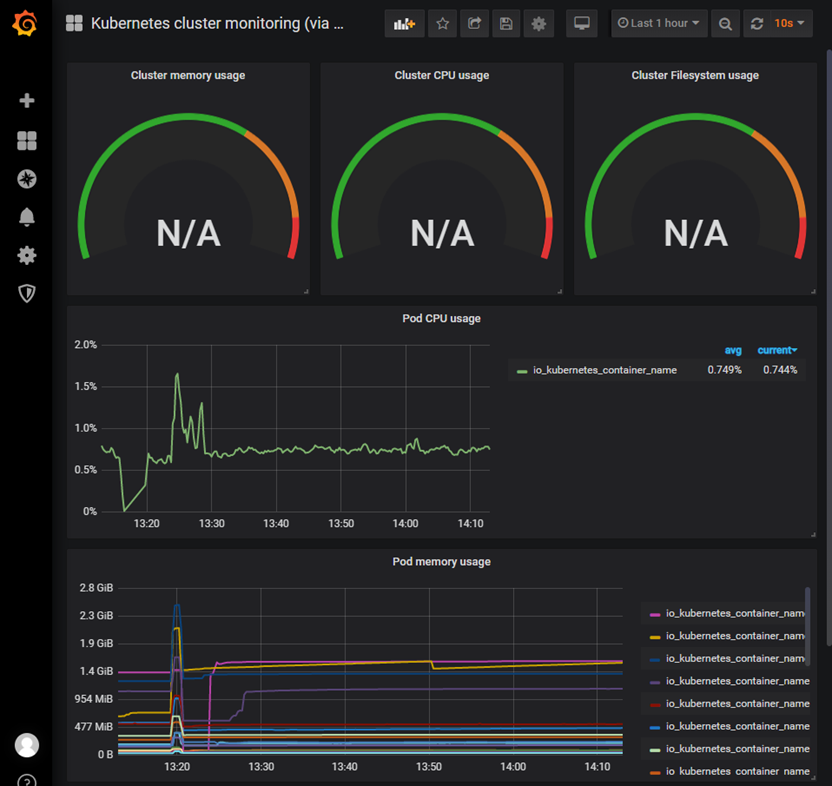
4.5 查看监控
附014.Kubernetes Prometheus+Grafana+EFK+Kibana+Glusterfs整合性方案的更多相关文章
- 附014.Kubernetes Prometheus+Grafana+EFK+Kibana+Glusterfs整合解决方案
一 glusterfs存储集群部署 注意:以下为简略步骤,详情参考<附009.Kubernetes永久存储之GlusterFS独立部署>. 1.1 架构示意 略 1.2 相关规划 主机 I ...
- Kubernetes+Prometheus+Grafana部署笔记
一.基础概念 1.1 基础概念 Kubernetes(通常写成“k8s”)Kubernetes是Google开源的容器集群管理系统.其设计目标是在主机集群之间提供一个能够自动化部署.可拓展.应用容器可 ...
- Kubernetes使用prometheus+grafana做一个简单的监控方案
前言 本文介绍在k8s集群中使用node-exporter.prometheus.grafana对集群进行监控.其实现原理有点类似ELK.EFK组合.node-exporter组件负责收集节点上的me ...
- Kubernetes prometheus+grafana k8s 监控
参考: https://www.cnblogs.com/terrycy/p/10058944.html https://www.cnblogs.com/weiBlog/p/10629966.html ...
- 附024.Kubernetes全系列大总结
Kubernetes全系列总结如下,后期不定期更新.欢迎基于学习.交流目的的转载和分享,禁止任何商业盗用,同时希望能带上原文出处,尊重ITer的成果,也是尊重知识.若发现任何错误或纰漏,留言反馈或右侧 ...
- SpringBoot+Prometheus+Grafana实现应用监控和报警
一.背景 SpringBoot的应用监控方案比较多,SpringBoot+Prometheus+Grafana是目前比较常用的方案之一.它们三者之间的关系大概如下图: 关系图 二.开发SpringBo ...
- 使用 Prometheus + Grafana 对 Kubernetes 进行性能监控的实践
1 什么是 Kubernetes? Kubernetes 是 Google 开源的容器集群管理系统,其管理操作包括部署,调度和节点集群间扩展等. 如下图所示为目前 Kubernetes 的架构图,由 ...
- [转帖]Prometheus+Grafana监控Kubernetes
原博客的位置: https://blog.csdn.net/shenhonglei1234/article/details/80503353 感谢原作者 这里记录一下自己试验过程中遇到的问题: . 自 ...
- 附010.Kubernetes永久存储之GlusterFS超融合部署
一 前期准备 1.1 基础知识 在Kubernetes中,使用GlusterFS文件系统,操作步骤通常是: 创建brick-->创建volume-->创建PV-->创建PVC--&g ...
随机推荐
- inventor安装未完成,某些产品无法安装的解决方法
inventor提示安装未完成,某些产品无法安装该怎样解决呢?,一些朋友在win7或者win10系统下安装inventor失败提示inventor安装未完成,某些产品无法安装,也有时候想重新安装inv ...
- REVIT 卸载工具,完美彻底卸载清除干净revit各种残留注册表和文件
一些同学安装revit出错了,也有时候想重新安装revit的时候会出现这种本电脑windows系统已安装revit,你要是不留意直接安装,只会安装revit的附件,revit是不会安装上的.这种原因呢 ...
- cesium入门示例-HelloWorld
示例准备: 在Cesium ion官网(https://cesium.com/)上注册用户,获取AccessToken,在js代码入口设置Cesium.Ion.defaultAccessToken,即 ...
- 编程原理—如何用javascript代码解决一些问题
关于编程,我最喜欢的就是解决问题.我不相信有谁天生具有解决问题的能力.这是一种通过反复锻炼而建立并维持的能力.像任何练习一样,有一套指导方针可以帮助你更有效地提高解决问题的能力.我将介绍5个最重要的软 ...
- 吴裕雄--天生自然 R语言开发学习:回归(续三)
#------------------------------------------------------------# # R in Action (2nd ed): Chapter 8 # # ...
- mac安装并配置nexus3.5.1版本
一.安装nexus 前置条件 :已经安装了JDK 1:下载nexus(http://www.sonatype.com/download-oss-sonatype) 最新版本(我的是3.5.1). 2: ...
- hexo命令
2017-09-12 by chenyan 安装 npm install hexo -g #安装npm update hexo -g #升级hexo init #初始化 简写 hexo n " ...
- Python不使用元类创建缓存实例
问题 当创建类实例时我们想返回一个缓存引用,让其指向上一个用同样参数(如果有的话)创建出来的类实例. 这个问题常常出现在当我们想确保针对一组输入参数只会有一个类实例存在时. 解决方法: 使用一个与类本 ...
- 2000字谏言,给那些想学Python的人,建议收藏后细看!
1. 这几天陆续收到很多读者.球友的留言.私信,说要怎么学Python?有没有基础的,偏小白的学习方法?我的回答是:等我统一答复. 小胖从不食言,今天就来说说我觉得一个零基础.想转行.一直不得法的人应 ...
- Jupyter自定义设置详解
今天专门花时间总结梳理一下jupyter的一些高级设置,jupyter我已经介绍过一次基本内容了,Setup and Linux | James Chen's Blogs,尤其是如何在服务器运行jup ...