
iptables4张表5条链
4张表:filter nat mangle raw
filter:协议过滤;
nat:地址转换,端口映射等;
mangle:协议修改 TTL等;
raw:This table is used mainly for configuring exemptions from connection tracking in combination with the NOTRACK target.
It registers at the netfilter hooks with higher priority and is thus called before ip_conntrack, or any other IP tables.
It provides the following built-in chains: PREROUTING (for packets arriving via any network interface) OUTPUT (for packets generated by local processes)
5条链:PREROUTING INPUT OUTPUT FORWARD POSTROUTING
PREROUTING:数据包进入路由表之前
INPUT:通过路由表后目的地为本机
FORWARDING:通过路由表后,目的地不为本机
OUTPUT:由本机产生,向外转发
POSTROUTIONG:发送到网卡接口之前。

数据包访问控制:ACCEPT DROP REJECT
数据包改写:SNAT DNAT
信息记录:LOG
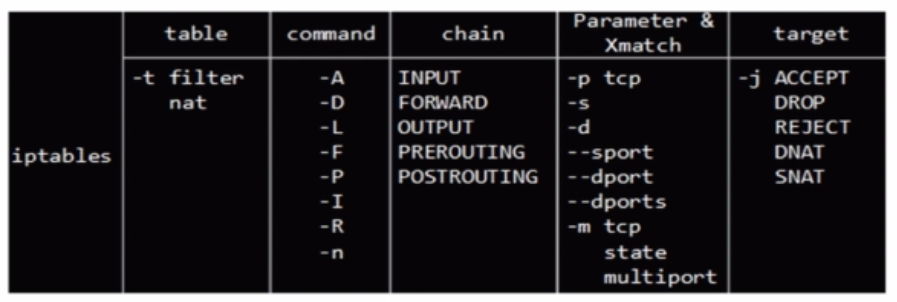
      COMMAND:
       -A, --append chain rule-specification

              Append  one  or  more  rules to the end of the selected chain.  When the source and/or destination names resolve to more than one address, a rule will be added for

              each possible address combination.

       -D, --delete chain rule-specification

       -D, --delete chain rulenum

              Delete one or more rules from the selected chain.  There are two versions of this command: the rule can be specified as a number in the chain (starting  at  1  for

              the first rule) or a rule to match.

       -I, --insert chain [rulenum] rule-specification

              Insert  one  or  more  rules in the selected chain as the given rule number.  So, if the rule number is 1, the rule or rules are inserted at the head of the chain.

              This is also the default if no rule number is specified.

       -R, --replace chain rulenum rule-specification

              Replace a rule in the selected chain.  If the source and/or destination names resolve to multiple addresses, the command will fail.  Rules are numbered starting at

              1.

       -L, --list [chain]

              List all rules in the selected chain.  If no chain is selected, all chains are listed. Like every other iptables command, it applies to the specified table (filter

              is the default), so NAT rules get listed by

               iptables -t nat -n -L

              Please note that it is often used with the -n option, in order to avoid long reverse DNS lookups.  It is legal to specify the -Z (zero) option as  well,  in  which

              case the chain(s) will be atomically listed and zeroed.  The exact output is affected by the other arguments given. The exact rules are suppressed until you use

               iptables -L -v

       -S, --list-rules [chain]

              Print  all  rules  in the selected chain.  If no chain is selected, all chains are printed like iptables-save. Like every other iptables command, it applies to the

              specified table (filter is the default).

       -F, --flush [chain]

              Flush the selected chain (all the chains in the table if none is given).  This is equivalent to deleting all the rules one by one.

       -Z, --zero [chain [rulenum]]

              Zero the packet and byte counters in all chains, or only the given chain, or only the given rule in a chain. It is legal to specify the -L, --list (list) option as

              well, to see the counters immediately before they are cleared. (See above.)

       -N, --new-chain chain

              Create a new user-defined chain by the given name.  There must be no target of that name already.

       -X, --delete-chain [chain]

              Delete  the  optional user-defined chain specified.  There must be no references to the chain.  If there are, you must delete or replace the referring rules before

              the chain can be deleted.  The chain must be empty, i.e. not contain any rules.  If no argument is given, it will attempt to delete every non-builtin chain in  the

              table.

       -P, --policy chain target

              Set  the  policy for the chain to the given target.  See the section TARGETS for the legal targets.  Only built-in (non-user-defined) chains can have policies, and

              neither built-in nor user-defined chains can be policy targets.

       -E, --rename-chain old-chain new-chain

              Rename the user specified chain to the user supplied name.  This is cosmetic, and has no effect on the structure of the table.
PARAMETERS

       The following parameters make up a rule specification (as used in the add, delete, insert, replace and append commands).

       [!] -p, --protocol protocol

              The protocol of the rule or of the packet to check.  The specified protocol can be one of tcp, udp, udplite, icmp, esp, ah, sctp or all, or it  can  be  a  numeric

              value,  representing  one  of these protocols or a different one.  A protocol name from /etc/protocols is also allowed.  A "!" argument before the protocol inverts

              the test.  The number zero is equivalent to all.  Protocol all will match with all protocols and is taken as default when this option is omitted.

       [!] -s, --source address[/mask][,...]

              Source specification. Address can be either a network name, a hostname, a network IP address (with /mask), or a plain IP address. Hostnames will be  resolved  once

              only,  before  the rule is submitted to the kernel.  Please note that specifying any name to be resolved with a remote query such as DNS is a really bad idea.  The

              mask can be either a network mask or a plain number, specifying the number of 1’s at the left side of the network mask.  Thus,  a  mask  of  24  is  equivalent  to

              255.255.255.0.   A  "!" argument before the address specification inverts the sense of the address. The flag --src is an alias for this option.  Multiple addresses

              can be specified, but this will expand to multiple rules (when adding with -A), or will cause multiple rules to be deleted (with -D).

       [!] -d, --destination address[/mask][,...]

              Destination specification.  See the description of the -s (source) flag for a detailed description of the syntax.  The flag --dst is an alias for this option.

       -j, --jump target

              This specifies the target of the rule; i.e., what to do if the packet matches it.  The target can be a user-defined chain (other than the one this rule is in), one

              of  the  special builtin targets which decide the fate of the packet immediately, or an extension (see EXTENSIONS below).  If this option is omitted in a rule (and

              -g is not used), then matching the rule will have no effect on the packet’s fate, but the counters on the rule will be incremented.

       -g, --goto chain

              This specifies that the processing should continue in a user specified chain. Unlike the --jump option return will  not  continue  processing  in  this  chain  but

              instead in the chain that called us via --jump.

       [!] -i, --in-interface name

              Name  of  an  interface via which a packet was received (only for packets entering the INPUT, FORWARD and PREROUTING chains).  When the "!" argument is used before

              the interface name, the sense is inverted.  If the interface name ends in a "+", then any interface which begins with this name will  match.   If  this  option  is

              omitted, any interface name will match.

       [!] -o, --out-interface name

              Name  of  an  interface  via  which  a packet is going to be sent (for packets entering the FORWARD, OUTPUT and POSTROUTING chains).  When the "!" argument is used

              before the interface name, the sense is inverted.  If the interface name ends in a "+", then any interface which begins with this name will match.  If this  option

              is omitted, any interface name will match.

       [!] -f, --fragment

              This  means that the rule only refers to second and further fragments of fragmented packets.  Since there is no way to tell the source or destination ports of such

              a packet (or ICMP type), such a packet will not match any rules which specify them.  When the "!" argument precedes the "-f" flag, the rule will  only  match  head

              fragments, or unfragmented packets.

       -c, --set-counters packets bytes

              This enables the administrator to initialize the packet and byte counters of a rule (during INSERT, APPEND, REPLACE operations).
| 分类 | 功能 | 作用链 |
| SNAT | 源地址转换 |
出口 POSTROUTING |
| DNAT | 目标地址转换 |
入口 PREROUTING |
Limit模块
作用:限速,控制流量
如:iptables -A INPUT-m limit --limit 4/hour
--limit-burst(初始的缓存区的大小)默认值为5
connlimit模块
作用:用于现在每一个客户端IP的并发连接数。
参数:--connlimit-above n #限制并发个数
例:iptables -I INPUT -p tcp --syn --dport 80 -m connlimit --connlimit-above 100 -j REJECT
参考:
http://www.imooc.com/video/7604/0
http://blog.itpub.net/312079/viewspace-245368/
http://linux.chinaunix.net/techdoc/net/2007/06/02/959143.shtml
iptables4张表5条链的更多相关文章
- iptables 4张表 5条链
- asp.net 建多个项目实现三层的实例——读取一张表中的记录条数
学习asp.net两周,通过学习发现,.net和php之间的区别还是蛮大的,比php要复杂一些,开始学习的有些吃力,后来跟着传智播客里的老师学习,渐渐的学到了一些东西. 今天要记录一下.net里的简单 ...
- 一条sql解决.一张表的数据复制到另外一张表
如何把一个表的数组复制到一张表?也许很多人会把这个表查出来的数据再插入到另外一张表里面,这样很麻烦又要写代码逻辑去处理,其实一条sql语句就可以把一张表的数据复制到另外一张表,或者一张表的某一条数据复 ...
- 用TSQL从sqlserve 发布订阅链中删除一张或几张表
一个简单的存储过程,用来实现从一个SQLSERVE 发布订阅链中删除一张或几张表. /* 1.停日志读取代理 2.exec usp_从复制订阅中删除表 'dbtestPub','test1' 3.开日 ...
- mysql结构相同的三张表查询一条记录\将一张表中的数据插入另外一张表
将一张表中的数据插入另外一张表 1.两张表结构相同 insert into 表1名称 select * from 表2名称 2.两张结构不相同的表 insert into 表1名称(列名1,列名2,列 ...
- Mysql复制一条或多条记录并插入表|mysql从某表复制一条记录到另一张表
Mysql复制一条或多条记录并插入表|mysql从某表复制一条记录到另一张表 一.复制表里面的一条记录并插入表里面 ① insert into article(title,keywords,de ...
- Mysql实现定时清空一张表的旧数据并保留几条数据
要达到如下目的: Mysql数据库会每隔一段时间(可以是2小时,也可以是一天,这个可以自定义),定时对一张库中的表做一个判断,如果这张表的数据超过了20条(这个数据也是自定义的,也可以是200条),就 ...
- 一条sql关联删除多张表数据
现有6张表存在关联关系,要删除主表则其他5张表关联数据也要一块删掉(单条sql多id批量删除) delete t1,t2,t3,t4,t5,t6 FROM rmd_v AS t1 LEFT JOIN ...
- MySQL实现两张表数据的同步
有两张表A和B,要求往A里面插入一条记录的同时要向B里面也插入一条记录,向B里面插入一条记录的同时也向A插入一条记录.两张表的结构不同,需要将其中几个字段对应起来.可以用下面的触发器实现. 表A的触发 ...
随机推荐
- POJ2455Secret Milking Machine[最大流 无向图 二分答案]
Secret Milking Machine Time Limit: 1000MS Memory Limit: 65536K Total Submissions: 11865 Accepted ...
- Struts2 使用jQuery实现Ajax
在jQuery中将Ajax相关的操作进行封装,使用时只需在合适的地方调用Ajax相关的方法即可,相比而言,使用jQuery实现Ajax更加简洁,方便 1.$.Ajax()可以通过发送Http请求加载远 ...
- git clone Linux 源码并切换TAG
想从github上下载一个特定TAG分支来查看代码,按照先git clone后git checkout的方式,提示说有文件没有提交.因为只查看不编译运行,所以这些关系不大的文件采取删除或者重新命名后提 ...
- wireshark 分析重传包
如下图所示,经过实验,wireshark把第一次重传包分类为out of order 类型,可以通过tcp.analysis.out_of_order过滤,如果第二次重传,分类为fast retran ...
- 中文乱码?不,是 HTML 实体编码!
When question comes 在 如何用 Nodejs 分析一个简单页面 一文中,我们爬取了博客园首页的 20 篇文章标题,输出部分拼接了一个字符串: var $ = cheerio.loa ...
- java certificate 工具 portecle.sourceforge.net
https://sourceforge.net/projects/portecle/?source=directory 当需要处理java证书的时候这个是个好工具.省得敲命令了.
- SharePoint远程发布Solution
1.在本地修改好代码,选择publish,将.wsp文件保存到本地: 2.将wsp文件上传到目标网站,停止原解决方案并删除,上传新解决方法并且激活: 停止原来的解决方案 上传解决方案 3.激活Solu ...
- css-css权威指南学习笔记5
第六章 文本属性 1.text-indent只能作用于块级元素(如p或inline-block或block后的span/a/i等). 2.text-align只能作用于块级元素(如p或inline-b ...
- POJ2763 Housewife Wind
Time Limit: 4000MS Memory Limit: 65536K Total Submissions: 9701 Accepted: 2661 Description Aft ...
- COGS746. [网络流24题] 骑士共存
骑士共存问题«问题描述:在一个n*n个方格的国际象棋棋盘上,马(骑士)可以攻击的棋盘方格如图所示.棋盘 上某些方格设置了障碍,骑士不得进入. «编程任务:对于给定的n*n个方格的国际象棋棋盘和障碍标志 ...