
21.iptables
1.策略与规则链
iptables 服务把用于处理或过滤流量的策略条目称之为规则,多条规则可以组成一个规则链,而规则链则依据数据包处理位置的不同进行分类,具体如下:
在进行路由选择前处理数据包(PREROUTING);
处理流入的数据包(INPUT);
处理流出的数据包(OUTPUT);
处理转发的数据包(FORWARD);
在进行路由选择后处理数据包(POSTROUTING)。
一般来说,从内网向外网发送的流量一般都是可控且良性的,因此我们使用最多的就是INPUT 规则链,该规则链可以增大黑客人员从外网入侵内网的难度。
处理匹配流量的动作:
ACCEPT(允许流量通过)、REJECT(拒绝流量通过)、LOG(记录日志信息)、DROP(拒绝流量通过)。
DROP:直接将流量丢弃而且不响应;
REJECT :在拒绝流量后再回复一条“您的信息已经收到,但是被扔掉了”信息,从而让流量发送方清晰地看到数据被拒绝的响应信息。
当把 Linux 系统中的防火墙策略修改成DROP 拒绝动作后,流量发送方会看到响应超时的提醒。但是流量发送方无法判断流量是被拒绝,还是接收方主机当前不在线:
当把 Linux 系统中的防火墙策略设置为REJECT 拒绝动作后,流量发送方会看到端口不可达的响应;
举例: reject
[root@localhost ~]# ping -c 4 192.168.10.10

PING 192.168.10.10 (192.168.10.10) 56(84) bytes of data.

From 192.168.10.10 icmp_seq=1 Destination Port Unreachable

From 192.168.10.10 icmp_seq=2 Destination Port Unreachable

From 192.168.10.10 icmp_seq=3 Destination Port Unreachable

From 192.168.10.10 icmp_seq=4 Destination Port Unreachable

--- 192.168.10.10 ping statistics ---

4 packets transmitted, 0 received, +4 errors, 100% packet loss, time 3002ms
drop
[root@localhost ~]# ping -c 4 192.168.10.10

PING 192.168.10.10 (192.168.10.10) 56(84) bytes of data.

--- 192.168.10.10 ping statistics ---

4 packets transmitted, 0 received, 100% packet loss, time 3000ms
2.iptables中的基本命令参数
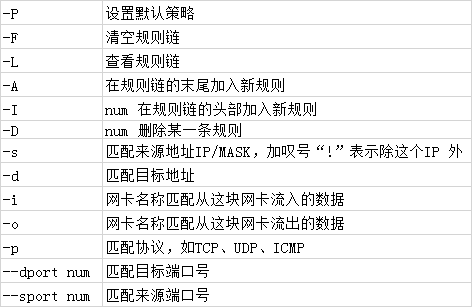
1)把INPUT规则链的默认规则设置为拒绝:
[root@localhost ~]# iptables -P INPUT DROP
此时ssh远程连接会断开。
2)向INPUT规则链中添加允许ICMP 和SSH流量进入的策略规则:
root@localhost ~]# iptables -I INPUT -p icmp -j ACCEPT
此时从远程设备ping 通测试机
3)向INPUT规则链中添加允许10.10.65.65远程SSH登录的策略规则:
[root@localhost ~]# iptables -I INPUT -s 10.10.65.65/32 -p tcp --dport 22 -j ACCEPT
4)查看规则链
[root@localhost ~]# iptables -L

Chain INPUT (policy DROP)

target     prot opt source               destination

ACCEPT     tcp  --  10.10.65.65          anywhere             tcp dpt:ssh

ACCEPT     icmp --  anywhere             anywhere

Chain FORWARD (policy ACCEPT)

target     prot opt source               destination

Chain OUTPUT (policy ACCEPT)

target     prot opt source               destination
5)清除所有的防火墙规则链,默认规则除外
[root@localhost ~]# iptables -F

[root@localhost ~]# iptables -L

Chain INPUT (policy DROP)

target     prot opt source               destination

Chain FORWARD (policy ACCEPT)

target     prot opt source               destination

Chain OUTPUT (policy ACCEPT)

target     prot opt source               destination
此时ssh远程连接会断开。
6)向INPUT 规则链中添加拒绝所有人访问本机12345 端口的策略规则:
[root@localhost ~]# iptables -L

Chain INPUT (policy ACCEPT)

target     prot opt source               destination

REJECT     udp  --  anywhere             anywhere             udp dpt:italk reject-with icmp-port-unreachable

REJECT     tcp  --  anywhere             anywhere             tcp dpt:italk reject-with icmp-port-unreachable
7)向INPUT 规则链中添加拒绝所有主机访问本机1000~1024 端口的策略规则:
[root@localhost ~]# iptables -A INPUT -p tcp --dport 1000:1024 -j REJECT

[root@localhost ~]# iptables -A INPUT -p udp --dport 1000:1024 -j REJECT
注:使用iptables 命令配置的防火墙规则默认会在系统下一次重启时失效,如果想让配置的防火墙策略永久生效,还要执行保存命令:
[root@localhost ~]# service iptables save

iptables: Saving firewall rules to /etc/sysconfig/iptables: [ OK ]
3.centos 7 中没有iptables 和service iptables save 指令使用失败问题解决方案
如果执行service iptables save 命令来保存iptables时失败,报出:
The service command supports only basic LSB actions (start, stop, restart, try-restart, reload, force-reload, status). For other actions, please try to use systemctl.
解决方法:
systemctl stop firewalld 关闭防火墙
yum install iptables-services 安装或更新服务
再使用systemctl enable iptables 启动iptables
最后 systemctl start iptables 打开iptables
再执行service iptables save
重启iptables服务:
service iptables restart
执行完毕之后/etc/syscofig/iptables文件就有了
21.iptables的更多相关文章
- CentOS系统配置 iptables防火墙
阿里云CentOS系统配置iptables防火墙 虽说阿里云推出了云盾服务,但是自己再加一层防火墙总归是更安全些,下面是我在阿里云vps上配置防火墙的过程,目前只配置INPUT.OUTPUT和FO ...
- 阿里云Centos配置iptables防火墙
虽说阿里云推出了云盾服务,但是自己再加一层防火墙总归是更安全些,下面是我在阿里云vps上配置防火墙的过程,目前只配置INPUT.OUTPUT和FORWORD都是ACCEPT的规则 一.检查iptabl ...
- CentOS6.4 配置iptables
如果没有安装iptables可以直接用yum安装 yum install -t iptables 检查iptables服务的状态, service iptables status 如果出现“iptab ...
- 阿里云 centos 修改iptables
一.检查iptables服务状态 首先检查iptables服务的状态 [root@woxplife ~]# service iptables status iptables: Firewall is ...
- 阿里云CentOS配置iptables防火墙[转]
虽说阿里云推出了云盾服务,但是自己再加一层防火墙总归是更安全些,下面是我在阿里云vps上配置防火墙的过程,目前只配置INPUT.OUTPUT和FORWORD都是ACCEPT的规则 一.检查iptabl ...
- 【安装防火墙】没有iptables时的解决办法
一.检查iptables服务状态 首先检查iptables服务的状态 [root@woxplife ~]# service iptables status iptables: Firewall is ...
- 〖Linux〗iptables使用实例
1. 使局域网用户可共享外网(拨号上网) > /proc/sys/net/ipv4/ip_forward iptables -t nat -A POSTROUTING -o ppp0 -j MA ...
- centos配置iptables
第一次配置前消除默认的规则 #这个一定要先做,不然清空后可能会悲剧 iptables -P INPUT ACCEPT #清空默认所有规则 iptables -F #清空自定义的所有规则 iptable ...
- iptables最常用的规则示例
iptables v1.4.21 iptables基础 规则(rules)其实就是网络管理员预定义的条件,规则一般的定义为“如果数据包头符合这样的条件,就这样处理这个数据包”.规则存储在内核空间的信息 ...
随机推荐
- 痞子衡嵌入式:MCUBootUtility v3.0发布,开始支持LPC, Kinetis啦
-- 痞子衡维护的NXP-MCUBootUtility工具距离上一个版本(v2.4.0)发布过去2个半月了,这一次痞子衡为大家带来了全新版本v3.0.0,从这个版本开始,NXP-MCUBootUtil ...
- 超有用的linux笔记
名词解释 根目录说明 tree -L 1 . ├── bin -> usr/bin # 英语binary的缩写,表示"二进制文件",bin目录包含了会被所有用户使用的可执行程 ...
- PHP 插件资源
PHP jsonRPC 百度云网盘地址 https://pan.baidu.com/s/1itCIhrdd5bPGJMefNUuKvw 提取码 : ax4d PHP Excel 百度云网盘 ...
- 十七:SQL注入之二次加解密,DNS注入
加解密,二次,DNSlog注入 注入原理,演示案例,实际应用. less-21关,base64进行解密 encode加密decode解密 cookie处注入 判断加密算法,然后进行注入 less-24 ...
- requests基础封装-get/post封装
字符串转化成字典: convert_to_dict.py: import jsonstr1 = '{"grant_type":"client_credential&qu ...
- CVE-2019-15107_webmin漏洞复现
一.漏洞描述 Webmin的是一个用于管理类Unix的系统的管理配置工具,具有网络页面.在其找回密码页面中,存在一处无需权限的命令注入漏洞,通过这个漏洞攻击者即可以执行任意系统命令.它已知在端口100 ...
- 安装percona-toolkit
http://www.percona.com/software/percona-toolkityum -y install perl-DBIyum -y install perl-DBD-mysqly ...
- RandomForest 随机森林算法与模型参数的调优
公号:码农充电站pro 主页:https://codeshellme.github.io 本篇文章来介绍随机森林(RandomForest)算法. 1,集成算法之 bagging 算法 在前边的文章& ...
- mysql锁表问题
查看当前所有的进程信息: show full processlist; 查看当前所有的事务 select * from information_schema.innodb_trx; 查看当前出现的锁 ...
- C++ STL getline()函数
getline() C++11 <string> 函数原型 //(1) istream& getline (istream& is, string& str, ch ...