
webpack源码-打包资源输出到本地
webpack收集完依赖是怎么打包资源的呢?
入口compiler.js:
this.applyPluginsParallel("make", compilation, err => {

    if(err) return callback(err);

    compilation.finish();

    compilation.seal(callback);

});
执行seal方法,createChunkAssets方法(compilation.js)
在createChunkAssets方法的时候做如下判断:
if(chunk.hasRuntime()) {

   source = this.mainTemplate.render(this.hash, chunk, this.moduleTemplate, this.dependencyTemplates);

} else {

    source = this.chunkTemplate.render(chunk, this.moduleTemplate, this.dependencyTemplates);

}
根据是否是entrypoints,进行资源打包(chunk.js)。
上面的mainTemplate.render方法:
render(hash, chunk, moduleTemplate, dependencyTemplates) {

    const buf = [];

    buf.push(this.applyPluginsWaterfall("bootstrap", "", chunk, hash, moduleTemplate, dependencyTemplates));

    buf.push(this.applyPluginsWaterfall("local-vars", "", chunk, hash));

    buf.push("");

    buf.push("// The require function");

    buf.push(`function ${this.requireFn}(moduleId) {`);

    buf.push(this.indent(this.applyPluginsWaterfall("require", "", chunk, hash)));

    buf.push("}");

    buf.push("");

    buf.push(this.asString(this.applyPluginsWaterfall("require-extensions", "", chunk, hash)));

    buf.push("");

    buf.push(this.asString(this.applyPluginsWaterfall("startup", "", chunk, hash)));

    let source = this.applyPluginsWaterfall("render", new OriginalSource(this.prefix(buf, " \t") + "\n", `webpack/bootstrap ${hash}`), chunk, hash, moduleTemplate, dependencyTemplates);

    if(chunk.hasEntryModule()) {

        source = this.applyPluginsWaterfall("render-with-entry", source, chunk, hash);

    }

    if(!source) throw new Error("Compiler error: MainTemplate plugin 'render' should return something");

    chunk.rendered = true;

    return new ConcatSource(source, ";");

}
buf中保存了webpackBootstrap中的主体代码:
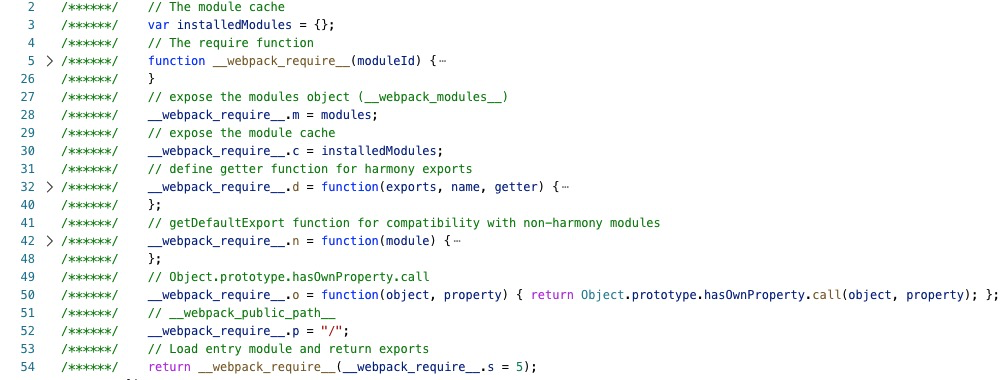 

render钩子(MainTemplate.js)
 const source = new ConcatSource();

    source.add("/******/ (function(modules) { // webpackBootstrap\n"); // 添加头部包裹体

    source.add(new PrefixSource("/******/", bootstrapSource)); // 添加bootstrap主体

    source.add("/******/ })\n");  // 结束

    source.add("/*****************************  *******************************************/\n");

    source.add("/******/ (");

    const modules = this.renderChunkModules(chunk, moduleTemplate, dependencyTemplates, "/******/ ");  // 返回一个concatSource的一个实例,包含了需要打包的所有内容

    source.add(this.applyPluginsWaterfall("modules", modules, chunk, hash, moduleTemplate, dependencyTemplates));

    source.add(")");

    return source;   // 返回一个concatSource实例
主要做了两件事:
1.生成webpackBootstrap中的主体代码
2.添加所有的代码到concatSource中
最后,执行compiler.run的回调函数 onCompiled(null, compilation)
执行 emitAssets方法
this.outputFileSystem.mkdirp(this.outputFileSystem.join(outputPath, dir), writeOut);// 创建dist目录

const targetPath = this.outputFileSystem.join(outputPath, targetFile);

const source = compilation.assets[file]; // createChunkAssets中有这样的处理this.assets[file] = source;

......

let content = source.source();

if(!Buffer.isBuffer(content)) {

    content = new Buffer(content, "utf8");

}

......

this.outputFileSystem.writeFile(targetPath, content, callback);// 输出到本地文件系统
至此打包资源,然后就基本结束了。
webpack源码-打包资源输出到本地的更多相关文章
- RPMBUILD源码打包资源汇总(转)
http://mattshma.github.io/2015/11/04/rpm%E6%89%93%E5%8C%85/ http://400053.blog.51cto.com/390053/7210 ...
- 从Webpack源码探究打包流程,萌新也能看懂~
简介 上一篇讲述了如何理解tapable这个钩子机制,因为这个是webpack程序的灵魂.虽然钩子机制很灵活,而然却变成了我们读懂webpack道路上的阻碍.每当webpack运行起来的时候,我的心态 ...
- .3-浅析webpack源码之预编译总览
写在前面: 本来一开始想沿用之前vue源码的标题:webpack源码之***,但是这个工具比较巨大,所以为防止有人觉得我装逼跑来喷我(或者随时鸽),加上浅析二字,以示怂. 既然是浅析,那么案例就不必太 ...
- .30-浅析webpack源码之doResolve事件流(1)
这里所有的插件都对应着一个小功能,画个图整理下目前流程: 上节是从ParsePlugin中出来,对'./input.js'入口文件的路径做了处理,返回如下: ParsePlugin.prototype ...
- .17-浅析webpack源码之compile流程-入口函数run
本节流程如图: 现在正式进入打包流程,起步方法为run: Compiler.prototype.run = (callback) => { const startTime = Date.now( ...
- .30-浅析webpack源码之doResolve事件流(2)
这里所有的插件都对应着一个小功能,画个图整理下目前流程: 上节是从ParsePlugin中出来,对'./input.js'入口文件的路径做了处理,返回如下: ParsePlugin.prototype ...
- Spring源码分析——资源访问利器Resource之实现类分析
今天来分析Spring的资源接口Resource的各个实现类.关于它的接口和抽象类,参见上一篇博文——Spring源码分析——资源访问利器Resource之接口和抽象类分析 一.文件系统资源 File ...
- maven源码打包
1.打包时附加外部Jar包 <!--编译+外部 Jar打包--> <plugin> <artifactId>maven-co ...
- 使用 maven 自动将源码打包并发布
1.maven-source-plugin 访问地址 在 pom.xml 中添加 下面的 内容,可以 使用 maven 生成 jar 的同时 生成 sources 包 <plugin> & ...
随机推荐
- ConcurrentHashMap源码解析-Java7
目录 一.ConcurrentHashMap的模型图 二.源码分析-类定义 2.1 极简ConcurrentHashMap定义 2.2 Segment内部类 2.3 HashEntry内部类 2.4 ...
- Beta冲刺测试随笔
测试工作安排 人员安排: 余文锦,孙劼成,陈富杰,明锐,王彦杰,陈康杰:测试 杨铭海,张鑫宇测试用例的编写 测试工具选择和运用 本来计划Beta冲刺挑选人员进行测试相关的接触和学习并胜任测试工作,但是 ...
- MongoDB设计方法及技巧
MongoDB是一种流行的数据库,可以在不受任何表格schema模式的约束下工作.数据以类似JSON的格式存储,并且可以包含不同类型的数据结构.例如,在同一集合collection 中,我们可以拥有以 ...
- 微信小程序-工具的下载与安装
QQ讨论群:785071190 安装开发工具 前往 开发者工具下载页面 ,根据自己的操作系统下载对应的安装包进行安装,有关开发者工具更详细的介绍可以查看 <开发者工具介绍> .工具安装非常 ...
- 后渗透工具Empire使用教程
一.前言 Empire是一个PowerShell后期漏洞利用代理工具同时也是一款很强大的后渗透测神器,它建立在密码学.安全通信和灵活的架构之上.Empire实现了无需powershell.exe就可运 ...
- ODBC 常见数据源配置整理
目录 1. 简介 1.1 ODBC和JDBC 1.2 ODBC配置工具 1.3 ODBC 数据源连接配置 2. MySQL 数据源配置 2.1 配置步骤 2.2 链接参数配置 3. SQLServer ...
- 处理TortoiseGit一直弹出密码框的方法 -输入git@XXXX.com的密码
问题 :在push和pull的时候,一直都弹出这个框 1.开始处搜索TortoiseGit文件夹,找到其中的“PuTTYgen”文件,如下显示 2.运行之后在弹出的窗口中点击下方的“Generate” ...
- Python3-json & pickle 序列化
JSON(JavaScript Object Notation, JS对象标记)是一中轻量级的数据交换格式,大部分语言都支持 Python3中的json提供了对json格式数据的序列化支持 json. ...
- keras训练函数fit和fit_generator对比,图像生成器ImageDataGenerator数据增强
1. [深度学习] Keras 如何使用fit和fit_generator https://blog.csdn.net/zwqjoy/article/details/88356094 ps:解决样本数 ...
- python文件处理-将图像根据坐标画矩形标记
内容涉及:文件遍历,选取csv后缀文件,用cv操作图片 import csv import os import sys import numpy as np import copy import sh ...