
Mybatis——Mapper解析
Mapper的注册入口在Configuration的addMapper方法中,其会调用MapperRegistry的addMapper方法。
Mapper的注册过程分为两个步骤:
1.创建MapperProxyFactory,将其与mapper的class进行映射
2.解析mapper对应xml文件和其方法上的注解,生成MappedStatement。
public class MapperRegistry {

	private final Map<Class<?>, MapperProxyFactory<?>> knownMappers = new HashMap<Class<?>, MapperProxyFactory<?>>();

	public <T> void addMapper(Class<T> type) {

    if (type.isInterface()) {

      if (hasMapper(type)) {

        throw new BindingException("Type " + type + " is already known to the MapperRegistry.");

      }

      boolean loadCompleted = false;

      try {

      	//1.创建MapperProxyFactory,将其与mapper的class进行映射

        knownMappers.put(type, new MapperProxyFactory<T>(type));

        2.解析mapper对应xml文件和其方法上的注解,生成MappedStatement。

        MapperAnnotationBuilder parser = new MapperAnnotationBuilder(config, type);

        parser.parse();

        loadCompleted = true;

      } finally {

        if (!loadCompleted) {

          knownMappers.remove(type);

        }

      }

    }

  }

}
MapperAnnotationBuilder解析过程
MapperAnnotationBuilder的解析过程分为两个步骤:
1.解析xml文件
2.解析mapper方法上的注解
public void parse() {

	//校验mapper是否已经解析

    String resource = type.toString();

    if (!configuration.isResourceLoaded(resource)) {

      //1.解析xml文件

      loadXmlResource();

      configuration.addLoadedResource(resource);

      assistant.setCurrentNamespace(type.getName());

      parseCache();

      parseCacheRef();

      //2.解析mapper方法上的注解

      Method[] methods = type.getMethods();

      for (Method method : methods) {

        try {

          // issue #237

          if (!method.isBridge()) {

            parseStatement(method);

          }

        } catch (IncompleteElementException e) {

          configuration.addIncompleteMethod(new MethodResolver(this, method));

        }

      }

    }

    //3.重新解析由于首次解析因为父元素未解析导致解析的方法

    parsePendingMethods();

  }
xml文件解析
private void loadXmlResource() {

    // Spring may not know the real resource name so we check a flag

    // to prevent loading again a resource twice

    // this flag is set at XMLMapperBuilder#bindMapperForNamespace

    if (!configuration.isResourceLoaded("namespace:" + type.getName())) {

      String xmlResource = type.getName().replace('.', '/') + ".xml";

      InputStream inputStream = null;

      try {

        inputStream = Resources.getResourceAsStream(type.getClassLoader(), xmlResource);

      } catch (IOException e) {

        // ignore, resource is not required

      }

      if (inputStream != null) {

        XMLMapperBuilder xmlParser = new XMLMapperBuilder(inputStream, assistant.getConfiguration(), xmlResource, configuration.getSqlFragments(), type.getName());

        xmlParser.parse();

      }

    }

  }
xml文件的路径为:String xmlResource = type.getName().replace('.', '/') + ".xml";mapper的全路径,并将后缀改为xml,因为要求xml文件与mapper class文件位于相同的路径下。
xmlParser.parse()解析流程:
public void parse() {

	//mapper节点解析

    if (!configuration.isResourceLoaded(resource)) {

      configurationElement(parser.evalNode("/mapper"));

      configuration.addLoadedResource(resource);

      bindMapperForNamespace();

    }

	//解析由于父ResultMap未解析的ResultMap

    parsePendingResultMaps();

    parsePendingCacheRefs();

    //解析由于依赖元素未解析的Insert/update/delete/select节点

    parsePendingStatements();

  }

  private void configurationElement(XNode context) {

    try {

      String namespace = context.getStringAttribute("namespace");

      if (namespace == null || namespace.equals("")) {

        throw new BuilderException("Mapper's namespace cannot be empty");

      }

      builderAssistant.setCurrentNamespace(namespace);

      cacheRefElement(context.evalNode("cache-ref"));

      cacheElement(context.evalNode("cache"));

      //解析parameterMap节点为ParameterMap,存放于configuration的parameterMaps中

      parameterMapElement(context.evalNodes("/mapper/parameterMap"));

      //解析resultMap节点为ResultMap,存放于configuration的ResultMaps中

      resultMapElements(context.evalNodes("/mapper/resultMap"));

      //解析sql片段,存放在configuration的sqlFragments中

      sqlElement(context.evalNodes("/mapper/sql"));

      //解析select|insert|update|delete节点生成MappedStatement,存放在configuration的mappedStatements中

      buildStatementFromContext(context.evalNodes("select|insert|update|delete"));

    } catch (Exception e) {

      throw new BuilderException("Error parsing Mapper XML. The XML location is '" + resource + "'. Cause: " + e, e);

    }

  }
method注解解析
void parseStatement(Method method) {

	//获取parameterType,如果有多个参数为ParamMap,单个参数为参数类型

    Class<?> parameterTypeClass = getParameterType(method);

    LanguageDriver languageDriver = getLanguageDriver(method);

    //解析@Select|Update|Delete|Insert中的value值,或者@SelectProvider|@UpdateProvider|@DeleteProvider|@InsertProvider的方法,生成SqlSource

    SqlSource sqlSource = getSqlSourceFromAnnotations(method, parameterTypeClass, languageDriver);

    if (sqlSource != null) {

      //解析@Options

      Options options = method.getAnnotation(Options.class);

      final String mappedStatementId = type.getName() + "." + method.getName();

      Integer fetchSize = null;

      Integer timeout = null;

      StatementType statementType = StatementType.PREPARED;

      ResultSetType resultSetType = ResultSetType.FORWARD_ONLY;

      SqlCommandType sqlCommandType = getSqlCommandType(method);

      boolean isSelect = sqlCommandType == SqlCommandType.SELECT;

      boolean flushCache = !isSelect;

      boolean useCache = isSelect;

      //解析@SelectKey生成KeyGenerator

      KeyGenerator keyGenerator;

      String keyProperty = "id";

      String keyColumn = null;

      if (SqlCommandType.INSERT.equals(sqlCommandType) || SqlCommandType.UPDATE.equals(sqlCommandType)) {

        // first check for SelectKey annotation - that overrides everything else

        SelectKey selectKey = method.getAnnotation(SelectKey.class);

        if (selectKey != null) {

          keyGenerator = handleSelectKeyAnnotation(selectKey, mappedStatementId, getParameterType(method), languageDriver);

          keyProperty = selectKey.keyProperty();

        } else if (options == null) {

          keyGenerator = configuration.isUseGeneratedKeys() ? Jdbc3KeyGenerator.INSTANCE : NoKeyGenerator.INSTANCE;

        } else {

          keyGenerator = options.useGeneratedKeys() ? Jdbc3KeyGenerator.INSTANCE : NoKeyGenerator.INSTANCE;

          keyProperty = options.keyProperty();

          keyColumn = options.keyColumn();

        }

      } else {

        keyGenerator = NoKeyGenerator.INSTANCE;

      }

      if (options != null) {

        if (FlushCachePolicy.TRUE.equals(options.flushCache())) {

          flushCache = true;

        } else if (FlushCachePolicy.FALSE.equals(options.flushCache())) {

          flushCache = false;

        }

        useCache = options.useCache();

        fetchSize = options.fetchSize() > -1 || options.fetchSize() == Integer.MIN_VALUE ? options.fetchSize() : null; //issue #348

        timeout = options.timeout() > -1 ? options.timeout() : null;

        statementType = options.statementType();

        resultSetType = options.resultSetType();

      }

	  //解析@ResultMap获取ResultMapId,或者解析@Resutls生成ResultMap

      String resultMapId = null;

      ResultMap resultMapAnnotation = method.getAnnotation(ResultMap.class);

      if (resultMapAnnotation != null) {//解析@ResultMap获取ResultMapId

        String[] resultMaps = resultMapAnnotation.value();

        StringBuilder sb = new StringBuilder();

        for (String resultMap : resultMaps) {

          if (sb.length() > 0) {

            sb.append(",");

          }

          sb.append(resultMap);

        }

        resultMapId = sb.toString();

      } else if (isSelect) {//解析@Resutls生成ResultMap

        resultMapId = parseResultMap(method);

      }

	  //根据上面解析得到的ResultMap、ParamterType、SqlSource等生成MapperStatement

      assistant.addMappedStatement(

          mappedStatementId,

          sqlSource,

          statementType,

          sqlCommandType,

          fetchSize,

          timeout,

          // ParameterMapID

          null,

          parameterTypeClass,

          resultMapId,

          getReturnType(method),

          resultSetType,

          flushCache,

          useCache,

          // TODO gcode issue #577

          false,

          keyGenerator,

          keyProperty,

          keyColumn,

          // DatabaseID

          null,

          languageDriver,

          // ResultSets

          options != null ? nullOrEmpty(options.resultSets()) : null);

    }

  }
ParameterMap解析
ParameterMap结构:
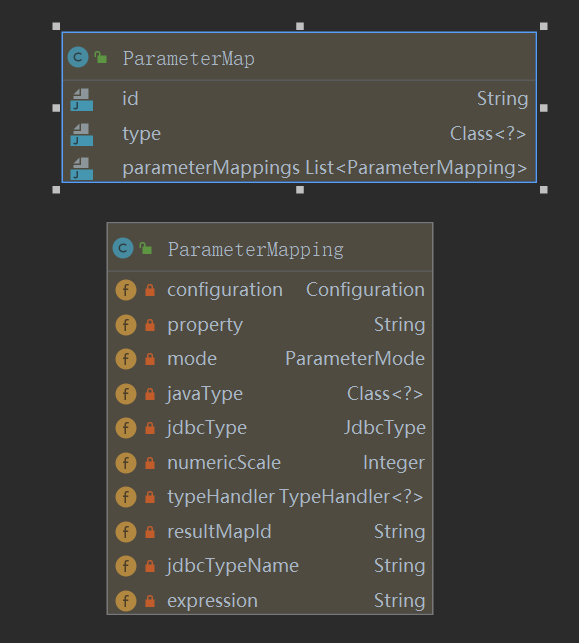
ParameterMap映射节点:
<parameterMap id="BaseParameterMap" type="com.example.demo.User">

        <parameter property="id" javaType="long" jdbcType="BIGINT"/>

        <parameter property="username" javaType="string" jdbcType="VARCHAR"/>

        <parameter property="password" javaType="string" jdbcType="VARCHAR"/>

</parameterMap>
parameterMap对应上面xml配置节点,该节点转换的parameterMap会注册到configuration中。解析逻辑在org.apache.ibatis.builder.xml.XMLMapperBuilder#parameterMapElement中。
此外还有select|insert|update|delete的parameter节点的parameterType属性,method注解的参数都是转换为parameterMap,但是只有id和type属性,且不会注册到configuration中,只会存放于mappedStatement中。生成逻辑位于org.apache.ibatis.builder.MapperBuilderAssistant#getStatementResultMaps中
ResultMap解析
resultMap映射节点:
xml
<resultMap id="BaseResultMap" type="com.example.demo.User">

    <id column="id" property="id" />

    <result column="username" property="username" />

    <result column="password" property="password" />

</resultMap>
注解
@Results(id = "BaseResultMap2",

            value = {

                    @Result(property = "id", column = "id"),

                    @Result(property = "username", column = "username"),

                    @Result(property = "password", column = "password"),

            }

    )
xml解析逻辑位于org.apache.ibatis.builder.xml.XMLMapperBuilder#resultMapElement(org.apache.ibatis.parsing.XNode, java.util.List<org.apache.ibatis.mapping.ResultMapping>)
注解解析逻辑位于org.apache.ibatis.builder.annotation.MapperAnnotationBuilder#parseResultMap
解析结果会注册到Configuration的resultMaps中
SqlSource解析
1.RawSqlSource:纯sql语句,不包含动态判断节点,例如:
select * from user where id = #{id}
创建过程如下为:
	@Test

    public void testRawSqlSource(){

        RawSqlSource rawSqlSource = new RawSqlSource(new Configuration(), "select * from user where id = #{id}", Long.class);

        System.out.println(rawSqlSource.getBoundSql(1L).getSql());

    }

2.DynamicSqlSource:动态sql语句,例如:
select * from user where

<if test="id != null">

      id = #{id}

</if>
创建过程如下为:
	@Test

    public void testDynamicSqlSource(){

        List<SqlNode> contents = new ArrayList<>();

        contents.add(new StaticTextSqlNode("select * from user where 1=1"));

        contents.add(new IfSqlNode(new StaticTextSqlNode("and id = #{id}"), "id != null"));

        MixedSqlNode mixedSqlNode = new MixedSqlNode(contents);

        DynamicSqlSource dynamicSqlSource = new DynamicSqlSource(new Configuration(), mixedSqlNode);

        BoundSql boundSql = dynamicSqlSource.getBoundSql(null);

        System.out.println(boundSql.getSql());

        MapperMethod.ParamMap<Object> objectParamMap = new MapperMethod.ParamMap<>();

        objectParamMap.put("id", 1);

        System.out.println(dynamicSqlSource.getBoundSql(objectParamMap).getSql());

    }
3.ProviderSqlSource:@SelectProvider|@UpdateProvider|@DeleteProvider|@InsertProvider修饰注解方法,例如:
	@Results(id = "BaseResultMap2",

            value = {

                    @Result(property = "id", column = "id"),

                    @Result(property = "username", column = "username"),

                    @Result(property = "password", column = "password"),

            }

    )

    @SelectProvider(type = UserSelectProvider.class, method = "selectById")

    User selectById2(@Param("id") Long id);

    public class UserSelectProvider{

        public String selectById(){

            return new SQL().SELECT("username", "password")

                    .FROM("user")

                    .WHERE("id = #{id}").toString();

        }

    }
创建过程如下:
	@Test

    public void testProviderSqlSource() {

        Method[] methods = UserMapper.class.getMethods();

        for (Method method : methods) {

            SelectProvider selectProvider = method.getAnnotation(SelectProvider.class);

            if(selectProvider != null) {

                ProviderSqlSource providerSqlSource = new ProviderSqlSource(new Configuration(), selectProvider, UserMapper.class, method);

                System.out.println(providerSqlSource.getBoundSql(null).getSql());

            }

        }

    }
4.StaticSqlSource:静态sqlSource,内部String类型的sql语句,上述3种最终都会转换为该SqlSource
解析逻辑位于org.apache.ibatis.scripting.xmltags.XMLScriptBuilder#parseScriptNode
MappedStatement解析
mappedStatement映射节点:
xml
<select id="selectById" resultType="com.example.demo.User" parameterType="long">    	select * from user where id = #{id};

</select>
注解
	@Results(id = "BaseResultMap2",

            value = {

                    @Result(property = "id", column = "id"),

                    @Result(property = "username", column = "username"),

                    @Result(property = "password", column = "password"),

            }

    )

    @Select("select * from user")

    @Options(fetchSize = 10)

    User selectById2(@Param("id") Long id);
mappedStatement的主要字段:
1.sqlCommandType:由使用的标签Select|Insert|Update|Delete等决定
2.parameterMap:传入参数,由属性parameterType|parameterMap决定
3.resultMaps:返回结果集,由属性resultMap|resultType决定
4.sqlSource:标签包围的sql节点,即:select * from user where id = #{id}
xml解析逻辑位于org.apache.ibatis.builder.xml.XMLStatementBuilder#parseStatementNode
注解解析逻辑位于org.apache.ibatis.builder.annotation.MapperAnnotationBuilder#parseStatement
整体创建一个MappedStatement如下:
<select id="selectById" resultType="com.example.demo.User" parameterType="long">    	select * from user where id = #{id};

</select>
	@Test

    public void testMappedStatement() {

        List<ParameterMapping> parameterMappings = new ArrayList<ParameterMapping>();

        ParameterMap parameterMap = new ParameterMap.Builder(

                configuration,

                "selectById-Inline",

                Long.class,

                parameterMappings).build();

        ResultMap inlineResultMap = new ResultMap.Builder(

                configuration,

                "selectById-Inline",

                User.class,

                new ArrayList<ResultMapping>(),

                null).build();

        RawSqlSource rawSqlSource = new RawSqlSource(configuration, "select * from user where id = #{id}", Long.class);

        MappedStatement.Builder builder = new MappedStatement

                .Builder(configuration, "selectById", rawSqlSource, SqlCommandType.SELECT);

        builder.parameterMap(parameterMap);

        builder.resultMaps(Collections.singletonList(inlineResultMap));

        MappedStatement mappedStatement = builder.build();

        configuration.addMappedStatement(mappedStatement);

        SqlSession sqlSession = sqlSessionFactory.openSession();

        System.out.println(sqlSession.selectOne("selectById", 18L));

    }
Mybatis——Mapper解析的更多相关文章
- mybatis源码-解析配置文件(四-1)之配置文件Mapper解析(cache)
目录 1. 简介 2. 解析 3 StrictMap 3.1 区别HashMap:键必须为String 3.2 区别HashMap:多了成员变量 name 3.3 区别HashMap:key 的处理多 ...
- MyBatis mapper文件中的变量引用方式#{}与${}的差别
MyBatis mapper文件中的变量引用方式#{}与${}的差别 #{},和 ${}传参的区别如下:使用#传入参数是,sql语句解析是会加上"",当成字符串来解析,这样相比于$ ...
- mybatis mapper namespace
http://www.mybatis.org/mybatis-3/zh/sqlmap-xml.html#insert_update_and_delete org.apache.ibatis.excep ...
- XML CDATA(Mybatis mapper and XML)
Tip:must be followed by either attribute specifications, ">" or "/>". 所有 X ...
- [DB][mybatis]MyBatis mapper文件引用变量#{}与${}差异
MyBatis mapper文件引用变量#{}与${}差异 默认,使用#{}语法,MyBatis会产生PreparedStatement中.而且安全的设置PreparedStatement參数,这个过 ...
- Mybatis Mapper接口是如何找到实现类的-源码分析
KeyWords: Mybatis 原理,源码,Mybatis Mapper 接口实现类,代理模式,动态代理,Java动态代理,Proxy.newProxyInstance,Mapper 映射,Map ...
- 基于注解的Mybatis mapper 接口注意事项
基于注解的Mybatis mapper 接口功能没有mapper xml配置文件丰富,并且动态sql语句的灵活性不能和xml配置相比. 这里仅仅说一下基于注解的动态sql注意事项: Mybatis提供 ...
- ][mybatis]MyBatis mapper文件中的变量引用方式#{}与${}的差别
转自https://blog.csdn.net/szwangdf/article/details/26714603 MyBatis mapper文件中的变量引用方式#{}与${}的差别 默认情况下,使 ...
- Mybatis的解析和运行原理
Mybatis的解析和运行原理 Mybatis的运行过程大致分为两大步:第一步,读取配置文件缓存到Configuration对象,用以创建 SqlSessionFactory:第二步,SqlSessi ...
随机推荐
- Axis WSDD文件参考文档
本部分介绍的所有的WSDD元素的名称空间都是"http://xml.apache.org/axis/wsdd/". <deployment> 告诉Axis Engine ...
- 33_栈程序演示.swf
pBottom执行栈底有效元素的前一个节点,该节点没有存储有效数据,这样设计是便于栈的管理,向链表一样pHead指向链表的第一个节点,该节点是不存储有效数据的 pTop执行栈顶最新的节点 如果pTop ...
- linux shell编程子bash变量
参考视频:https://www.imooc.com/u/279399/courses?sort=publish https://www.imooc.com/video/6516 慕课网 用户的自定义 ...
- element ui 版本升级
element ui 版本升级 1. 卸载之前版本 npm uninstall element-ui 2.重新安装element-ui npm i element-ui 3.就如package.jso ...
- robot framework使用小结(一)
项目组要用到robot framework验收web,因此花了两天时间了解了一下这个框架.我把网上各位大侠分享的内容整理成一个小小demo,参考的出处没有列出来,在此一并感谢各位. demo仍旧是打开 ...
- 蝙蝠算法(BA)学习笔记
算法原理 蝙蝠能够在夜间或十分昏暗的环境中自由飞翔和准确无误地捕捉食物,是因为他们能够从喉头发出地超声脉冲回声来定位.受这一启发,Yang教授在2010年提出了蝙蝠算法(Bat Algorithm,B ...
- 二.5vue服务器展示
1.展示服务器列表前端页面 (1)写视图模版views/resources/servers.vue <template> <div class="resources-ser ...
- 创建windows窗口
from tkinter import * win=Tk() #创建窗口对象 win.title("我的第一个gu ...
- 关于WebServices的调用
1.使用soapui测试接口是否能通 具体操作步骤请查看:https://www.cnblogs.com/BINDAI/p/13201513.html Soapui请求结果集 2.获得soapu ...
- HTML5(三)SVG vs. Canvas
HTML5 内联 SVG 什么是SVG? SVG 指可伸缩矢量图形 (Scalable Vector Graphics) SVG 用于定义用于网络的基于矢量的图形 SVG 使用 XML 格式定义图形 ...