
Mybatis——Mapper解析
Mapper的注册入口在Configuration的addMapper方法中,其会调用MapperRegistry的addMapper方法。
Mapper的注册过程分为两个步骤:
1.创建MapperProxyFactory,将其与mapper的class进行映射
2.解析mapper对应xml文件和其方法上的注解,生成MappedStatement。
public class MapperRegistry {

	private final Map<Class<?>, MapperProxyFactory<?>> knownMappers = new HashMap<Class<?>, MapperProxyFactory<?>>();

	public <T> void addMapper(Class<T> type) {

    if (type.isInterface()) {

      if (hasMapper(type)) {

        throw new BindingException("Type " + type + " is already known to the MapperRegistry.");

      }

      boolean loadCompleted = false;

      try {

      	//1.创建MapperProxyFactory,将其与mapper的class进行映射

        knownMappers.put(type, new MapperProxyFactory<T>(type));

        2.解析mapper对应xml文件和其方法上的注解,生成MappedStatement。

        MapperAnnotationBuilder parser = new MapperAnnotationBuilder(config, type);

        parser.parse();

        loadCompleted = true;

      } finally {

        if (!loadCompleted) {

          knownMappers.remove(type);

        }

      }

    }

  }

}
MapperAnnotationBuilder解析过程
MapperAnnotationBuilder的解析过程分为两个步骤:
1.解析xml文件
2.解析mapper方法上的注解
public void parse() {

	//校验mapper是否已经解析

    String resource = type.toString();

    if (!configuration.isResourceLoaded(resource)) {

      //1.解析xml文件

      loadXmlResource();

      configuration.addLoadedResource(resource);

      assistant.setCurrentNamespace(type.getName());

      parseCache();

      parseCacheRef();

      //2.解析mapper方法上的注解

      Method[] methods = type.getMethods();

      for (Method method : methods) {

        try {

          // issue #237

          if (!method.isBridge()) {

            parseStatement(method);

          }

        } catch (IncompleteElementException e) {

          configuration.addIncompleteMethod(new MethodResolver(this, method));

        }

      }

    }

    //3.重新解析由于首次解析因为父元素未解析导致解析的方法

    parsePendingMethods();

  }
xml文件解析
private void loadXmlResource() {

    // Spring may not know the real resource name so we check a flag

    // to prevent loading again a resource twice

    // this flag is set at XMLMapperBuilder#bindMapperForNamespace

    if (!configuration.isResourceLoaded("namespace:" + type.getName())) {

      String xmlResource = type.getName().replace('.', '/') + ".xml";

      InputStream inputStream = null;

      try {

        inputStream = Resources.getResourceAsStream(type.getClassLoader(), xmlResource);

      } catch (IOException e) {

        // ignore, resource is not required

      }

      if (inputStream != null) {

        XMLMapperBuilder xmlParser = new XMLMapperBuilder(inputStream, assistant.getConfiguration(), xmlResource, configuration.getSqlFragments(), type.getName());

        xmlParser.parse();

      }

    }

  }
xml文件的路径为:String xmlResource = type.getName().replace('.', '/') + ".xml";mapper的全路径,并将后缀改为xml,因为要求xml文件与mapper class文件位于相同的路径下。
xmlParser.parse()解析流程:
public void parse() {

	//mapper节点解析

    if (!configuration.isResourceLoaded(resource)) {

      configurationElement(parser.evalNode("/mapper"));

      configuration.addLoadedResource(resource);

      bindMapperForNamespace();

    }

	//解析由于父ResultMap未解析的ResultMap

    parsePendingResultMaps();

    parsePendingCacheRefs();

    //解析由于依赖元素未解析的Insert/update/delete/select节点

    parsePendingStatements();

  }

  private void configurationElement(XNode context) {

    try {

      String namespace = context.getStringAttribute("namespace");

      if (namespace == null || namespace.equals("")) {

        throw new BuilderException("Mapper's namespace cannot be empty");

      }

      builderAssistant.setCurrentNamespace(namespace);

      cacheRefElement(context.evalNode("cache-ref"));

      cacheElement(context.evalNode("cache"));

      //解析parameterMap节点为ParameterMap,存放于configuration的parameterMaps中

      parameterMapElement(context.evalNodes("/mapper/parameterMap"));

      //解析resultMap节点为ResultMap,存放于configuration的ResultMaps中

      resultMapElements(context.evalNodes("/mapper/resultMap"));

      //解析sql片段,存放在configuration的sqlFragments中

      sqlElement(context.evalNodes("/mapper/sql"));

      //解析select|insert|update|delete节点生成MappedStatement,存放在configuration的mappedStatements中

      buildStatementFromContext(context.evalNodes("select|insert|update|delete"));

    } catch (Exception e) {

      throw new BuilderException("Error parsing Mapper XML. The XML location is '" + resource + "'. Cause: " + e, e);

    }

  }
method注解解析
void parseStatement(Method method) {

	//获取parameterType,如果有多个参数为ParamMap,单个参数为参数类型

    Class<?> parameterTypeClass = getParameterType(method);

    LanguageDriver languageDriver = getLanguageDriver(method);

    //解析@Select|Update|Delete|Insert中的value值,或者@SelectProvider|@UpdateProvider|@DeleteProvider|@InsertProvider的方法,生成SqlSource

    SqlSource sqlSource = getSqlSourceFromAnnotations(method, parameterTypeClass, languageDriver);

    if (sqlSource != null) {

      //解析@Options

      Options options = method.getAnnotation(Options.class);

      final String mappedStatementId = type.getName() + "." + method.getName();

      Integer fetchSize = null;

      Integer timeout = null;

      StatementType statementType = StatementType.PREPARED;

      ResultSetType resultSetType = ResultSetType.FORWARD_ONLY;

      SqlCommandType sqlCommandType = getSqlCommandType(method);

      boolean isSelect = sqlCommandType == SqlCommandType.SELECT;

      boolean flushCache = !isSelect;

      boolean useCache = isSelect;

      //解析@SelectKey生成KeyGenerator

      KeyGenerator keyGenerator;

      String keyProperty = "id";

      String keyColumn = null;

      if (SqlCommandType.INSERT.equals(sqlCommandType) || SqlCommandType.UPDATE.equals(sqlCommandType)) {

        // first check for SelectKey annotation - that overrides everything else

        SelectKey selectKey = method.getAnnotation(SelectKey.class);

        if (selectKey != null) {

          keyGenerator = handleSelectKeyAnnotation(selectKey, mappedStatementId, getParameterType(method), languageDriver);

          keyProperty = selectKey.keyProperty();

        } else if (options == null) {

          keyGenerator = configuration.isUseGeneratedKeys() ? Jdbc3KeyGenerator.INSTANCE : NoKeyGenerator.INSTANCE;

        } else {

          keyGenerator = options.useGeneratedKeys() ? Jdbc3KeyGenerator.INSTANCE : NoKeyGenerator.INSTANCE;

          keyProperty = options.keyProperty();

          keyColumn = options.keyColumn();

        }

      } else {

        keyGenerator = NoKeyGenerator.INSTANCE;

      }

      if (options != null) {

        if (FlushCachePolicy.TRUE.equals(options.flushCache())) {

          flushCache = true;

        } else if (FlushCachePolicy.FALSE.equals(options.flushCache())) {

          flushCache = false;

        }

        useCache = options.useCache();

        fetchSize = options.fetchSize() > -1 || options.fetchSize() == Integer.MIN_VALUE ? options.fetchSize() : null; //issue #348

        timeout = options.timeout() > -1 ? options.timeout() : null;

        statementType = options.statementType();

        resultSetType = options.resultSetType();

      }

	  //解析@ResultMap获取ResultMapId,或者解析@Resutls生成ResultMap

      String resultMapId = null;

      ResultMap resultMapAnnotation = method.getAnnotation(ResultMap.class);

      if (resultMapAnnotation != null) {//解析@ResultMap获取ResultMapId

        String[] resultMaps = resultMapAnnotation.value();

        StringBuilder sb = new StringBuilder();

        for (String resultMap : resultMaps) {

          if (sb.length() > 0) {

            sb.append(",");

          }

          sb.append(resultMap);

        }

        resultMapId = sb.toString();

      } else if (isSelect) {//解析@Resutls生成ResultMap

        resultMapId = parseResultMap(method);

      }

	  //根据上面解析得到的ResultMap、ParamterType、SqlSource等生成MapperStatement

      assistant.addMappedStatement(

          mappedStatementId,

          sqlSource,

          statementType,

          sqlCommandType,

          fetchSize,

          timeout,

          // ParameterMapID

          null,

          parameterTypeClass,

          resultMapId,

          getReturnType(method),

          resultSetType,

          flushCache,

          useCache,

          // TODO gcode issue #577

          false,

          keyGenerator,

          keyProperty,

          keyColumn,

          // DatabaseID

          null,

          languageDriver,

          // ResultSets

          options != null ? nullOrEmpty(options.resultSets()) : null);

    }

  }
ParameterMap解析
ParameterMap结构:
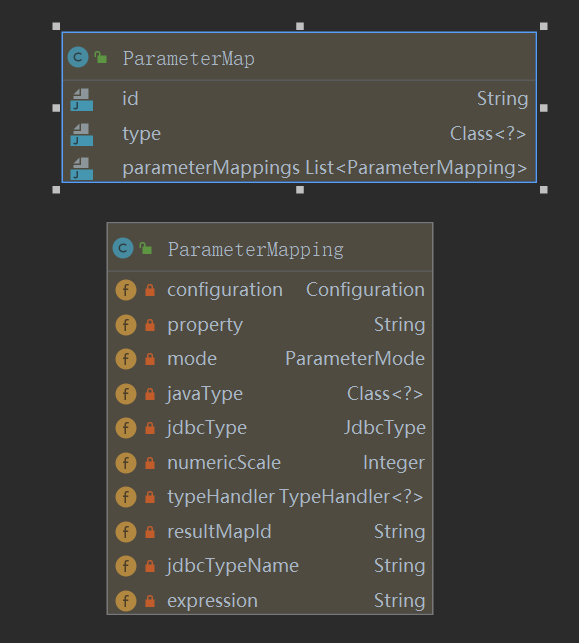
ParameterMap映射节点:
<parameterMap id="BaseParameterMap" type="com.example.demo.User">

        <parameter property="id" javaType="long" jdbcType="BIGINT"/>

        <parameter property="username" javaType="string" jdbcType="VARCHAR"/>

        <parameter property="password" javaType="string" jdbcType="VARCHAR"/>

</parameterMap>
parameterMap对应上面xml配置节点,该节点转换的parameterMap会注册到configuration中。解析逻辑在org.apache.ibatis.builder.xml.XMLMapperBuilder#parameterMapElement中。
此外还有select|insert|update|delete的parameter节点的parameterType属性,method注解的参数都是转换为parameterMap,但是只有id和type属性,且不会注册到configuration中,只会存放于mappedStatement中。生成逻辑位于org.apache.ibatis.builder.MapperBuilderAssistant#getStatementResultMaps中
ResultMap解析
resultMap映射节点:
xml
<resultMap id="BaseResultMap" type="com.example.demo.User">

    <id column="id" property="id" />

    <result column="username" property="username" />

    <result column="password" property="password" />

</resultMap>
注解
@Results(id = "BaseResultMap2",

            value = {

                    @Result(property = "id", column = "id"),

                    @Result(property = "username", column = "username"),

                    @Result(property = "password", column = "password"),

            }

    )
xml解析逻辑位于org.apache.ibatis.builder.xml.XMLMapperBuilder#resultMapElement(org.apache.ibatis.parsing.XNode, java.util.List<org.apache.ibatis.mapping.ResultMapping>)
注解解析逻辑位于org.apache.ibatis.builder.annotation.MapperAnnotationBuilder#parseResultMap
解析结果会注册到Configuration的resultMaps中
SqlSource解析
1.RawSqlSource:纯sql语句,不包含动态判断节点,例如:
select * from user where id = #{id}
创建过程如下为:
	@Test

    public void testRawSqlSource(){

        RawSqlSource rawSqlSource = new RawSqlSource(new Configuration(), "select * from user where id = #{id}", Long.class);

        System.out.println(rawSqlSource.getBoundSql(1L).getSql());

    }

2.DynamicSqlSource:动态sql语句,例如:
select * from user where

<if test="id != null">

      id = #{id}

</if>
创建过程如下为:
	@Test

    public void testDynamicSqlSource(){

        List<SqlNode> contents = new ArrayList<>();

        contents.add(new StaticTextSqlNode("select * from user where 1=1"));

        contents.add(new IfSqlNode(new StaticTextSqlNode("and id = #{id}"), "id != null"));

        MixedSqlNode mixedSqlNode = new MixedSqlNode(contents);

        DynamicSqlSource dynamicSqlSource = new DynamicSqlSource(new Configuration(), mixedSqlNode);

        BoundSql boundSql = dynamicSqlSource.getBoundSql(null);

        System.out.println(boundSql.getSql());

        MapperMethod.ParamMap<Object> objectParamMap = new MapperMethod.ParamMap<>();

        objectParamMap.put("id", 1);

        System.out.println(dynamicSqlSource.getBoundSql(objectParamMap).getSql());

    }
3.ProviderSqlSource:@SelectProvider|@UpdateProvider|@DeleteProvider|@InsertProvider修饰注解方法,例如:
	@Results(id = "BaseResultMap2",

            value = {

                    @Result(property = "id", column = "id"),

                    @Result(property = "username", column = "username"),

                    @Result(property = "password", column = "password"),

            }

    )

    @SelectProvider(type = UserSelectProvider.class, method = "selectById")

    User selectById2(@Param("id") Long id);

    public class UserSelectProvider{

        public String selectById(){

            return new SQL().SELECT("username", "password")

                    .FROM("user")

                    .WHERE("id = #{id}").toString();

        }

    }
创建过程如下:
	@Test

    public void testProviderSqlSource() {

        Method[] methods = UserMapper.class.getMethods();

        for (Method method : methods) {

            SelectProvider selectProvider = method.getAnnotation(SelectProvider.class);

            if(selectProvider != null) {

                ProviderSqlSource providerSqlSource = new ProviderSqlSource(new Configuration(), selectProvider, UserMapper.class, method);

                System.out.println(providerSqlSource.getBoundSql(null).getSql());

            }

        }

    }
4.StaticSqlSource:静态sqlSource,内部String类型的sql语句,上述3种最终都会转换为该SqlSource
解析逻辑位于org.apache.ibatis.scripting.xmltags.XMLScriptBuilder#parseScriptNode
MappedStatement解析
mappedStatement映射节点:
xml
<select id="selectById" resultType="com.example.demo.User" parameterType="long">    	select * from user where id = #{id};

</select>
注解
	@Results(id = "BaseResultMap2",

            value = {

                    @Result(property = "id", column = "id"),

                    @Result(property = "username", column = "username"),

                    @Result(property = "password", column = "password"),

            }

    )

    @Select("select * from user")

    @Options(fetchSize = 10)

    User selectById2(@Param("id") Long id);
mappedStatement的主要字段:
1.sqlCommandType:由使用的标签Select|Insert|Update|Delete等决定
2.parameterMap:传入参数,由属性parameterType|parameterMap决定
3.resultMaps:返回结果集,由属性resultMap|resultType决定
4.sqlSource:标签包围的sql节点,即:select * from user where id = #{id}
xml解析逻辑位于org.apache.ibatis.builder.xml.XMLStatementBuilder#parseStatementNode
注解解析逻辑位于org.apache.ibatis.builder.annotation.MapperAnnotationBuilder#parseStatement
整体创建一个MappedStatement如下:
<select id="selectById" resultType="com.example.demo.User" parameterType="long">    	select * from user where id = #{id};

</select>
	@Test

    public void testMappedStatement() {

        List<ParameterMapping> parameterMappings = new ArrayList<ParameterMapping>();

        ParameterMap parameterMap = new ParameterMap.Builder(

                configuration,

                "selectById-Inline",

                Long.class,

                parameterMappings).build();

        ResultMap inlineResultMap = new ResultMap.Builder(

                configuration,

                "selectById-Inline",

                User.class,

                new ArrayList<ResultMapping>(),

                null).build();

        RawSqlSource rawSqlSource = new RawSqlSource(configuration, "select * from user where id = #{id}", Long.class);

        MappedStatement.Builder builder = new MappedStatement

                .Builder(configuration, "selectById", rawSqlSource, SqlCommandType.SELECT);

        builder.parameterMap(parameterMap);

        builder.resultMaps(Collections.singletonList(inlineResultMap));

        MappedStatement mappedStatement = builder.build();

        configuration.addMappedStatement(mappedStatement);

        SqlSession sqlSession = sqlSessionFactory.openSession();

        System.out.println(sqlSession.selectOne("selectById", 18L));

    }
Mybatis——Mapper解析的更多相关文章
- mybatis源码-解析配置文件(四-1)之配置文件Mapper解析(cache)
目录 1. 简介 2. 解析 3 StrictMap 3.1 区别HashMap:键必须为String 3.2 区别HashMap:多了成员变量 name 3.3 区别HashMap:key 的处理多 ...
- MyBatis mapper文件中的变量引用方式#{}与${}的差别
MyBatis mapper文件中的变量引用方式#{}与${}的差别 #{},和 ${}传参的区别如下:使用#传入参数是,sql语句解析是会加上"",当成字符串来解析,这样相比于$ ...
- mybatis mapper namespace
http://www.mybatis.org/mybatis-3/zh/sqlmap-xml.html#insert_update_and_delete org.apache.ibatis.excep ...
- XML CDATA(Mybatis mapper and XML)
Tip:must be followed by either attribute specifications, ">" or "/>". 所有 X ...
- [DB][mybatis]MyBatis mapper文件引用变量#{}与${}差异
MyBatis mapper文件引用变量#{}与${}差异 默认,使用#{}语法,MyBatis会产生PreparedStatement中.而且安全的设置PreparedStatement參数,这个过 ...
- Mybatis Mapper接口是如何找到实现类的-源码分析
KeyWords: Mybatis 原理,源码,Mybatis Mapper 接口实现类,代理模式,动态代理,Java动态代理,Proxy.newProxyInstance,Mapper 映射,Map ...
- 基于注解的Mybatis mapper 接口注意事项
基于注解的Mybatis mapper 接口功能没有mapper xml配置文件丰富,并且动态sql语句的灵活性不能和xml配置相比. 这里仅仅说一下基于注解的动态sql注意事项: Mybatis提供 ...
- ][mybatis]MyBatis mapper文件中的变量引用方式#{}与${}的差别
转自https://blog.csdn.net/szwangdf/article/details/26714603 MyBatis mapper文件中的变量引用方式#{}与${}的差别 默认情况下,使 ...
- Mybatis的解析和运行原理
Mybatis的解析和运行原理 Mybatis的运行过程大致分为两大步:第一步,读取配置文件缓存到Configuration对象,用以创建 SqlSessionFactory:第二步,SqlSessi ...
随机推荐
- 个人认为目前比较好用的ECMAScript(16-20)新特性
ECMAScript(16.17.18.19)新特性 Array.prototype.includes includes 是数组上的简单实例方法,可以轻松查找到数组中是否包含指定内容(包括NaN) 返 ...
- VulnHub PowerGrid 1.0.1靶机渗透
本文首发于微信公众号:VulnHub PowerGrid 1.0.1靶机渗透,未经授权,禁止转载. 难度评级:☆☆☆☆☆官网地址:https://download.vulnhub.com/power ...
- 如何完美获得一个double值的整数部分
如果是java有float类型的向上取整:Math.ceil() //只要有小数都+1向下取整:Math.floor() //不取小数四舍五入:Math.round() //四舍五入 如果是C++:方 ...
- LeetCode57. 插入区间
对于新插入的区间newInterval,原区间列表intervals可以分为三个部分: 左边与newInterval不重合的区间,这些区间直接加入结果数组中: 中间与newInterval重合的区间, ...
- hive中如何查询除了其中某个字段剩余所有字段
想要将hive分区表中的某个分区复制到新的分区中,使用如下sql语句 insert overwrite table zcfw_sda.sda04_core_request_base_ratio_ifr ...
- Centos 6.4 安装KSnapshot 和gimp截图工具
一. # wget http://www.ibiblio.org/pub/Linux/X11/xutils/ksnapshot-0.2.7.tar.gz # tar -zxvf ksnapshot-0 ...
- 每日一题 - 剑指 Offer 43. 1~n整数中1出现的次数
题目信息 时间: 2019-07-01 题目链接:Leetcode tag: 整除 取余 规律 递归 难易程度:中等 题目描述: 输入一个整数 n ,求1-n这n个整数的十进制表示中1出现的次数. 例 ...
- 基于ASP.NET core的MVC站点开发笔记 0x01
基于ASP.NET core的MVC站点开发笔记 0x01 我的环境 OS type:mac Software:vscode Dotnet core version:2.0/3.1 dotnet sd ...
- 阐述Fetch.ai的能源市场优化
原文链接:https://fetch.ai/explaining-fetch-ais-energy-market-optimization/ 阐述Fetch.ai的能源市场优化 2019年11月4日 ...
- 简单了解一下 Swagger
一.Swagger 1.什么是 Swagger ? Swagger 是一个规范和完整的框架,用于生成.描述.调用以及可视化的 Restful 风格的 Web 服务. 简单的理解:是一款 REST AP ...