
RGB打水印在YUV图片上
一、 概述
将RGB图片打在YUV上需要注意的是, 字体之外应该透明, 否则背景也会被覆盖不好看, 所以RGB必须有透明度, 本测试格式为BMP ARGB8888(也即B是最低字节, A是最高字节),
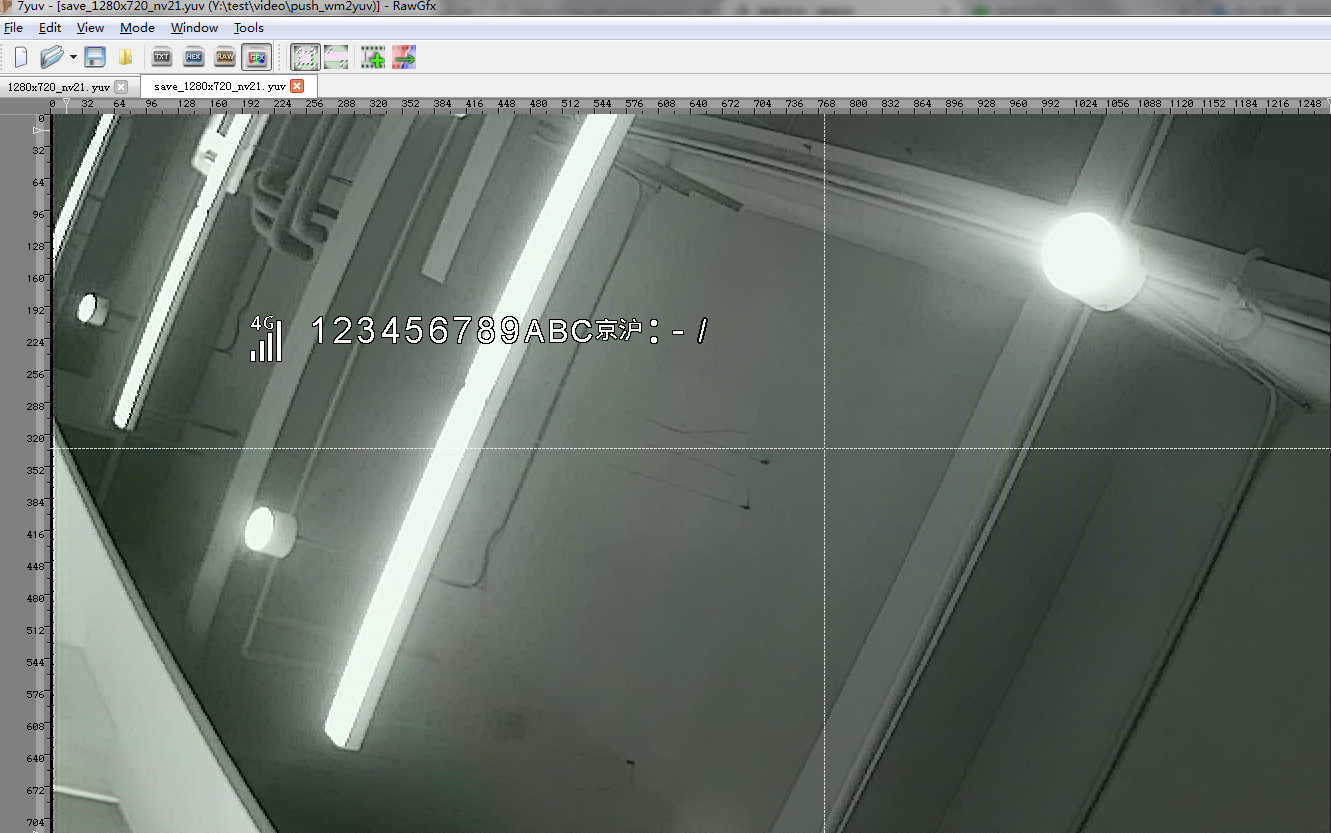
YUV格式为NV21(YUV420SP), 第一步是将ARGB转换成NV21, 然后小NV21打在打NV21上即可, 最后保存图片, 用7yuv.exe软件查看!
二、 示例代码
#include <unistd.h>

#include <sys/types.h>

#include <sys/stat.h>

#include <fcntl.h>

#include <stdio.h>

#include <sys/ioctl.h>

#include <stdlib.h>

#include <linux/types.h>

#include <linux/videodev2.h>

#include <malloc.h>

#include <math.h>

#include <string.h>

#include <sys/mman.h>

#include <errno.h>

#include <assert.h>

#define MAX_ICON_NUM    42

#define SAVE_IMG_PATH    "./save_1280x720_nv21.yuv"

#define WATERMARK_BMP_DIR    "./watermark"

struct wm_icon

{

    int id;

    int width;

    int height;

    unsigned char *y;

    unsigned char *c;

    unsigned char *alph;

};

struct wm_icon icon_arry[MAX_ICON_NUM];

struct disp_content{

    int x;

    int y;

#define MAX_CONTENT_LEN   32

    char content[MAX_CONTENT_LEN];

};

struct backgroud_info

{

    int width;

    int height;

    unsigned char *y;

    unsigned char *c;

};

static void argb8888toyuv420sp(unsigned char *src_p, int width, int height, unsigned char *dest_y, unsigned char *dest_c, unsigned char *dest_alph)

{

    int i,j;

    for(i = ; i < (int)height; i++) {

        if((i&) == ) {

            for(j= ; j< (int)width; j++) {

                *dest_y = (*src_p[]+*src_p[]+*src_p[])/;

                if((j&) == )

                    *dest_c++ = +(*(src_p[]-*dest_y)/); //cb

                else

                    *dest_c++ = +(*(src_p[]-*dest_y)/); //cr

                *dest_alph++ = src_p[];

                src_p +=;

                dest_y++;

            }

        } else {

            for(j= ; j< (int)width; j++) {

                *dest_y = (*src_p[]+*src_p[]+*src_p[])/;

                *dest_alph++ = src_p[];

                src_p +=;

                dest_y++;

            }

        }

    }

    return;

}

int init_watermark()

{

    FILE *fp = NULL;

    int i;

    int pic_width = , pic_height = ;

    char filename[];

    unsigned char *argb_buf = NULL;

    for(i = ; i < MAX_ICON_NUM; i++) {

        sprintf(filename, "%s/argb8888_24x32_%d.bmp", WATERMARK_BMP_DIR, i);

        printf("open file %s\n", filename);

        fp = fopen(filename, "r");

        if(NULL == fp) {

            printf("Fail to open file %s(%s)!", filename, strerror(errno));

            goto OPEN_FILE_ERR;

        }

        icon_arry[i].id = i;

        /* BMP格式解析说明: https://www.cnblogs.com/vedic/p/13608566.html */

        fseek(fp, , SEEK_SET);

        fread(&pic_width, , , fp);

        fread(&pic_height, , , fp);

        icon_arry[i].width = abs(pic_width);

        icon_arry[i].height = abs(pic_height);

        printf("real width=%d(%d), height=%d(%d)\n", icon_arry[i].width, pic_width, icon_arry[i].height, pic_height);

        icon_arry[i].y = (unsigned char*)malloc(icon_arry[i].width * icon_arry[i].height*/);

        if(NULL == icon_arry[i].y) {

            printf("malloc picture yuv fail !\n");

            fclose(fp);

            goto ALLOC_Y_ERR;

        }

        memset(icon_arry[i].y, 0xff, (icon_arry[i].width * icon_arry[i].height*/));

        icon_arry[i].alph = icon_arry[i].y + icon_arry[i].width * icon_arry[i].height;

        icon_arry[i].c = icon_arry[i].alph + icon_arry[i].width * icon_arry[i].height;

        argb_buf = (unsigned char *)malloc(icon_arry[i].width * icon_arry[i].height * );

        if (NULL == argb_buf) {

            printf("malloc bmp buf fail !\n");

            fclose(fp);

            goto ALLOC_BUF_ERR;

        }

        fseek(fp, , SEEK_SET);

        fread(argb_buf, icon_arry[i].width * icon_arry[i].height * , , fp);

        argb8888toyuv420sp(argb_buf, icon_arry[i].width, icon_arry[i].height,

                   icon_arry[i].y, icon_arry[i].c, icon_arry[i].alph);

        fclose(fp);

        free(argb_buf);

    }

    return ;

ALLOC_BUF_ERR:

ALLOC_Y_ERR:

OPEN_FILE_ERR:

    for(i = ; i < MAX_ICON_NUM; ++i) {

        if(icon_arry[i].y != NULL) {

            free(icon_arry[i].y);

            icon_arry[i].y = NULL;

        }

    }

    return -;

}

static int get_word_num(char val)

{

    int i;

    int cnt = ;

    for(i=; i>=; i--) {

        if(!(val & (<<i)))

            break;

        else

            cnt++;

    }

    if (cnt == )

        return ;

    return cnt;

}

#define DEFAULT_NUM    36

static int get_word_index(char *data, int wordlen)

{

    int index = DEFAULT_NUM;

    if(wordlen == ) {

        if (*data >= '' && *data <= '') {

            printf("choose numben 0 ~ 9\n");

            index = (*data - ); //落在数组下标0开始

        } else if (*data >= 'A' && *data <= 'Z') {

            printf("choose A~Z\n");

            index = (*data - ); //落在数组下标10开始

        } else if (*data == ' ') {

            printf("choose kong\n");

            index = ;

        } else if (*data == '-') {

            printf("choose -\n");

            index = ;

        } else if (*data == '.') {

            printf("choose .\n");

            index = DEFAULT_NUM;

        } else if (*data == ':') {

            printf("choose eng :\n");

            index = ;

        } else if (*data == '/') {

            printf("choose /\n");

            index = ;

        } else {

            printf("not match %s , use DEFAULT_NUM\n", data);

            index = DEFAULT_NUM;

        }

    } else if (wordlen == ) {

        if(!memcmp(data, "京", )) {

            printf("choose %s\n", "京");

            index = ;

        } else if (!memcmp(data, "沪", )) {

            printf("choose %s\n", "沪");

            index = ;

        } else if (!memcmp(data, ":", )) {

            printf("choose chn :\n");

            index = ;

        } else {

            printf("choose DEFAULT_NUM\n");

            index = DEFAULT_NUM;

        }

    }

    printf("\twordlen -> %d, index -> %d\n", wordlen, index);

    return index;

}

void yuv420sp_blending(unsigned char *bg_y, unsigned char *bg_c, int bg_width, int bg_height, int left, unsigned int top, int fg_width, int fg_height,

                       unsigned char *fg_y, unsigned char *fg_c, unsigned char *alph)

{

    unsigned char *bg_y_p = NULL;

    unsigned char *bg_c_p = NULL;

    int i = ;

    int j = ;

    bg_y_p = bg_y + top * bg_width + left;

    bg_c_p = bg_c + (top >>)*bg_width + left;

    for(i = ; i<(int)fg_height; i++) {

        if((i&) == ) {

            for(j=; j< (int)fg_width; j++) {

                *bg_y_p = (( - *alph)*(*bg_y_p) + (*fg_y++)*(*alph))>>;

                *bg_c_p = (( - *alph)*(*bg_c_p) + (*fg_c++)*(*alph))>>;

                alph++;

                bg_y_p++;

                bg_c_p++;

            }

            bg_c_p = bg_c_p + bg_width - fg_width;

        } else {

            for(j=; j< (int)fg_width; j++) {

                *bg_y_p = (( - *alph)*(*bg_y_p) + (*fg_y++)*(*alph))>>;

                alph++;

                bg_y_p++;

            }

        }

            bg_y_p = bg_y_p + bg_width - fg_width;

    }

}

int save_image(void *addr, int length)

{

    FILE *fp = fopen(SAVE_IMG_PATH, "w");

    if(fp == NULL) {

        printf("Fail to fopen %s\n", SAVE_IMG_PATH);

        exit(-);

    }

    fwrite(addr, length, , fp);

    fflush(fp);

    usleep();

    fclose(fp);

    return ;

}

int push_wm2bg(unsigned char *bg_yuv_buf, int bg_width, int bg_height, struct disp_content *single_wm)

{

    int pos_x;

    struct backgroud_info bg_info;

    int buflen, wordlen;

    char *p_content;

    int pic_index;

    int i;

    bg_info.width = bg_width;

    bg_info.height = bg_height;

    bg_info.y = bg_yuv_buf;

    bg_info.c = bg_yuv_buf + bg_width * bg_height;

    p_content = single_wm->content;

    buflen = strlen(single_wm->content);

    pos_x = single_wm->x;

    printf("\nshow: %s(%d Bytes):\n", p_content, buflen);

    for (i = ; i < strlen(single_wm->content); i++) {

        wordlen = get_word_num(p_content[]);

        buflen -= wordlen;

        if(buflen < ) break;

        pic_index = get_word_index(p_content, wordlen);

        yuv420sp_blending(bg_info.y, bg_info.c, bg_info.width, bg_info.height, pos_x, single_wm->y,

                icon_arry[pic_index].width, icon_arry[pic_index].height,

                icon_arry[pic_index].y, icon_arry[pic_index].c,

                icon_arry[pic_index].alph);

        pos_x += icon_arry[pic_index].width;

        p_content += wordlen;

    }

    return ;

    }

/* Note:

*    input file 1280*720 NV21 format

*    watermark ARGB8888

*/

int main(int argc, char **argv)

{

    unsigned int bg_width = ;

    unsigned int bg_height = ;

    unsigned int bg_nv21_size = bg_width * bg_height * /;

    FILE *fp;

    char *bg_file = argv[];

    unsigned char *bg_yuv_buf;

    /* 汉字编码用UTF-8, 建议用UTF-8编码 */

    struct disp_content single_wm = {, , "0 123456789ABC京沪:-/"};

    if(bg_file == NULL) {

        printf("Pls input backgroud file !\n");

        printf("\t eg: %s 1280x720_nv21.yuv\n", argv[]);

        exit(-);

    }

    fp = fopen(bg_file, "rb");

    if(fp == NULL) {

        printf("open backgroud file(%s) fail !\n", bg_file);

        exit(-);

    }

    bg_yuv_buf = (unsigned char *)malloc(bg_nv21_size);

    if(bg_yuv_buf == NULL){

        printf("malloc bg_yuv_buf fail!\n");

        exit(-);

    }

    fread(bg_yuv_buf, , bg_nv21_size, fp);

    init_watermark();

    push_wm2bg(bg_yuv_buf, bg_width, bg_height, &single_wm);

    save_image(bg_yuv_buf, bg_nv21_size);

    return ;

}


fzk@mdvr:push_wm2yuv$ ./a.out 1280x720_nv21.yuv

open file ./watermark/argb8888_24x32_0.bmp

real width=(), height=()

open file ./watermark/argb8888_24x32_1.bmp

real width=(), height=(-)

open file ./watermark/argb8888_24x32_2.bmp

real width=(), height=(-)

open file ./watermark/argb8888_24x32_3.bmp

real width=(), height=(-)

open file ./watermark/argb8888_24x32_4.bmp

real width=(), height=(-)

open file ./watermark/argb8888_24x32_5.bmp

real width=(), height=(-)

open file ./watermark/argb8888_24x32_6.bmp

real width=(), height=(-)

open file ./watermark/argb8888_24x32_7.bmp

real width=(), height=(-)

open file ./watermark/argb8888_24x32_8.bmp

real width=(), height=(-)

open file ./watermark/argb8888_24x32_9.bmp

real width=(), height=(-)

open file ./watermark/argb8888_24x32_10.bmp

real width=(), height=(-)

open file ./watermark/argb8888_24x32_11.bmp

real width=(), height=(-)

open file ./watermark/argb8888_24x32_12.bmp

real width=(), height=(-)

open file ./watermark/argb8888_24x32_13.bmp

real width=(), height=(-)

open file ./watermark/argb8888_24x32_14.bmp

real width=(), height=(-)

open file ./watermark/argb8888_24x32_15.bmp

real width=(), height=(-)

open file ./watermark/argb8888_24x32_16.bmp

real width=(), height=(-)

open file ./watermark/argb8888_24x32_17.bmp

real width=(), height=(-)

open file ./watermark/argb8888_24x32_18.bmp

real width=(), height=(-)

open file ./watermark/argb8888_24x32_19.bmp

real width=(), height=(-)

open file ./watermark/argb8888_24x32_20.bmp

real width=(), height=(-)

open file ./watermark/argb8888_24x32_21.bmp

real width=(), height=(-)

open file ./watermark/argb8888_24x32_22.bmp

real width=(), height=(-)

open file ./watermark/argb8888_24x32_23.bmp

real width=(), height=(-)

open file ./watermark/argb8888_24x32_24.bmp

real width=(), height=(-)

open file ./watermark/argb8888_24x32_25.bmp

real width=(), height=(-)

open file ./watermark/argb8888_24x32_26.bmp

real width=(), height=(-)

open file ./watermark/argb8888_24x32_27.bmp

real width=(), height=(-)

open file ./watermark/argb8888_24x32_28.bmp

real width=(), height=(-)

open file ./watermark/argb8888_24x32_29.bmp

real width=(), height=(-)

open file ./watermark/argb8888_24x32_30.bmp

real width=(), height=(-)

open file ./watermark/argb8888_24x32_31.bmp

real width=(), height=(-)

open file ./watermark/argb8888_24x32_32.bmp

real width=(), height=(-)

open file ./watermark/argb8888_24x32_33.bmp

real width=(), height=(-)

open file ./watermark/argb8888_24x32_34.bmp

real width=(), height=(-)

open file ./watermark/argb8888_24x32_35.bmp

real width=(), height=(-)

open file ./watermark/argb8888_24x32_36.bmp

real width=(), height=(-)

open file ./watermark/argb8888_24x32_37.bmp

real width=(), height=(-)

open file ./watermark/argb8888_24x32_38.bmp

real width=(), height=(-)

open file ./watermark/argb8888_24x32_39.bmp

real width=(), height=(-)

open file ./watermark/argb8888_24x32_40.bmp

real width=(), height=()

open file ./watermark/argb8888_24x32_41.bmp

real width=(), height=()

show:  123456789ABC京沪:-/( Bytes):

choose numben  ~

        wordlen -> , index ->

choose kong

        wordlen -> , index ->

choose numben  ~

        wordlen -> , index ->

choose numben  ~

        wordlen -> , index ->

choose numben  ~

        wordlen -> , index ->

choose numben  ~

        wordlen -> , index ->

choose numben  ~

        wordlen -> , index ->

choose numben  ~

        wordlen -> , index ->

choose numben  ~

        wordlen -> , index ->

choose numben  ~

        wordlen -> , index ->

choose numben  ~

        wordlen -> , index ->

choose A~Z

        wordlen -> , index ->

choose A~Z

        wordlen -> , index ->

choose A~Z

        wordlen -> , index ->

choose 京

        wordlen -> , index ->

choose 沪

        wordlen -> , index ->

choose chn :

        wordlen -> , index ->

choose -

        wordlen -> , index ->

choose /

        wordlen -> , index ->
执行log
三、注意事项
1. BMP具体解析请查看上一篇博客: https://www.cnblogs.com/vedic/p/13608566.html
2. 请用UTF-8格式查看, 否则中文会乱码
3. 代码自动解析BMP头部图片的宽高, 所以不只是支持32x24
4. 黑白图片没问题, 彩色会有问题
5. 测试用的背景图片: https://files-cdn.cnblogs.com/files/vedic/1280x720_nv21.bmp 注意将后缀改成.yuv

6. 测试用的水印图标: https://files.cnblogs.com/files/vedic/watermark.rar
7. 最后展示:

RGB打水印在YUV图片上的更多相关文章
- Photoshop去图片水印——适用复杂图片上有水印
该方法适合复杂图片上有水印的,不过这个只适合水印只是文字而没有背景的那种.不是所有的水印图片都适合处理.下面是处理前后的对照 工具/原料 photoshop8.0 方法/步骤 1 打开需要 ...
- php文字水印和php图片水印实现代码
本文章向码农们介绍php文字水印和php图片水印实现代码,需要的码农可以参考一下. php 文字水印 文字水印就是在图片上加上文字,主要使用gd库的imagefttext方法,并且需要字体文件. 实现 ...
- php文字水印和php图片水印实现代码(二种加水印方法)
文字水印 文字水印就是在图片上加上文字,主要使用gd库的imagefttext方法,并且需要字体文件.效果图如下: $dst_path = 'dst.jpg';//创建图片的实例$dst = imag ...
- java多图片上传--前端实现预览--图片压缩 、图片缩放,区域裁剪,水印,旋转,保持比例。
java多图片上传--前端实现预览 前端代码: https://pan.baidu.com/s/1cqKbmjBSXOhFX4HR1XGkyQ 解压后: java后台: <!--文件上传--&g ...
- [原创]超强C#图片上传,加水印,自动生成缩略图源代码
<%@ Page Language=“C#“ AutoEventWireup=“true“ %> <%@ Import Namespace=“System“ %> <%@ ...
- yii php 图片上传与生成缩略图
今天需要做图片上传与生成缩略图的功能,把代码进行记录如下: html 视图 ($pic_action_url = $this->createAbsoluteUrl('h ...
- 基于WebImage的图片上传工具类
支持缩略图和水印. using System; using System.IO; using System.Linq; using System.Web; using System.Web.Helpe ...
- 包含修改字体,图片上传等功能的文本输入框-Bootstrap
通过jQuery Bootstrap小插件,框任何一个div转换变成一个富文本编辑框,主要特色: 在Mac和window平台下自动针对常用操作绑定热键 可以拖拽插入图片,支持图片上传(也可以获取移动设 ...
- 火车头dede采集接口,图片加水印,远程图片本地化,远程无后缀的无图片本地化
<?php /* [LocoySpider] (C)2005-2010 Lewell Inc. 火车采集器 DedeCMS 5.7 UTF8 文章发布接口 Update content: 图片加 ...
随机推荐
- 用Python做一个简单的翻译工具
编程本身是跟年龄无关的一件事,不论你现在是十四五岁,还是四五十岁,如果你热爱它,并且愿意持续投入其中,必定会有所收获. 很多人学习python,不知道从何学起.很多人学习python,掌握了基本语法过 ...
- 《RabbitMQ》如何保证消息不被重复消费
一 重复消息 为什么会出现消息重复?消息重复的原因有两个:1.生产时消息重复,2.消费时消息重复. 1.1 生产时消息重复 由于生产者发送消息给MQ,在MQ确认的时候出现了网络波动,生产者没有收到确认 ...
- 某大型企业ospf面试题分析(含路由策略和路由过滤,及双点双向重发布)
面试问题背景 本面试题来自国内最大通信技术公司之一,央企,有很多金融网项目. 了解行业的同学,一定知道事哪个企业. 上面试问题(取自百哥收集整理的面试总结大全,关注百哥CSDN或知乎,不定期分享名企面 ...
- C#LeetCode刷题之#69-x 的平方根(Sqrt(x))
问题 该文章的最新版本已迁移至个人博客[比特飞],单击链接 https://www.byteflying.com/archives/3848 访问. 实现 int sqrt(int x) 函数. 计算 ...
- C#LeetCode刷题之#581-最短无序连续子数组( Shortest Unsorted Continuous Subarray)
问题 给定一个整数数组,你需要寻找一个连续的子数组,如果对这个子数组进行升序排序,那么整个数组都会变为升序排序. 你找到的子数组应是最短的,请输出它的长度. 输入: [2, 6, 4, 8, 10, ...
- G4560 HD610安装黑苹果Hakintosh
这一篇主要是写给使用G4560笔记本折腾黑苹果的朋友. 我折腾了几天黑苹果,发现怎么也无法成功,最后我才知道HD610现在还不支持黑苹果. 由于大多数笔记本不支持屏蔽核显,这意味着要想使用黑苹果必须要 ...
- day6 函数
1.关键字参数 给实参对应的形参 调用函数时 设置关键字参数,形参=实参,把实参固定给那个形参 2.元组的可变(不定长参数)的使用 可变参数可以接收任意数量的普通的形参,并且组包 ...
- Redis设计与实现——数据结构与对象
SDS 简单动态字符串 在redis数据库里面,包含字符串值得键值对在底层都是由SDS实现的. redis > set msg "hello world" 1)键值对的键是 ...
- 前端vue2-org-tree实现精美组织架构图
最近遇到开发组织架构的需求,与以往开发的组织架构不同,不光要展示人名,还要显示职务(或者子公司名称).对应的头像等,并且要考虑,如果用户未上传头像,需使用默认头像(男.女.中性),(⊙o⊙)…要尊重尊 ...
- Docker入门教程-Linux环境安装Nginx及入门使用
介绍 Nginx("engine x")是一款是由俄罗斯的程序设计师Igor Sysoev所开发高性能的 Web和 反向代理 服务器,也是一个 IMAP/POP3/SMTP 代理服 ...