
微信小程序弹出层

wx.showToast({

  title: '成功',

  icon: 'success',

  duration: 2000

})

2.模态弹窗 wx.showModal
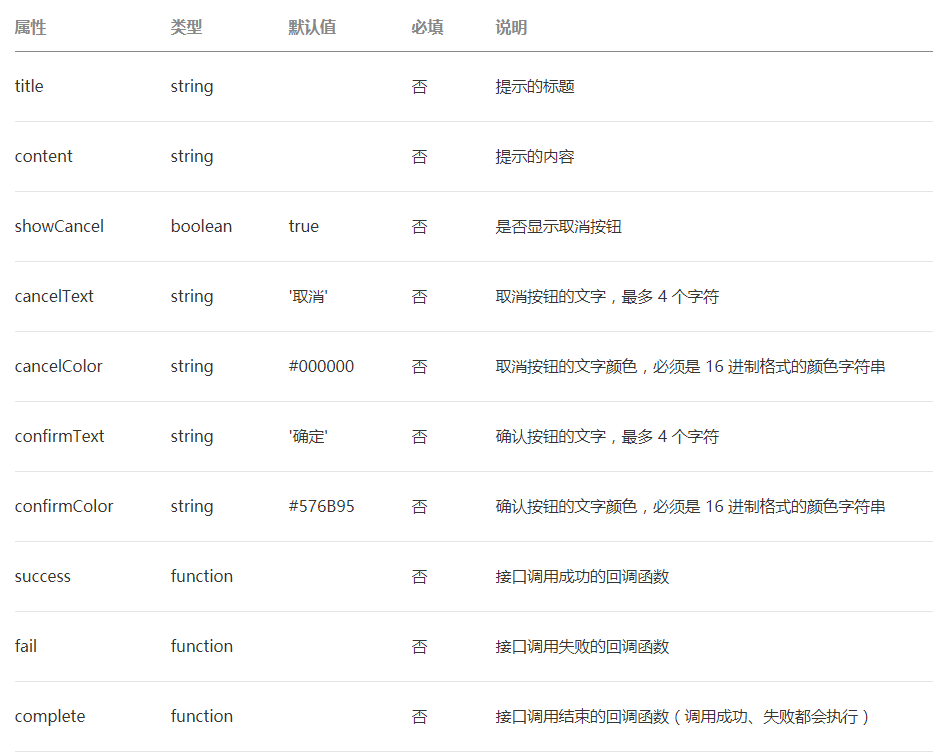
wx.showModal({

  title: '提示',

  content: '这是一个模态弹窗',

  success (res) {

    if (res.confirm) {

      console.log('用户点击确定')

    } else if (res.cancel) {

      console.log('用户点击取消')

    }

  }

})
3.操作菜单 wx.showActionSheet

wx.showActionSheet({

  itemList: ['A', 'B', 'C'],

  success (res) {

    console.log(res.tapIndex)

  },

  fail (res) {

    console.log(res.errMsg)

  }

})

4.加载中  wx.showLoading
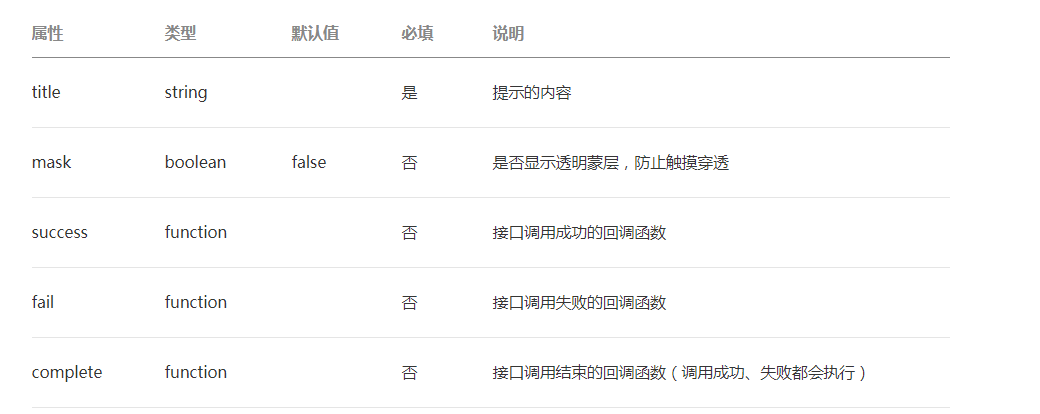
wx.showLoading({

  title: '加载中',

})

setTimeout(function () {

  wx.hideLoading()

}, 2000)
5.自定义modal(带有表单的弹出框)
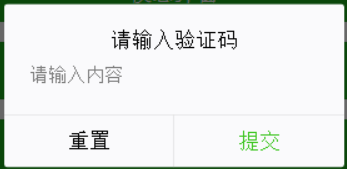
<modal hidden="{{hiddenmodalput}}" title="请输入验证码" confirm-text="提交" cancel-text="重置" bindcancel="cancel" bindconfirm="confirm">

   <input type='text'placeholder="请输入内容" auto-focus/>

</modal>
- Page({
- data:{
- hiddenmodalput:true,
- //可以通过hidden是否掩藏弹出框的属性,来指定那个弹出框
- },
- //点击按钮痰喘指定的hiddenmodalput弹出框
- modalinput:function(){
- this.setData({
- hiddenmodalput: !this.data.hiddenmodalput
- })
- },
- //取消按钮
- cancel: function(){
- this.setData({
- hiddenmodalput: true
- });
- },
- //确认
- confirm: function(){
- this.setData({
- hiddenmodalput: true
- })
- }
- })
注意
- wx.showLoading 和 wx.showToast 同时只能显示一个
- wx.showToast 应与 wx.hideToast 配对使用
微信小程序弹出层的更多相关文章
- 微信小程序弹出层点击穿透问题
问题描述:使用小程序的modal组件实现遮罩层效果时,会出现滚动穿透的问题,即遮罩层后面的页面依旧可以滚动. 解决方案: 给底层页面动态添加 position:fixed; 代码: wxml: < ...
- 使用movable-view制作可拖拽的微信小程序弹出层效果。
仿了潮汐睡眠小程序的代码.[如果有侵权联系删除 最近做的项目有个弹出层效果,类似音乐播放器那种.按照普通的做了一般感觉交互不是很优雅,设计妹子把潮汐睡眠的弹层给我看了看,感觉做的挺好,于是乘着有空仿照 ...
- 微信小程序弹出层动画特效
.rules_modal_cont{ height:800rpx; width:200rpx; -webkit-animation: showZeroAlert .3s; animation: sho ...
- 微信小程序 - 弹出层组件
需要的可以下载示例:maskalert
- 微信小程序弹出操作菜单
微信小程序弹出操作菜单 比如在页面上放一个按钮,点击按钮弹出操作菜单,那么在按钮的 bindtap 事件里,执行下面的代码即可: wx.showActionSheet({ itemList: ['A' ...
- [bug]小程序弹出层滚动穿透问题修复
如题,解决方案有两种: 1.如果弹出层没有滚动事件,就直接在蒙板和弹出层上加 catchtouchmove;(方便快捷) <template name="popup-modal&quo ...
- 微信小程序 - 弹出键盘遮挡住输入框
在开发微信小程序的时候遇到,输入用户名或者手机号以及地址,手机键盘调起来,会把输入框遮挡. 如图: 以上两张图是自己工作中遇到的,此处不要着急,一个属性帮你搞定. cursor-spacing:指定光 ...
- 微信小程序弹出可填写框两种方法
方法一: html页面: < view class = "container" class = "zn-uploadimg" > < butt ...
- 微信小程序弹出和隐藏遮罩层动画以及五星评分
参考源码: http://www.see-source.com/weixinwidget/detail.html?wid=82 https://blog.csdn.net/pcaxb/article/ ...
随机推荐
- gym100923C. Por Costel and Bujor (高斯消元)
题意:简化一下 就是解N个 系数矩阵一样 等式右边列矩阵不一样的方程组 题解:系数矩阵一样 为什么我却毫无办法???? 其实只要把等式右边的矩阵都排在后面就好了啊 就变成解一个N x 2N的方程组了 ...
- P1251 餐巾计划 (网络流)
题意:餐厅每天会需要用Ri块新的餐巾 用完后也会产生Ri块旧的餐巾 每天购买新的餐巾单价p元 每天产出的旧餐巾可以送到快洗部花费每张c1元 在i + v1天可以使用 也可以花费c2元每张送到慢洗部 在 ...
- 2020 年百度之星·程序设计大赛 - 初赛一Dec 简单dp
题意: Problem Description 初始有 a, ba,b 两个正整数,每次可以从中选一个大于 1 的数减 1,最后两个都会减到 1,我们想知道在过程中两个数互质的次数最多是多少. Inp ...
- Linux 设置简单密码
centos: echo 密码 | passwd --stdin 用户名 ubuntu:(需先设置一个密码) sudo passwd username https://blog.csdn.net/mi ...
- 004、Python xlsxwriter模块
简单用法demo # !/usr/bin/python # coding:utf-8 # xlsxwriter的基本用法 import xlsxwriter # 1. 创建一个Excel文件 work ...
- 请问什么时候对象分配会不在 TLAB 内分配
Java 对象分配流程 我们这里不考虑栈上分配,这些会在 JIT 的章节详细分析,我们这里考虑的是无法栈上分配需要共享的对象. 对于 HotSpot JVM 实现,所有的 GC 算法的实现都是一种对于 ...
- Ansible 自动化部署
参考 BLOG: Ansible 系列模块 Ansible 部署与使用 Ansible Book Ansible Ansible 是一个自动化统一配置管理工具,自动化主要体现在 Ansible 集成了 ...
- 网络协议 & 协议体系结构模型
基本知识概述 网络协议是什么? 为进行网络中的数据交换,而建立的规则(约定),就称为网络协议 网络协议的三个组成要素? 语法:数据与控制信息的结构或格式 语义:发出何种控制信息,完成何种动作,作出何种 ...
- next v5升级到next v7需要注意的地方
title: next v5升级到next v7需要注意的地方 date: 2020-03-04 categories: web tags: [hexo,next] 大部分的设置都是一样的,但有一些细 ...
- CDD All In One
CDD All In One 组件驱动开发 (CDD) refs https://www.componentdriven.org/ https://www.learnstorybook.com/int ...