
java的poi技术读取Excel[2003-2007,2010]
这篇blog主要是讲述java中poi读取excel,而excel的版本包括:2003-2007和2010两个版本, 即excel的后缀名为:xls和xlsx。
读取excel和MySQL相关: java的poi技术读取Excel数据到MySQL
你也可以在 : java的poi技术读取和导入Excel了解到写入Excel的方法信息
使用JXL技术 :java的jxl技术导入Excel
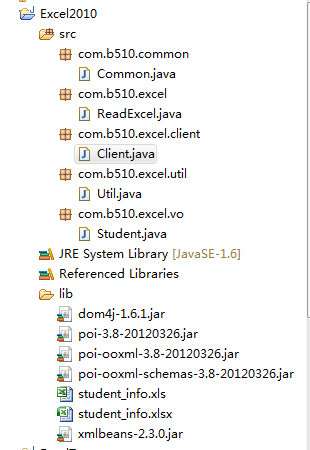
下面是本文的项目结构:
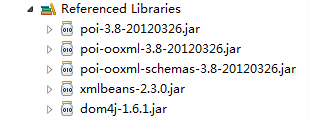
项目中所需要的jar文件:
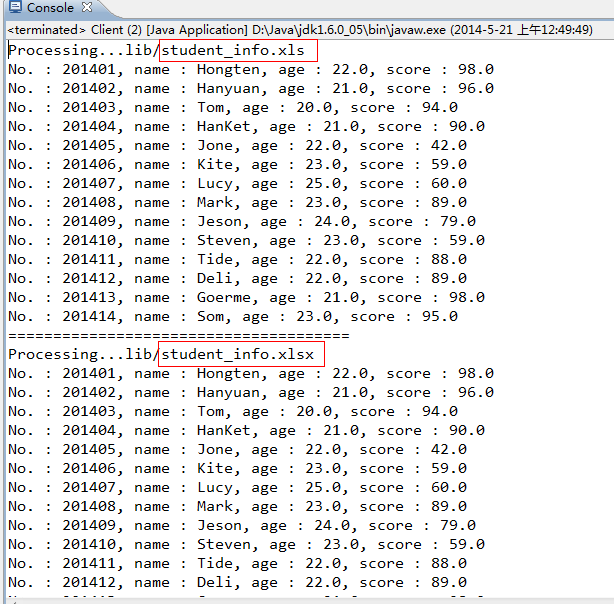
所用的Excel数据(2003-2007,2010都是一样的数据)

运行效果:
=================================================
源码部分:
=================================================
/Excel2010/src/com/b510/common/Common.java
 /**

  *

  */

 package com.b510.common;

 /**

  * @author Hongten

  * @created 2014-5-21

  */

 public class Common {

     public static final String OFFICE_EXCEL_2003_POSTFIX = "xls";

     public static final String OFFICE_EXCEL_2010_POSTFIX = "xlsx";

     public static final String EMPTY = "";

     public static final String POINT = ".";

     public static final String LIB_PATH = "lib";

     public static final String STUDENT_INFO_XLS_PATH = LIB_PATH + "/student_info" + POINT + OFFICE_EXCEL_2003_POSTFIX;

     public static final String STUDENT_INFO_XLSX_PATH = LIB_PATH + "/student_info" + POINT + OFFICE_EXCEL_2010_POSTFIX;

     public static final String NOT_EXCEL_FILE = " : Not the Excel file!";

     public static final String PROCESSING = "Processing...";

 }
/Excel2010/src/com/b510/excel/ReadExcel.java
 /**

  *

  */

 package com.b510.excel;

 import java.io.FileInputStream;

 import java.io.IOException;

 import java.io.InputStream;

 import java.util.ArrayList;

 import java.util.List;

 import org.apache.poi.hssf.usermodel.HSSFCell;

 import org.apache.poi.hssf.usermodel.HSSFRow;

 import org.apache.poi.hssf.usermodel.HSSFSheet;

 import org.apache.poi.hssf.usermodel.HSSFWorkbook;

 import org.apache.poi.xssf.usermodel.XSSFCell;

 import org.apache.poi.xssf.usermodel.XSSFRow;

 import org.apache.poi.xssf.usermodel.XSSFSheet;

 import org.apache.poi.xssf.usermodel.XSSFWorkbook;

 import com.b510.common.Common;

 import com.b510.excel.util.Util;

 import com.b510.excel.vo.Student;

 /**

  * @author Hongten

  * @created 2014-5-20

  */

 public class ReadExcel {

     /**

      * read the Excel file

      * @param path the path of the Excel file

      * @return

      * @throws IOException

      */

     public List<Student> readExcel(String path) throws IOException {

         if (path == null || Common.EMPTY.equals(path)) {

             return null;

         } else {

             String postfix = Util.getPostfix(path);

             if (!Common.EMPTY.equals(postfix)) {

                 if (Common.OFFICE_EXCEL_2003_POSTFIX.equals(postfix)) {

                     return readXls(path);

                 } else if (Common.OFFICE_EXCEL_2010_POSTFIX.equals(postfix)) {

                     return readXlsx(path);

                 }

             } else {

                 System.out.println(path + Common.NOT_EXCEL_FILE);

             }

         }

         return null;

     }

     /**

      * Read the Excel 2010

      * @param path the path of the excel file

      * @return

      * @throws IOException

      */

     public List<Student> readXlsx(String path) throws IOException {

         System.out.println(Common.PROCESSING + path);

         InputStream is = new FileInputStream(path);

         XSSFWorkbook xssfWorkbook = new XSSFWorkbook(is);

         Student student = null;

         List<Student> list = new ArrayList<Student>();

         // Read the Sheet

         for (int numSheet = 0; numSheet < xssfWorkbook.getNumberOfSheets(); numSheet++) {

             XSSFSheet xssfSheet = xssfWorkbook.getSheetAt(numSheet);

             if (xssfSheet == null) {

                 continue;

             }

             // Read the Row

             for (int rowNum = 1; rowNum <= xssfSheet.getLastRowNum(); rowNum++) {

                 XSSFRow xssfRow = xssfSheet.getRow(rowNum);

                 if (xssfRow != null) {

                     student = new Student();

                     XSSFCell no = xssfRow.getCell(0);

                     XSSFCell name = xssfRow.getCell(1);

                     XSSFCell age = xssfRow.getCell(2);

                     XSSFCell score = xssfRow.getCell(3);

                     student.setNo(getValue(no));

                     student.setName(getValue(name));

                     student.setAge(getValue(age));

                     student.setScore(Float.valueOf(getValue(score)));

                     list.add(student);

                 }

             }

         }

         return list;

     }

     /**

      * Read the Excel 2003-2007

      * @param path the path of the Excel

      * @return

      * @throws IOException

      */

     public List<Student> readXls(String path) throws IOException {

         System.out.println(Common.PROCESSING + path);

         InputStream is = new FileInputStream(path);

         HSSFWorkbook hssfWorkbook = new HSSFWorkbook(is);

         Student student = null;

         List<Student> list = new ArrayList<Student>();

         // Read the Sheet

         for (int numSheet = 0; numSheet < hssfWorkbook.getNumberOfSheets(); numSheet++) {

             HSSFSheet hssfSheet = hssfWorkbook.getSheetAt(numSheet);

             if (hssfSheet == null) {

                 continue;

             }

             // Read the Row

             for (int rowNum = 1; rowNum <= hssfSheet.getLastRowNum(); rowNum++) {

                 HSSFRow hssfRow = hssfSheet.getRow(rowNum);

                 if (hssfRow != null) {

                     student = new Student();

                     HSSFCell no = hssfRow.getCell(0);

                     HSSFCell name = hssfRow.getCell(1);

                     HSSFCell age = hssfRow.getCell(2);

                     HSSFCell score = hssfRow.getCell(3);

                     student.setNo(getValue(no));

                     student.setName(getValue(name));

                     student.setAge(getValue(age));

                     student.setScore(Float.valueOf(getValue(score)));

                     list.add(student);

                 }

             }

         }

         return list;

     }

     @SuppressWarnings("static-access")

     private String getValue(XSSFCell xssfRow) {

         if (xssfRow.getCellType() == xssfRow.CELL_TYPE_BOOLEAN) {

             return String.valueOf(xssfRow.getBooleanCellValue());

         } else if (xssfRow.getCellType() == xssfRow.CELL_TYPE_NUMERIC) {

             return String.valueOf(xssfRow.getNumericCellValue());

         } else {

             return String.valueOf(xssfRow.getStringCellValue());

         }

     }

     @SuppressWarnings("static-access")

     private String getValue(HSSFCell hssfCell) {

         if (hssfCell.getCellType() == hssfCell.CELL_TYPE_BOOLEAN) {

             return String.valueOf(hssfCell.getBooleanCellValue());

         } else if (hssfCell.getCellType() == hssfCell.CELL_TYPE_NUMERIC) {

             return String.valueOf(hssfCell.getNumericCellValue());

         } else {

             return String.valueOf(hssfCell.getStringCellValue());

         }

     }

 }
/Excel2010/src/com/b510/excel/client/Client.java
 /**

  *

  */

 package com.b510.excel.client;

 import java.io.IOException;

 import java.util.List;

 import com.b510.common.Common;

 import com.b510.excel.ReadExcel;

 import com.b510.excel.vo.Student;

 /**

  * @author Hongten

  * @created 2014-5-21

  */

 public class Client {

     public static void main(String[] args) throws IOException {

         String excel2003_2007 = Common.STUDENT_INFO_XLS_PATH;

         String excel2010 = Common.STUDENT_INFO_XLSX_PATH;

         // read the 2003-2007 excel

         List<Student> list = new ReadExcel().readExcel(excel2003_2007);

         if (list != null) {

             for (Student student : list) {

                 System.out.println("No. : " + student.getNo() + ", name : " + student.getName() + ", age : " + student.getAge() + ", score : " + student.getScore());

             }

         }

         System.out.println("======================================");

         // read the 2010 excel

         List<Student> list1 = new ReadExcel().readExcel(excel2010);

         if (list1 != null) {

             for (Student student : list1) {

                 System.out.println("No. : " + student.getNo() + ", name : " + student.getName() + ", age : " + student.getAge() + ", score : " + student.getScore());

             }

         }

     }

 }
/Excel2010/src/com/b510/excel/util/Util.java
 /**

  *

  */

 package com.b510.excel.util;

 import com.b510.common.Common;

 /**

  * @author Hongten

  * @created 2014-5-21

  */

 public class Util {

     /**

      * get postfix of the path

      * @param path

      * @return

      */

     public static String getPostfix(String path) {

         if (path == null || Common.EMPTY.equals(path.trim())) {

             return Common.EMPTY;

         }

         if (path.contains(Common.POINT)) {

             return path.substring(path.lastIndexOf(Common.POINT) + 1, path.length());

         }

         return Common.EMPTY;

     }

 }
/Excel2010/src/com/b510/excel/vo/Student.java
 /**

  *

  */

 package com.b510.excel.vo;

 /**

  * Student

  *

  * @author Hongten

  * @created 2014-5-18

  */

 public class Student {

     /**

      * id

      */

     private Integer id;

     /**

      * 学号

      */

     private String no;

     /**

      * 姓名

      */

     private String name;

     /**

      * 学院

      */

     private String age;

     /**

      * 成绩

      */

     private float score;

     public Integer getId() {

         return id;

     }

     public void setId(Integer id) {

         this.id = id;

     }

     public String getNo() {

         return no;

     }

     public void setNo(String no) {

         this.no = no;

     }

     public String getName() {

         return name;

     }

     public void setName(String name) {

         this.name = name;

     }

     public String getAge() {

         return age;

     }

     public void setAge(String age) {

         this.age = age;

     }

     public float getScore() {

         return score;

     }

     public void setScore(float score) {

         this.score = score;

     }

 }
相关Jar文件下载:http://pan.baidu.com/s/1mg7IG6c
源码下载:http://pan.baidu.com/s/1qWwfpDi
---------updated on 2018-08-21
源码下载:
链接: https://pan.baidu.com/s/1Sktrm4gu3aBMB1o8n_ubtA
密码: tri2
========================================================
More reading,and english is important.
I'm Hongten
大哥哥大姐姐,觉得有用打赏点哦!多多少少没关系,一分也是对我的支持和鼓励。谢谢。
Hongten博客排名在100名以内。粉丝过千。
Hongten出品,必是精品。
E | hongtenzone@foxmail.com B | http://www.cnblogs.com/hongten
========================================================
java的poi技术读取Excel[2003-2007,2010]的更多相关文章
- java的poi技术读取Excel[2003-2007,2010]
这篇blog主要是讲述java中poi读取excel,而excel的版本包括:2003-2007和2010两个版本, 即excel的后缀名为:xls和xlsx. 读取excel和MySQL相关: ja ...
- java的poi技术读取Excel数据
这篇blog主要是讲述java中poi读取excel,而excel的版本包括:2003-2007和2010两个版本, 即excel的后缀名为:xls和xlsx. 读取excel和MySQL相关: ja ...
- Java Struts2读取Excel 2003/2007/2010例子
Java读写Excel的包是Apache POI(项目地址:http://poi.apache.org/),因此需要先获取POI的jar包,本实验使用的是POI 3.9稳定版. Apache POI ...
- java的poi技术读取Excel数据到MySQL
这篇blog是介绍java中的poi技术读取Excel数据,然后保存到MySQL数据中. 你也可以在 : java的poi技术读取和导入Excel了解到写入Excel的方法信息 使用JXL技术可以在 ...
- java的poi技术写Excel的Sheet
在这之前写过关于java读,写Excel的blog如下: Excel转Html java的poi技术读,写Excel[2003-2007,2010] java的poi技术读取Excel[2003-20 ...
- java的poi技术读取和导入Excel实例
本篇文章主要介绍了java的poi技术读取和导入Excel实例,报表输出是Java应用开发中经常涉及的内容,有需要的可以了解一下. 报表输出是Java应用开发中经常涉及的内容,而一般的报表往往缺乏通用 ...
- java的poi技术读取和导入Excel
项目结构: http://www.cnblogs.com/hongten/gallery/image/111987.html 用到的Excel文件: http://www.cnblogs.com/h ...
- java的poi技术下载Excel模板上传Excel读取Excel中内容(SSM框架)
使用到的jar包 JSP: client.jsp <%@ page language="java" contentType="text/html; charset= ...
- Java使用poi包读取Excel文档
项目需要解析Excel文档获取数据,就在网上找了一些资料,结合自己这次使用,写下心得: 1.maven项目需加入如下依赖: <dependency> <groupId>org. ...
随机推荐
- Ubuntu下su被拒绝
ubuntu@ubuntu:~$ sudo passwd root输入新的 UNIX 密码: 重新输入新的 UNIX 密码: passwd:已成功更新密码前提是你肯定得知道当前用户的密码. 然后登录: ...
- AJAX 与 MySQL
AJAX 与 MySQL AJAX 可用来与数据库进行交互式通信. AJAX 数据库实例 下面的实例将演示网页如何通过 AJAX 从数据库读取信息: 实例 Select a person: P ...
- APP常用字体
font-family:Microsoft YaHei,Helvitica,Verdana,Tohoma,Arial,san-serif;
- codeblock 编译googletest
1.cmake安装 2.codeblock 16.01 3.Google Test 1.7.0 4.PATH路径添加(重启电脑,保证设置的PATH路径生效) 5.python安装 6.编译安装: ...
- linux source
清华TUNA镜像源https://mirrors.tuna.tsinghua.edu.cn/ 中科大USTC镜像源 https://mirrors.ustc.edu.cn/ ali http://mi ...
- struts2 自定义校验规则
自定义校验规则:(了解) 在Struts2自定义校验规则: 1.实现一个Validator 接口. 2.一般开发中继承ValidatorSupport 或者 FieldValidatorSupport ...
- python在windows下获取cpu、硬盘、bios、主板序列号
测试 此处使用的是wmi库,可以去google里面搜索“python wmi” import os, sysimport timeimport wmi,zlib def get_cpu_info() ...
- CKEditor 配置
在asp.net 中注意需要特殊处理控件的ID 先引入js <script type="text/javascript" src="ckeditor/ckedito ...
- Oracle行转列、列转行的Sql语句总结(转)
多行转字符串 这个比较简单,用||或concat函数可以实现 select concat(id,username) str from app_userselect id||username str f ...
- JavaScript链表
//实现列表类 function list() { this.listSize = 0;//元素个数 属性 this.pos = 0;//当前位置 属性 ...