
Flutter实战视频-移动电商-57.购物车_在Model中增加选中字段
57.购物车_在Model中增加选中字段
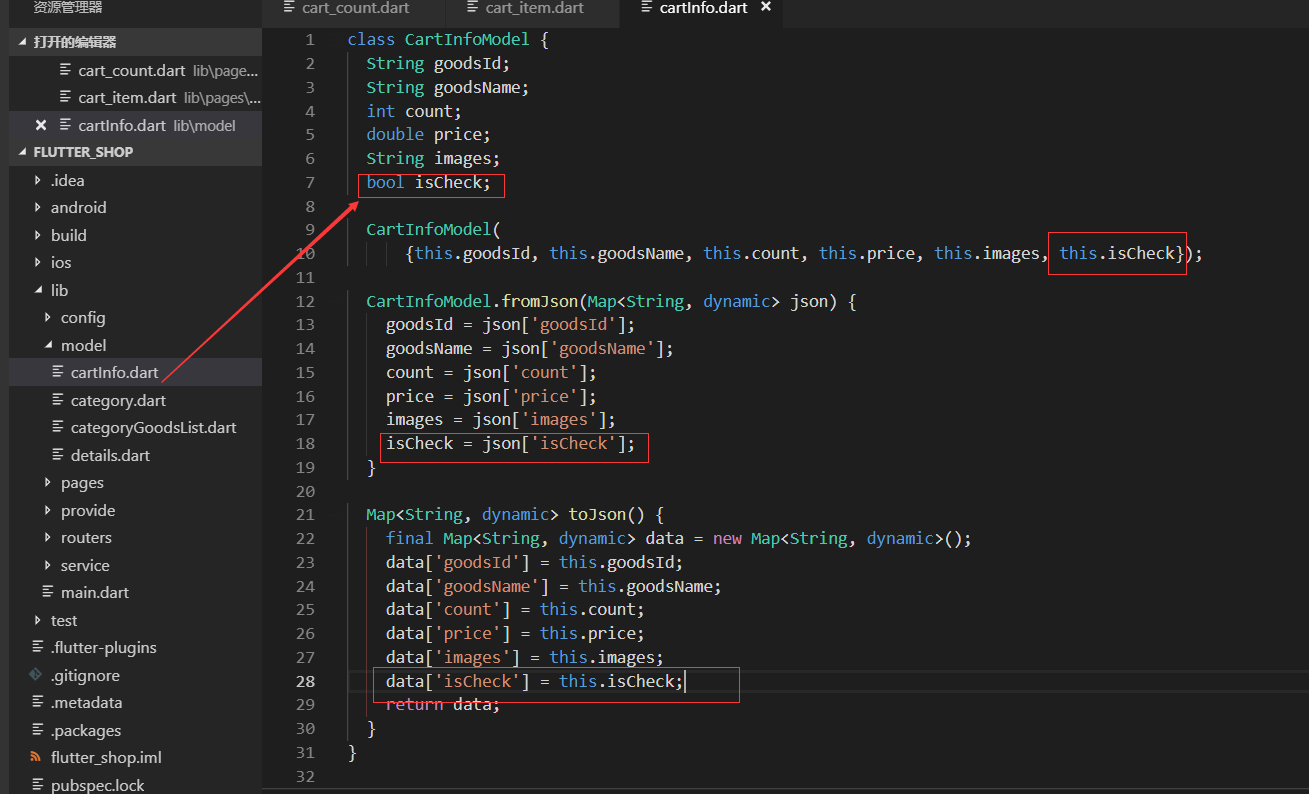
先修改model类
model/cartInfo.dart类增加是否选中的属性
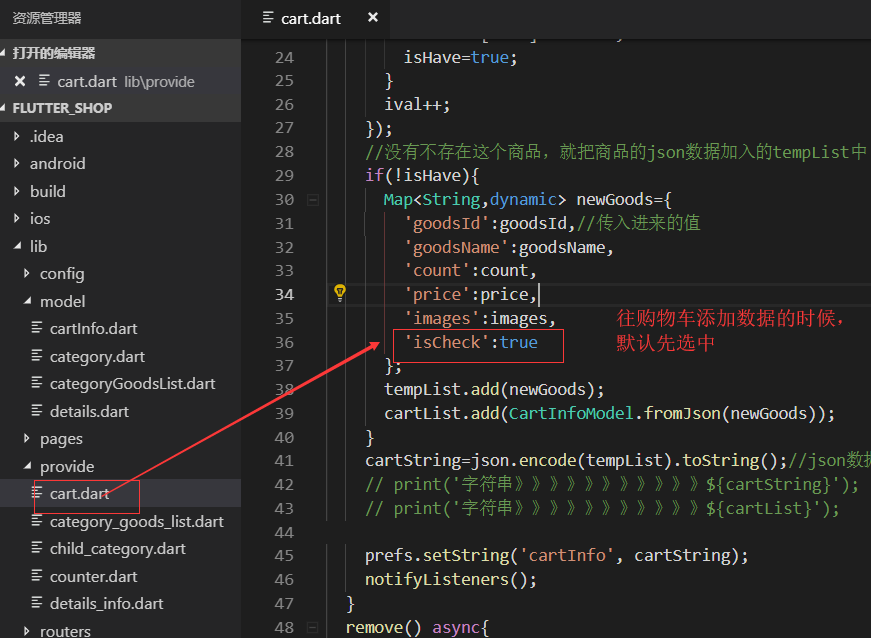
修改provide
修改UI部分pages/cart_page/cart_item.dart

测试效果
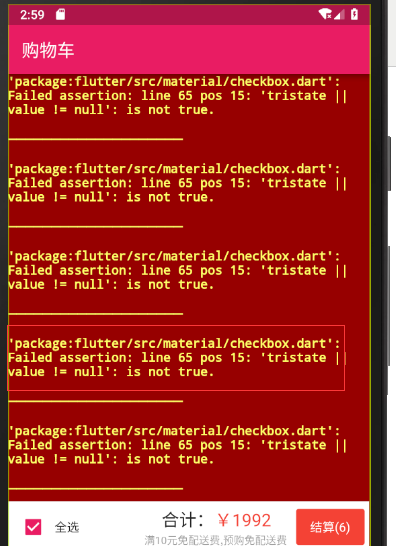
出现问题的原因,应该是在购物车内持久化的数据,没有isCheck这个新增加的属性,所以就报错了我们需要先点进去一个商品,把持久化的购物车数据清空掉,再重新添加购物车的持久化数据
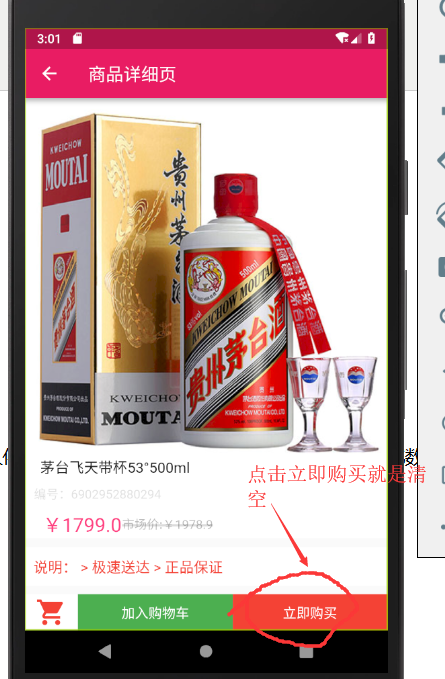
然后重新添加几个商品到购物车内
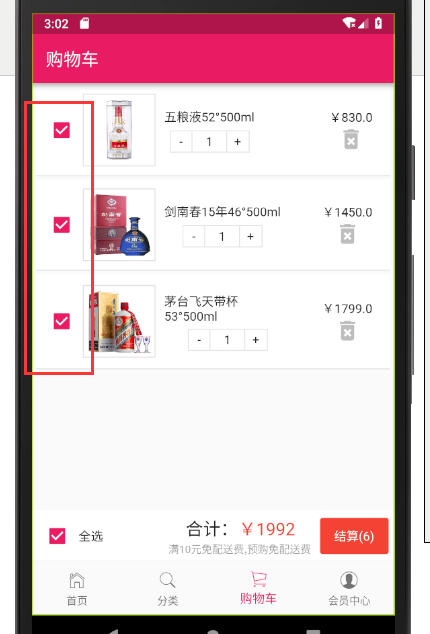
最终代码
model/cartInfo.dart
class CartInfoModel {

  String goodsId;

  String goodsName;

  int count;

  double price;

  String images;

  bool isCheck;

  CartInfoModel(

      {this.goodsId, this.goodsName, this.count, this.price, this.images, this.isCheck});

  CartInfoModel.fromJson(Map<String, dynamic> json) {

    goodsId = json['goodsId'];

    goodsName = json['goodsName'];

    count = json['count'];

    price = json['price'];

    images = json['images'];

    isCheck = json['isCheck'];

  }

  Map<String, dynamic> toJson() {

    final Map<String, dynamic> data = new Map<String, dynamic>();

    data['goodsId'] = this.goodsId;

    data['goodsName'] = this.goodsName;

    data['count'] = this.count;

    data['price'] = this.price;

    data['images'] = this.images;

    data['isCheck'] = this.isCheck;

    return data;

  }

}
provide/cart.dart
import 'package:flutter/material.dart';

import 'package:shared_preferences/shared_preferences.dart';

import 'dart:convert';

import '../model/cartInfo.dart';

class CartProvide with ChangeNotifier{

  String cartString="[]";//声明一个变量 做持久化的存储

  List<CartInfoModel> cartList=[];

  //声明一个异步的方法,购物车操作放在前台不在请求后台的数据

  save(goodsId,goodsName,count,price,images) async {

    SharedPreferences prefs = await SharedPreferences.getInstance();

    cartString= prefs.getString('cartInfo');//先从持久化中获取

    var temp = cartString==null?[]:json.decode(cartString.toString());

    //声明list 强制类型是Map

    List<Map> tempList=(temp as List).cast();//把temp转成list

    bool isHave=false;//是否已经存在了这条记录

    int ival=;//foreach循环的索引

    //循环判断列表是否存在该goodsId的商品,如果有就数量+1

    tempList.forEach((item){

      if(item['goodsId']==goodsId){

        tempList[ival]['count']=item['count']+;

        cartList[ival].count++;

        isHave=true;

      }

      ival++;

    });

    //没有不存在这个商品,就把商品的json数据加入的tempList中

    if(!isHave){

      Map<String,dynamic> newGoods={

        'goodsId':goodsId,//传入进来的值

        'goodsName':goodsName,

        'count':count,

        'price':price,

        'images':images,

        'isCheck':true

      };

      tempList.add(newGoods);

      cartList.add(CartInfoModel.fromJson(newGoods));

    }

    cartString=json.encode(tempList).toString();//json数据转字符串

    // print('字符串》》》》》》》》》》》${cartString}');

    // print('字符串》》》》》》》》》》》${cartList}');

    prefs.setString('cartInfo', cartString);

    notifyListeners();

  }

  remove() async{

    SharedPreferences prefs=await SharedPreferences.getInstance();

    prefs.remove('cartInfo');

    cartList=[];

    print('清空完成----------------------');

    notifyListeners();

  }

  getCartInfo() async{

    SharedPreferences prefs=await SharedPreferences.getInstance();

    cartString=prefs.getString('cartInfo');//持久化中获得字符串

    print('购物车持久化的数据================>'+cartString);

    cartList=[];//把最终的结果先设置为空list

    if(cartString==null){

      cartList=[];//如果持久化内没有数据 那么就还是空的list

    }else{

      //声明临时的变量

      List<Map> tempList=(json.decode(cartString.toString()) as List).cast();

      tempList.forEach((item){

        cartList.add(CartInfoModel.fromJson(item));//json转成对象,加入到cartList中

      });

    }

    notifyListeners();//通知

  }

}
pages/cart_page/cart_item.dart
import 'package:flutter/material.dart';

import 'package:flutter_screenutil/flutter_screenutil.dart';

import '../../model/cartInfo.dart';

import './cart_count.dart';

class CartItem extends StatelessWidget {

  final CartInfoModel item;

  CartItem(this.item);

  @override

  Widget build(BuildContext context) {

   //print(item);

    return Container(

      margin: EdgeInsets.fromLTRB(5.0, 2.0, 5.0, 2.0),

      padding: EdgeInsets.fromLTRB(5.0, 10.0, 5.0, 10.0),

      decoration: BoxDecoration(

        color: Colors.white,

        border: Border(

          bottom: BorderSide(width: ,color: Colors.black12)

        )

      ),

      child: Row(

        children: <Widget>[

          _cartCheckBt(context,item),

          _cartImage(),

          _cartGoodsName(),

          _cartPrice()

        ],

      ),

    );

  }

  //复选框

  Widget _cartCheckBt(context,item){

    return Container(

      child: Checkbox(

        value: item.isCheck,//这里的值变成动态的

        activeColor: Colors.pink,//激活颜色设置为粉色

        onChanged:(bool val){

        }

      ),

    );

  }

  //商品图片

  Widget _cartImage(){

    return Container(

      width: ScreenUtil().setWidth(),

      padding: EdgeInsets.all(3.0),//内边距

      decoration: BoxDecoration(

        border: Border.all(width:1.0,color: Colors.black12)

      ),

      child: Image.network(item.images),//item声明好了 所以不用传递

    );

  }

  //商品名称

  Widget _cartGoodsName() {

    return Container(

      width: ScreenUtil().setWidth(),

      padding: EdgeInsets.all(),

      alignment: Alignment.topLeft,//顶端左对齐

      child: Column(

        children: <Widget>[

          Text(item.goodsName),

          CartCount()

        ],

      ),

    );

  }

  //商品价格

  Widget _cartPrice() {

    return Container(

      width: ScreenUtil().setWidth(),//只要合起来不超过750 就不会溢出

      alignment: Alignment.centerRight,//居中靠右

      child: Column(

        children: <Widget>[

          Text('¥${item.price}'),

          Container(//用来放icon删除按钮

            child: InkWell(

              onTap: (){},

              child: Icon(

                Icons.delete_forever,

                color: Colors.black26,//浅灰色

                size: ,

              ),

            ),

          )

        ],

      ),

    );

  }

}
Flutter实战视频-移动电商-57.购物车_在Model中增加选中字段的更多相关文章
- Flutter实战视频-移动电商-52.购物车_数据模型建立和Provide修改
52.购物车_数据模型建立和Provide修改 根据json数据生成模型类 {,"price":830.0,"images":"http://imag ...
- Flutter实战视频-移动电商-53.购物车_商品列表UI框架布局
53.购物车_商品列表UI框架布局 cart_page.dart 清空原来写的持久化的代码; 添加对应的引用,stless生成一个静态的类.建议始终静态的类,防止重复渲染 纠正个错误,上图的CartP ...
- Flutter实战视频-移动电商-54.购物车_商品列表子项布局
54.购物车_商品列表子项布局 子项做成一个单独的页面 新建cartItem.dart文件 新建cart_page文件夹,在里面新建cart_item.dart页面, 页面名字叫做CartItem 定 ...
- Flutter实战视频-移动电商-55.购物车_底部结算栏UI制作
55.购物车_底部结算栏UI制作 主要做下面结算这一栏目 cart_bottom.dart页面 先设置下内边距 拆分成三个子元素 全选 因为有一个文本框和一个全选的text文本,所以这里也用了Row布 ...
- Flutter实战视频-移动电商-56.购物车_商品数量控制区域制作
56.购物车_商品数量控制区域制作 主要做购物车中的数量这里 cart_page文件夹下新建cart_count.dart 减少按钮 因为会有点击事件,所以这里我们使用InkWell. child里面 ...
- Flutter实战视频-移动电商-58.购物车_删除商品功能制作
58.购物车_删除商品功能制作 主要做购物车后面的删除按钮 删除的方法写在provide里面 provide/cart.dart文件 传入goodsId,循环对比,找到后进行移除 //删除单个购物车商 ...
- Flutter实战视频-移动电商-59.购物车_计算商品价格和数量
59.购物车_计算商品价格和数量 本节课主要是加上自动计算的功能 provide/cart.dart 在provide的类里面增加两个变量 cart_bottom.dart 三个组件因为我们都需要套一 ...
- Flutter实战视频-移动电商-60.购物车_全选按钮的交互效果制作
60.购物车_全选按钮的交互效果制作 主要做全选和复选框的这两个功能 provide/cart.dart 业务逻辑写到provide里面 先持久化取出来字符串,把字符串编程list.循环list ca ...
- Flutter实战视频-移动电商-61.购物车_商品数量的加减操作
61.购物车_商品数量的加减操作 provide/cart.dart pages/cart_page/cart_count.dart 先引入provide和cartProvide 定义接收一个item ...
随机推荐
- 怎么将linux的动态IP设置成静态IP
例如我的eth0网卡信息如下 eth0 Link encap:Ethernet HWaddr :0C::AA:B2:CA inet addr:192.168.79.135 Bcast:192.168. ...
- ContentPresenter理解
这是2年前写了一篇文章 http://www.cnblogs.com/Clingingboy/archive/2008/07/03/wpfcustomcontrolpart-1.html 我们先来看M ...
- 怎样得到QML package的具体API接口
虽然我们的developer站点有丰富的API介绍,可是,有些API的介绍可能并不全,有些API也在不断地演进中. 为了得到更具体的API,我们能够通过例如以下的命令来得到更加具体的信息.比方我们对& ...
- Subversion基础:概念、安装、配置和基本操作(转)
本文转载至http://www.cnblogs.com/cokecoffe/archive/2012/06/01/2537130.html 转自:http://www.uml.org.cn/pzgl/ ...
- error LNK1112: module machine type 'X86' conflicts with target machine type 'x64'
1 这个error是什么原因造成的 cmake默认选择的是x86,即32位的生成子. 2 怎么解决这个error 在cmake ..的时候,在后面加上“-G "Visual Studio 1 ...
- 6.5.1.3 Caching SHA-2 Pluggable Authentication
MySQL :: MySQL 8.0 Reference Manual :: 6.5.1.3 Caching SHA-2 Pluggable Authentication https://dev.my ...
- Ubuntu Firefox没有声音的解决方案
安装ubuntu-restricted-extras sudo apt-get install ubuntu-restricted-extras 参考博文:解决ubuntu中firefox没有声音的问 ...
- js 单例模式的实现方式----闭包和构造函数内部判断
闭包: var singleton = function( fn ){ var result; return function(){ return result || ( result = fn .a ...
- sam模板
SAM模板 struct SAM{ * ; struct node{ node*nxt[],*fail; int len; }; node*root;int cnt; node no[maxn]; n ...
- ubuntu搜狗拼音安装
1.官方下载deb 2.双击安装 3.终端im-config,选择fcitx 4.重启 5.输入法设置中add一下sougoupinyin