
MPTCP in Wireshark(转)
最新的wireshark可以直接识别出mptcp。
Wireshark is a widely used network analyzer that can capture network traffic, save the captured packets (*.pcap) for later analysis and most importantly helps with analyzing such packet traces. Wireshark supports many protocols, which means it is able to assign meaning to bytes (dissect in the wireshark nomenclature) and display it accordingly. In some cases as in the TCP dissector, Wireshark even builds some state to provide expert information, for instance to identify TCP retransmissions. So far, Wireshark supported stateless dissection of MPTCP, i.e., it could dissect MPTCP options correctly, without being able to identify Multipath TCP connections.
Since November 2015 and the following patch (i.e., starting from Wireshark >= 2.1), Wireshark now considers MPTCP as a separate protocol, and builds states for MPTCP as well, thus mimicking TCP dissection.
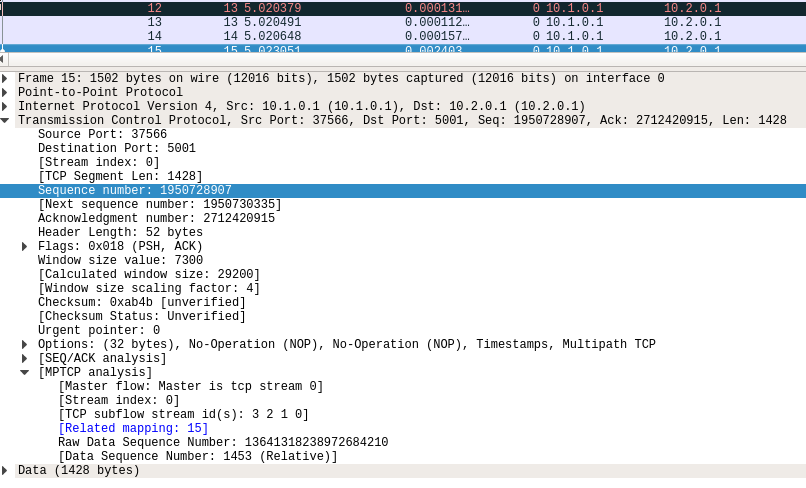
This means Wireshark is now able to (providing the matching features are enabled):
- map TCP subflows (tcp.stream) to MPTCP connections (mptcp.stream, see also mptcp.analysis.subflows).
- List MPTCP connections
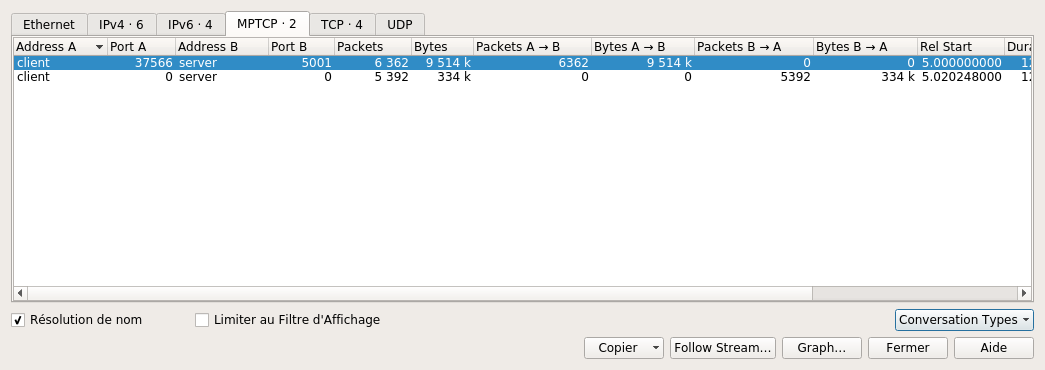
- identify the master subflows (*mptcp.master == 1*)
- check for mistmatched key/tokens and key/initial sequence data number (ISN)
- etc... start filtering packets with *mptcp.* and wireshark autocompletion should show the different possibilities
Full MPTCP dissection can be quite CPU-consuming, thus some options are disabled by default and can be enabled through the menu Edit -> Preferences -> Protocols ->MPTCP.
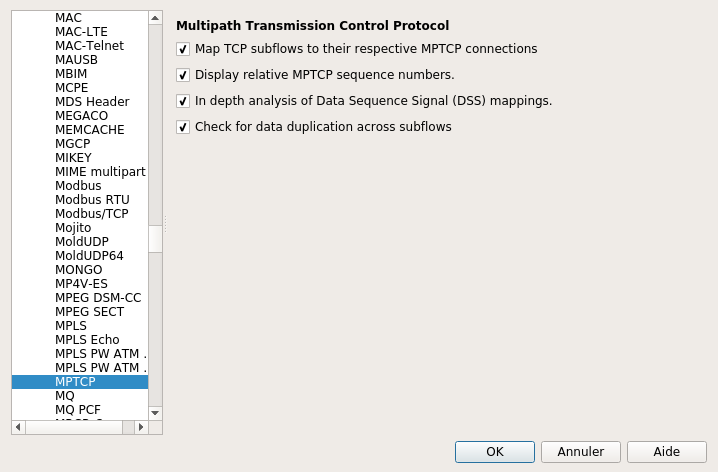
- Display relative MPTCP sequence numbers substracts the ISN to Data Sequence Numbers. This works only if the initial packets with the keys (3 way handshake) are captured and the wireshark option tcp relative sequence numbers is enabled.
- In depth analysis of data sequence signal (DSS) mappings tells wireshark to look for the packets which sent the DSS mappings that cover the current packet; wireshark then displays a clickable item that brings you to the packet. This feature enables the creation of interval trees (introduced especially for this feature), which should consume quite a bit of memory/CPU so use with care !
- Check for data duplication across subflows is a feature that was intended to help detect opportunistic reinjections or redundant schedulers but this is mostly experimental so use with care.
http://blog.multipath-tcp.org/blog/html/2016/08/23/mptcp_analyzer.html
MPTCP in Wireshark(转)的更多相关文章
- MPTCP iperf 发包方式
之前用的发包方式是发送大文件,用NC监测. 今天改了另外一种发包方式iperf,简单记录下. iperf发包,具体方法: 1.在终端中运行拓扑脚本: 运行py脚本:sudo python topy.p ...
- wireshark 相关提示
Packet size limited during capture 提示说明标记的包没有抓全,在某些操作系统中,默认只抓96个字节,tcpdump中有"-s"参数可用于 ...
- Wireshark
0. install Wireshark on Ubuntu 14 sudo apt-get install -y wireshark sudo addgroup -quiet -system wir ...
- 通过Wireshark抓包进行Cookie劫持
首先在目标A机器上运行Wireshark并开启浏览器,开启前关闭其他占用网络的软件,这里我拿51CTO.com做测试. 正常登陆51CTO用户中心,此时使用 http.cookie and http. ...
- 运维之网络安全抓包—— WireShark 和 tcpdump
------------------------------------------------本文章只解释抓包工具的捕获器和过滤器的说明,以及简单使用,应付日常而已----------------- ...
- 【转】[fix] Wireshark error: There are no interfaces on which a capture can be done. on Mac OS X
I got the following error message when trying to open a network interface for capture using Wireshar ...
- kali linux之窥看女神上网隐私(ettercap+wireshark+zenmap +dsniff)
作者:小波 http://www.cnblogs.com/xiaobo-Linux/ 无聊就玩了玩,不要干一些坏事哟~~网上也有一些文章关于kali linux的,就实战了一番.kali是用的debi ...
- Ubuntu16.04 LTS下apt安装WireShark
Ubuntu16.04 LTS下apt安装WireShark 安装与配置 首先通过apt安装WireShark: $ sudo apt install wireshark 会同时安装许多的依赖包,其中 ...
- wireshark lua脚本
1.目的:解析rssp2协议 2.如何使用wireshark lua插件 将编写的(假设为rssp2.lua)lua文本,放入wireshark 安装目录下,放哪里都行只要dofile添加了路径. ...
随机推荐
- FastDFS的配置、部署与API使用解读(5)FastDFS配置详解之Tracker配置(转)
本文是 tracker.conf 配置文件的详细介绍. 1 基本配置 disable #func:配置是否生效 #valu:true.false disable=false bind_addr #fu ...
- Laravel建站05--缓存、时间日期处理包
缓存 Laravel 给多种缓存系统提供丰富而统一的 API,缓存配置信息位于 config/cache.php,在这个文件中你可以为你的应用程序指定默认的缓存驱动,Laravel 支持当前流行的缓存 ...
- Ubuntu16.04下自定义命令
每次启动pycharm的时候需要敲一段很长的文本,真的是感觉好麻烦啊,如果能直接敲命令启动就好了,既装B又实用的 那么到底应该怎么做呢?其实挺简单的 在文件/root/.bashrc 中添加下边的几行 ...
- Ubuntu 静态IP
linux 用了好多年了,每次设置静态ip都上网查,就是记不住.唉~ cat /etc/network/interfaces auto lo iface lo inet loopback #auto ...
- bzoj-2251 外星联络
题意: 给出一个字符串,求出现次数超过1的子串的出现个数. 字符串长度<=3000: 题解: 题目问的是子串的个数.那么首先我们要找到全部的子串. 而字符串的全部后缀的前缀能够不重不漏的表示全部 ...
- vsftp登录时间太长的解决办法
与ssh一样,vsftp的配置文件默认开启了DNS反向解析,这可能会造成用户在登陆到FTP服务器的时候奇慢无比,只要在配置文件中禁用DNS反向解析即可解决文件. 编辑/etc/vsftpd/vsftp ...
- vue中引入百度统计
vue作为单页面的,引入百度统计,需要注意不少. 一.基本的流量统计 在index.html 入口文件中引入百度统计生成的一连串代码: var _hmt = _hmt || []; (function ...
- Linux ARM交叉编译工具链制作过程【转】
本文转载自:http://www.cnblogs.com/Charles-Zhang-Blog/archive/2013/02/21/2920999.html 一.下载源文件 源代码文件及其版本与下载 ...
- HDU2068 RPG的错排 —— 错排
题目链接:https://vjudge.net/problem/HDU-2068 RPG的错排 Time Limit: 1000/1000 MS (Java/Others) Memory Lim ...
- js程序开发-2
<h1>DOM节点操作</h1> createElement() 创建节点:返回一个元素对象; cloneNode() 克隆节点,接受一个参数deep,值为true或false ...