
MPTCP in Wireshark(转)
最新的wireshark可以直接识别出mptcp。
Wireshark is a widely used network analyzer that can capture network traffic, save the captured packets (*.pcap) for later analysis and most importantly helps with analyzing such packet traces. Wireshark supports many protocols, which means it is able to assign meaning to bytes (dissect in the wireshark nomenclature) and display it accordingly. In some cases as in the TCP dissector, Wireshark even builds some state to provide expert information, for instance to identify TCP retransmissions. So far, Wireshark supported stateless dissection of MPTCP, i.e., it could dissect MPTCP options correctly, without being able to identify Multipath TCP connections.
Since November 2015 and the following patch (i.e., starting from Wireshark >= 2.1), Wireshark now considers MPTCP as a separate protocol, and builds states for MPTCP as well, thus mimicking TCP dissection.
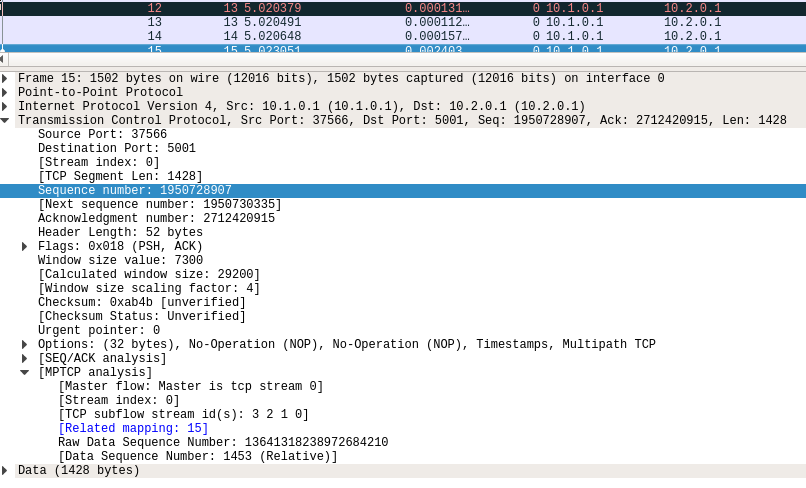
This means Wireshark is now able to (providing the matching features are enabled):
- map TCP subflows (tcp.stream) to MPTCP connections (mptcp.stream, see also mptcp.analysis.subflows).
- List MPTCP connections
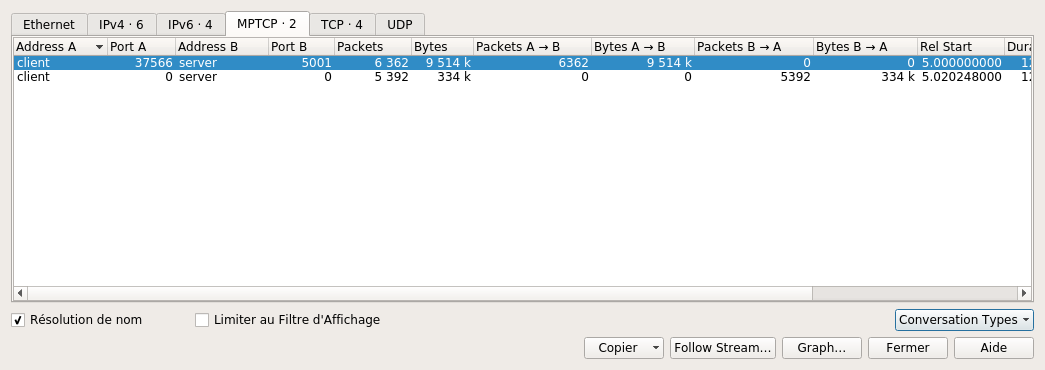
- identify the master subflows (*mptcp.master == 1*)
- check for mistmatched key/tokens and key/initial sequence data number (ISN)
- etc... start filtering packets with *mptcp.* and wireshark autocompletion should show the different possibilities
Full MPTCP dissection can be quite CPU-consuming, thus some options are disabled by default and can be enabled through the menu Edit -> Preferences -> Protocols ->MPTCP.
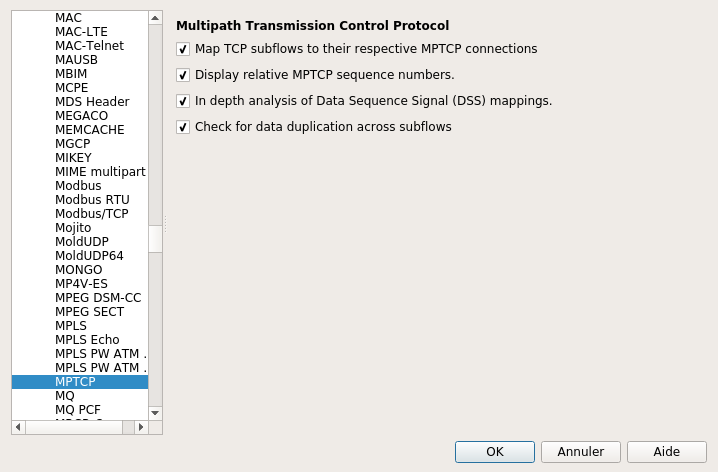
- Display relative MPTCP sequence numbers substracts the ISN to Data Sequence Numbers. This works only if the initial packets with the keys (3 way handshake) are captured and the wireshark option tcp relative sequence numbers is enabled.
- In depth analysis of data sequence signal (DSS) mappings tells wireshark to look for the packets which sent the DSS mappings that cover the current packet; wireshark then displays a clickable item that brings you to the packet. This feature enables the creation of interval trees (introduced especially for this feature), which should consume quite a bit of memory/CPU so use with care !
- Check for data duplication across subflows is a feature that was intended to help detect opportunistic reinjections or redundant schedulers but this is mostly experimental so use with care.
http://blog.multipath-tcp.org/blog/html/2016/08/23/mptcp_analyzer.html
MPTCP in Wireshark(转)的更多相关文章
- MPTCP iperf 发包方式
之前用的发包方式是发送大文件,用NC监测. 今天改了另外一种发包方式iperf,简单记录下. iperf发包,具体方法: 1.在终端中运行拓扑脚本: 运行py脚本:sudo python topy.p ...
- wireshark 相关提示
Packet size limited during capture 提示说明标记的包没有抓全,在某些操作系统中,默认只抓96个字节,tcpdump中有"-s"参数可用于 ...
- Wireshark
0. install Wireshark on Ubuntu 14 sudo apt-get install -y wireshark sudo addgroup -quiet -system wir ...
- 通过Wireshark抓包进行Cookie劫持
首先在目标A机器上运行Wireshark并开启浏览器,开启前关闭其他占用网络的软件,这里我拿51CTO.com做测试. 正常登陆51CTO用户中心,此时使用 http.cookie and http. ...
- 运维之网络安全抓包—— WireShark 和 tcpdump
------------------------------------------------本文章只解释抓包工具的捕获器和过滤器的说明,以及简单使用,应付日常而已----------------- ...
- 【转】[fix] Wireshark error: There are no interfaces on which a capture can be done. on Mac OS X
I got the following error message when trying to open a network interface for capture using Wireshar ...
- kali linux之窥看女神上网隐私(ettercap+wireshark+zenmap +dsniff)
作者:小波 http://www.cnblogs.com/xiaobo-Linux/ 无聊就玩了玩,不要干一些坏事哟~~网上也有一些文章关于kali linux的,就实战了一番.kali是用的debi ...
- Ubuntu16.04 LTS下apt安装WireShark
Ubuntu16.04 LTS下apt安装WireShark 安装与配置 首先通过apt安装WireShark: $ sudo apt install wireshark 会同时安装许多的依赖包,其中 ...
- wireshark lua脚本
1.目的:解析rssp2协议 2.如何使用wireshark lua插件 将编写的(假设为rssp2.lua)lua文本,放入wireshark 安装目录下,放哪里都行只要dofile添加了路径. ...
随机推荐
- UUID随机字符串
public static void main(String[] args){ System.out.println(UUID.randomUUID().toString()); } //输出:698 ...
- <转>关于 error LNK2019:无法解析的外部符号 ,该符号在函数**中被引用的思考
错误提示信息摘抄如下: ---------------------------------------------------------------------------------------- ...
- jvm基础(2)
7.类装载器 (1)class装载验证流程: A加载.这是装载类的第一个阶段,执行的动作包括:取得类的二进制流,转为方法区数据结构,在java堆中生成对应的java.lang.Class对象. B链接 ...
- Android开源git40个App源代码
(JamsMusicPlayer)非常棒的音乐播放器(new) (F8)日程安排的软件 (Conversations)基于XMPP的应用 (Bitocle)能够在手机上查看自己github ...
- wpf中的样式与模板
1.WPF样式类似于Web应用程序中的CSS,在WPF中可以为控件定义统一的样式(Style).样式属于资源的一种,例如为Button定义统一的背景颜色和字体: <Window.Resource ...
- 安卓Android手机直播推送同步录像功能设计与实现源码
本文转自:http://blog.csdn.net/jyt0551/article/details/58714595 EasyPusher是一款非常棒的推送客户端.稳定.高效.低延迟,音视频同步等都特 ...
- Phoenix 索引生命周期
本文主要介绍Phoenix索引状态的生命周期,帮助大家解惑“为什么我的phoenix索引不能正常使用了?” 索引状态 索引总共有以下几个状态,其状态信息存储在SYSTEM.CATALOG表中.可以通过 ...
- spawn类expect方法详解
本文我们将介绍spawn类的基本方法expect方法,这个方法是用来匹配返回的结果,这个返回的结果是指子程序的返回结果,同时会将匹配的相关信息保存在spawn类的相关属性中. 基本属性包括三个,第一个 ...
- SpringBoot-(7)-基于Web,JDBC,MySql,Druid,MyBatis整合创建SpringBoot项目
1 打开Spring Initializr 如果Project SDK为空,手动指定下JDK SDK路径 2, 填写Group和Artifact 3,选择依赖 选择Web,MySQL,JDBC,MyB ...
- 【Effective C++】构造/析构/赋值运算
条款05:了解C++默默编写并调用哪些函数 默认构造函数.拷贝构造函数.拷贝赋值函数.析构函数构成了一个类的脊梁,只有良好的处理这些函数的定义才能保证类的设计良好性. 当我们没有人为的定义上面的几个函 ...