
openlayer3 加载geoserver发布的WFS服务
转自原文 openlayer3加载geoserver发布的WFS服务
1 参考一
1.1 问题

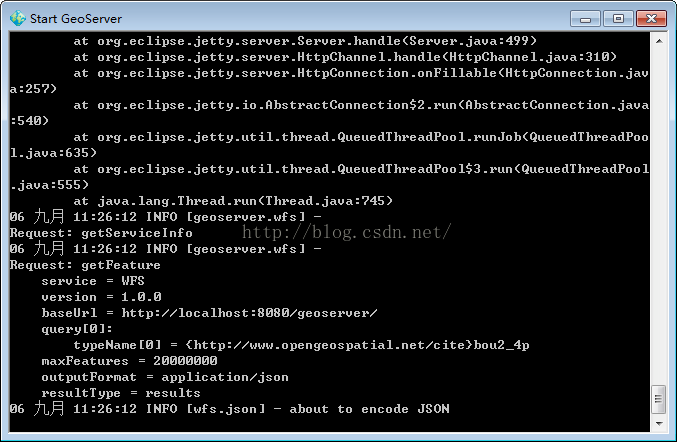
1.2 调用代码
//参数字段

    var wfsParams = {

            service : 'WFS',

            version : '1.0.0',

            request : 'GetFeature',

            typeName : 'cite:bou2_4p',  //图层名称

            outputFormat : 'text/javascript',  //重点,不要改变

            format_options : 'callback:loadFeatures'  //回调函数声明

        };

     var vectorSource = new ol.source.Vector({

         format: new ol.format.GeoJSON(),

         loader: function(extent, resolution, projection) {  //加载函数

             var url = 'http://localhost:8080/geoserver/wfs';

             $.ajax({

                 url: url,

                 data : $.param(wfsParams),   //传参

                 type : 'GET',

                 dataType: 'jsonp',   //解决跨域的关键

                 jsonpCallback:'loadFeatures'  //回调

             });

         },

         strategy: ol.loadingstrategy.tile(new ol.tilegrid.createXYZ({

             maxZoom: 25

         })),

         projection: 'EPSG:4326'

     });

      //回调函数使用

     window.loadFeatures = function(response) {

         vectorSource.addFeatures((new ol.format.GeoJSON()).readFeatures(response));  //载入要素

     };

     var vectorLayer = new ol.layer.Vector({

         source: vectorSource

     });

     map.addLayer(vectorLayer);
但出现了如图所示的问题,查看开发工具发现json数据没有套上回调名。
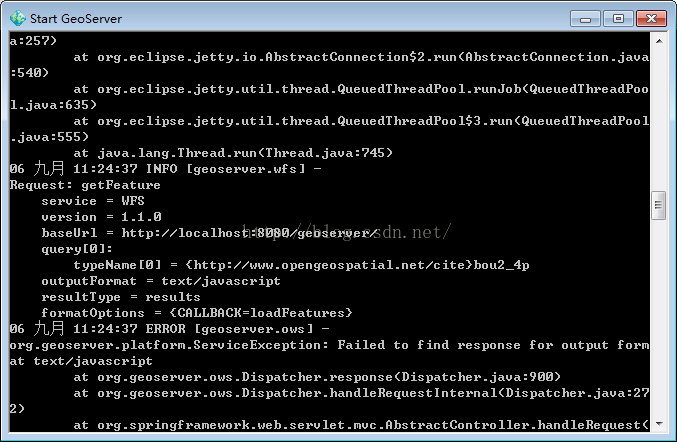
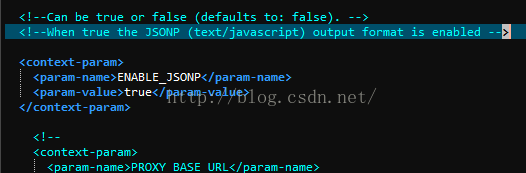
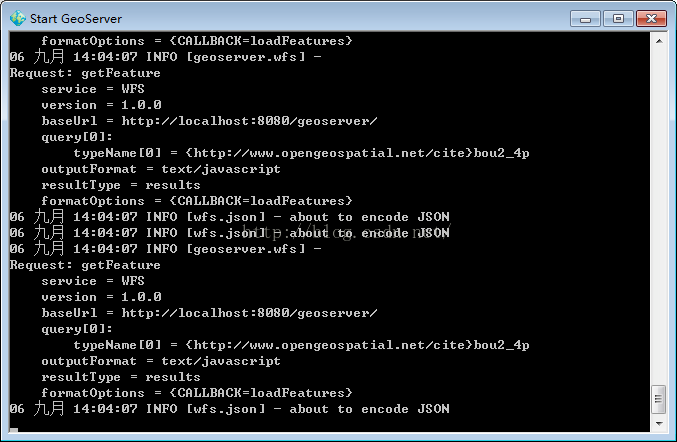
1.3 问题的解决
2 参考二
openlayers3调用GeoServer发布的wfs
<!doctype html>

<html>

<head>

<meta charset="utf-8">

<title>Load wfs</title>

    <!-- The line below is only needed for old environments like Internet Explorer and Android 4.x -->

    <script src="js/polyfill.min.js?features=requestAnimationFrame,Element.prototype.classList,URL"></script>

    <script src="js/ol.js"></script>

    <!--<script src="js/p-ol3.debug.js"></script>-->

    <script src="js/jquery-2.1.1.min.js"></script>

    <script src="js/drag.js"></script>

</head>

<div id="map" style="width: 100%"></div>

<button id="loadJson" onClick="loadJson();">Load Json</button>

<body>

    <script type="text/javascript">

    //======================================

    var osmLayer = new ol.layer.Tile({

        source: new ol.source.OSM()

    });

    var map = new ol.Map({

      controls: ol.control.defaults(),

      layers:[

        osmLayer

      ],

      target: 'map',

        view: new ol.View({

            center: [590810,4915303],

            zoom: 2,

            projection: 'EPSG:3857'

        })

    });

    map.addLayer(wfsVectorLayer);

    //======================================方法一

    var wfsVectorLayer;

    wfsVectorLayer = new ol.layer.Vector({

        source: new ol.source.Vector({

          format: new ol.format.GeoJSON({

            geometryName: 'the_geom'

          }),

          url: 'http://localhost:8080/geoserver/wfs?service=wfs&version=1.1.0&request=GetFeature&typeNames=tiger:tiger_roads&outputFormat=application/json&srsname=EPSG:4326'

        }),

        style: function(feature, resolution) {

          return new ol.style.Style({

            stroke: new ol.style.Stroke({

              color: 'blue',

              width: 5

            })

          });

        }

      });

    //======================================方法二

    //参数字段

    var wfsParams = {

        service : 'WFS',

        version : '1.0.0',

        request : 'GetFeature',

        typeName : 'topp:tasmania_roads',  //图层名称

        outputFormat : 'text/javascript',  //重点,不要改变

        format_options : 'callback:loadFeatures'  //回调函数声明

    };

     //使用jsonp,可以解决跨域的问题,GeoServer中的web.xml文件关于jsonp的注释要去掉,就可以支持跨域了

     var vectorSource = new ol.source.Vector({

         format: new ol.format.GeoJSON(),

         loader: function(extent, resolution, projection) {  //加载函数

             var url = 'http://localhost:8888/geoserver/wfs';

             $.ajax({

                 url: url,

                 data : $.param(wfsParams),   //传参

                 type : 'GET',

                 dataType: 'jsonp',   //解决跨域的关键

                 jsonpCallback:'loadFeatures'  //回调

             });

         },

         strategy: ol.loadingstrategy.tile(new ol.tilegrid.createXYZ({

             maxZoom: 25

         })),

         projection: 'EPSG:4326'

     });

      //回调函数使用

     window.loadFeatures = function(response) {

         //vectorSource.addFeatures((new ol.format.GeoJSON()).readFeatures(response));  //载入要素

         //坐标转换,将返回的数据的坐标转换到当前使用地图的坐标系,否则,无法正常显示

         vectorSource.addFeatures((new ol.format.GeoJSON()).readFeatures(response,{

             dataProjection: 'EPSG:4326',    // 设定JSON数据使用的坐标系

             featureProjection: 'EPSG:3857' // 设定当前地图使用的feature的坐标系

         }));  //载入要素

     };

     var vectorLayer = new ol.layer.Vector({

         source: vectorSource

     });

     map.addLayer(vectorLayer);

    //======================================

    </script>

</body>

</html>
执行结果:
图中用红色笔圈出来的部分就是添加的wfs层

openlayer3 加载geoserver发布的WFS服务的更多相关文章
- openlayers 3加载GeoServer发布的wfs类型服务
转:https://blog.csdn.net/u013323965/article/details/52449502 问题产生: openlayer3加载WFS存在跨域问题,需要用json ...
- World Wind Java开发之十三——加载Geoserver发布的WMS服务(转)
这篇是转载的平常心博客,原地址见:http://www.v5cn.cn/?p=171 1.WMSTiledImageLayer类说明 一个WMSTiledImageLayer类对象只能对应一个WMS发 ...
- ArcGIS api fo silverlight学习一(silverlight加载GeoServer发布的WMS地图)
最好的学习资料ArcGIS api fo silverlight官网:http://help.arcgis.com/en/webapi/silverlight/samples/start.htm 一. ...
- OSGEarth加载 geoserver 发布 TMS
geoserver配好数据并用自带的gwc切片好后, 访问 http://localhost:9999/geoserver/gwc/service/tms/1.0.0/ 在OsgEarth的earth ...
- skyline加载arcgis发布的wms服务
function AddWMSLayer(LayerName) {var _WMSUrl =“http://10.0.4.141:6080/arcgis/services/poss1/MapServe ...
- 如何在Skyline中加载ArcGISServer发布的WMS和WMTS服务
如何在Skyline中加载ArcGISServer发布的WMS和WMTS服务? 我这里的测试环境是ArcGISServer10.1和TerraExplorer Pro7.0,主要过程截图如下,
- arcgis for js 4.6加载本地发布好的2维地图
我本地发布好的地图服务信息如下图所示: 我们在代码中使用到的url是图中所示的REST URL 加载代码如下: <!DOCTYPE html> <html> <head& ...
- OpenLayers调用ArcGIS Server发布的WFS服务
OpenLayers调用ArcGIS Server发布的WFS服务 原创: 蔡建良 2013-08-20 一. 开发环境 1) Openlayers2.13+arcgis server9.3 2) W ...
- sql2008r2,以前好好可以用的,但装了vs2017后,连接不上了,服务也停了,结果手动也 启动不了, 无法加载或初始化请求的服务提供程
日志: 2017-12-14 12:33:17.53 服务器 A self-generated certificate was successfully loaded for encryption.2 ...
随机推荐
- HDU - 4763 Theme Section (KMP的next数组的应用)
给定一个字符串,求出一个前缀A,使得字符串的构成可以表示成ABABA的形式(B可以为空串). 输出这个前缀的最大长度. KMP算法Next数组的使用. 枚举中间的每个位置,可以根据Next数组求出这个 ...
- German Collegiate Programming Contest 2015 计蒜课
// Change of Scenery 1 #include <iostream> #include <cstdio> #include <algorithm> ...
- Java监听器Listener使用说明
转载:http://blog.csdn.net/meng2602956882/article/details/13511587 1.什么是Java监听器 监听器也叫Listener,是Servlet的 ...
- 关于前台jsp页面的js取值问题
在后程序中传一个字符串到前台页面上,后台代码model.addAttribute("ccc", "cccc"); 在页面js上用下面两种方法取值 1. var ...
- 关于 NSData 的数据类型(2进制,16进制之间)及深入剖析
1. NSData 与 NSString NSData-> NSString NSString *aString = [[NSString alloc initWithData:adataenc ...
- python基础-爬虫
爬虫引入 爬虫: 1 百度:搜索引擎 爬虫:spider 种子网站开始爬,下载网页,分析链接,作为待抓取的网页 分词 index:词--->某个结果 Page rank(1 网站很大(互链) ...
- Python全栈开发第二期课表
day01-python 全栈开发-基础篇 01 开课介绍 01:55:13 ★ 02 开课介绍02 01:28:31 ★ 03 开课介绍03 00:22:55 ...
- KMP算法入门
学一把看毛片算法我觉得自己才能变得更加出色 明明昨天的题我都知道怎么模拟了,但是还是不会改KMP,是我学丑了 KMP是Knuth-Morris-Pratt三人设计的线性时间字符串匹配算法 nxt数组的 ...
- Java判断浏览器是微信还是支付宝
private static final String WX_AGENT = "micromessenger"; private static final String ALI_A ...
- solr 创建core
mkdir /var/solr/data/CORE_NAME cp -r /opt/solr/server/solr/configsets/basic_configs/* /var/solr/data ...