
struts1二:基本环境搭建
首先建立一个web项目
引入需要的jar包
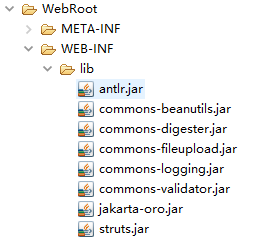
建立包com.bjpowernode.struts
创建LoginAction
package com.bjpowernode.struts;

import javax.servlet.http.HttpServletRequest;

import javax.servlet.http.HttpServletResponse;

import org.apache.struts.action.Action;

import org.apache.struts.action.ActionForm;

import org.apache.struts.action.ActionForward;

import org.apache.struts.action.ActionMapping;

public class LoginAction extends Action{

    @Override

    public ActionForward execute(ActionMapping mapping, ActionForm form,

            HttpServletRequest request, HttpServletResponse response)

            throws Exception {

        //struts1会自动的把相应的属性装载到对于的ActionForm中

        LoginActionForm laf = (LoginActionForm)form;

        if("admin".equals(laf.getUsername()) && "admin".equals(laf.getPassword())){

            return mapping.findForward("success");

        }

        return mapping.findForward("error");

    }

}
创建LoginActionForm
package com.bjpowernode.struts;

import org.apache.struts.action.ActionForm;

public class LoginActionForm extends ActionForm {

    private String username;

    private String password;

    public String getUsername() {

        return username;

    }

    public void setUsername(String username) {

        this.username = username;

    }

    public String getPassword() {

        return password;

    }

    public void setPassword(String password) {

        this.password = password;

    }

}
配置web.xml
<?xml version="1.0" encoding="UTF-8"?>

<web-app version="3.0"

    xmlns="http://java.sun.com/xml/ns/javaee"

    xmlns:xsi="http://www.w3.org/2001/XMLSchema-instance"

    xsi:schemaLocation="http://java.sun.com/xml/ns/javaee

    http://java.sun.com/xml/ns/javaee/web-app_3_0.xsd">

  <display-name></display-name>

  <welcome-file-list>

    <welcome-file>index.jsp</welcome-file>

  </welcome-file-list>

  <servlet>

      <servlet-name>struts1</servlet-name>

      <servlet-class>org.apache.struts.action.ActionServlet</servlet-class>

  </servlet>

  <servlet-mapping>

      <servlet-name>struts1</servlet-name>

      <url-pattern>*.do</url-pattern>

  </servlet-mapping>

</web-app>
配置struts-config.xml,放置在WEB-INF下
<?xml version="1.0" encoding="ISO-8859-1" ?>

<!DOCTYPE struts-config PUBLIC

"-//Apache Software Foundation//DTD Struts Configuration 1.2//EN"

"http://jakarta.apache.org/struts/dtds/struts-config_1_2.dtd">

<struts-config>

<form-beans>

<form-bean name="LoginActionForm" type="com.bjpowernode.struts.LoginActionForm"></form-bean>

</form-beans>

<action-mappings>

<action path="/login"

type="com.bjpowernode.struts.LoginAction"

name="LoginActionForm"

scope="request">

<forward name="success" path="/login_success.jsp"></forward>

<forward name="error" path="/login_error.jsp"></forward>

</action>

</action-mappings>

</struts-config>
提供index.jsp文件
<%@ page language="java" import="java.util.*" pageEncoding="GB18030"%>

<%

String path = request.getContextPath();

String basePath = request.getScheme()+"://"+request.getServerName()+":"+request.getServerPort()+path+"/";

%>

<!DOCTYPE HTML PUBLIC "-//W3C//DTD HTML 4.01 Transitional//EN">

<html>

  <head>

    <base href="<%=basePath%>">

    <title>My JSP 'index.jsp' starting page</title>

    <meta http-equiv="pragma" content="no-cache">

    <meta http-equiv="cache-control" content="no-cache">

    <meta http-equiv="expires" content="0">

    <meta http-equiv="keywords" content="keyword1,keyword2,keyword3">

    <meta http-equiv="description" content="This is my page">

    <!--

    <link rel="stylesheet" type="text/css" href="styles.css">

    -->

  </head>

  <body>

<form action="login.do">

    <input type="text" name="username"><br>

    <input type="password" name="password"><br>

    <input type="submit" value="登录">

</form>

  </body>

</html>
提供login_success.jsp文件
<%@ page language="java" import="java.util.*" pageEncoding="GB18030"%>

<%

String path = request.getContextPath();

String basePath = request.getScheme()+"://"+request.getServerName()+":"+request.getServerPort()+path+"/";

%>

<!DOCTYPE HTML PUBLIC "-//W3C//DTD HTML 4.01 Transitional//EN">

<html>

  <head>

    <base href="<%=basePath%>">

    <title>My JSP 'login_success.jsp' starting page</title>

    <meta http-equiv="pragma" content="no-cache">

    <meta http-equiv="cache-control" content="no-cache">

    <meta http-equiv="expires" content="0">

    <meta http-equiv="keywords" content="keyword1,keyword2,keyword3">

    <meta http-equiv="description" content="This is my page">

    <!--

    <link rel="stylesheet" type="text/css" href="styles.css">

    -->

  </head>

  <body>

    This is my JSP page. Success!!! <br>

  </body>

</html>
提供login_error.jsp文件
<%@ page language="java" import="java.util.*" pageEncoding="GB18030"%>

<%

String path = request.getContextPath();

String basePath = request.getScheme()+"://"+request.getServerName()+":"+request.getServerPort()+path+"/";

%>

<!DOCTYPE HTML PUBLIC "-//W3C//DTD HTML 4.01 Transitional//EN">

<html>

  <head>

    <base href="<%=basePath%>">

    <title>My JSP 'login_success.jsp' starting page</title>

    <meta http-equiv="pragma" content="no-cache">

    <meta http-equiv="cache-control" content="no-cache">

    <meta http-equiv="expires" content="0">

    <meta http-equiv="keywords" content="keyword1,keyword2,keyword3">

    <meta http-equiv="description" content="This is my page">

    <!--

    <link rel="stylesheet" type="text/css" href="styles.css">

    -->

  </head>

  <body>

    This is my JSP page. Error!!! <br>

  </body>

</html>
struts1二:基本环境搭建的更多相关文章
- Appium+python自动化(二)- 环境搭建—下(超详解)
简介 宏哥的人品还算说得过去,虽然很久没有搭建环境了,但是换了新电脑设备,一气呵成,将android的测试开发环境已经搭建准备完毕.上一篇android测试开发环境已经准备好, 那么接下来就是appi ...
- Selenium基础教程(二)环境搭建
一.环境搭建 (1)初学者最佳环境: Python 2.7 + Selenium 2+ Firefox 46 (2)喜欢尝新的环境: Python 3.6 + Selenium 3+ Firefox ...
- cesium编程入门(二)环境搭建
环境搭建 环境搭建 编译 node 安装 Node.js安装包及源码下载地址为:https://nodejs.org/en/download/. 安装完成后,打开命令行,输入:node -v,如果结果 ...
- 【Hbase二】环境搭建
此笔记仅用于作者记录复习使用,如有错误地方欢迎留言指正,作者感激不尽,如有转载请指明出处 Hbase环境搭建 Hbase环境搭建 hadoop为HA的Hbase配置 Zookeeper集群的正常部署并 ...
- mybatis学习(二)——环境搭建
开发环境搭建主要包括以下几步 1.新建一个JAVA项目(可以只建一个文件夹) 2.导入jar包 log4j是一个日志包,可以不加,这里为了定位问题添加了该包,下面两个包必须需要. 3.创建数据库 C ...
- RocketMQ系列(二)环境搭建
RocketMQ的基本概念在上一篇中给大家介绍了,这一节将给大家介绍环境搭建.RocketMQ中最基础的就是NameServer,我们先来看看它是怎么搭建的. NameServer RocketMQ要 ...
- 大数据学习系列之二 ----- HBase环境搭建(单机)
引言 在上一篇中搭建了Hadoop的单机环境,这一篇则搭建HBase的单机环境 环境准备 1,服务器选择 阿里云服务器:入门型(按量付费) 操作系统:linux CentOS 6.8 Cpu:1核 内 ...
- 分布式实时日志系统(二) 环境搭建之 flume 集群搭建/flume ng资料
最近公司业务数据量越来越大,以前的基于消息队列的日志系统越来越难以满足目前的业务量,表现为消息积压,日志延迟,日志存储日期过短,所以,我们开始着手要重新设计这块,业界已经有了比较成熟的流程,即基于流式 ...
- 持续集成(二)环境搭建篇—内网邮件server搭建
在我们的持续构建中,项目构建中出现错误提醒.或者开发者之间的沟通交流,进度汇报的事务,都是离不开一个通信工具.那就是邮件.在我们的项目开发中假设使用第三方的邮件平台,这肯定不是最好的选择.由于第三方的 ...
随机推荐
- 《UML大战需求分析》阅读随笔(二)
在需求方面,我自己大体认为,分为两个部分:客户和软件公司. 客户:提出需求. 软件公司:解决需求. 这就是我所认为的 需求的关系. 就像书中所说的: 软件公司(项目组)始终都是跟着客户的后面追,客户需 ...
- 【Hawk】高级教程——post参数采集万方医学网论文
目标——万方医学网论文列表 http://med.wanfangdata.com.cn/Author/General/A000000001 和普通网页不一样的地方在于点击下一页的时候,URL没有发生变 ...
- npm 基础
npm账户 npm adduser npm whoami 初始化项目: npm init --scope=<username> 项目必要文件 README.md pageage.json: ...
- jQuery实战
1.获取标签在文档中的位置 var left = $('.selected').offset().left; var top = $('.selected').offset().top; 2.获取选中 ...
- Android中Retrifit使用总结
Android中网络请求框架Retrofit的使用注意事项 1.Retrofit是基于OkHttp网络请求框架的二次封装而已,懂Okhttp的小伙伴,那么Retrofit也就基本都会. 2.Retro ...
- 【转】request.getServletPath()和request.getPathInfo()用法
转自:https://my.oschina.net/sub/blog/182408 在 Web 中,我们通常需要获取 URL 相对于 Webapp 的路径,主要是下面的几个方法: request.ge ...
- Java数据结构——栈的应用(以数制转换为例子)
看一万遍,不如自己动手实践,请不要直接copy代码,先自己去理解例子实现的原理,然后试着自己动手去实践. 用Java去实现栈操作,会用到stack这个类,这类中有几个方法需要知道他们的用法 bool ...
- MVC4 项目迁移 服务器被配置为不列出此目录的内容
前言: 将服务器中已经发布在IIS7上的网站,迁移到虚拟机中. 方便以后出现问题了,可以在自己的虚拟机中做测试提高工作效率. 问题: 迁移的6个MVC项目中有俩个碰到如下问题. 应用程序"T ...
- indows server 2008 多用户远程桌面连接设置(验证有效
然后,在运行框中输入 gpedit.msc 之后,点击确定或者直接按键盘上的回车键 计算机配置-->管理模板-->Windows组件---->远程桌面服务--->远程桌面会话 ...
- spring hibernate4 c3p0连接池配置
c3p0-0.9.1.2.jar,c3p0-oracle-thin-extras-0.9.1.2.jar,点此下载 <bean id="dataSource" class=& ...