
5个最佳的Android测试框架(带示例)
谷歌的Android生态系统正在不断地迅速扩张。有证据表明,新的移动OEM正在攻陷世界的每一个角落,不同的屏幕尺寸、ROM /固件、芯片组以及等等等等,层出不穷。于是乎,对于Android开发人员而言,处理存储碎片变得越来越困窘。
不过幸运的是,Android(还有iOS)开发人员可以无限制地访问一些先进的基于云的解决方案,如Testdroid Cloud,就可以在大规模的真实设备上执行自动化测试以确保质量,赞吧。此外,不同的Android测试框架的出现也大大减轻了Android开发人员 的负担。
今天,我们就要说说5款最常用的Android测试框架,并且每个框架都给出了基本的代码示例。
1.Robotium
不可否认,Robotium曾是Android世界之初使用最广泛的Android测试框架,风靡一时。由于它与Android有着相似的Selenium,所以它能够使得API的测试变得简单起来。
Robotium是一个扩展于JUnit的开源库,运用多种有用的方法来支持Android UI测试。它提供的强大的自动化黑箱测试范例,可用于Android应用(原生的和混合的)和web测试。只要源代码允许,你就可以通过Robotium 写功能、系统和验收测试方案,以及测试应用。
Robotium的代码示例:
// Public void for the operation
public void testRecorded() throws Exception {
// Wait for the text 'Hello!' to be shown for
newbie
if (solo.waitForText("Hello!")) {
// R class ID identifier for 'Sign in' - and click
it
solo.clickOnView(solo.findViewById("com.twitter.android.R.id.sign_in"));
// R class ID identifier for entering username
solo.enterText((EditText)
solo.findViewById("com.twitter.android.R.id.login_username"),"username");
// R class ID identifier for entering password
solo.enterText((EditText)
solo.findViewById("com.twitter.android.R.id.login_password"),"password");
// R class ID identifier for clicking log in
solo.clickOnView(solo.findViewById("com.twitter.android.R.id.login_login"));
// Wait until log in is done
solo.waitForActivity("HomeTabActivity");
}
// Activate the text field to compose a tweet
solo.clickOnView(solo.findViewById("com.twitter.android.R.id.menu_compose_tweet"));
// Type the tweet
solo.enterText((EditText)
solo.findViewById("com.twitter.android.R.id.edit"),
"Testdroid");
// Tweeting!
solo.clickOnView(solo.findViewById("com.twitter.android.R.id.composer_post"));
}
为了给大家提供便捷,还有一个用Robotium构建的用于测试脚本创建的一个非常棒的记录工具——Testdroid
Recorder。当你在真实设备上执行实际行动时,它可以记录你的每一个步骤和每一个行为,并转换成JavaScript,以便于你进一步的修改。
并且,你还可以全权下载和使用它的扩展库——ExtSolo,它里面包含了多种还没有被纳入到Robotium中的实用方法,例如:
- 支持任意分辨率的x、Y点击自动缩放
- 多路径拖动
- 测试故障时自动截图
- 模拟地点
- 更改设备语言
- 控制WiFi连接
官方网站:https://code.google.com/p/robotium/
2.uiautomator
虽然Robotium是一个很好的测试框架,但是uiautomator能让你在测试Android应用和Android游戏时做得更多。谷歌的测
试框架允许你在一个或多个设备上测试原生Android应用的用户界面(UI)。Uiautomator的另一个优点是,它运行的JUnit测试用例是有
特殊权限的,这意味着测试用例可以跨越不同的进程。它还提供了五种不同的类给开发人员使用:
com.android.uiautomator.core.UiCollection;
com.android.uiautomator.core.UiDevice;
com.android.uiautomator.core.UiObject;
com.android.uiautomator.core.UiScrollable;
com.android.uiautomator.core.UiSelector
遗憾的是,uiautomator只能工作于API16或更高级别的Android设备上。它的另一个缺点是不支持web视图,也没有办法直接访问Android对象。
uiautomator的代码示例:
// Public void for the operation
public void testSignInAndTweet() throws Exception
{
// Starting application:
getUiDevice().wakeUp(); // Press Home button to ensure we're on
homescreen
getUiDevice().pressHome(); // Select 'Apps' and click
button
new UiObject(new UiSelector().description("Apps")).click(); //
Select 'Twitter' and click
new UiObject(new UiSelector().text("Twitter")).click(); // Locate
and select 'Sign in'
UiSelector signIn = new UiSelector().text("Sign In"); // If button
is available, click
UiObject signInButton = new UiObject(signIn);
if (signInButton.exists()) {
signInButton.click(); // Set the username
new UiObject(new
UiSelector().className("android.widget.EditText").instance(0)).setText("username");
new UiObject(new
UiSelector().className("android.widget.EditText").instance(1)).setText("password");
new UiObject(new
UiSelector().className("android.widget.Button").
text("Sign In").instance(0)).click(); // Wait Sign in progress
window
getUiDevice().waitForWindowUpdate(null, 2000); // Wait for main
window
getUiDevice().waitForWindowUpdate(null, 30000);
}
new UiObject(new UiSelector().description("New tweet")).click(); //
Typing text for a tweet
new UiObject(new
UiSelector().className("android.widget.LinearLayout").instance(8)).
setText("Awesome #Testdroid!"); // Tweeting!
new UiObject(new UiSelector().text("Tweet")).click();
官方网站:http://developer.android.com/tools/help/uiautomator/index.html
3.Espresso
Espresso是由Google开源的一款最新的Android自动化测试框架,有助于于开发人员和测试人员锤炼出中意的用户界面。
Espresso的API体积小、可预见、简单易学,构建在Android仪表框架的基础上。使用它,能让你快速编写出简洁可靠的Android
UI测试。它支持API level 8级(Froyo)、10(Gingerbread),和15(Ice Cream
Sandwich)及后续。
一方面它相当可靠,因为和UI线程是同步的,另一方面又非常之快,因为没有任何睡眠的必要(当某个毫秒,应用程序空转时,运行测试)。不过它同样不支持web视图。
Espresso的代码示例:
public void testEspresso() {
// Check if view with the text 'Hello.' is shown
onView(withText("Hello.")).check(matches(isDisplayed()));
// R class ID identifier for 'Sign in' - and click
it
onView(withId(getInstrumentation().getTargetContext().getResources()
.getIdentifier("com.twitter.android:id/sign_in", null,
null))).perform(click());
// R class ID identifier for entering username
onView(withId(getInstrumentation().getTargetContext().getResources()
.getIdentifier("com.twitter.android:id/login_username", null,
null))).perform((typeText("username")));
// R class ID identifier for entering password
onView(withId(getInstrumentation().getTargetContext().getResources()
.getIdentifier("com.twitter.android:id/login_password", null,
null))).perform((typeText("password")));
// R class ID identifier for clicking log in
onView(withId(getInstrumentation().getTargetContext().getResources()
.getIdentifier("com.twitter.android:id/login_login", null,
null))).perform(click());
// Activate the text field to compose a tweet
onView(withId(getInstrumentation().getTargetContext().getResources()
.getIdentifier("com.twitter.android:id/menu_compose_tweet", null,
null))).perform(click());
// Type the tweet
onView(withId(getInstrumentation().getTargetContext().getResources()
.getIdentifier("com.twitter.android:id/edit", null,
null))).perform((typeText(”#Testdroid")));
// Tweeting!
onView(withId(getInstrumentation().getTargetContext().getResources()
.getIdentifier("com.twitter.android:id/composer_post", null,
null))).perform(click());
}
官方网站:https://code.google.com/p/android-test-kit/wiki/Espresso
4.Calabash
Calabash是一款跨平台的自动化测试框架,支持Android和iOS原生和混合的应用程序。Calabash易于理解的语法,使得即使是非
技术人员也可以在这两个移动平台上为app创建和执行自动化验收测试。Calabash的测试描述于Cucumber,然后在运行时转化为
Robotium或Frank。它支持约80种不同的自然语言指令(控制器),并且可以使用Ruby和Java实现新的控制器。
Calabash的代码示例:
Feature: Login feature
Scenario: As a valid user I can log into my app
I wait for text "Hello"
Then I press view with id "Sign in"
Then I enter text "username" into "login_username"
Then I enter text "password" into "login_password"
Then I wait for activity "HomeTabActivity"
Then I press view with id "menu_compose_tweet"
Then I enter text "Testdroid" into field with id
"edit"
Then I press view with id "composer_post"
官方网站:http://calaba.sh/
5.Appium
Appium是一款移动的自动化测试框架(和工具),支持iOS和Android原生和混合的移动Web应用程序。它内部使用的
JSONWireProtocol通过Selenium的WebDriver,来与iOS和Android应用进行交互。它通过
uiautomator(API level 16或更高)和Seledroid(API level
低于16)支持Android,通过UI Automation支持iOS,还有Android和iOS都支持的移动web如Selenium
driver。
Appium的最大优点在于你几乎可以用任意一种编程语言(例如,Java、Objective-C、JavaScript、PHP、Ruby、
Python和C#等)来编写Appium脚本而不必选择工具,兼容最重要的平台(Android和iOS)而不必安装和配置设备适应测试等等。并且,如
果你熟悉Selenium的话,那么使用Appium用于移动app测试对你而言将是轻而易举的一件事。因为它们使用相同的WebDriver,并且以同
样的方式使用DesiredCapabilities。所以Appium与Selenium在配置应用程序运行时有诸多相似之处。
Appium的代码示例:
# wait for hello
sleep(3)
textFields =
driver.find_elements_by_tag_name('textField')
assertEqual(textFields[0].get_attribute("value"),
"Hello")
# click sign-in button
driver.find_elements_by_name('Sign in')[0].click()
# find the text fields again, and enter username and
password
textFields =
driver.find_elements_by_tag_name('textField')
textFields[0].send_keys("twitter_username")
textFields[1].send_keys("passw0rd")
# click the Login button (the first button in the
view)
driver.find_elements_by_tag_name('button')[0].click()
# sleep
sleep(3)
# click the first button with name "Compose"
driver.find_elements_by_name('Compose')[0].click()
# type in the tweet message
driver.find_elements_by_tag_name('textField')[0].send_keys(”#Testdroid
is awesome!")
# press the Send button
driver.find_elements_by_name('Send')[0].click()
# exit
driver.quit()
官方网站:http://appium.io/
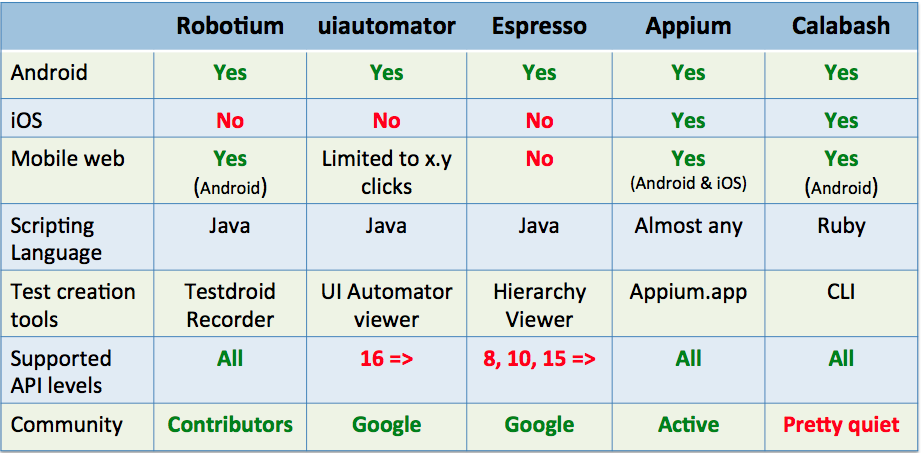
总结
以上就是我们列出的5款最棒的测试框架,可用于日常的Android构建,创立和修改。当然,每一种框架都有其优势和缺陷。Appium可以同时测
试你的Android和iOS版本。但如果你是一个忠实的Android开发人员只开发安卓版本的app,那么,使用Robotium就很不错的。
Testdroid
Recorder还可为我们在生成测试脚本节省大量的时间和金钱(这是免费的哦!)。因此,好好思考下你的测试需求——功能测试、兼容性测试、UI测试等
等——然后为自己选取最适合和最佳的Android测试框架。
译文链接: http://www.codeceo.com/article/5-android-test-framework.html
英文原文: Top
5 Android Testing Frameworks (with Examples)
5个最佳的Android测试框架(带示例)的更多相关文章
- Android测试框架初步
一.实验目的 1.掌握android测试项目的建立 2.掌握android测试框架的基本内容 3.编写运行android测试 二.实验内容与步骤 建立android项目MyProject,运行截图如下 ...
- Android测试框架1(非原创)
1.继承AndroidTestCase :public class JunitTest3 extends AndroidTestCase {} 2.在AndroidManifest.xml清单文件中添 ...
- Android测试框架-uiautomator
官方示例:https://github.com/googlesamples/android-testing 官方文档请 google 要求: Android SDK v23 Android Build ...
- Android测试框架2(非原创)
package com.example.sqlitedatabase.test; import android.content.ContentValues;import android.databas ...
- Android开源测试框架学习
近期因工作需要,分析了一些Android的测试框架,在这也分享下整理完的资料. Android测试大致分三大块: 代码层测试 用户操作模拟,功能测试 安装部署及稳定性测试 代码层测试 对于一般java ...
- [转]Android开源测试框架学习
近期因工作需要,分析了一些Android的测试框架,在这也分享下整理完的资料. Android测试大致分三大块: 代码层测试 用户操作模拟,功能测试 安装部署及稳定性测试 代码层测试 对于一般java ...
- android测试分析1
Android测试框架,开发环境中集成的一部分,提供一个架构和强有力的工具 可以帮助测试你的应用从单元到框架的每个方面. 测试框架有这些主要特征: 1.Android测试组件基于Junit.你可以使用 ...
- 2014 非常好用的开源 Android 测试工具
http://www.php100.com/html/it/mobile/2014/1015/7495.html 当前有很大的趋势是转向移动应用平台,Android 是最广泛使用的移动操作系统,201 ...
- 十大免费移动程序测试框架(Android/iOS)
十大免费移动程序测试框架(Android/iOS) 概述:本文将介绍10款免费移动程序测试框架,帮助开发人员简化测试流程,一起来看看吧. Bug是移动开发者最头痛的一大问题.不同于Web应用程序开发, ...
随机推荐
- Spring Boot : Swagger 2
每次修改完代码需要找原本的API时楼主的内心是痛苦的,因为一般情况下都找不到,需要重新写一份.如果使用Swagger的话,只要加几个注解就可以实时生成最新的在线API文档,而且不仅仅是文档,同时支持A ...
- SqlServer查询文件组被占用情况
在SqlServer中,删除一个文件组 alter database [xxxxx] remove filegroup FGMonthTurnIntroduceByMonth13 有时候会遇到如下报错 ...
- AD7190的小总结
1.单次转换模式 通过配置“模式寄存器的MD2.MD1.MD0为001”,便可启动单次转换. 流程“上电 -> 单次转换 -> 省电模式 ” , 片内振荡上电需要大约1ms. 单次转换 ...
- pta 编程题6 树的同构
其它pta数据结构编程题请参见:pta 题目请参见:树的同构 因题目中左右子树是按照下标给出,因此用数组存放树是更好的方法. 判断两棵树是否同构:用递归的方法.如果当前两个结点都为空,则返回TRUE: ...
- DOM编程艺术-setTimeout,"moveElement('"+elementID+"',"+final_x+","+final_y+","+interval+")"
DOM编程艺术一个小demo,看到这里的时候不理解 "moveElement('"+elementID+"',"+final_x+","+f ...
- codeforces 600C Make Palindrome
要保证变化次数最少就是出现次数为奇数的相互转化,而且对应字母只改变一次.保证字典序小就是字典序大的字母变成字典序小的字母. 长度n为偶数时候,次数为奇数的有偶数个,按照上面说的搞就好了. n为奇数时, ...
- 【BZOJ3930】[CQOI2015] 选数(容斥)
点此看题面 大致题意: 让你求出在区间\([L,H]\)间选择\(n\)个数时,有多少种方案使其\(gcd\)为\(K\). 容斥 原以为是一道可怕的莫比乌斯反演题. 但是,数据范围中有这样一句话:\ ...
- python脚本执行报错:SyntaxError: Non-ASCII character '\xe6' in file ip.py on line 4...
报错信息 [root@chenbj ~]# python ip.py 192.168.1.1 File "ip.py", line 4 SyntaxError: Non-ASCII ...
- 在C++类中使用dllimport和dllexport导出,
在Windows平台下: 您可以使用dllimport或dllexport属性声明C ++类.这些形式意味着导入或导出整个类.以这种方式导出的类称为可导出类. 以下示例定义可导出的类.导出其所有成员函 ...
- 在maven项目中 配置代理对象远程调用crm
1 在maven项目中配置代理对象远程调用crm 1.1 在项目的pom.xml中引入CXF的依赖 <dependency> <groupId>org.apache.cxf&l ...