
ASP.NET MVC- Controllers and Routing- Routing
二、Creating Custom Routes
In this tutorial, you learn how to add a custom route to an ASP.NET MVC application. You learn how to modify the default route table in the Global.asax file with a custom route.
For many simple ASP.NET MVC applications, the default route table will work just fine. However, you might discover that you have specialized routing needs. In that case, you can create a custom route.
Imagine, for example, that you are building a blog application. You might want to handle incoming requests that look like this:
/Archive/12-25-2009
When a user enters this request, you want to return the blog entry that corresponds to the date 12/25/2009. In order to handle this type of request, you need to create a custom route.
The Global.asax file in Listing 1 contains a new custom route, named Blog, which handles requests that look like /Archive/entry date.
Listing 1 - Global.asax (with custom route)
using System.Web.Mvc;

using System.Web.Routing;

namespace MvcApplication1

{

    public class MvcApplication : System.Web.HttpApplication

    {

        public static void RegisterRoutes(RouteCollection routes)

        {

            routes.IgnoreRoute("{resource}.axd/{*pathInfo}");

            routes.MapRoute(

                "Blog",                                           // Route name

                "Archive/{entryDate}",                            // URL with parameters

                new { controller = "Archive", action = "Entry" }  // Parameter defaults

            );

            routes.MapRoute(

                "Default",                                              // Route name

                "{controller}/{action}/{id}",                           // URL with parameters

                new { controller = "Home", action = "Index", id = "" }  // Parameter defaults

            );

        }

        protected void Application_Start()

        {

            RegisterRoutes(RouteTable.Routes);

        }

    }

}
The order of the routes that you add to the route table is important. Our new custom Blog route is added before the existing Default route. If you reversed the order, then the Default route always will get called instead of the custom route.
The custom Blog route matches any request that starts with /Archive/. So, it matches all of the following URLs:
/Archive/12-25-2009
/Archive/10-6-2004
/Archive/apple
The custom route maps the incoming request to a controller named Archive and invokes the Entry() action. When the Entry() method is called, the entry date is passed as a parameter named entryDate.
You can use the Blog custom route with the controller in Listing 2.
Listing 2 - ArchiveController.cs
using System;

using System.Web.Mvc;

namespace MvcApplication1.Controllers

{

    public class ArchiveController : Controller

    {

        public string Entry(DateTime entryDate)

        {

            return "You requested the entry from " + entryDate.ToString();

        }

    }

}
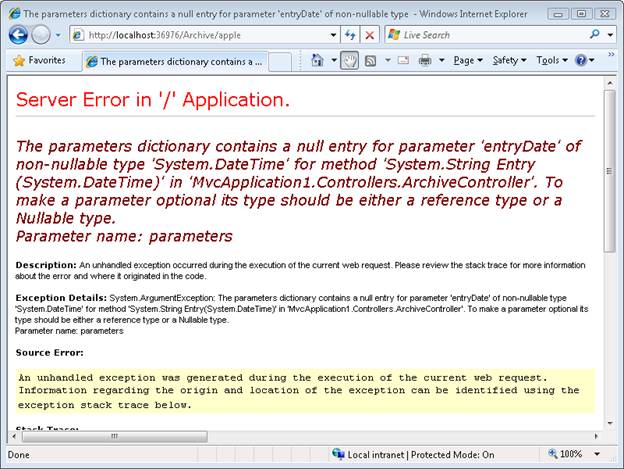
Notice that the Entry() method in Listing 2 accepts a parameter of type DateTime. The MVC framework is smart enough to convert the entry date from the URL into a DateTime value automatically. If the entry date parameter from the URL cannot be converted to a DateTime, an error is raised (see Figure 1).
Figure 1 - Error from converting parameter
Summary
The goal of this tutorial was to demonstrate how you can create a custom route. You learned how to add a custom route to the route table in the Global.asax file that represents blog entries. We discussed how to map requests for blog entries to a controller named ArchiveController and a controller action named Entry().
三、Creating a Route Constraint
In this tutorial, Stephen Walther demonstrates how you can control how browser requests match routes by creating route constraints with regular expressions.
You use route constraints to restrict the browser requests that match a particular route. You can use a regular expression to specify a route constraint.
For example, imagine that you have defined the route in Listing 1 in your Global.asax file.
Listing 1 - Global.asax.cs
routes.MapRoute(

    "Product",

    "Product/{productId}",

    new {controller="Product", action="Details"}

);
Listing 1 contains a route named Product.
You can use the Product route to map browser requests to the ProductController contained in Listing 2.
Listing 2 - Controllers\ProductController.cs
using System.Web.Mvc;

namespace MvcApplication1.Controllers

{

    public class ProductController : Controller

    {

        public ActionResult Details(int productId)

        {

            return View();

        }

    }

}
Notice that the Details() action exposed by the Product controller accepts a single parameter named productId. This parameter is an integer parameter.
The route defined in Listing 1 will match any of the following URLs:
- /Product/23
- /Product/7
Unfortunately, the route will also match the following URLs:
- /Product/blah
- /Product/apple
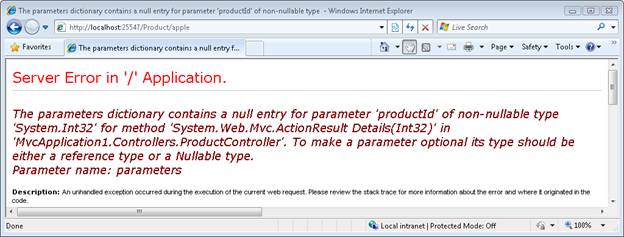
Because the Details() action expects an integer parameter, making a request that contains something other than an integer value will cause an error. For example, if you type the URL /Product/apple into your browser then you will get the error page in Figure 1.
What you really want to do is only match URLs that contain a proper integer productId. You can use a constraint when defining a route to restrict the URLs that match the route. The modified Product route in Listing 3 contains a regular expression constraint that only matches integers.
Listing 3 - Global.asax.cs
routes.MapRoute(

    "Product",

    "Product/{productId}",

    new {controller="Product", action="Details"},

    new {productId = @"\d+" }

 );
The regular expression \d+ matches one or more integers. This constraint causes the Product route to match the following URLs:
- /Product/3
- /Product/8999
But not the following URLs:
- /Product/apple
- /Product
These browser requests will be handled by another route or, if there are no matching routes, a The resource could not be found error will be returned.
四、Creating a Custom Route Constraint
Stephen Walther demonstrates how you can create a custom route constraint. We implement a simple custom constraint that prevents a route from being matched when a browser request is made from a remote computer.
The goal of this tutorial is to demonstrate how you can create a custom route constraint. A custom route constraint enables you to prevent a route from being matched unless some custom condition is matched.
In this tutorial, we create a Localhost route constraint. The Localhost route constraint only matches requests made from the local computer. Remote requests from across the Internet are not matched.
You implement a custom route constraint by implementing the IRouteConstraint interface. This is an extremely simple interface which describes a single method:
bool Match(

    HttpContextBase httpContext,

    Route route,

    string parameterName,

    RouteValueDictionary values,

    RouteDirection routeDirection

)
The method returns a Boolean value. If you return false, the route associated with the constraint won’t match the browser request.The Localhost constraint is contained in Listing 1.
Listing 1 - LocalhostConstraint.cs
using System.Web;

using System.Web.Routing;

namespace MvcApplication1.Constraints

{

    public class LocalhostConstraint : IRouteConstraint

    {

        public bool Match

            (

                HttpContextBase httpContext,

                Route route,

                string parameterName,

                RouteValueDictionary values,

                RouteDirection routeDirection

            )

        {

            return httpContext.Request.IsLocal;

        }

    }

}
The constraint in Listing 1 takes advantage of the IsLocal property exposed by the HttpRequest class. This property returns true when the IP address of the request is either 127.0.0.1 or when the IP of the request is the same as the server’s IP address.
You use a custom constraint within a route defined in the Global.asax file. The Global.asax file in Listing 2 uses the Localhost constraint to prevent anyone from requesting an Admin page unless they make the request from the local server. For example, a request for /Admin/DeleteAll will fail when made from a remote server.
Listing 2 - Global.asax
using System;

using System.Collections.Generic;

using System.Linq;

using System.Web;

using System.Web.Mvc;

using System.Web.Routing;

using MvcApplication1.Constraints;

namespace MvcApplication1

{

    public class MvcApplication : System.Web.HttpApplication

    {

        public static void RegisterRoutes(RouteCollection routes)

        {

            routes.IgnoreRoute("{resource}.axd/{*pathInfo}");

            routes.MapRoute(

                "Admin",

                "Admin/{action}",

                new {controller="Admin"},

                new {isLocal=new LocalhostConstraint()}

            );

            //routes.MapRoute(

            //    "Default",                                              // Route name

            //    "{controller}/{action}/{id}",                           // URL with parameters

            //    new { controller = "Home", action = "Index", id = "" }  // Parameter defaults

            //);

        }

        protected void Application_Start()

        {

            RegisterRoutes(RouteTable.Routes);

        }

    }

}
The Localhost constraint is used in the definition of the Admin route. This route won’t be matched by a remote browser request. Realize, however, that other routes defined in Global.asax might match the same request. It is important to understand that a constraint prevents a particular route from matching a request and not all routes defined in the Global.asax file.
Notice that the Default route has been commented out from the Global.asax file in Listing 2. If you include the Default route, then the Default route would match requests for the Admin controller. In that case, remote users could still invoke actions of the Admin controller even though their requests wouldn’t match the Admin route.
原文:http://www.asp.net/mvc/tutorials/controllers-and-routing/asp-net-mvc-controller-overview-vb
译文:http://www.cnblogs.com/JimmyZhang/archive/2009/03/08/1406512.html
ASP.NET MVC- Controllers and Routing- Routing的更多相关文章
- Post Complex JavaScript Objects to ASP.NET MVC Controllers
http://www.nickriggs.com/posts/post-complex-javascript-objects-to-asp-net-mvc-controllers/ Post ...
- Asp.Net MVC 3【URLs, Routing,and Areas】续
http://www.cnblogs.com/HuiTai/archive/2012/07/24/2597875.html 接着前面继续学习分享我们的路由. 现在我们把Global.asax文件里的R ...
- ASP.NET MVC 入门3、Routing
本系列文章基于Microsoft ASP.NET MVC Beta. 在一个route中,通过在大括号中放一个占位符来定义( { and } ).当解析URL的时候,符号"/"和& ...
- [转]ASP.NET MVC 入门3、Routing
在一个route中,通过在大括号中放一个占位符来定义( { and } ).当解析URL的时候,符号"/"和"."被作为一个定义符来解析,而定义符之间的值则匹配 ...
- ASP.NET MVC Controllers and Actions
MVC应用程序里的URL请求是通过控制器Controller处理的,不管是请求视图页面的GET请求,还是传递数据到服务端处理的Post请求都是通过Controller来处理的,先看一个简单的Contr ...
- Asp.net MVC十问十答[译]
1. Explain MVC (Model-View-Controller) in general? MVC (Model-View-Controller) is an architectural s ...
- [引]ASP.NET MVC 4 Content Map
本文转自:http://msdn.microsoft.com/en-us/library/gg416514(v=vs.108).aspx The Model-View-Controller (MVC) ...
- 【转】ASP.NET MVC教程
转自:http://www.cnblogs.com/QLeelulu/category/123326.html ASP.NET MVC的最佳实践与性能优化的文章 摘要: 就一些文章链接,就不多废话了. ...
- ASP.NET MVC HttpVerbs.Delete/Put Routes not firing
原文地址: https://weblog.west-wind.com/posts/2015/Apr/09/ASPNET-MVC-HttpVerbsDeletePut-Routes-not-firing ...
- 自学MVC看这里——全网最全ASP.NET MVC 教程汇总
MVC架构已深得人心,微软也不甘落后,推出了Asp.net MVC.小编特意整理博客园乃至整个网络最具价值的MVC技术原创文章,为想要学习ASP.NET MVC技术的学习者提供一个整合学习入口.本文从 ...
随机推荐
- 【javascript 引用类型(一)】
javascript 的引用类型大致分为:Object 类型.Array 类型.Date 类型.RegExp 类型.Function 类型.基本包装类型和单体内置对象.这里我们着重介绍 Object ...
- datagridview用get,set访问并加锁,可以控制所有使用datagridview的地方都顺序进行访问
public System.Windows.Forms.DataGridView dataGridView1 { get { lock (ojb) { return dataGridView; } } ...
- wpf RadioButton控件的一个bug,onpropertychanged后会修改旧属性的值
测试代码下载:http://files.cnblogs.com/djangochina/RadioButtonBug.zip 从上面列表选择不同的行,再设置下面不同的radiobutton看看结果 b ...
- c++ 最短路两种算法
最短路是个老问题了,大神们留下很多文档但是很多都是针对算法使用一些固定大小的数组进行数据存储在实际应用中受到限制,这里自己练习一下,主要用了一些c++的stl,减少了固定长度数组的依赖,换一种写法试图 ...
- 如何通过SNMP的OID识别不同厂商的设备
众所周知,SNMP作为通用的网络协议常用于系统监控之中,那么如何借助SNMP来识别不同厂商的设备呢? 事实上,在SNMP的OID树状图中专门有一个节点用于识别各不同的厂商,这个节点是: iso(1) ...
- shell 基础 $(cd `dirname $0`;pwd)
$ cd `dirname $0` 和PWD%/* shell变量的一些特殊用法 在命令行状态下单纯执行 $ cd `dirname $0` 是毫无意义的.因为他返回当前路径的"." ...
- 关于键盘冲突那点事(3键冲突/7键冲突/PS2/USB的各种原理)
转自关于键盘冲突那点事(3键冲突/7键冲突/PS2/USB的各种原理) 最近闲得无聊,正好看到有人发帖提问,于是就来详细说说所谓键位冲突和无冲突的各种原理--基本上这也是个老生常谈的话题了,但相关的技 ...
- SPRING IN ACTION 第4版笔记-第一章-004-用类来管理DI
一. 1. package chapter01.sia.knights.config; import org.springframework.context.annotation.Bean; impo ...
- 解析Android开发优化之:对Bitmap的内存优化详解
在Android应用里,最耗费内存的就是图片资源.而且在Android系统中,读取位图Bitmap时,分给虚拟机中的图片的堆栈大小只有8M,如果超出了,就会出现OutOfMemory异常.所以,对于图 ...
- AD认证
这两天接触到一个新的知识点,AD验证.什么是AD验证?Active Directory——活动目录,活动目录只是LDAP的一个实现,提供LDAP认证.Radius认证和NTML认证,都是标准认证方式 ...