
ASP.NET MVC- Controllers and Routing- Routing
二、Creating Custom Routes
In this tutorial, you learn how to add a custom route to an ASP.NET MVC application. You learn how to modify the default route table in the Global.asax file with a custom route.
For many simple ASP.NET MVC applications, the default route table will work just fine. However, you might discover that you have specialized routing needs. In that case, you can create a custom route.
Imagine, for example, that you are building a blog application. You might want to handle incoming requests that look like this:
/Archive/12-25-2009
When a user enters this request, you want to return the blog entry that corresponds to the date 12/25/2009. In order to handle this type of request, you need to create a custom route.
The Global.asax file in Listing 1 contains a new custom route, named Blog, which handles requests that look like /Archive/entry date.
Listing 1 - Global.asax (with custom route)
using System.Web.Mvc;

using System.Web.Routing;

namespace MvcApplication1

{

    public class MvcApplication : System.Web.HttpApplication

    {

        public static void RegisterRoutes(RouteCollection routes)

        {

            routes.IgnoreRoute("{resource}.axd/{*pathInfo}");

            routes.MapRoute(

                "Blog",                                           // Route name

                "Archive/{entryDate}",                            // URL with parameters

                new { controller = "Archive", action = "Entry" }  // Parameter defaults

            );

            routes.MapRoute(

                "Default",                                              // Route name

                "{controller}/{action}/{id}",                           // URL with parameters

                new { controller = "Home", action = "Index", id = "" }  // Parameter defaults

            );

        }

        protected void Application_Start()

        {

            RegisterRoutes(RouteTable.Routes);

        }

    }

}
The order of the routes that you add to the route table is important. Our new custom Blog route is added before the existing Default route. If you reversed the order, then the Default route always will get called instead of the custom route.
The custom Blog route matches any request that starts with /Archive/. So, it matches all of the following URLs:
/Archive/12-25-2009
/Archive/10-6-2004
/Archive/apple
The custom route maps the incoming request to a controller named Archive and invokes the Entry() action. When the Entry() method is called, the entry date is passed as a parameter named entryDate.
You can use the Blog custom route with the controller in Listing 2.
Listing 2 - ArchiveController.cs
using System;

using System.Web.Mvc;

namespace MvcApplication1.Controllers

{

    public class ArchiveController : Controller

    {

        public string Entry(DateTime entryDate)

        {

            return "You requested the entry from " + entryDate.ToString();

        }

    }

}
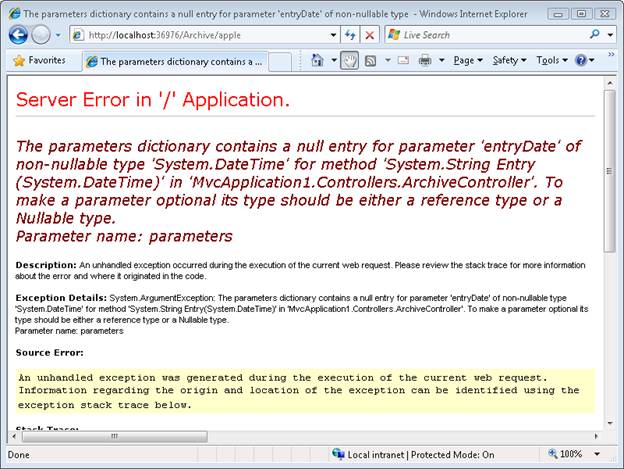
Notice that the Entry() method in Listing 2 accepts a parameter of type DateTime. The MVC framework is smart enough to convert the entry date from the URL into a DateTime value automatically. If the entry date parameter from the URL cannot be converted to a DateTime, an error is raised (see Figure 1).
Figure 1 - Error from converting parameter
Summary
The goal of this tutorial was to demonstrate how you can create a custom route. You learned how to add a custom route to the route table in the Global.asax file that represents blog entries. We discussed how to map requests for blog entries to a controller named ArchiveController and a controller action named Entry().
三、Creating a Route Constraint
In this tutorial, Stephen Walther demonstrates how you can control how browser requests match routes by creating route constraints with regular expressions.
You use route constraints to restrict the browser requests that match a particular route. You can use a regular expression to specify a route constraint.
For example, imagine that you have defined the route in Listing 1 in your Global.asax file.
Listing 1 - Global.asax.cs
routes.MapRoute(

    "Product",

    "Product/{productId}",

    new {controller="Product", action="Details"}

);
Listing 1 contains a route named Product.
You can use the Product route to map browser requests to the ProductController contained in Listing 2.
Listing 2 - Controllers\ProductController.cs
using System.Web.Mvc;

namespace MvcApplication1.Controllers

{

    public class ProductController : Controller

    {

        public ActionResult Details(int productId)

        {

            return View();

        }

    }

}
Notice that the Details() action exposed by the Product controller accepts a single parameter named productId. This parameter is an integer parameter.
The route defined in Listing 1 will match any of the following URLs:
- /Product/23
- /Product/7
Unfortunately, the route will also match the following URLs:
- /Product/blah
- /Product/apple
Because the Details() action expects an integer parameter, making a request that contains something other than an integer value will cause an error. For example, if you type the URL /Product/apple into your browser then you will get the error page in Figure 1.
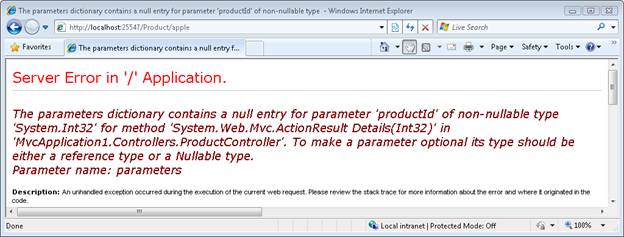
What you really want to do is only match URLs that contain a proper integer productId. You can use a constraint when defining a route to restrict the URLs that match the route. The modified Product route in Listing 3 contains a regular expression constraint that only matches integers.
Listing 3 - Global.asax.cs
routes.MapRoute(

    "Product",

    "Product/{productId}",

    new {controller="Product", action="Details"},

    new {productId = @"\d+" }

 );
The regular expression \d+ matches one or more integers. This constraint causes the Product route to match the following URLs:
- /Product/3
- /Product/8999
But not the following URLs:
- /Product/apple
- /Product
These browser requests will be handled by another route or, if there are no matching routes, a The resource could not be found error will be returned.
四、Creating a Custom Route Constraint
Stephen Walther demonstrates how you can create a custom route constraint. We implement a simple custom constraint that prevents a route from being matched when a browser request is made from a remote computer.
The goal of this tutorial is to demonstrate how you can create a custom route constraint. A custom route constraint enables you to prevent a route from being matched unless some custom condition is matched.
In this tutorial, we create a Localhost route constraint. The Localhost route constraint only matches requests made from the local computer. Remote requests from across the Internet are not matched.
You implement a custom route constraint by implementing the IRouteConstraint interface. This is an extremely simple interface which describes a single method:
bool Match(

    HttpContextBase httpContext,

    Route route,

    string parameterName,

    RouteValueDictionary values,

    RouteDirection routeDirection

)
The method returns a Boolean value. If you return false, the route associated with the constraint won’t match the browser request.The Localhost constraint is contained in Listing 1.
Listing 1 - LocalhostConstraint.cs
using System.Web;

using System.Web.Routing;

namespace MvcApplication1.Constraints

{

    public class LocalhostConstraint : IRouteConstraint

    {

        public bool Match

            (

                HttpContextBase httpContext,

                Route route,

                string parameterName,

                RouteValueDictionary values,

                RouteDirection routeDirection

            )

        {

            return httpContext.Request.IsLocal;

        }

    }

}
The constraint in Listing 1 takes advantage of the IsLocal property exposed by the HttpRequest class. This property returns true when the IP address of the request is either 127.0.0.1 or when the IP of the request is the same as the server’s IP address.
You use a custom constraint within a route defined in the Global.asax file. The Global.asax file in Listing 2 uses the Localhost constraint to prevent anyone from requesting an Admin page unless they make the request from the local server. For example, a request for /Admin/DeleteAll will fail when made from a remote server.
Listing 2 - Global.asax
using System;

using System.Collections.Generic;

using System.Linq;

using System.Web;

using System.Web.Mvc;

using System.Web.Routing;

using MvcApplication1.Constraints;

namespace MvcApplication1

{

    public class MvcApplication : System.Web.HttpApplication

    {

        public static void RegisterRoutes(RouteCollection routes)

        {

            routes.IgnoreRoute("{resource}.axd/{*pathInfo}");

            routes.MapRoute(

                "Admin",

                "Admin/{action}",

                new {controller="Admin"},

                new {isLocal=new LocalhostConstraint()}

            );

            //routes.MapRoute(

            //    "Default",                                              // Route name

            //    "{controller}/{action}/{id}",                           // URL with parameters

            //    new { controller = "Home", action = "Index", id = "" }  // Parameter defaults

            //);

        }

        protected void Application_Start()

        {

            RegisterRoutes(RouteTable.Routes);

        }

    }

}
The Localhost constraint is used in the definition of the Admin route. This route won’t be matched by a remote browser request. Realize, however, that other routes defined in Global.asax might match the same request. It is important to understand that a constraint prevents a particular route from matching a request and not all routes defined in the Global.asax file.
Notice that the Default route has been commented out from the Global.asax file in Listing 2. If you include the Default route, then the Default route would match requests for the Admin controller. In that case, remote users could still invoke actions of the Admin controller even though their requests wouldn’t match the Admin route.
原文:http://www.asp.net/mvc/tutorials/controllers-and-routing/asp-net-mvc-controller-overview-vb
译文:http://www.cnblogs.com/JimmyZhang/archive/2009/03/08/1406512.html
ASP.NET MVC- Controllers and Routing- Routing的更多相关文章
- Post Complex JavaScript Objects to ASP.NET MVC Controllers
http://www.nickriggs.com/posts/post-complex-javascript-objects-to-asp-net-mvc-controllers/ Post ...
- Asp.Net MVC 3【URLs, Routing,and Areas】续
http://www.cnblogs.com/HuiTai/archive/2012/07/24/2597875.html 接着前面继续学习分享我们的路由. 现在我们把Global.asax文件里的R ...
- ASP.NET MVC 入门3、Routing
本系列文章基于Microsoft ASP.NET MVC Beta. 在一个route中,通过在大括号中放一个占位符来定义( { and } ).当解析URL的时候,符号"/"和& ...
- [转]ASP.NET MVC 入门3、Routing
在一个route中,通过在大括号中放一个占位符来定义( { and } ).当解析URL的时候,符号"/"和"."被作为一个定义符来解析,而定义符之间的值则匹配 ...
- ASP.NET MVC Controllers and Actions
MVC应用程序里的URL请求是通过控制器Controller处理的,不管是请求视图页面的GET请求,还是传递数据到服务端处理的Post请求都是通过Controller来处理的,先看一个简单的Contr ...
- Asp.net MVC十问十答[译]
1. Explain MVC (Model-View-Controller) in general? MVC (Model-View-Controller) is an architectural s ...
- [引]ASP.NET MVC 4 Content Map
本文转自:http://msdn.microsoft.com/en-us/library/gg416514(v=vs.108).aspx The Model-View-Controller (MVC) ...
- 【转】ASP.NET MVC教程
转自:http://www.cnblogs.com/QLeelulu/category/123326.html ASP.NET MVC的最佳实践与性能优化的文章 摘要: 就一些文章链接,就不多废话了. ...
- ASP.NET MVC HttpVerbs.Delete/Put Routes not firing
原文地址: https://weblog.west-wind.com/posts/2015/Apr/09/ASPNET-MVC-HttpVerbsDeletePut-Routes-not-firing ...
- 自学MVC看这里——全网最全ASP.NET MVC 教程汇总
MVC架构已深得人心,微软也不甘落后,推出了Asp.net MVC.小编特意整理博客园乃至整个网络最具价值的MVC技术原创文章,为想要学习ASP.NET MVC技术的学习者提供一个整合学习入口.本文从 ...
随机推荐
- Python 函数式编程学习
描述:通过将函数作为参数,使得功能类似的函数实现可以整合到同一个函数. Before def getAdd(lst): result = 0 for item in lst: result += it ...
- POJ 3321 Apple Tree dfs+二叉索引树
题目:http://poj.org/problem?id=3321 动态更新某个元素,并且求和,显然是二叉索引树,但是节点的标号不连续,二叉索引树必须是连续的,所以需要转化成连续的,多叉树的形状已经建 ...
- JS简单仿QQ聊天工具的制作
刚接触JS,对其充满了好奇,利用刚学到的一点知识,写了一个简单的仿QQ聊天的东西,其中还有很多的不足之处,有待慢慢提高. 功能:1.在输入框中输入内容,点击发送,即可在上方显示所输入内容. 2.点击‘ ...
- Case When PK PIVOT
SELECT *FROM ScoreInfogo Name Course Score---------- ---------- -----------Lucy Chinese 74Jim Math 8 ...
- U盘装系统出现错误 安装失败怎么办
在用U盘装系统的时候,有些用户犹豫第一次操作,经常会遇到一些问题.例如U盘装系统失败;U盘容量已用完;内存损坏等种种问题.因此小编整理了一些关于U盘装系统失败的常见问题解答,希望对大家有帮助! 1. ...
- Stanford CoreNLP--常量定义
在运行Stanford CoreNLP过程中会用到tokenize,pos等参数,这些以常量形式定义在edu.stanford.nlp.pipeline.Annotator中,具体如下: /** * ...
- ThreadLocal学习
1.简介: 类ThreadLocal<T>,为变量提供了线程本地化副本.对于用ThreadLocal维护的变量,当前线程中的副本不同于它在其他线程中的副本,每个线程通过ThreadLoca ...
- 使AspNetPager控件中文显示分页信息
在日常的编程过程中,很多学员对于使AspNetPager控件中文显示分页信息不是很清楚,本文将由达内的老师为各位学员介绍一下使AspNetPager控件中文显示分页信息的内容. AspNetPager ...
- 【网络流24题】No.21 (最长 k 可重区间集问题 最长不相交路径 最大费用流)
[] 输入文件示例input.txt4 21 76 87 109 13 输出文件示例output.txt15 [分析] 直接co题解好了,写得挺全.. [建模方法] 方法1 按左端点排序所有区间,把每 ...
- bzoj1016
这道题主要利用了最小生成树的两个性质 最小生成树每种边权的数目固定不变 最小生成树每种边权带来的连通状况一定唯一 由于每种边权的只有不到10种,所以直接穷举然后乘法原理即可 ; type node=r ...