
Linux Kernel basics
Linux内核作用:
The Linux kernel is the heart of the operating system. It is the layer between the user who works with Linux from a shell environment and the hardware that is available in the computer on which the user is working. The kernel is doing so by managing the I/O instructions it receives from the software and translating those to processing instructions that are to be executed by the central processing unit and other hardware in the computer. The kernel also takes care of handling essential operating system tasks. One example of such a task is the scheduler that makes sure that processes that are started on the operating system are handled by the CPU.The operating system tasks that are performed by the kernel are implemented by different kernel threads.
查看系统内核进程:
[root@rhel7 ~]# ps aux | head -n 20

USER       PID %CPU %MEM    VSZ   RSS TTY      STAT START   TIME COMMAND

root         1  0.0  0.3 126560  7264 ?        Ss   02:23   0:04 /usr/lib/systemd/systemd --switched-root --system --deserialize 20

root         2  0.0  0.0      0     0 ?        S    02:23   0:00 [kthreadd]

root         3  0.0  0.0      0     0 ?        S    02:23   0:00 [ksoftirqd/0]

root         5  0.0  0.0      0     0 ?        S<   02:23   0:00 [kworker/0:0H]

root         7  0.0  0.0      0     0 ?        S    02:23   0:00 [migration/0]

root         8  0.0  0.0      0     0 ?        S    02:23   0:00 [rcu_bh]

root         9  0.0  0.0      0     0 ?        S    02:23   0:00 [rcuob/0]

root        10  0.0  0.0      0     0 ?        S    02:23   0:00 [rcuob/1]

root        11  0.0  0.0      0     0 ?        S    02:23   0:01 [rcu_sched]

root        12  0.0  0.0      0     0 ?        S    02:23   0:00 [rcuos/0]

root        13  0.0  0.0      0     0 ?        S    02:23   0:01 [rcuos/1]

root        14  0.0  0.0      0     0 ?        S    02:23   0:00 [watchdog/0]

root        15  0.0  0.0      0     0 ?        S    02:23   0:00 [watchdog/1]

root        16  0.0  0.0      0     0 ?        S    02:23   0:00 [migration/1]

root        17  0.0  0.0      0     0 ?        S    02:23   0:00 [ksoftirqd/1]

root        19  0.0  0.0      0     0 ?        S<   02:23   0:00 [kworker/1:0H]

root        20  0.0  0.0      0     0 ?        S<   02:23   0:00 [khelper]

root        21  0.0  0.0      0     0 ?        S    02:23   0:00 [kdevtmpfs]

root        22  0.0  0.0      0     0 ?        S<   02:23   0:00 [netns]
The kernel thread names are listed between square brackets.
- Hardware Initialization--内核的一个重要工作就是硬件初始化
The loading of drivers is an automated process that roughly goes like this:
1. During boot, the kernel probes available hardware.
2. Upon detection of a hardware component, the systemd-udevd process takes care of loading the appropriate driver and making the hardware device available.
3. To decide how the devices are initialized, systemd-udevd reads rules files in / usr/lib/udev/rules.d. These are system provided udev rules files that should not be modified.
4. After processing the system provided udev rules files, systemd-udevd goes to the /etc/udev/rules.d directory to read any custom rules if these are available.
5. As a result, required kernel modules are loaded automatically and status about the kernel modules and associated hardware is written to the sysfs file system which is mounted on the /sys directory.
[root@rhel7 rules.d]# udevadm monitor

monitor will print the received events for:

UDEV - the event which udev sends out after rule processing

KERNEL - the kernel uevent

KERNEL[26762.720715] change   /devices/pci0000:00/0000:00:01.1/ata2/host1/target1:0:0/1:0:0:0/block/sr0 (block) --挂载光驱

UDEV  [26762.780435] change   /devices/pci0000:00/0000:00:01.1/ata2/host1/target1:0:0/1:0:0:0/block/sr0 (block)

KERNEL[26781.664833] change   /devices/pci0000:00/0000:00:01.1/ata2/host1/target1:0:0/1:0:0:0/block/sr0 (block) --卸载光驱

UDEV  [26781.767169] change   /devices/pci0000:00/0000:00:01.1/ata2/host1/target1:0:0/1:0:0:0/block/sr0 (block)
In this command, you can see how features that are offered by the hardware are discovered automatically by the kernel and udev working together. Each phase of the hardware probing is concluded by the creation of a file in the /sys file system. Once the hardware has been fully initialized, you can also see that some kernel modules are loaded.
- Analyzing What the Kernel Is Doing --查看内核正在进行的操作
To help analyze what the kernel is doing, some tools are provided by the Linux operating systems:
■ The dmesg utility --journalctl --dmesg或者journalctl -k
■ The /proc file system
■ The uname utility
[root@rhel7 ~]# journalctl --dmesg

-- Logs begin at Sat 2016-08-13 02:23:44 EDT, end at Sat 2016-08-13 10:01:01 EDT. --

Aug 13 02:23:44 localhost.localdomain kernel: Initializing cgroup subsys cpuset

Aug 13 02:23:44 localhost.localdomain kernel: Initializing cgroup subsys cpu

Aug 13 02:23:44 localhost.localdomain kernel: Initializing cgroup subsys cpuacct

Aug 13 02:23:44 localhost.localdomain kernel: Linux version 3.10.0-327.el7.x86_64 (mockbuild@x86-034.build.eng.bos.redhat.com) (gcc versio

Aug 13 02:23:44 localhost.localdomain kernel: Command line: BOOT_IMAGE=/vmlinuz-3.10.0-327.el7.x86_64 root=/dev/mapper/rhel-root ro crashk

Aug 13 02:23:44 localhost.localdomain kernel: e820: BIOS-provided physical RAM map:

Aug 13 02:23:44 localhost.localdomain kernel: BIOS-e820: [mem 0x0000000000000000-0x000000000009fbff] usable

Aug 13 02:23:44 localhost.localdomain kernel: BIOS-e820: [mem 0x000000000009fc00-0x000000000009ffff] reserved

Aug 13 02:23:44 localhost.localdomain kernel: BIOS-e820: [mem 0x00000000000f0000-0x00000000000fffff] reserved

Aug 13 02:23:44 localhost.localdomain kernel: BIOS-e820: [mem 0x0000000000100000-0x000000007ffeffff] usable

Aug 13 02:23:44 localhost.localdomain kernel: BIOS-e820: [mem 0x000000007fff0000-0x000000007fffffff] ACPI data

Aug 13 02:23:44 localhost.localdomain kernel: BIOS-e820: [mem 0x00000000fffc0000-0x00000000ffffffff] reserved

Aug 13 02:23:44 localhost.localdomain kernel: NX (Execute Disable) protection: active

Aug 13 02:23:44 localhost.localdomain kernel: SMBIOS 2.5 present.

Aug 13 02:23:44 localhost.localdomain kernel: DMI: innotek GmbH VirtualBox/VirtualBox, BIOS VirtualBox 12/01/2006

Aug 13 02:23:44 localhost.localdomain kernel: e820: update [mem 0x00000000-0x00000fff] usable ==> reserved
In the dmesg output, all kernel-related messages are shown. Each message starts with a time indicator that shows at which specific second the event was logged. This time indicator is relative to the start of the kernel, which allows you to see exactly how many seconds have passed between the start of the kernel and a particular event. (Notice that the journalctl -k / --dmesg commands show clock time, instead of time that is relative to the start of the kernel.) This time indicator gives a clear indication of what has been happening and at which time it has happened.
Another valuable source of information is the /proc file system. The /proc file system is an interface to the Linux kernel, and it contains files with detailed actual status information on what is happening on your server. Many of the performancerelated tools mine the /proc file system for more information.
As an administrator, you will find that some of the files in /proc are very readable and contain actual status information about CPU, memory, mounts, and more. Take a look, for instance, at /proc/meminfo, which gives detailed information about each memory segment and what exactly is happening in these memory segments.
A last useful source of information that should be mentioned here is the uname command. This command gives different kinds of information about your operating system. Type, for instance, uname -a for an overview of all relevant parameters of uname -r to see which kernel version currently is used. This information also shows when using the hostnamectl status command.
- Managing Kernel Modules --管理内核模块
Linux kernel modules normally are loaded automatically for the devices that need them, but you will sometimes have to load the appropriate kernel modules manually. A few commands are used for manual management of kernel modules. An alternative method of loading kernel modules is by doing this through the /etc/ modules-load.d directory. In this directory, you can create files to load modules automatically that are not loaded by the udev method already.
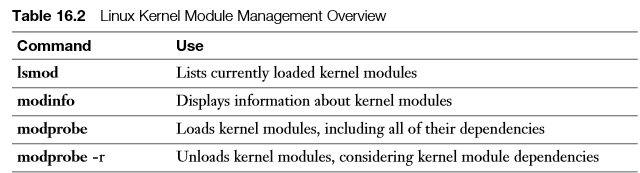
The first command to use when working with kernel modules is lsmod . This command lists all kernel modules that currently are used, including the modules by which this specific module is used.
If you want to have more information about a specific kernel module, you can use the modinfo command. This gives complete information about the specific kernel modules, including two interesting sections: the alias and the parms. A module alias is another name that can also be used to address the module. The parms lines refer to parameters that can be set while loading the module.
[root@rhel7 ~]# modinfo cdrom

filename:       /lib/modules/3.10.0-327.el7.x86_64/kernel/drivers/cdrom/cdrom.ko

license:        GPL

rhelversion:    7.2

srcversion:     BE3BD0D17D080229D55B173

depends:

intree:         Y

vermagic:       3.10.0-327.el7.x86_64 SMP mod_unload modversions

signer:         Red Hat Enterprise Linux kernel signing key

sig_key:        BC:73:C3:CE:E8:9E:5E:AE:99:4A:E5:0A:0D:B1:F0:FE:E3:FC:09:13

sig_hashalgo:   sha256

parm:           debug:bool

parm:           autoclose:bool

parm:           autoeject:bool

parm:           lockdoor:bool

parm:           check_media_type:bool

parm:           mrw_format_restart:bool
To manually load and unload modules, you can use the modprobe and modprobe -r commands.
[root@rhel7 ~]# lsmod | grep ext4

[root@rhel7 ~]# modprobe ext4

[root@rhel7 ~]# lsmod | grep ext4

ext4                  578819  0

mbcache                14958  1 ext4

jbd2                  102940  1 ext4

[root@rhel7 ~]# modinfo ext4

filename:       /lib/modules/3.10.0-327.el7.x86_64/kernel/fs/ext4/ext4.ko

license:        GPL

description:    Fourth Extended Filesystem

author:         Remy Card, Stephen Tweedie, Andrew Morton, Andreas Dilger, Theodore Ts'o and others

alias:          fs-ext4

alias:          ext3

alias:          fs-ext3

alias:          ext2

alias:          fs-ext2

rhelversion:    7.2

srcversion:     DB48BDADD011DE28724EB21

depends:        mbcache,jbd2

intree:         Y

vermagic:       3.10.0-327.el7.x86_64 SMP mod_unload modversions

signer:         Red Hat Enterprise Linux kernel signing key

sig_key:        BC:73:C3:CE:E8:9E:5E:AE:99:4A:E5:0A:0D:B1:F0:FE:E3:FC:09:13

sig_hashalgo:   sha256

[root@rhel7 ~]# modproe -r ext4

-bash: modproe: command not found

[root@rhel7 ~]# modprobe -r ext4

[root@rhel7 ~]# modprobe -r xfs

modprobe: FATAL: Module xfs is in use.

[root@rhel7 ~]# modinfo xfs

filename:       /lib/modules/3.10.0-327.el7.x86_64/kernel/fs/xfs/xfs.ko

license:        GPL

description:    SGI XFS with ACLs, security attributes, no debug enabled

author:         Silicon Graphics, Inc.

alias:          fs-xfs

rhelversion:    7.2

srcversion:     978077FBDF054363971A9EE

depends:        libcrc32c

intree:         Y

vermagic:       3.10.0-327.el7.x86_64 SMP mod_unload modversions

signer:         Red Hat Enterprise Linux kernel signing key

sig_key:        BC:73:C3:CE:E8:9E:5E:AE:99:4A:E5:0A:0D:B1:F0:FE:E3:FC:09:13

sig_hashalgo:   sha256

[root@rhel7 ~]#
- Upgrading the Linux Kernel --linux内核升级
From time to time, you need to upgrade the Linux kernel. When you upgrade the Linux kernel, a new version of the kernel is installed and used as the default kernel. The old version of the kernel file will still be available, though. This ensures that your computer can still boot if in the new kernel nonsupported functionality is included. To install a new version of the kernel, you can use the command yum upgrade kernel . The yum install kernel command also works. Both commands install the new kernel besides the old kernel. The kernel files for the last four kernels that you have installed on your server will be kept in the /boot directory. The GRUB 2 boot loader automatically picks up all kernels that it finds in this directory.
Linux Kernel basics的更多相关文章
- the Linux Kernel: Traffic Control, Shaping and QoS
−Table of Contents Journey to the Center of the Linux Kernel: Traffic Control, Shaping and QoS 1 Int ...
- Linux kernel make 常用选项介绍
Linux kernel 编译方法大全记录 一.这是一个我自己写的自动make脚本: #!/bin/sh export ARCH=arm export CROSS_COMPILE=arm-linux- ...
- Linux Kernel代码艺术——系统调用宏定义
我们习惯在SI(Source Insight)中阅读Linux内核,SI会建立符号表数据库,能非常方便地跳转到变量.宏.函数等的定义处.但在处理系统调用的函数时,却会遇到一些麻烦:我们知道系统调用函数 ...
- Linux Kernel 代码艺术——编译时断言
本系列文章主要写我在阅读Linux内核过程中,关注的比较难以理解但又设计巧妙的代码片段(不关注OS的各个模块的设计思想,此部分我准备写在“深入理解Linux Kernel” 系列文章中),一来通过内核 ...
- linux kernel的中断子系统 softirq
linux kernel的中断子系统之(八):softirq http://www.wowotech.net/irq_subsystem/soft-irq.html http://www.ibm.co ...
- karottc A Simple linux-virus Analysis、Linux Kernel <= 2.6.37 - Local Privilege Escalation、CVE-2010-4258、CVE-2010-3849、CVE-2010-3850
catalog . 程序功能概述 . 感染文件 . 前置知识 . 获取ROOT权限: Linux Kernel <= - Local Privilege Escalation 1. 程序功能概述 ...
- linux kernel 字符设备详解
有关Linux kernel 字符设备分析: 参考:http://blog.jobbole.com/86531/ 一.linux kernel 将设备分为3大类,字符设备,块设备,网络设备. 字符设备 ...
- linux kernel 杂谈
首先介绍一下背景吧,工作三个星期了.复习了一波u-boot,跟了一下事件上报,搞了下平台设备,扣了一个内存检查代码. 想想生活是不是有点无聊.对啊,真的很无聊!!!! 无聊也没有办法啊,所以找点方法去 ...
- 与您共享Linux Kernel 4.8分支首个维护版本
导读 Linux Kernel 4.8正式版于10月2日由Linus Torvalds发布,带来了包括AMDGPU OverDrive支持.NVIDIA Pascal支持.AMDGPU PowerPl ...
随机推荐
- Android Studio删除Project
最直截了当的方法是在Project所在目录直接删除整个Project,然后再次打开Android Studio的欢迎界面中把光标移到你的Project上,然后按键盘上的Delete键即可! 参考自st ...
- javascript学习(知识点整理)
有了这个代码,就可以在定义 中增加更多的控制了 后面会举例关于extjs定义的更多控制 此种方案可以解决定义时需要一些函数调用的情况 函数作用域和声明提前: 即由于js是解释性语言,在执行前会 ...
- javascript 向上滚动
<html xmlns="http://www.w3.org/1999/xhtml"><head> <meta http-equiv="Co ...
- 手把手教你使用python复杂一点点的装饰器
#只要@deco后面跟括号,都要 先传装饰器参数,返回 再传目标待装饰函数,返回 传目标函数的参数 #这个参数可以是类 def deco(arg):#装饰器的函数在这里传 print('0',arg) ...
- HTML&CSS基础学习笔记1.28-给网页添加一个css样式
CSS是什么? 当HTML配合CSS一起使用时,我们发现页面变得好看了很多.那么CSS到底是什么呢? CSS指层叠样式表 (Cascading Style Sheets),它主要是用于定义HTML标签 ...
- Can't connect to local MySQL server through socket
今天上午在测试代码的时候发现在执行写mysql的时候总是超时,然后失败,使用mysql命令 show processlist; 发现有两条update的sql语句已经执行了很长时间,以为是这两个程序把 ...
- OPNET安装要点
最近在做一点网络的仿真工作,需要用到OPNET这个工具,安装了一早上终于安装好了.安装过程如下: 1.安装visual studio 2010:其他版本如vs2005, vs2008也是可以的.vs2 ...
- poi简单案例
//poi api 操作 public static void main(String[] args) { // TODO Auto-generated method stub // 创建一个工作 ...
- Heapsort 堆排序算法详解(Java实现)
Heapsort (堆排序)是最经典的排序算法之一,在google或者百度中搜一下可以搜到很多非常详细的解析.同样好的排序算法还有quicksort(快速排序)和merge sort(归并排序),选择 ...
- 各加密模式的演示(ECB,CBC)
对于较长的明文进行加密需要进行分块加密,但是直接加密(ecb)不容易隐藏模式,用OpenCV写了个程序论证了一下 ECB 优点就是简单,可以并行计算,不会迭代误差 缺点就是隐藏不了模式 CBC 需要初 ...