
iOS UIKit:viewController之Present (3)
弹出和转换view controller技术是一种快速且简单的方式将新view content展示在屏幕中。目前有两种方式弹出新的view controller:Present方式和segues方式。本文介绍Present方式,下文介绍segues方式。
存在两种方式将新view controller显示在屏幕中:Container 方式和present(弹出)方式。Present方式是由UIViewController类自身支持的,所以任何view controller对象都可用。弹出view controller的过程就是创建原始view controller和新view controller之间的关系,其中将原始view controller称作presenting view controller(主动),而将新的view controller称作presented view controller(被动)。
1.样式
1.1 Presentation样式
view controller的Presentation(弹出)样式控制着view controller出现在屏幕的行为,UIKit定义了很多种弹出样式,用户也可以自定义。若需改变默认的弹出样式,可修改新view controller (UIViewController对象)的modalPresentationStyle属性即可。
1) Full-Screen样式
Full screen样式会覆盖整个屏幕,从而阻止与底层视图内容进行交互。其中在屏幕处于水平环境下,只有一种Full screen样式会覆盖整个屏幕,其它样式只是覆盖了底层view controller的部分内容,而没有覆盖的部分则处于模糊状态。
如图 31所示,是在horizontally regular环境下使用UIModalPresentationFullScreen,UIModalPresentationPageSheet,和UIModalPresentationFormSheet样式的例子。其中左上绿色的view controller弹出了右上蓝色的view controller,然后有最底下三种样式的不同效果。
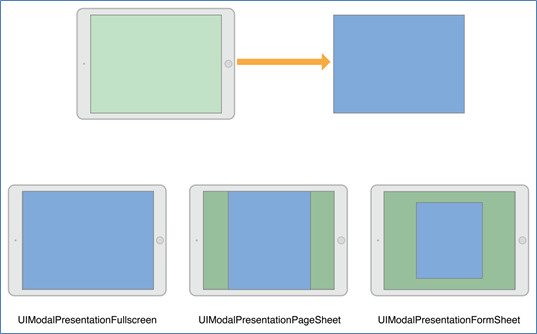
图 31 The full screen presentation styles
注意:
当使用了UIModalPresentationFullScreen样式弹出一个view cotroller时,UIKit正常会移除底层的view cotroller,当然可以将其改为UIModalPresentationOverFullScreen样式,从而阻止移除操作。当新弹出的view controller有透明的部分,就应该使用UIModalPresentationOverFullScreen样式。
2) Popover样式
以Popover样式弹出view controller是使用了UIModalPresentationPopover属性值。在horizontally regular环境下,popover view只是覆盖了部分屏幕,如图 32所示。在horizontally compact环境下,popover默认采用UIModalPresentationOverFullScreen样式。若在弹出view controller之后,触摸popover view以外部分,则被弹出view controller将自动消失。
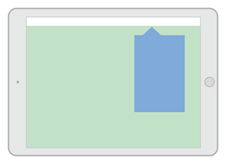
图 32 The popover presentation style
因为在horizontally compact环境下,popover样式是覆盖的整个屏幕,所以需要修改代码来适配。
3) Current Context样式
使用UIModalPresentationCurrentContext样式可以覆盖指定的view controller。当使用这种样式,那么需要设置覆盖 view controller的definesPresentationContext属性为YES。如图 33所示,只覆盖split view controller的其中一个child view cotroller。
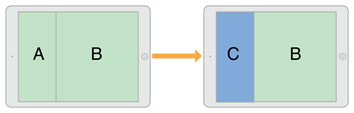
图 33 The current context presentation style
当转换到horizontally compact环境时,那么current context样式将采用UIModalPresentationFullScreen样式。
4) Custom样式
当使用自定义的样式,可以设置view controller为UIModalPresentationCustom 样式。当创建自定义样式时,将调用UIPresentationController子类,并且使用某种动画方式展示自定义view到屏幕中,及设置新弹出的view controller的尺寸和位置。
1.2 Transition样式
Transition样式决定了新view controller的动画方式,可以使用内置的标准Transition样式来设置新view controller的modalTransitionStyle属性。当弹出view controller时,UIKit会创建一个相应动画。如图 34所示,是使用了UIModalTransitionStyleCoverVertical属性值来弹出view controller例子,B view controller从底部向上升起。
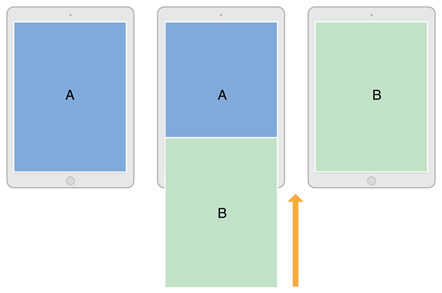
图 34 A transition animation for a view controller
1.3 Present与Show
UIViewController类提供两种方式来显示view controller:
- showViewController:sender和showDetailViewController:sender方法:这两个方法让新的view controller来决定怎样最好的处理present操作;
- presentViewController:animated:completion方法:该方法总是以模态的形式弹出view controller。
2 Present
2.1 Show
使用showViewController和showDetailViewController方法可以将view controller展示在屏幕中,其操作步骤非常简单:
a) 创建一个被展示的view controller,并对其进行初始化;
b) 设置这个被展示view controller的modalPresentationStyle属性;
c) 置这个被展示view controller的modalTransitionStyleproperty属性;
d) 调用当前view controller的showViewController或showDetailViewController方法。
如下所示:
1 - (IBAction)segueDown:(id)sender {

2     firstViewController *firstVC = [self.storyboard instantiateViewControllerWithIdentifier:@"firstViewController"];

3     firstVC.modalPresentationStyle = UIModalPresentationFullScreen;

4     firstVC.modalTransitionStyle = UIModalTransitionStyleFlipHorizontal;

5

6     [self showViewController:firstVC sender:sender];

7 }
当采用Present模型弹出一个view controller时,应该告诉UIKit想弹出的view controller是什么,并且还需告诉以什么动画样式展示。其使用过程为:
a) 创建一个被展示的view controller,并对其进行初始化;
b) 设置这个被展示view controller的modalPresentationStyle属性;
c) 置这个被展示view controller的modalTransitionStyleproperty属性;
d) 调用当前view controller的presentViewController:animated:completion:方法。
如下所示:
1 - (IBAction)PresentDown:(id)sender {

2     firstViewController *firstVC = [self.storyboard instantiateViewControllerWithIdentifier:@"firstViewController"];

3     firstVC.modalPresentationStyle = UIModalPresentationFullScreen;

4     firstVC.modalTransitionStyle = UIModalTransitionStyleFlipHorizontal;

5

6     [self presentViewController:firstVC animated:YES completion:nil];

7 }
2.3 Present(Popover)
若是以Popover样式弹出view controller,则需要进行一些配置,因为默认会被配置为UIModalPresentationOverFullScreen样式。其中配置过程为:
a) 创建一个被展示的view controller,并对其进行初始化。
b) 设置这个新view controller的modalPresentationStyle属性为UIModalPresentationPopover值。
c) 获取新view controller的popoverPresentationController属性,即UIPopoverPresentationController对象。
d) 设置UIPopoverPresentationController对象中的preferredContentSize属性值,即为弹出view cotroller窗口的显示大小。 设置弹出的锚点,其中有两种方式:
若是bar button item,则设置UIPopoverPresentationController对象的barButtonItem属性;
若是普通视图,则设置UIPopoverPresentationController对象的sourceView和sourceRect属性。
e) 设置UIPopoverPresentationController对象的delegate,并且该delegate需要实现两个方法:adaptivePresentationStyleForPresentationController和popoverPresentationControllerShouldDismissPopover。
f) 调用当前view controller的presentViewController:animated:completion:方法。
如下是两种不同锚点的设置方法:
1) 导航工具栏
若是在工具栏按钮中弹出Popover,则设置UIPopoverPresentationController对象的barButtonItem属性为相应工具栏项,该项只是显示箭头显示的起始位置。
 1 - (UIModalPresentationStyle)adaptivePresentationStyleForPresentationController:(UIPresentationController *)controller traitCollection:(UITraitCollection *)traitCollection   //实现delegate的两个方法

 2 {

 3     return UIModalPresentationNone;

 4 }

 5 - (BOOL)popoverPresentationControllerShouldDismissPopover:(UIPopoverPresentationController *)popoverPresentationController

 6 {

 7     return YES;

 8 }

 9 - (IBAction)PopoverDown:(id)sender  //该方法为按钮的响应方法。

10 {

11     firstViewController *firstVC = [self.storyboard instantiateViewControllerWithIdentifier:@"firstViewController"];

12     firstVC.modalPresentationStyle = UIModalPresentationPopover;

13     firstVC.preferredContentSize = CGSizeMake(100, 150);   //设置弹出窗口的长宽值,可选

14

15     UIPopoverPresentationController *popvc = [firstVC popoverPresentationController];

16     popvc.barButtonItem = _navigation.rightBarButtonItem;

17 popvc.permittedArrowDirections = UIPopoverArrowDirectionUp;    //设置弹出窗口的箭头方向,可选

18 popvc.delegate = self;    //必须设置委托对象

19

20     [self presentViewController:firstVC animated:YES completion:nil];

21 }
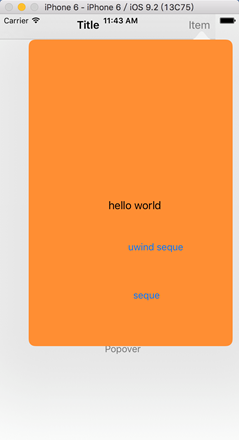
图 35 导航工具栏Popover弹出效果图
2) 按钮
也可将锚点设置在按钮中,其它操作方法相同,也需要实现delegate,如下的delegate与上述一样,如下所示。
 1 - (IBAction)PopoverDown:(id)sender   //该方法为按钮的响应方法。

 2 {

 3     firstViewController *firstVC = [self.storyboard instantiateViewControllerWithIdentifier:@"firstViewController"];

 4     firstVC.modalPresentationStyle = UIModalPresentationPopover;

 5     firstVC.modalTransitionStyle = UIModalTransitionStyleCoverVertical;

 6 //    firstVC.preferredContentSize = CGSizeMake(100, 150);

 7

 8     UIPopoverPresentationController *popvc = [firstVC popoverPresentationController];

 9     popvc.permittedArrowDirections = UIPopoverArrowDirectionDown;  //与上述的箭头方向不同

10     popvc.sourceView = _popoverButton;

11     popvc.sourceRect = _popoverButton.bounds;

12 popvc.delegate = self;

13

14     [self presentViewController:firstVC animated:YES completion:nil];

15 }
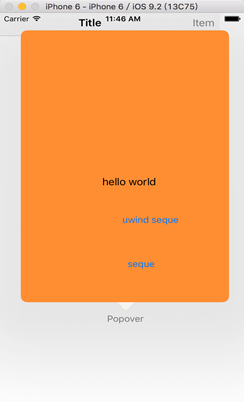
图 36 按钮位置的Popover的显示效果图
3 Dismiss
可以清除一个已经被弹出的view controller,只需调用原来view controller中的dismissViewControllerAnimated:completion方法。当然也可以调用被弹出view controller的dismissViewControllerAnimated:completion方法,一样可以返回到弹出view controller的状态。
如下是在被弹出view controller的按钮响应方法中:
- (IBAction)dismissDown:(id)sender

{

    [self dismissViewControllerAnimated:YES completion:nil];

}
4 Storyboard间
在同一个Storyboard中,可以使用segues来完成不同view controller的弹出操作;但在不同的Storyboard之间是无法使用segues完成弹出操作的。但以Programing方式,是可以实现不同Storyboard间的view controller的弹出操作。
如下所示:
1     UIStoryboard* sb = [UIStoryboard storyboardWithName:@"SecondStoryboard" bundle:nil];

2     MyViewController* myVC = [sb instantiateViewControllerWithIdentifier:@"MyViewController"];

3     [self presentViewController:myVC animated:YES completion:nil]; // Display the view controller
iOS UIKit:viewController之Present (3)的更多相关文章
- iOS UIKit:viewController之动画(5)
当弹出一个view controller时,UIKit提供了一些标准转换动画,并且也支持用户自定义的动画效果. 1 UIView动画 UIView是自带动画实现功能,其中有两种方式实现: ...
- iOS UIKit:viewController之层次结构(1)
ViewController是iOS应用程序中重要的部分,是应用程序数据和视图之间的重要桥梁.且应用程序至少有一个view controller.每个view controller对象都负责和管理一个 ...
- iOS UIKit:viewController之定义(2)
@import url(http://i.cnblogs.com/Load.ashx?type=style&file=SyntaxHighlighter.css);@import url(/c ...
- iOS UIKit:viewController之Segues (4)
@import url(http://i.cnblogs.com/Load.ashx?type=style&file=SyntaxHighlighter.css);@import url(/c ...
- iOS UIKit:Navigation Controllers
navigation controller是一种层次结构的container view controller,即其通过一个view controllers栈来管理内部的content view con ...
- iOS UIKit:view
@import url(http://i.cnblogs.com/Load.ashx?type=style&file=SyntaxHighlighter.css); @import url(/ ...
- iOS UIKit Dynamics入门 UIKit动力学,实现重力、连接、碰撞、悬挂等动画效果
本文为转载文章 版权归原文所有 什么是UIKit动力学(UIKit Dynamics) 其实就是UIKit的一套动画和交互体系.我们现在进行UI动画基本都是使用CoreAnimation或者UIVie ...
- [Android开发学iOS系列] ViewController
iOS ViewController 写UIKit的代码, ViewController是离不开的. 本文试图讲讲它的基本知识, 不是很深入且有点杂乱, 供初级选手和跨技术栈同学参考. What is ...
- iOS UIKit:TableView之编辑模式(3)
一般table view有编辑模式和正常模式,当table view进入编辑模式时,会在row的左边显示编辑和重排控件,如图 42所示的编辑模式时的控件布局:左边的editing control有表 ...
随机推荐
- Encoding 类别
Encoding 類別 .NET Framework 4.5 表示字元編碼方式. 繼承階層架構 System.Object System.Text.Encoding System.Tex ...
- 机械硬盘与SSD固态硬盘性能的深度
从7200转硬盘升级到10000转的迅猛龙,那叫量变.从10000转的迅猛龙升级到SSD,这个叫质变.2者的差距是有些地方相当大,而有些却很接近,主要是难比较. 经常听到有人说:我买2个黑盘组RAID ...
- linux下常用网络操作汇总
首先说明下RHEL6下设置IP地址的确和RHEL5下有几点是不同的. 我装完RHEL6中默认选择的是DHCP自动获取方式: [root@localhost ~]# vi /etc/sysconfig/ ...
- flat ui switch 改变状态而不响应事件
Flat UI是一套精美的扁平风格 UI 工具包,基于 Twitter Bootstrap实现.这套界面工具包含许多基本的和复杂的 UI 部件,例如按钮,输入框,组合按钮,复选框,单选按钮,标签,菜单 ...
- bzoj2165
类似于bzoj1706,考虑到楼层是等价的我们令f[p,i,j]为用了2^p次电梯,从房间i到j最多上升了多少层然后从2^p很容易推到2^(p+1),类似于floyd的转移即可下面我们要用最小的电梯次 ...
- bzoj2734
非常巧妙地题目对于一个数x列出这样的矩阵x 2x 4x 8x ……3x 6x 12x 24x ………………………………不难方案数就是求取数不相邻的方案数考虑矩阵宽不超过logn,所以可以用状压dp解决 ...
- LoadRunner监控Windows和Linux常见问题
LoadRunner 加载监听服务器的步骤如下: 1.在 LoadRunner Controller 下,将工作面板切换到 Run状态,Available Graphs 栏 ,System Resou ...
- Perfect Squares——Leetcode
Given a positive integer n, find the least number of perfect square numbers (for example, 1, 4, 9, 1 ...
- Tree2cycle
Problem Description A tree with N nodes and N-1 edges is given. To connect or disconnect one edge, w ...
- POJ 1159 Palindrome 最长公共子序列的问题
Description A palindrome is a symmetrical string, that is, a string read identically from left to ri ...