
Android 极光推送集成
集成Jpush
1.用Android Studio创建一个Demo
2.创建激光推送开发者账号,要创建极光推送开发者帐号,请访问极光推送官方网站https://www.jiguang.cn/push
3.在Portal上创建应用
使用注册账号登陆,进入极光控制台后,点击“创建应用”按钮。创建帐号进入极光推送后,首先显示的是创建应用的界面。填上你的应用程序的名称,以及 Android包名这二项就可以了。
4.手动集成,导入相关文件 http://docs.jiguang.cn/jpush/client/Android/android_guide/
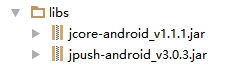
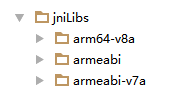
注意:在Android studio中需要建立jni文件夹,在更名为jniLibs,把so文件导进去。
再复制res中的drawable-hdpi,layout,values文件中的资源导入到建立的工程对应的同名目录下
3.配置AndroidManifest.xml
3.1添加权限(注意改包名)
<permission

        android:name="您应用的包名.permission.JPUSH_MESSAGE"

        android:protectionLevel="signature" />

    <uses-permission android:name="您应用的包名.permission.JPUSH_MESSAGE" />

    <uses-permission android:name="android.permission.RECEIVE_USER_PRESENT" />

    <uses-permission android:name="android.permission.INTERNET" />

    <uses-permission android:name="android.permission.WAKE_LOCK" />

    <uses-permission android:name="android.permission.READ_PHONE_STATE" />

    <uses-permission android:name="android.permission.WRITE_EXTERNAL_STORAGE" />

    <uses-permission android:name="android.permission.READ_EXTERNAL_STORAGE" />

    <uses-permission android:name="android.permission.VIBRATE" />

    <uses-permission android:name="android.permission.MOUNT_UNMOUNT_FILESYSTEMS" />

    <uses-permission android:name="android.permission.ACCESS_NETWORK_STATE" />

    <uses-permission android:name="android.permission.WRITE_SETTINGS" />

    <uses-permission android:name="android.permission.ACCESS_WIFI_STATE" />
3.2复制核心代码(执意更改包名以及appkey)
<!-- Required SDK 核心功能-->

        <!-- 可配置android:process参数将PushService放在其他进程中 -->

        <service

            android:name="cn.jpush.android.service.PushService"

            android:enabled="true"

            android:exported="false" >

            <intent-filter>

                <action android:name="cn.jpush.android.intent.REGISTER" />

                <action android:name="cn.jpush.android.intent.REPORT" />

                <action android:name="cn.jpush.android.intent.PushService" />

                <action android:name="cn.jpush.android.intent.PUSH_TIME" />

            </intent-filter>

        </service>

        <!-- since 1.8.0 option 可选项。用于同一设备中不同应用的JPush服务相互拉起的功能。 -->

        <!-- 若不启用该功能可删除该组件,将不拉起其他应用也不能被其他应用拉起 -->

         <service

             android:name="cn.jpush.android.service.DaemonService"

             android:enabled="true"

             android:exported="true">

             <intent-filter >

                 <action android:name="cn.jpush.android.intent.DaemonService" />

                 <category android:name="您应用的包名"/>

             </intent-filter>

         </service>

        <!-- Required SDK核心功能-->

        <receiver

            android:name="cn.jpush.android.service.PushReceiver"

            android:enabled="true" >

          <intent-filter android:priority="1000">

                <action android:name="cn.jpush.android.intent.NOTIFICATION_RECEIVED_PROXY" />

                <category android:name="您应用的包名"/>

            </intent-filter>

            <intent-filter>

                <action android:name="android.intent.action.USER_PRESENT" />

                <action android:name="android.net.conn.CONNECTIVITY_CHANGE" />

            </intent-filter>

            <!-- Optional -->

            <intent-filter>

                <action android:name="android.intent.action.PACKAGE_ADDED" />

                <action android:name="android.intent.action.PACKAGE_REMOVED" />

                <data android:scheme="package" />

            </intent-filter>

        </receiver>

        <!-- Required SDK核心功能-->

        <activity

            android:name="cn.jpush.android.ui.PushActivity"

            android:configChanges="orientation|keyboardHidden"

            android:theme="@android:style/Theme.NoTitleBar"

            android:exported="false" >

            <intent-filter>

                <action android:name="cn.jpush.android.ui.PushActivity" />

                <category android:name="android.intent.category.DEFAULT" />

                <category android:name="您应用的包名" />

            </intent-filter>

        </activity>

        <!-- SDK核心功能-->

        <activity

            android:name="cn.jpush.android.ui.PopWinActivity"

            android:configChanges="orientation|keyboardHidden"

            android:exported="false"

            android:theme="@style/MyDialogStyle">

            <intent-filter>

                <category android:name="android.intent.category.DEFAULT" />

                <category android:name="您应用的包名" />

            </intent-filter>

        </activity>

        <!-- Required SDK核心功能-->

        <service

            android:name="cn.jpush.android.service.DownloadService"

            android:enabled="true"

            android:exported="false" >

        </service>

        <!-- Required SDK核心功能-->

        <receiver android:name="cn.jpush.android.service.AlarmReceiver" />

        <!-- User defined. 用户自定义的广播接收器-->

         <receiver

             android:name="您自己定义的Receiver"

             android:enabled="true">

             <intent-filter>

                 <!--Required 用户注册SDK的intent-->

                 <action android:name="cn.jpush.android.intent.REGISTRATION" />

                 <!--Required 用户接收SDK消息的intent-->

                 <action android:name="cn.jpush.android.intent.MESSAGE_RECEIVED" />

                 <!--Required 用户接收SDK通知栏信息的intent-->

                 <action android:name="cn.jpush.android.intent.NOTIFICATION_RECEIVED" />

                 <!--Required 用户打开自定义通知栏的intent-->

                 <action android:name="cn.jpush.android.intent.NOTIFICATION_OPENED" />

                 <!-- 接收网络变化 连接/断开 since 1.6.3 -->

                 <action android:name="cn.jpush.android.intent.CONNECTION" />

                 <category android:name="您应用的包名" />

             </intent-filter>

         </receiver>

        <!-- Required. For publish channel feature -->

        <!-- JPUSH_CHANNEL 是为了方便开发者统计APK分发渠道。-->

        <!-- 例如: -->

        <!-- 发到 Google Play 的APK可以设置为 google-play; -->

        <!-- 发到其他市场的 APK 可以设置为 xxx-market。 -->

        <!-- 目前这个渠道统计功能的报表还未开放。-->

        <meta-data android:name="JPUSH_CHANNEL" android:value="developer-default"/>

        <!-- Required. AppKey copied from Portal -->

        <meta-data android:name="JPUSH_APPKEY" android:value="您应用的Appkey"/>
4.创建自己的广播接收器MyReceiver
/**

 * 自定义接收器

 * <p>

 * 如果不定义这个 Receiver,则:

 * 1) 默认用户会打开主界面

 * 2) 接收不到自定义消息

 */

public class MyReceiver extends BroadcastReceiver {

    private static final String TAG = "JPush";

    private List<String> list = new ArrayList<>();

    public void onReceive(Context context, Intent intent) {

        Bundle bundle = intent.getExtras();

        if (JPushInterface.ACTION_REGISTRATION_ID.equals(intent.getAction())) {

            String regId = bundle.getString(JPushInterface.EXTRA_REGISTRATION_ID);

            Log.d(TAG, "[MyReceiver] 接收Registration Id : " + regId);

        } else if (JPushInterface.ACTION_MESSAGE_RECEIVED.equals(intent.getAction())) {

            Log.d(TAG, "收到了自定义消息。消息内容是:" + bundle.getString(JPushInterface.EXTRA_MESSAGE));

            // 自定义消息不会展示在通知栏,完全要开发者写代码去处理

            String content = bundle.getString(JPushInterface.EXTRA_MESSAGE);

            Toast.makeText(context, content, Toast.LENGTH_SHORT).show();

        } else if (JPushInterface.ACTION_NOTIFICATION_RECEIVED.equals(intent.getAction())) {

            // 在这里可以做些统计,或者做些其他工作

        } else if (JPushInterface.ACTION_NOTIFICATION_OPENED.equals(intent.getAction())) {

            String content = bundle.getString(JPushInterface.EXTRA_ALERT);

//此处,我们取出的是通知的内容。还可以取出别的信息,这个大家可自行处理

//           在这里可以自己写代码去定义用户点击后的行为

            Intent i = new Intent(context, TestActivity.class);

            i.putExtra("content", content);

            i.setFlags(Intent.FLAG_ACTIVITY_NEW_TASK);

            context.startActivity(i);

        } else {

        }

    }

}
5.集成Jpush Android SDK的混淆
在工程的混淆文件proguard.jar中添加以下配置
-dontoptimize

-dontpreverify

-dontwarn cn.jpush.**

-keep class cn.jpush.* { ; }

-dontwarn cn.jiguang.**

-keep class cn.jiguang.* { ; }
6.注册(最好在application中注册)
JPushInterface.init(this);
这样,在极光推送控制台推送消息,程序就可以接收了。
Android 极光推送集成的更多相关文章
- Android 极光推送造成IM服务绑定失败bug
由于极光推送对8.0的支持问题,升级到了最新版本的极光推送.但是最新版本的极光推送,默认将推送服务设置到了新的进程里面,由此引发 Android 极光推送多进程造成的application运行两次 和 ...
- JPushDemo【极光推送集成,基于v3.1.8版本】
版权声明:本文为HaiyuKing原创文章,转载请注明出处! 前言 这个Demo只是记录极光推送的集成,不能运行. 使用步骤 一.项目组织结构图 注意事项: 1. 导入类文件后需要change包名以 ...
- android极光推送
版权声明:本文为博主原创文章,未经博主允许不得转载. Android开发记录18-集成推送服务的一点说明 关于推送服务,国内有很多选择,笔者也对它们进行了一个详细的对比,一般我们产品选择推送服务主要考 ...
- 【android极光推送】—从客户端到后台,一文通吃
sion android:name="android.permission.VIBRATE" /> <uses-permission android:name=&quo ...
- Android 极光推送JPush---自定义提示音
极光推送提供三种方法实现Notification通知 三方开发平台发送普通消息,客户端设置PushNotificationBuilder,实现基础的Notification通知 三方开放平台发送普通消 ...
- 极光推送集成——iOS10 接受消息问题及解决
iOS10升级后极光推送发生了很大的变化,要求Xcode更新到8.0及以上版本才可以实现iOS10接受消息的方法 常见错误 这个问题困扰了我一天,辛亏好友盼神帮我解决,在此再次感谢盼神.一下是解决办法 ...
- android极光推送初步了解
推送可以及时,主动的与用户发起交互 (1)继承jar包,照示例AndroidManifest.xml添加. (2)自定义MyApp继承自Application,在onCreate方法中调用JPushI ...
- iOS极光推送集成步骤
1.下载SDK,导入Xcode 2.在苹果开发者中心建立AppId与bundleID进行关联,注意勾选推送功能 3.在苹果开发者中心建立推送证书 4.在极光后台建立应用且上传推送证书 5.建立描述文件 ...
- android 极光推送 声音与振动 的关闭和开启
前言:最近刚好在写一些推送方面的东西,又是新手,不断在网上找资料,很少,不过还是找到了一些,反正百度我是再也不想百度了,谷歌一下子就能找到想要的. 废话不多说. 1.主要方法就是如下一个函数 priv ...
随机推荐
- docker的集群管理工具
docker 集群管理三剑客: docker compose: Compose 是用于定义和运行多容器 Docker 应用程序的工具.通过 Compose,您可以使用 YML 文件来配置应用程序需要的 ...
- 【Azure 存储服务】代码版 Azure Storage Blob 生成 SAS (Shared Access Signature: 共享访问签名)
问题描述 在使用Azure存储服务,为了有效的保护Storage的Access Keys.可以使用另一种授权方式访问资源(Shared Access Signature: 共享访问签名), 它的好处可 ...
- svg的animate动画动态加载删除遇到删除animate后再次加载的animate动画没有效果问题
svg上有多个圆圈,当选中特定圆圈后给其加上animate动画效果,并把其他圆圈的animate效果去除. 第一次选择一个点实现动画效果完全达到效果,因为是第一次所以不需要把其他圆圈的animate子 ...
- Linux&C 线程控制 课后习题
Q1:多线程与多进程相比有什么优势? 多进程程序耗费的资源大,因为fork()的时候子进程需要继承父进程的几乎所有东西,但是多线程程序线程只继承一部分,即自己的私有数据,例如自己的线程ID,一组寄存器 ...
- Java中禁止浏览器开启缓存的方法命令
响应头里添加禁止浏览器缓存的内容 Cache-Control: no-cache, no-store, must-revalidate Pragma: no-cache Expires: 0 其中,C ...
- Kubernetes 中的 gRPC 负载均衡
安装环境依赖 docker-desktop >= 4.1.1 kubernetes >= 1.21.5 go >= 1.17 protobuf >= 3.17.3 istioc ...
- C#长程序(留着看)
using System; using System.Collections.Generic; using System.ComponentModel; using System.Data; usin ...
- [loj3146]路灯
显然,能从$l$到$r$当且仅当$[l,r)$中的灯全部都亮,以下不妨令询问的$r$全部减1 当修改节点$x$时,找到包含$x$的极大的灯(除$x$以外)全部都亮的区间$[l,r]$,即令$l_{0} ...
- [cf1215F]Radio Stations
这道题如果没有功率的限制,显然就是一个裸的2-sat 考虑将功率的限制也放在图上:如果选择了功率i,那么功率区间不包含它的点只能不选,连边即可 但是这样建图的边数是o(n^2),需要优化 将功率区间分 ...
- 1、使用ValueOperations操作redis(String字符串)
文章来源:https://www.cnblogs.com/shiguotao-com/p/10559997.html 方法 c参数 s说明 void set(K key, V value); ke ...