
[技术博客]使用pylint实现django项目的代码风格检查
使用pylint实现django项目的代码风格检查
前言
一个项目大多都是由一个团队来完成,如果没有统一的代码规范,那么每个人的代码的风格必定会有很大的差别。且不说会存在多个人同时开发同一模块的情况,即使是分工十分明晰的项目,等到要整合代码的时候也会非常头疼(亲身体会)。大多数情况下,并非程序中有复杂的算法或是复杂的逻辑,而是由于风格的不同,去读别人的代码实在是一件痛苦的事情。统一的风格使得代码可读性大大提高了,人们看到任何一段代码都会觉得像自己写的差不多。显然的,规范的代码在团队的合作开发中是非常有益而且必要的。
下面将介绍pylint如何在django项目中实现代码风格检查。
pylint介绍
Pylint 是一个 Python 代码分析工具,它分析 Python 代码中的错误,查找不符合代码风格标准(Pylint 默认使用的代码风格是 PEP 8)和有潜在问题的代码。
- Pylint 是一个 Python 工具,除了平常代码分析工具的作用之外,它提供了更多的功能:如检查一行代码的长度,变量名是否符合命名标准,一个声明过的接口是否被真正实现等等。
- Pylint 的一个很大的好处是它的高可配置性,高可定制性,并且可以很容易写小插件来添加功能。
- 目前PyCharm的插件中也集成了 Pylint。
安装
pylint的安装十分简单,在命令行中执行
pip install pylint
即可完成安装
pylint在Django项目中的使用
方法一、集成在PyCharm中
在看此方法前,请务必确认Django项目正确地在PyCharm中创建了。
1.安装pylint插件:
打开PyCharm,左上角点击File--Settings,打开设置页面,再选择Plugins,进入插件市场,搜索Pylint:

点击Install下载,下载完成后会提示重启IDE,按提示重启即可
2. 配置.pylintrc文件(推荐将其放于项目的根目录)
这里可以通过命令行直接生成配置文件加以修改,也可以直接参考我的.pylintrc文件。
命令行生成文件方法:
在任意目录打开命令行,执行:
pylint --persistent=n --generate-rcfile > .pylintrc
生成的文件大概有400多行,每一个配置选项都有详细的英文注释,涉及到:
- [MASTER]部分,涉及pylint运行时的配置
- [MESSAGES CONTROL]部分,在这里你可以禁用一些你不需要的规则
- [REPORTS]部分,涉及检查完毕后输出结果显示的内容
- [REFACTORING]部分,涉及代码重构部分
- [BASIC]部分,涉及命名规范
- 在此之后的部分均涉及到代码风格的配置,本文不再细说
Django项目推荐禁用的规则有:
- E0401(import-error),Django项目的有些文件经常会谜之报这个错误,例如Django.admin等
- C0111(missing-docstring),如果不想给每个文件和模块都写docstring的话可以禁用
- R0903(too-few-public-methods),规定了一个类里至少要有1个公有方法,但是Django的Model类是不配置方法的,推荐禁用
- E1101(no-member),同E0401
我的.pylintrc:
# lint Python modules using external checkers.

#

# This is the main checker controlling the other ones and the reports

# generation. It is itself both a raw checker and an astng checker in order

# to:

# * handle message activation / deactivation at the module level

# * handle some basic but necessary stats'data (number of classes, methods...)

#

[MASTER]

# Specify a configuration file.

#rcfile=

# Python code to execute, usually for sys.path manipulation such as

# pygtk.require().

#init-hook=

# Profiled execution.

profile=no

# Add <file or directory> to the black list. It should be a base name, not a

# path. You may set this option multiple times.

ignore=manage.py

# Pickle collected data for later comparisons.

persistent=no

# Set the cache size for astng objects.

cache-size=500

# List of plugins (as comma separated values of python modules names) to load,

# usually to register additional checkers.

load-plugins=pylint_django

[MESSAGES CONTROL]

# Enable only checker(s) with the given id(s). This option conflicts with the

# disable-checker option

#enable-checker=

# Enable all checker(s) except those with the given id(s). This option

# conflicts with the enable-checker option

#disable-checker=

# Enable all messages in the listed categories.

#enable-msg-cat=

# Disable all messages in the listed categories.

#disable-msg-cat=

# Enable the message(s) with the given id(s).

#enable-msg=

# Disable the message(s) with the given id(s).

# I0011: *Locally disabling %s*

disable-msg=I0011

# Disable the message(s) with the given id(s).

# 本项目禁用规则

# [E0401(import-error)] Unable to import %s Used when pylint has been unable to import a module.

# [C0111(missing-docstring)] Missing module docstring

# [R0903(too-few-public-methods), ParentType] Too few public methods (at least 1)

# [E1101(no-member)] %s %r has no %r member%s Used when a variable is accessed for an unexistent member.

disable =

    E0401,

    C0111,

    R0903,

    E1101

[REPORTS]

# Set the output format. Available formats are text, parseable, colorized, msvs

# (visual studio) and html

output-format=parseable

# Include message's id in output

include-ids=yes

# Put messages in a separate file for each module / package specified on the

# command line instead of printing them on stdout. Reports (if any) will be

# written in a file name "pylint_global.[txt|html]".

files-output=no

# Tells wether to display a full report or only the messages

reports=no

# Python expression which should return a note less than 10 (10 is the highest

# note). You have access to the variables errors warning, statement which

# respectivly contain the number of errors / warnings messages and the total

# number of statements analyzed. This is used by the global evaluation report

# (R0004).

evaluation=10.0 - ((float(5 * error + warning + refactor + convention) / statement) * 10)

# Add a comment according to your evaluation note. This is used by the global

# evaluation report (R0004).

comment=yes

# Enable the report(s) with the given id(s).

#enable-report=

# Disable the report(s) with the given id(s).

#disable-report=

# checks for :

# * doc strings

# * modules / classes / functions / methods / arguments / variables name

# * number of arguments, local variables, branchs, returns and statements in

# functions, methods

# * required module attributes

# * dangerous default values as arguments

# * redefinition of function / method / class

# * uses of the global statement

#

[BASIC]

# Required attributes for module, separated by a comma

required-attributes=

# Regular expression which should only match functions or classes name which do

# not require a docstring

no-docstring-rgx=__.*__

# Regular expression which should only match correct module names

module-rgx=(([a-z_][a-z0-9_]*)|([A-Z][a-zA-Z0-9]+))$

# Regular expression which should only match correct module level names

const-rgx=(([A-Z_][A-Z0-9_]*)|(__.*__))$

# Regular expression which should only match correct class names

class-rgx=[A-Z_][a-zA-Z0-9]+$

# Regular expression which should only match correct function names

function-rgx=[a-z_][a-z0-9_]{2,30}$

# Regular expression which should only match correct method names

method-rgx=[a-z_][a-z0-9_]{2,30}$

# Regular expression which should only match correct instance attribute names

attr-rgx=[a-z_][a-z0-9_]{2,30}$

# Regular expression which should only match correct argument names

argument-rgx=[a-z_][a-z0-9_]{2,30}$

# Regular expression which should only match correct variable names

variable-rgx=[a-z_][a-z0-9_]{2,30}$

# Regular expression which should only match correct list comprehension /

# generator expression variable names

inlinevar-rgx=[A-Za-z_][A-Za-z0-9_]*$

# Good variable names which should always be accepted, separated by a comma

good-names=i,j,k,ex,Run,_

# Bad variable names which should always be refused, separated by a comma

bad-names=foo,bar,baz,toto,tutu,tata

# List of builtins function names that should not be used, separated by a comma

bad-functions=map,filter,apply,input

# try to find bugs in the code using type inference

#

[TYPECHECK]

# Tells wether missing members accessed in mixin class should be ignored. A

# mixin class is detected if its name ends with "mixin" (case insensitive).

ignore-mixin-members=yes

# List of classes names for which member attributes should not be checked

# (useful for classes with attributes dynamicaly set).

ignored-classes=SQLObject

# When zope mode is activated, add a predefined set of Zope acquired attributes

# to generated-members.

zope=no

# List of members which are set dynamically and missed by pylint inference

# system, and so shouldn't trigger E0201 when accessed.

generated-members=REQUEST,acl_users,aq_parent

# checks for

# * unused variables / imports

# * undefined variables

# * redefinition of variable from builtins or from an outer scope

# * use of variable before assigment

#

[VARIABLES]

# Tells wether we should check for unused import in __init__ files.

init-import=no

# A regular expression matching names used for dummy variables (i.e. not used).

dummy-variables-rgx=_|dummy

# List of additional names supposed to be defined in builtins. Remember that

# you should avoid to define new builtins when possible.

additional-builtins=

# checks for :

# * methods without self as first argument

# * overridden methods signature

# * access only to existant members via self

# * attributes not defined in the __init__ method

# * supported interfaces implementation

# * unreachable code

#

[CLASSES]

# List of interface methods to ignore, separated by a comma. This is used for

# instance to not check methods defines in Zope's Interface base class.

ignore-iface-methods=isImplementedBy,deferred,extends,names,namesAndDescriptions,queryDescriptionFor,getBases,getDescriptionFor,getDoc,getName,getTaggedValue,getTaggedValueTags,isEqualOrExtendedBy,setTaggedValue,isImplementedByInstancesOf,adaptWith,is_implemented_by

# List of method names used to declare (i.e. assign) instance attributes.

defining-attr-methods=__init__,__new__,setUp

# checks for sign of poor/misdesign:

# * number of methods, attributes, local variables...

# * size, complexity of functions, methods

#

[DESIGN]

# Maximum number of arguments for function / method

max-args=10

# Maximum number of locals for function / method body

max-locals=35

# Maximum number of return / yield for function / method body

max-returns=10

# Maximum number of branch for function / method body

max-branchs=15

# Maximum number of statements in function / method body

max-statements=50

# Maximum number of parents for a class (see R0901).

max-parents=7

# Maximum number of attributes for a class (see R0902).

max-attributes=10

# Minimum number of public methods for a class (see R0903).

min-public-methods=1

# Maximum number of public methods for a class (see R0904).

max-public-methods=50

# checks for

# * external modules dependencies

# * relative / wildcard imports

# * cyclic imports

# * uses of deprecated modules

#

[IMPORTS]

# Deprecated modules which should not be used, separated by a comma

deprecated-modules=regsub,string,TERMIOS,Bastion,rexec

# Create a graph of every (i.e. internal and external) dependencies in the

# given file (report R0402 must not be disabled)

import-graph=

# Create a graph of external dependencies in the given file (report R0402 must

# not be disabled)

ext-import-graph=

# Create a graph of internal dependencies in the given file (report R0402 must

# not be disabled)

int-import-graph=

# checks for :

# * unauthorized constructions

# * strict indentation

# * line length

# * use of <> instead of !=

#

[FORMAT]

# Maximum number of characters on a single line.

max-line-length=120

# Maximum number of lines in a module

max-module-lines=1000

# String used as indentation unit. This is usually " " (4 spaces) or "\t" (1

# tab).

indent-string='    '

# checks for:

# * warning notes in the code like FIXME, XXX

# * PEP 263: source code with non ascii character but no encoding declaration

#

[MISCELLANEOUS]

# List of note tags to take in consideration, separated by a comma.

notes=FIXME,XXX,TODO

# checks for similarities and duplicated code. This computation may be

# memory / CPU intensive, so you should disable it if you experiments some

# problems.

#

[SIMILARITIES]

# Minimum lines number of a similarity.

min-similarity-lines=50

# Ignore comments when computing similarities.

ignore-comments=yes

# Ignore docstrings when computing similarities.

ignore-docstrings=yes
3.配置pylint插件
现在pylint插件应该会出现在PyCharm的左下角:
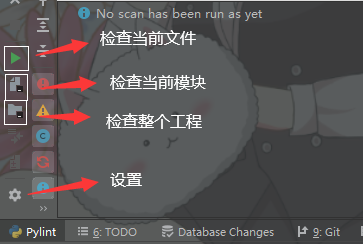
点击设置:

Path to Pylint executable中Pylint的exe文件应该会自动检测并为你配置好,如果没有的话照着我的路径配置一下
Path to pylintrc就是选择我们刚刚生成好的.pylintrc文件的路径,推荐将其放于项目的根目录
Arguments是参数设置,我这么配置的原因是希望它跳过数据库迁移文件,因为数据库迁移文件的代码风格一定是有问题的,而且是自动生成的。
到这里配置就完成了。
4.运行Pylint
点击检查整个工程的按钮,等待检查完成。
若显示Pylint found no problems,则表明你的工程代码风格已经完全满足pylint的要求,否则可以根据提示按要求修改。
方法二、使用命令行来检查
如果不使用PyCharm,那我们也可以通过命令行来检查,检查单个文件的网上教程有很多,这里就不再赘述,仅介绍检查整个工程的方法。
请根据方法1中的第二步,配置好.pylintrc文件并放置于项目根目录中后,在根目录中添加__init__.py文件(将整个工程看作一个包),再在根目录下命令行执行:
pylint [你的项目文件夹名] --ignore-patterns=00.*py
即可实现对整个工程的检查:

[技术博客]使用pylint实现django项目的代码风格检查的更多相关文章
- [技术博客]ubuntu+nginx+uwsgi+Django+https的部署
ubuntu+nginx+uwsgi+Django+https部署文档 配置机器介绍 操作系统:Ubuntu 18.04.2 LTS 64位 python版本:Python 3.6.7 Django版 ...
- 【技术博客】MySQL和Django常用操作
MySQL和Django是搭建网站常用的配置之一,在此记录一下在Windows系统搭建网站时MySQL以及Django常用的操作. MySQL MySQL的SQL语句不区分大小写,推荐将保留字大写,数 ...
- 【技术博客】JWT的认证机制Django项目中应用
开发组在开发过程中,都不可避免地遇到了一些困难或问题,但都最终想出办法克服了.我们认为这样的经验是有必要记录下来的,因此就有了[技术博客]. JWT的认证机制Django项目中应用 这篇技术博客基于软 ...
- 【技术博客】Django中文件下载的实现
开发组在开发过程中,都不可避免地遇到了一些困难或问题,但都最终想出办法克服了.我们认为这样的经验是有必要记录下来的,因此就有了[技术博客]. Django中文件下载的实现 1.背景 在VisualPy ...
- [技术博客] Django中文件的保存与访问
[技术博客] Django中文件的保存与访问 在TextMarking项目开发中,数据库需要保存用户上传的文本文档. 原型设计:用户点击上传文本->保存文本->文本发送到后端保存为文件. ...
- 开源的服务发现项目Zookeeper,Doozer,Etcd - 木精灵的技术博客 - CSDN博客
开源的服务发现项目Zookeeper,Doozer,Etcd - 木精灵的技术博客 - CSDN博客 http://blog.csdn.net/shlazww/article/details/38 ...
- 有哪些关于 Python 的技术博客?
Python是一种动态解释型的编程语言,它可以在Windows.UNIX.MAC等多种操作系统以及Java..NET开发平台上使用.不过包含的内容很多,加上各种标准库.拓展库,乱花渐欲迷人眼.因此如何 ...
- 转: BAT等研发团队的技术博客
BAT 技术团队博客 1. 美团技术团队博客: 地址: http://tech.meituan.com/ 2. 腾讯社交用户体验设计(ISUX) 地址:http://isux.tencent.c ...
- 【转】【技术博客】Spark性能优化指南——高级篇
http://mp.weixin.qq.com/s?__biz=MjM5NjQ5MTI5OA==&mid=2651745207&idx=1&sn=3d70d59cede236e ...
随机推荐
- 区间DP的瞎扯淡
写在前面连个引言都不加就直接开1. 区间DP状态常见模板: f[i][j]常常表示第i个到第j个这个区间内达到题目要求,所需要的最小值(最大值) 如: 1. [石子合并](https://www.lu ...
- TCP协议和套接字
一.TCP通信概述,逻辑连接就是三次握手 二.客户端和服务端实现TCP协议通信基本步骤 1.客户端套接字对象 Socket 2.服务端套接字ServerSocket 客户端补充完整代码:除了创建各自的 ...
- elementui table的新增,编辑和删除
\ 新增 this.tableData.unshift(data); 编辑 this.$set(this.tableData,data.index,data); 删除 rows.splice(inde ...
- 【第二篇】- Git 安装配置之Spring Cloud直播商城 b2b2c电子商务技术总结
Git 安装配置 在使用Git前我们需要先安装 Git.Git 目前支持 Linux/Unix.Solaris.Mac和 Windows 平台上运行. Git 各平台安装包下载地址为:http://g ...
- Oracle基本入门
一.数据的存储 1.java 程序中的对象:数组.集合保存.当运行的程序结束的时候,里面的数据就消亡. 2.文件存储系统: 存在的缺陷: 2.1)没有明确的数据类型划分. 2.2)没有用户身份验证机制 ...
- Zend Studio 配置SVN并导入SVN项目
php 开发过程中,一个项目比较大的话,就需要很多人共同来完成.那么怎样来管理之间的相互配合,分工等呢??那么SVN这个神器就有用处了.SVN:代码版本管理软件.更多svn详细信息请查阅相关文档,这里 ...
- HTML 网页开发、CSS 基础语法——七.HTML常用标签
标题标签(h1-h6) 1.标题标签 ① 标题(Heading),通过<h1>-<h6>六个标签分别来对六个级别的标题进行性定义的. ② <h1>是级别最高,也是字 ...
- windows kubectl 远程操作k8s
在windows 电脑上配置kubectl远程操作kubernetes 一.下载windows版的kubectl可执行文件 下载地址 二.创建.kube 建议使用git bash cd ~ mkdir ...
- P4100-[HEOI2013]钙铁锌硒维生素【矩阵求逆,最大匹配】
正题 题目链接:https://www.luogu.com.cn/problem/P4100 题目大意 给出\(n\)个线性无关的向量\(A_i\),然后给出\(n\)个向量\(B_i\),求一个字典 ...
- WPF进阶技巧和实战03-控件(5-列表、树、网格03)
数据视图 数据视图是在后台工作的,用于协调绑定数据的集合.使用数据视图可以添加导航逻辑.实现数据过滤.排序.分组. 当将集合或者DataTable绑定到ItemsControl控件时,会不加通告地在后 ...