
spark 解决错误java.io.InvalidClassException
今天遇到一个现场问题,任务报错java.io.InvalidClassException。在开发环境是没有报错的,正式环境报错。大概类似于下面这样(非报错原文,摘自网上同类博客)
java.io.InvalidClassException: com.test.Test; local class incompatible: stream classdesc serialVersionUID = 7981560250804078237, local class serialVersionUID = -8334405535134160822
在网上查找资料后了解到 :
该异常是由于反序列化时, 当前类的serialVersionUID 与 反序列化后的类的serialVersionUID 不同所致。在未显示声明情况下由java编译器计算得出,但是不同的java编译器可能计算出的结果不同(本次出现该问题的直接原因是spark各个节点接收到的是sparksql jar包不一致),因此强烈推荐显式声明serialVersionUID 。
声明方法如下:
@SerialVersionUID(1234567890L) class xxx() extends yyy with Serializable {
  ......


}
问题补充:
1、如何查看类的serialVersionUID,
针对java的话,可以使用 serialver命令。 首先解压想查询类所在jar包,然后cd至解压目录,serialver 完整类名 ,即可得到serialVersionUID
针对Scala 不推荐使用serialver,使用serialver时,不包含scala标准库,会报错找不到scala Serializable类,建议直接使用代码查询
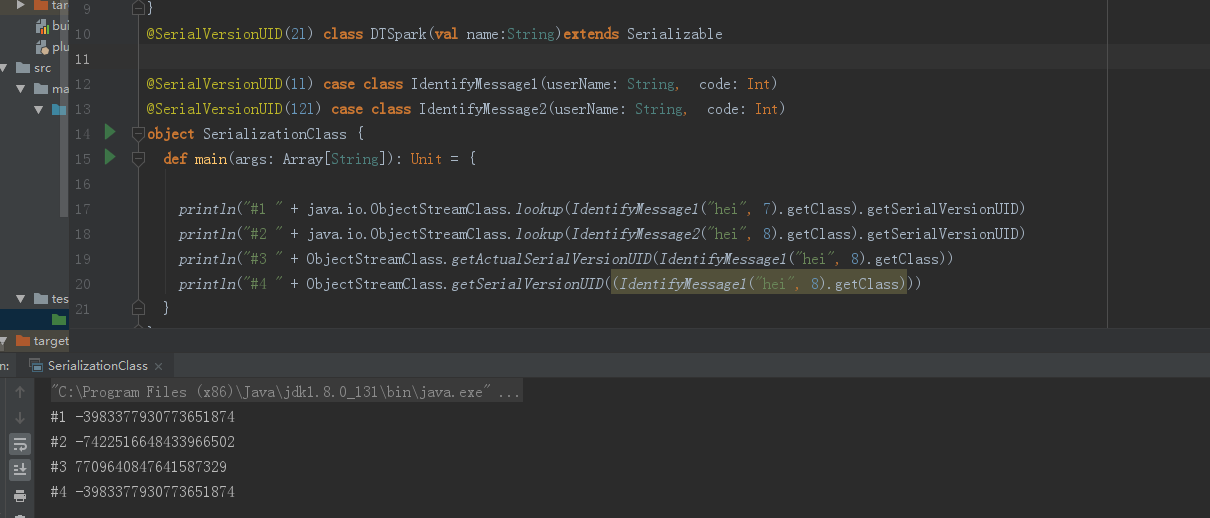
下面提供了一个例子读取类中的serialVersionUID
@SerialVersionUID(1l) case class IdentifyMessage1(userName: String,  code: Int)

@SerialVersionUID(12l) case class IdentifyMessage2(userName: String,  code: Int)

object SerializationClass {

  def main(args: Array[String]): Unit = {

    println("#1 " + java.io.ObjectStreamClass.lookup(IdentifyMessage1("hei", 7).getClass).getSerialVersionUID)

    println("#2 " + java.io.ObjectStreamClass.lookup(IdentifyMessage2("hei", 8).getClass).getSerialVersionUID)

    println("#3 " +com.sun.corba.se.impl.io.ObjectStreamClass.ObjectStreamClass.getActualSerialVersionUID(IdentifyMessage1("hei", 8).getClass))
    println("#4 " +com.sun.corba.se.impl.io.ObjectStreamClass.ObjectStreamClass.getSerialVersionUID((IdentifyMessage1("hei", 8).getClass)))
  }
}
不过虽然这个例子是我写的,但是我也还有没弄懂的地方,本例子在本地单机环境下运行是不会更改SerialVersionUID 的。这个问题如果有大神知道的话,欢迎留言
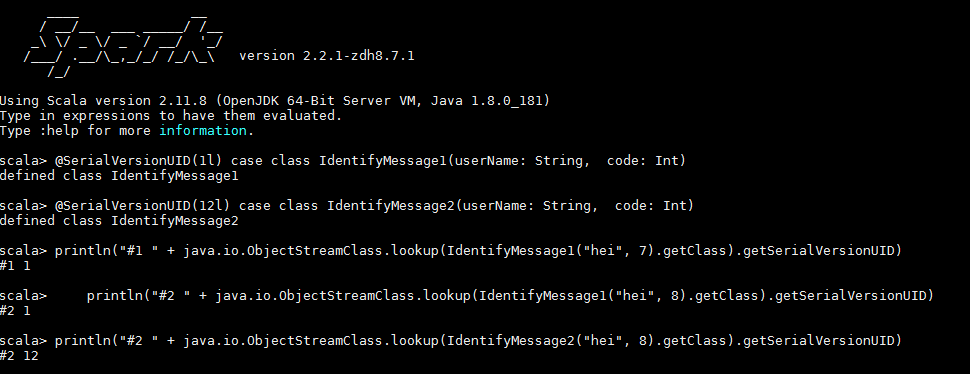
但是在spark里面是可以生效的。(两者java版本一直)
附上关于Serializable接口的说明
The serialization runtime associates with each serializable class a version number, called a serialVersionUID, which is used during deserialization to verify that the sender and receiver of a serialized object have loaded classes for that object that are compatible with respect to serialization. If the receiver has loaded a class for the object that has a different serialVersionUID than that of the corresponding sender's class, then deserialization will result in an InvalidClassException. A serializable class can declare its own serialVersionUID explicitly by declaring a field named "serialVersionUID" that must be static, final, and of type long:

   ANY-ACCESS-MODIFIER static final long serialVersionUID = 42L;

If a serializable class does not explicitly declare a serialVersionUID, then the serialization runtime will calculate a default serialVersionUID value for that class based on various aspects of the class, as described in the Java(TM) Object Serialization Specification. However, it is strongly recommended that all serializable classes explicitly declare serialVersionUID values, since the default serialVersionUID computation is highly sensitive to class details that may vary depending on compiler implementations, and can thus result in unexpected InvalidClassExceptions during deserialization. Therefore, to guarantee a consistent serialVersionUID value across different java compiler implementations, a serializable class must declare an explicit serialVersionUID value. It is also strongly advised that explicit serialVersionUID declarations use the private modifier where possible, since such declarations apply only to the immediately declaring class--serialVersionUID fields are not useful as inherited members. Array classes cannot declare an explicit serialVersionUID, so they always have the default computed value, but the requirement for matching serialVersionUID values is waived for array classes
spark 解决错误java.io.InvalidClassException的更多相关文章
- java.io.InvalidClassException 异常解决, 实现Serializable接口的注意事项
解决方案: 在类中显式指定 private static final long serialVersionUID = 42L; 类实现序列化接口, 进行序列化反序列化的时候, 抛出 java.io.I ...
- 解决:java.io.IOException: No FileSystem for scheme: hdfs
解决:java.io.IOException: No FileSystem for scheme: hdfs 开发项目初期,写完代码开始放到服务器上开始测试的时候,报出这样的一个错,不知道怎么处理了, ...
- Java 异常 —— java.io.InvalidClassException: javax.xml.namespace.QName; local class incompatible
项目中有个 WebService 接口,调试时使用 Main 方法运行,别人的机器上都能运行,就笔者的机器出问题.他们说是RP的问题…… 异常信息: java.io.InvalidClassExcep ...
- java.io.InvalidClassException: com.master.CurrentMessages; local class incompatible:
报错信息如下: java.io.InvalidClassException: com.master.CurrentMessages; local class incompatible: stream ...
- keytool 错误: java.io.FileNotFoundException: 拒绝访问
keytool 错误: java.io.FileNotFoundException: 拒绝访问 打开命令行,切换到D:\AndroidStudioProjects\MyApplication\app目 ...
- java.io.InvalidClassException
java.io.InvalidClassException public class PetroleumCoke implements Serializable { private static fi ...
- Error:(12, 64) java: 未报告的异常错误java.io.IOException; 必须对其进行捕获或声明以便抛出
Error:(12, 64) java: 未报告的异常错误java.io.IOException; 必须对其进行捕获或声明以便抛出 package com.test; import org.apach ...
- hadoop错误java.io.IOException Failed to replace a bad datanode on the existing pipeline due to no more good datanodes being available to try
错误: java.io.IOException: Failed to replace a bad datanode on the existing pipeline due to no more go ...
- mybatis错误——java.io.IOException: Could not find resource com/xxx/xxxMapper.xml
在学习Mybatis的时候,参考网上的教程进行简单demo的搭建,配置的没有问题,然后出现了下面的错误! Exception in thread "main" java.lang. ...
随机推荐
- idea导出jar包及坑
导出基本步骤 1.打开项目结构,在artifact新建一个jar 2.然后填写主类和依赖 3.这里的坑: 4.查看 5.点击编译输出 6.得到jar包
- PyQT5基础布局管理
绝对定位布局 使用move(x, y)可以对窗口进行布局,以窗口左上角为原点,向右为 x 轴正方向,向下为 y 轴正方向,移动(x,y); import sys from PyQt5.QtGui im ...
- C# ASP.NET RAZOR 链接SQLSERVER
@using System.Data.SqlClient; @using System.Data;//必须引用 <html> <body> <h1>Learn Sq ...
- Shell脚本一键部署——源码编译安装MySQL及自动补全工具
Shell脚本一键部署--源码编译安装MySQL及自动补全工具 编译安装MySQL 1.软件包 Mysql安装包 将安装包拖至/opt目录下,编辑一个脚本文件,将以下内容复制进去,然后source或者 ...
- MapperScannerConfigurer之sqlSessionFactoryBeanName注入方式
Spring整合Mybatis时,项目启动时报错:(MapperScannerConfigurer之sqlSessionFactoryBeanName注入方式) pringframework.bean ...
- vue 进入页面每次都调用methods里的方法
// 监听路由,每次进入页面调用方法,放在method里 mounted(){ this.getPath() }, methods: { getPath(){ console.log(this.$ro ...
- 自定义cs程序安装界面
http://www.crifan.com/achieve_fixed_install_path_while_install_software_when_make_msi_installer/ 制作C ...
- 在树莓派用C#+Winform实现传感器监测
最近学校里发了个任务,说要做一个科技节小发明,然后我就掏出我的树莓派准备大干一场. 调料 Raspberry Pi 3B+ 树莓派GPIO扩展板 3.5寸电容触摸屏(GPIO接口) 土壤湿度传感器(G ...
- vue-自定义指令(directive )的使用方法
前言 在vue项目中我们经常使用到 v-show ,v-if,v-for等内置的指令,除此之外vue还提供了非常方便的自定义指令,供我们对普通的dom元素进行底层的操作.使我们的日常开发变得更加方便快 ...
- 基于Tensorflow + Opencv 实现CNN自定义图像分类
摘要:本篇文章主要通过Tensorflow+Opencv实现CNN自定义图像分类案例,它能解决我们现实论文或实践中的图像分类问题,并与机器学习的图像分类算法进行对比实验. 本文分享自华为云社区< ...