
@FeignClient常用属性
@FeignClient(name = "gateway-test", value = "gateway-test", url = "localhost:9997", fallbackFactory = FallbackFactory.class, contextId = "GatewayClient")
name/value: 服务名称
//查看源码可知: 两个属性等价

public @interface FeignClient {

   @AliasFor("value")

	String name() default "";

	@AliasFor("value")

	String name() default "";

}

//查看源码可知: 两个属性至少要配置一个

FeignClientsRegistrar {

    private String getClientName(Map<String, Object> client) {

        if (client == null) {

            return null;

        }

        String value = (String) client.get("contextId");

        if (!StringUtils.hasText(value)) {

            value = (String) client.get("value");

        }

        if (!StringUtils.hasText(value)) {

            value = (String) client.get("name");

        }

        if (!StringUtils.hasText(value)) {

            value = (String) client.get("serviceId");

        }

        if (StringUtils.hasText(value)) {

            return value;

        }

        throw new IllegalStateException("Either 'name' or 'value' must be provided in @"

                                        + FeignClient.class.getSimpleName());

    }

}
url: 请求地址, 没配置的话, 会把name/value的属性值当成服务名进行调用, 配置的话则使用url的值
示例:
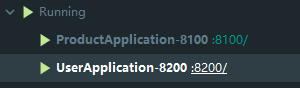
Product服务: 服提供者, 服务名product-client, 存在一个接口/product/test, 返回"test"字符串
User服务: 调用方, 服务名user-client, 存在一个接口/user/test, 调用product服务的test接口
//配置url方式,请求地址为url的地址

@FeignClient(name = "product-client", url = "localhost:9997")

public interface ProductClient {

    /**

     *  ..

     * @return .

     */

    @GetMapping("/product/test")

    String test();

}

@RequestMapping("/user")

public class UserController {

    @Resource

    private ProductClient client;

    @GetMapping("/test")

    public String test() {

        return client.test();

    }

}

//访问http://localhost:8200/user/test报错:

//Connection refused: connect executing GET http://localhost:9997/product/test with root cause

//说明配置了url属性后,确实是根据url的值作为请求地址进行调用
//使用服务名调用方式

@FeignClient(name = "product-client")

public interface ProductClient {

    /**

     *  ..

     * @return .

     */

    @GetMapping("/product/test")

    String test();

}

//调用成功,后台能看到获取注册中心(nacos)的数据解析获取真实的url地址的日志

//用一个不存在的服务名再验证一下

@FeignClient(name = "product-client123")

public interface ProductClient {

    /**

     *  ..

     * @return .

     */

    @GetMapping("/product/test")

    String test();

}

//报错信息:

com.netflix.client.ClientException: Load balancer does not have available server for client: product-client123
fallbackFactory: 获取异常信息
示例:
user服务开启hystrix

feign:

  hystrix:

    enabled: true

//user服务添加fallback,用于在调用服务出现错误时,返回自定义信息

@Component

public class ProductClientFallback implements ProductClient{

    @Override

    public String test() {

        return "error";

    }

}

//user服务添加fallbackFactory,用户在调用服务出现错误时,获取错误信息

@Component

public class ProductClientFallbackFactory implements FallbackFactory<ProductClient> {

    @Resource

    ProductClientFallback fallback;

    @Override

    public ProductClient create(Throwable cause) {

        System.out.println("cause.getMessage() = " + cause.getMessage());

        return fallback;

    }

}

//product服务修改/product/test接口,模拟出现异常

@RestController

@RequestMapping("/product")

public class ProductController {

    @GetMapping("/test")

    public String test() throws Exception {

        throw new Exception("test Exception");

    }

}
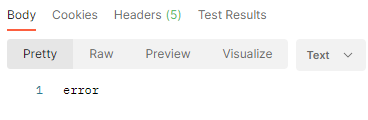
Postman访问 http://localhost:8200/user/test ,成功返回自定义的异常信息
查看服务调用方User的日志, 成功打印出错误日志

message信息为空的话,配置一下Product服务:
server:

  error:

    include-message: ALWAYS
具体原因请查看 博客, 也可以通过使用@ControllerAdvice来解决
contextId: 别名
假设一个User服务有两个FeignClient,都需要调用Product服务, 因为name属性值一样,所以需要通过配置contextId来区分,否则启动项目时会报错
@FeignClient(name = "product-client", fallbackFactory = ProductClientFallbackFactory.class, contextId = "ProductClientCopy")

public interface ProductClientCopy {

    /**

     *  ..

     * @return .

     */

    @GetMapping("/product/testCopy")

    String test();

}

@FeignClient(name = "product-client", fallbackFactory = ProductClientFallbackFactory.class, contextId = "ProductClient")

public interface ProductClient {

    /**

     *  ..

     * @return .

     */

    @GetMapping("/product/testCopy")

    String test();

}
@FeignClient常用属性的更多相关文章
- 【Android自学日记】五大布局常用属性
线性布局(LinearLayout)常用属性: android:orientation="vertical"--决定子类控件的排布方式(vertical垂直:horizontal水 ...
- DataGrid中的常用属性
DataGrid中的常用属性 $('#dg').datagrid({ url:'datagrid_data.json', columns:[[ {field:'code',title:'Code',w ...
- Node.js process 模块常用属性和方法
Node.js是常用的Javascript运行环境,本文和大家发分享的主要是Node.js中process 模块的常用属性和方法,希望通过本文的分享,对大家学习Node.js http://www.m ...
- ImageView的常用属性
ImageView的一些常用属性,并且这些属性都有与之对应的getter.setter方法: android:adjustViewBounds:设置ImageView是否调整自己的边界来保持所显示图片 ...
- HTML a标签、4个伪类、常用属性(下载)、锚链接(待扩展:邮件、电话、短信、GPS)
HTML 超链接<a> 1.超链接可以是一个字.一个词.一组词.一幅图像,您可以点击这些内容来跳转到新的文档或者当前文档中的某个部分. 2.当您把鼠标指针移动到网页中的某个链接上时,箭头会 ...
- iOS导航控制器常用函数与navigationBar常用属性
导航控制器常用函数触发时机 当视图控制器的View将要出现时触发 - (void)viewWillAppear:(BOOL)animated 当视图控制器的View已经出现时触发 - (void)vi ...
- CSS样式常用属性整理
web工程师是最近5年刚刚兴起的一门高薪职业,人们的专注度越来越高. 那么前端除了学习html标签之外还需要掌握什么知识点呢? 为大家整理了一个和HTML标签密不可分的知识要点--<CSS样式常 ...
- WPF DataGrid常用属性记录
WPF DataGrid常用属性记录 组件常用方法: BeginEdit:使DataGrid进入编辑状态. CancelEdit:取消DataGrid的编辑状态. CollapseRowGroup:闭 ...
- Android开发中XML布局的常用属性说明
<!-- 常用属性说明: android:id="@+id/button" 为控件指定Id android:text="NNNNNNNNNN" 指定控件的 ...
随机推荐
- 轻松吃透实时时钟芯片DS1302软硬件设计,看完秒懂
今天我们来讨论一款老掉牙的实时时钟芯片DS1302.什么是实时时钟(RealTime Clock, RTC)呢?为什么我们需要它呢?假设你使用单片机实现万年历应用,一般的做法是这样的:设置中断后判断1 ...
- Luat Demo | 一文读懂,如何使用Cat.1开发板实现Camera功能
让万物互联更简单,合宙通信高效便捷的二次开发方式Luat,为广大客户提供了丰富实用的Luat Demo示例,便于项目开发灵活应用. 本期采用合宙全新推出的VSCode插件LuatIDE,为大家演示如何 ...
- Spring Boot动态权限变更实现的整体方案
1.前言 在Web项目中,权限管理即权限访问控制为网站访问安全提供了保障,并且很多项目使用了Session作为缓存,结合AOP技术进行token认证和权限控制.权限控制流程大致如下图所示: 现 ...
- react 中的PropTypes与DefaultProps
每个组件都有自己的props参数,这参数是从父组件接收的一些属性.那我们应该如何对参数的类型做校验,如何定义参数的默认值呢? 1.使用PropTypes校验父组件传过来的参数是否合法 import P ...
- c++实现希尔密码
实验名称: 希尔密码的实现(c++版;本文只以26个大写英文字符作为加密后的密文的可选项) 实验原理: 引用知识: 记 Zm={0,1,2,...,m-1} 定义1:设A为定义在集合Zm 上的n阶方阵 ...
- 【译】Go:程序如何恢复?
原文:https://medium.com/a-journey-with-go/go-how-does-a-program-recover-fbbbf27cc31e 当程序不能正确处理错误时, 会 ...
- js--你需要知道的字符串使用方法(含es6及之后)
前言 字符串作为 JavScript 的基本数据类型,在开发以及面试过程中作为程序员对基础掌握情况的重要考点,本文来总结一下字符串的相关属性以及用法.包含了ES6中的一些新语法特性. 正文 1.字符串 ...
- Kafka:Springboot整合Kafka消息队列
本文主要分享下Spring Boot和Spring Kafka如何配置整合,实现发送和接收来自Spring Kafka的消息. 项目结构 pom依赖包 <?xml version="1 ...
- 使用命令行操作MySQL 及 语法
在使用之前先要确保服务中的MySQL 已启动,否则会报错:ERROR 2003 (HY000): Can't connect to MySQL server on 'localhost' (10061 ...
- HDU2050
思路分析,被我写到分割问题里面.可以去看看. 贴下代码