
css绘制内扣圆角
纯静态的一种效果绘制,避免使用图标浪费内存。效果如下
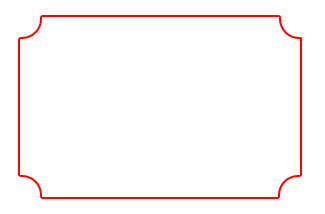
废话不多说,代码如下:
<!DOCTYPE html>

<html lang="en">

<head>

    <meta charset="UTF-8">

    <title>circle</title>

    <style type="text/css">

        #app{

            width:300px;height:200px;position: relative;box-sizing: border-box;padding:10px;

        }

        .box{

            width:100%;height:100%;border:2px solid #f00;

        }

        .circle{

            display: block;width:20px;height:20px;border:2px solid transparent;position: absolute;z-index: 1;background:#fff;

        }

        .top-left{

            left:10px;top: 10px;border-right-color: #f00;border-bottom-color: #f00;border-radius:0 0 20px 0;

        }

        .top-right{

            right: 5px;top: 10px;border-left-color: #f00;border-bottom-color: #f00;border-radius:0 0 0 20px;

        }

        .btm-left{

            left: 10px;bottom:6px;border-right-color: #f00;border-top-color: #f00;border-radius:0 20px 0 0;

        }

        .btm-right{

            right: 6px;bottom: 6px;border-left-color: #f00;border-top-color: #f00;border-radius:20px 0 0 0;

        }

    </style>

</head>

<body>

    <div id="app">

        <div class="box"></div>

        <i class="circle top-left"></i>

        <i class="circle top-right"></i>

        <i class="circle btm-left"></i>

        <i class="circle btm-right"></i>

    </div>

</body>

</html>
效果二:
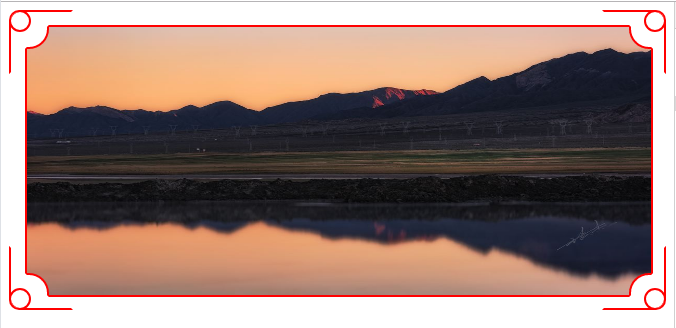
相比第一种效果,增加了四角的曲别针效果,完整代码为:
<!DOCTYPE html>

<html lang="en">

<head>

    <meta charset="UTF-8">

    <title>circle</title>

    <style type="text/css">

        .cont{

            height:300px;

            box-sizing: border-box;padding:10px;

            position: relative;

        }

        .icon-box{

            width:60px;height:60px;border:2px solid #f00;position: absolute;overflow: hidden;

        }

        .icon-top-left{

            left: 0;top: 0;border-right-color: transparent;border-bottom-color: transparent;border-radius:10px 0 0 0;

        }

        .icon-top-right{

            right: 0;top: 0;border-left-color: transparent;border-bottom-color: transparent;border-radius:0 10px 0 0;

        }

        .icon-btm-left{

            left: 0;bottom: 0;border-right-color: transparent;border-top-color: transparent;border-radius:0 0 0 10px;

        }

        .icon-btm-right{

            right: 0;bottom: 0;border-left-color: transparent;border-top-color: transparent;border-radius:0 0 10px 0;

        }

        .icon-box i{

            display: block;width:18px;height:18px;border-radius:50%;border:2px solid #f00;position: absolute;z-index: 2;

        }

        .icon-top-left i{

            left: -2px;top: -2px;

        }

        .icon-top-right i{

            right: -2px;top: -2px;

        }

        .icon-btm-left i{

            left: -2px;bottom: -2px;

        }

        .icon-btm-right i{

            right: -2px;bottom: -2px;

        }

        .app{

            width:100%;height:100%;

            position: relative;box-sizing: border-box;padding:5px 7px 7px 6px;

        }

        .box{

            width:100%;height:100%;border:2px solid #f00;

        }

        .circle{

            display: block;width:20px;height:20px;border:2px solid transparent;position: absolute;z-index: 1;background:#fff;

        }

        .top-left{

            left:6px;top: 5px;border-right-color: #f00;border-bottom-color: #f00;border-radius:0 0 20px 0;

        }

        .top-right{

            right: 3px;top:5px;border-left-color: #f00;border-bottom-color: #f00;border-radius:0 0 0 20px;

        }

        .btm-left{

            left: 6px;bottom:3px;border-right-color: #f00;border-top-color: #f00;border-radius:0 20px 0 0;

        }

        .btm-right{

            right: 3px;bottom: 3px;border-left-color: #f00;border-top-color: #f00;border-radius:20px 0 0 0;

        }

        .box img{

            display: block;width:100%;height:100%;

        }

    </style>

</head>

<body>

    <div class="cont">

        <div class="icon-box icon-top-left"><i></i></div>

        <div class="icon-box icon-top-right"><i></i></div>

        <div class="icon-box icon-btm-left"><i></i></div>

        <div class="icon-box icon-btm-right"><i></i></div>

        <div class="app">

            <div class="box"><img src="img_src" alt=""></div>

            <i class="circle top-left"></i>

            <i class="circle top-right"></i>

            <i class="circle btm-left"></i>

            <i class="circle btm-right"></i>

        </div>

    </div>

</body>

</html>
css绘制内扣圆角的更多相关文章
- css边框内凹圆角,解决优惠券的边框问题
关于css边框内凹圆角,找了好久才找到的 <html <head> <title>无标题页</title> <style> body{ backg ...
- CSS实现多重边框和内凹圆角
CSS实现多重边框 <!DOCTYPE html> <html lang="zh-cn"> <head> <meta charset=&q ...
- CSS布局技巧 -- 内凹圆角
圆角,相信每一个了解CSS属性的都知道,通过border-radius实现圆角(外凸圆角),但是如果需要实现内凹圆角怎么办呢?比如四角内凹的元素,比如如下所示这样的内凹圆角 对于这种问题,很多人的反应 ...
- CSS-论css如何纯代码实现内凹圆角
background-image: radial-gradient(200px at 50px 0px, #fff 50px, #4169E1 50px); 这是做内凹圆角的核心代码,就是背景图的ra ...
- CSS 魔法系列:纯 CSS 绘制三角形(各种角度)
我们的网页因为 CSS 而呈现千变万化的风格.这一看似简单的样式语言在使用中非常灵活,只要你发挥创意就能实现很多比人想象不到的效果.特别是随着 CSS3 的广泛使用,更多新奇的 CSS 作品涌现出来. ...
- 摘记 史上最强大的40多个纯CSS绘制的图形(一)
今天在国外的网站上看到了很多看似简单却又非常强大的纯CSS绘制的图形,里面有最简单的矩形.圆形和三角形,也有各种常见的多边形,甚至是阴阳太极和网站小图标,真的非常强大,分享给大家. Square(正方 ...
- 史上最强大的40多个纯CSS绘制的图形
Square(正方形) #square { width: 100px; height: 100px; background: red; } Rectangle(矩形) #rectangle { wid ...
- 40多个纯CSS绘制的图形
本文由码农网 – 陈少华原创,转载请看清文末的转载要求. 今天在国外的网站上看到了很多看似简单却又非常强大的纯CSS绘制的图形,里面有最简单的矩形.圆形和三角形,也有各种常见的多边形,甚至是阴阳太极和 ...
- css绘制三角形原理
1.新建一个元素,将它的宽高都设置为0:然后通过设置border属性来实现三角形效果,下面是css绘制三角形的原理: <!DOCTYPE html> <html> <he ...
随机推荐
- java 和 c++ 实现的各种基础数据结构和算法
https://github.com/phishman3579/java-algorithms-implementation https://github.com/xorz57/forest
- Remove menucool tooltip trial version
You use this crack on your own risk , i dont reserve any right on this script or what is going to af ...
- MTSC2019第五届中国移动互联网测试开发大会北京站震撼来袭!
MTSC2019 暨第五届中国移动互联网测试开发大会(Mobile Testing Summit China)是由国内最大的测试开发技术社区之一 TesterHome 发起的行业会议,聚焦于软件测试及 ...
- node(03 fs文件模块)
我们通过读取一个文件内容并将内容写入到另外一个文件中. fs.createWriteStream 写入文件其实 这个可以看文档 参考这个更全一店 https://www.jianshu.com/p/d ...
- 初识GitHub之创建文件
在新建了一个项目(repository)后,会跳转到项目主页,如下图 Create new file(创建新文件)就是新建一个代码文件,Upload file(上传文件)即从内存中将代码文件上传至本项 ...
- C# Newtonsoft.Json JsonSerializerSettings 全局序列化设置
Newtonsoft.Json.JsonSerializerSettings setting = new Newtonsoft.Json.JsonSerializerSettings(); JsonC ...
- Oarcle 入门之 order by 关键字
order by 关键字 作用:用于对查询结果进行排序 select * from emp where deptno = 20 order by sal asc /desc; 如何排序之升降问题 *用 ...
- bzoj2880
打公式好麻烦 QAQ 为了节省时间去复习,原谅我引用一下别人的博客...http://blog.csdn.net/acdreamers/article/details/8542292 #include ...
- IE缓存清除
原文转载自:http://blog.csdn.net/whatday/article/details/7566925 首先: 在 stdafx.h中要加入: #include "atlba ...
- oracle ora-12514解决办法
原来配置好的数据库监听用plsql登陆报错ORA-12514 TNS 监听程序当前无法识别连接描述符中请求服务 网上说的改listener.ora 添加如下配置 SID_LIST_LISTENER = ...