
python链家网高并发异步爬虫asyncio+aiohttp+aiomysql异步存入数据
python链家网二手房异步IO爬虫,使用asyncio、aiohttp和aiomysql
很多小伙伴初学python时都会学习到爬虫,刚入门时会使用requests、urllib这些同步的库进行单线程爬虫,速度是比较慢的,后学会用scrapy框架进行爬虫,速度很快,原因是scrapy是基于twisted多线程异步IO框架。
本例使用的asyncio也是一个异步IO框架,在python3.5以后加入了协程的关键字async,能够将协程和生成器区分开来,更加方便使用协程。
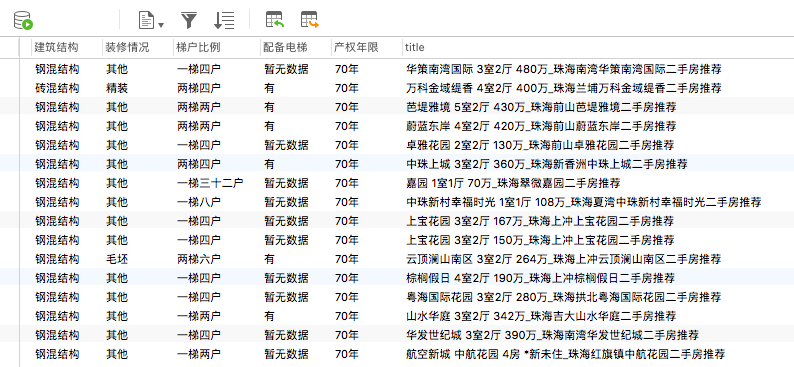
经过测试,平均1秒可以爬取30个详情页信息
可以使用asyncio.Semaphore来控制并发数,达到限速的效果

# -*- coding: utf-8 -*-
"""
    :author: KK
    :url: http://github.com/PythonerKK
    :copyright: © 2019 KK <705555262@qq.com.com>
"""
import asyncio
import re
import aiohttp
from pyquery import PyQuery
import aiomysql
from lxml import etree

pool = ''
#sem = asyncio.Semaphore(4)  用来控制并发数,不指定会全速运行
stop = False
headers = {
    'User-Agent': 'Mozilla/5.0 (Windows NT 10.0; WOW64) AppleWebKit/537.36 (KHTML, like Gecko) Chrome/61.0.3163.100 Safari/537.36'
}
MAX_PAGE = 10
TABLE_NAME = 'data'  #数据表名
city = 'zh'  #城市简写
url = 'https://{}.lianjia.com/ershoufang/pg{}/'  #url地址拼接
urls = []  #所有页的url列表
links_detail = set()  #爬取中的详情页链接的集合
crawled_links_detail = set()  #爬取完成的链接集合,方便去重

async def fetch(url, session):
    '''
    aiohttp获取网页源码
    '''
    # async with sem:
    try:
        async with session.get(url, headers=headers, verify_ssl=False) as resp:
            if resp.status in [200, 201]:
                data = await resp.text()
                return data
    except Exception as e:
        print(e)

def extract_links(source):
    '''
    提取出详情页的链接
    '''
    pq = PyQuery(source)
    for link in pq.items("a"):
        _url = link.attr("href")
        if _url and re.match('https://.*?/\d+.html', _url) and _url.find('{}.lianjia.com'.format(city)):
            links_detail.add(_url)

    print(links_detail)

def extract_elements(source):
    '''
    提取出详情页里面的详情内容
    '''
    try:
        dom = etree.HTML(source)
        id = dom.xpath('//link[@rel="canonical"]/@href')[0]
        title = dom.xpath('//title/text()')[0]
        price = dom.xpath('//span[@class="unitPriceValue"]/text()')[0]
        information = dict(re.compile('<li><span class="label">(.*?)</span>(.*?)</li>').findall(source))
        information.update(title=title, price=price, url=id)
        print(information)
        asyncio.ensure_future(save_to_database(information, pool=pool))

    except Exception as e:
        print('解析详情页出错!')
        pass

async def save_to_database(information, pool):
    '''
    使用异步IO方式保存数据到mysql中
    注:如果不存在数据表,则创建对应的表
    '''
    COLstr = ''  # 列的字段
    ROWstr = ''  # 行字段
    ColumnStyle = ' VARCHAR(255)'
    for key in information.keys():
        COLstr = COLstr + ' ' + key + ColumnStyle + ','
        ROWstr = (ROWstr + '"%s"' + ',') % (information[key])
    # 异步IO方式插入数据库
    async with pool.acquire() as conn:
        async with conn.cursor() as cur:
            try:
                await cur.execute("SELECT * FROM  %s" % (TABLE_NAME))
                await cur.execute("INSERT INTO %s VALUES (%s)"%(TABLE_NAME, ROWstr[:-1]))
                print('插入数据成功')
            except aiomysql.Error as e:
                await cur.execute("CREATE TABLE %s (%s)" % (TABLE_NAME, COLstr[:-1]))
                await cur.execute("INSERT INTO %s VALUES (%s)" % (TABLE_NAME, ROWstr[:-1]))
            except aiomysql.Error as e:
                print('mysql error %d: %s' % (e.args[0], e.args[1]))

async def handle_elements(link, session):
    '''
    获取详情页的内容并解析
    '''
    print('开始获取: {}'.format(link))
    source = await fetch(link, session)
    #添加到已爬取的集合中
    crawled_links_detail.add(link)
    extract_elements(source)

async def consumer():
    '''
    消耗未爬取的链接
    '''
    async with aiohttp.ClientSession() as session:
        while not stop:
            if len(urls) != 0:
                _url = urls.pop()
                source = await fetch(_url, session)
                print(_url)
                extract_links(source)

            if len(links_detail) == 0:
                print('目前没有待爬取的链接')
                await asyncio.sleep(2)
                continue

            link = links_detail.pop()
            if link not in crawled_links_detail:
                asyncio.ensure_future(handle_elements(link, session))

async def main(loop):
    global pool
    pool = await aiomysql.create_pool(host='127.0.0.1', port=3306,
                                      user='root', password='xxxxxx',
                                      db='aiomysql_lianjia', loop=loop, charset='utf8',
                                      autocommit=True)

    for i in range(1, MAX_PAGE):
        urls.append(url.format(city, str(i)))
    print('爬取总页数:{} 任务开始...'.format(str(MAX_PAGE)))
    asyncio.ensure_future(consumer())

if __name__ == '__main__':
    loop = asyncio.get_event_loop()
    asyncio.ensure_future(main(loop))
    loop.run_forever()
python链家网高并发异步爬虫asyncio+aiohttp+aiomysql异步存入数据的更多相关文章
- python链家网高并发异步爬虫and异步存入数据
python链家网二手房异步IO爬虫,使用asyncio.aiohttp和aiomysql 很多小伙伴初学python时都会学习到爬虫,刚入门时会使用requests.urllib这些同步的库进行单线 ...
- Pyspider爬虫简单框架——链家网
pyspider 目录 pyspider简单介绍 pyspider的使用 实战 pyspider简单介绍 一个国人编写的强大的网络爬虫系统并带有强大的WebUI.采用Python语言编写,分布式架构, ...
- 使用python抓取并分析数据—链家网(requests+BeautifulSoup)(转)
本篇文章是使用python抓取数据的第一篇,使用requests+BeautifulSoup的方法对页面进行抓取和数据提取.通过使用requests库对链家网二手房列表页进行抓取,通过Beautifu ...
- Python的scrapy之爬取链家网房价信息并保存到本地
因为有在北京租房的打算,于是上网浏览了一下链家网站的房价,想将他们爬取下来,并保存到本地. 先看链家网的源码..房价信息 都保存在 ul 下的li 里面 爬虫结构: 其中封装了一个数据库处理模 ...
- 分享系列--面试JAVA架构师--链家网
本月7日去了一趟链家网面试,虽然没有面上,但仍有不少收获,在此做个简单的分享,当然了主要是分享给自己,让大家见笑了.因为这次是第一次面试JAVA网站架构师相关的职位,还是有些心虚的,毕竟之前大部分时间 ...
- Scrapy实战篇(一)之爬取链家网成交房源数据(上)
今天,我们就以链家网南京地区为例,来学习爬取链家网的成交房源数据. 这里推荐使用火狐浏览器,并且安装firebug和firepath两款插件,你会发现,这两款插件会给我们后续的数据提取带来很大的方便. ...
- TOP100summit:【分享实录】链家网大数据平台体系构建历程
本篇文章内容来自2016年TOP100summit 链家网大数据部资深研发架构师李小龙的案例分享. 编辑:Cynthia 李小龙:链家网大数据部资深研发架构师,负责大数据工具平台化相关的工作.专注于数 ...
- Scrapy实战篇(九)之爬取链家网天津租房数据
以后有可能会在天津租房子,所以想将链家网上面天津的租房数据抓下来,以供分析使用. 思路: 1.以初始链接https://tj.lianjia.com/zufang/rt200600000001/?sh ...
- 链家网爬虫同步VS异步执行时间对比
异步执行时间 import time import asyncio import aiohttp from lxml import etree start_time = time.time() asy ...
随机推荐
- CentOS配置VSFTP服务
1.安装vsftpd a.查看是否安装vsftp [root@wsyjlly ~]# rpm -q vsftpd package vsftpd is not installed b.如果没有则安装vs ...
- API接口规范V1.0——制定好规范,才好合作开发
返回码规范: 统一六位 000000 表示成功! 参数相关返回码预留100000-199999:系统相关返回码预留200000-299999:数据中心310000-319999后续项目以此类推,后续根 ...
- vue选中与取消简单实现
<li v-for="(item,index) in assign" :key="index" @click="selected(item)&q ...
- 【读书笔记】iOS-iOS安全基础知识
一,iOS硬件/设备的类型. iPad的问世,就是在这一方向上迈出的第一步.第一代iPad使用了ARM Cortex-A8架构的CUP,它的速度大约是第一代iPhone所使用CPU速度的两倍. iPa ...
- Oracle绑定变量在C#.NET中的应用及意义
一. 什么是绑定变量 绑定变量(bind variable) : select * from emp where empno=:empno; 是用户放入查询中的占位符,它会告诉Oracle“我会随后为 ...
- 【转】用yum只下载rpm包而不安装
转自:http://liucheng.name/1950/ CentOS用yum安装软件是非常方便的,有时,我们只需要下载其中的rpm包,而不直接安装时咋办呢? 一般情况下,yum是不提供只下载的功能 ...
- loadrunner 脚本优化-关联函数web_reg_save_param()函数详解
脚本优化-关联函数web_reg_save_param()函数详解 by:授客 QQ:1033553122 Insert->New Step,打开Add Step对话框 选择函数web_re ...
- linux设置自动更换壁纸
#!/bin/bash let n=0 files=($HOME/wallpapers/*.jpg) count=${#files[@]} while [ 1 ] do let "n=n%$ ...
- 将 Azure 文件共享用于 Windows VM
可将 Azure 文件共享用作一种从 VM 中存储和访问文件的方式. 例如,你可以存储一个要与所有 VM 共享的脚本或应用程序配置文件. 本主题将介绍如何创建和装载 Azure 文件共享,以及如何上传 ...
- cx_Oracle读取Oracle数据库中文乱码问题解决
在使用cx_Oracle模块读取Oracle数据库中的中文记录时,返回值皆为?,后google得此佳文,遂问题得以解决,特此记之. Oracle数据库版本是10g,字符集是AL32UTF8. 编写的p ...