
python杂记一
1. 输出CSV文件
用python输出csv文件不难,可是MS office excel和WPS 对输出的CSV文件打开规则不一样。
WPS可以支持CSV以'\t'为分隔符,打开文件直接写内容
MS office excel必须用','为分隔符,打开文件在写内容之前,要先写入文件头:u"\ufeff",否则输出的中文会出现乱码。
import codecs

csvstr = 'test'

fh = codecs.open("myfile.csv","w","utf-8")

fh.write(u"\ufeff")

fh.write(csvstr)

fh.close()
2. 使用pyInstaller打包python程序
pyInstaller包目前可以直接使用pip install pyinstaller来安装,安装完成之后,在命令行输入pyinstaller命令,会出现参数提示信息。
D:\Source\Python>pyinstaller

usage: pyinstaller [-h] [-v] [-D] [-F] [--specpath DIR] [-n NAME]

                   [--add-data <SRC;DEST or SRC:DEST>]

                   [--add-binary <SRC;DEST or SRC:DEST>] [-p DIR]

                   [--hidden-import MODULENAME]

                   [--additional-hooks-dir HOOKSPATH]

                   [--runtime-hook RUNTIME_HOOKS] [--exclude-module EXCLUDES]

                   [--key KEY] [-d [{all,imports,bootloader,noarchive}]] [-s]

                   [--noupx] [-c] [-w]

                   [-i <FILE.ico or FILE.exe,ID or FILE.icns>]

                   [--version-file FILE] [-m <FILE or XML>] [-r RESOURCE]

                   [--uac-admin] [--uac-uiaccess] [--win-private-assemblies]

                   [--win-no-prefer-redirects]

                   [--osx-bundle-identifier BUNDLE_IDENTIFIER]

                   [--runtime-tmpdir PATH] [--bootloader-ignore-signals]

                   [--distpath DIR] [--workpath WORKPATH] [-y]

                   [--upx-dir UPX_DIR] [-a] [--clean] [--log-level LEVEL]

                   scriptname [scriptname ...]

pyinstaller: error: the following arguments are required: scriptname
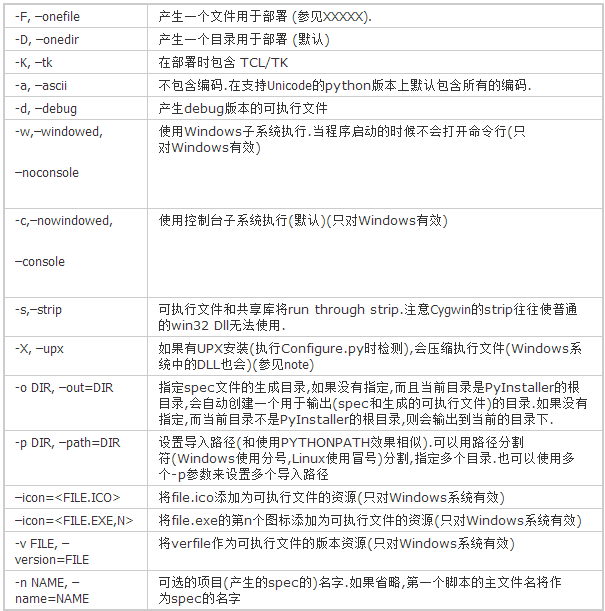
pyinstaller命令后scriptname参数是必须的,这是要生成exe的脚本文件,其都是可选参数,如果直接用pyinstaller scriptname来打包,会生成很多dll文件,如果想打包成一个可执行程序,要加参数-F,pyinstaller -F scriptname,其他参数下如图所示。
要打包的脚本文件要注意import的包,尽量只import需要的包和类,否则生成的文件可能会很大。
3. 获取当前文件路径,上级目录路径
import os,sys
使用sys.path[0]、sys.argv[0]、os.getcwd()、os.path.abspath(__file__)、os.path.realpath(__file__)
sys.path是Python会去寻找模块的搜索路径列表,sys.path[0]和sys.argv[0]是一回事因为Python会自动把sys.argv[0]加入sys.path。
如果你在C:\test目录下执行python getpath\getpath.py,那么os.getcwd()会输出“C:\test”,sys.path[0]会输出“C:\test\getpath”。
获取当前的路径:
__file__是当前执行的文件
# 获取当前文件__file__的路径

print(os.path.realpath(__file__))

# 获取当前文件__file__的所在目录

print(os.path.dirname(os.path.realpath(__file__)))

print(os.path.abspath(os.path.dirname(__file__)))

print(os.path.split(os.path.realpath(__file__))[0])

# 获取上级目录

print(os.path.abspath(os.path.dirname(os.path.dirname(__file__))))

print(os.path.abspath(os.path.join(os.path.dirname('APPtest\\RSA.py'),'.\..')))

# 获取上上级目录

print(os.path.abspath(os.path.join(os.path.dirname('APPtest\\RSA.py'),'../..')))
python杂记一的更多相关文章
- python杂记-4(迭代器&生成器)
#!/usr/bin/env python# -*- coding: utf-8 -*-#1.迭代器&生成器#生成器#正确的方法是使用for循环,因为generator也是可迭代对象:g = ...
- python杂记-3(购买商品)
#!/usr/bin/env python# -*- coding: utf-8 -*-#如下是一个购物程序:#先输入工资,显示商品列表,购买,quit退出,最后格式化输出所买的商品.count = ...
- python杂记-1(os模块)
os模块说明:python os模块包含普遍的操作系统功能 os.access(path, mode) # 检验权限模式 os.chdir(path) # 改变当前工作目录os.chflags(pat ...
- python杂记-6(time&datetime模块)
#!/usr/bin/env python# -*- coding: utf-8 -*-import timeprint(time.clock())##返回处理器时间,3.3开始已废弃 , 改成了ti ...
- python杂记-5(装饰器)
1.被装饰的函数有参数(一个参数): def w1(func): def inner(arg): # 验证1 # 验证2 # 验证3 return func(arg) return inner @w1 ...
- python 杂记
class TestA(object): def __init__(self): print("A is initing"); def foo(self): print(" ...
- Python杂记
一.函数 1.numpy 模块中的nonzero函数 nonzero返回的数非零元素的下标. 如果输入是单维度的时候它的返回值只有一个:如果输入是多个维度的话,那么它的返回值也是多个维度的.并且的它的 ...
- python杂记二
1. 写文件可以直接使用print函数 file_name = open("file_name.txt","w") print("file conta ...
- Python——杂记
python 最近出错总结: 1.而for..in ..中不要用else if x in y: print else: print2.def fibs(num): ... ...
随机推荐
- 如何使用HackRF做一个简单的IMSI捕获器
关于IMSI IMSI为国际用户识别码(International Mobile Subscriber Identity)的缩写,是用于区分蜂窝网络中不同用户的,在所在蜂窝网络中不重复的识别码.IMS ...
- CCF-URL映射-(正则匹配)-20180303
果然正则表达式是一个强大的工具 更短的代码....hhh 版本1: 正则表达式..so easy~~ #include <iostream> #include <algorithm& ...
- 软件测试_Linux
# Linux## 基础知识### 操作系统* 作为中间人,连接软件和硬件### Linux * 特点 * 免费+安全### 查看日志,定位bug,修改文件,搭建环境## 安装### 装虚拟机 vmw ...
- day07 深浅拷贝
今日概要 深浅拷贝(重点) 文件操作 详细内容 直接赋值: 直接将对象的引用赋值给另一个对象 v1=1000 v2=v1 #v1 v2指向同一个内存地址 print(id(v1),id(v2))#相等 ...
- 基于ajax 验证表单是否被占用----------------附:10.25日总结
总得来说,今天的主要工作是注册页面的处理, 1.判断 用户名与密码是否为空值 ,两次密码框输入的值是否相同.判断邮箱过程中,有使用到正则表达式 2.用户名是否使用过,有用到了json与ajax的知识. ...
- PythonStudy——Python 内存池机制 (Memory pool mechanism) Pymalloc
Python是如何进行内存管理-内存池机制 Pymalloc Python引用了一个内存池(memory pool)机制,即Pymalloc机制(malloc:n.分配内存),用于对小块内存的申请和释 ...
- PythonStudy——进制 System of numeration
十进制 人类天然选择了十进制. 二进制 二进制有两个特点:它由两个数码0,1组成,二进制数运算规律是逢二进一. 四进制 四进制是以4为基数的进位制,以 0.1.2 和 3 四个数字表示任何实数. 七进 ...
- jQuery基础(二)DOM
DOM节点的创建 jQuery节点创建与属性的处理 创建元素节点: $("<div></div>") 创建为文本节点: $("<div> ...
- Linux whereis命令详解
Linux whereis命令 Linux whereis命令用于查找文件. 该指令会在特定目录中查找符合条件的文件.这些文件应属于原始代码.二进制文件,或是帮助文件. 该指令只能用于查找二进制文件. ...
- ADS1.2和JlinkV8 erro starting external process,Process error code 87(0x57)参数错误
ADS1.2和JlinkV8 erro starting external process,Process error code 87(0x57)参数错误 网上的大致说法是说这个跟W7有关 说是将I ...