
IDEA使用SpringBoot 、maven创建微服务的简单过程
使用IDEA新建一个简单的微服务
1、 打开IDEA,File -> New -> project 打开如下图1-1所示的对话框
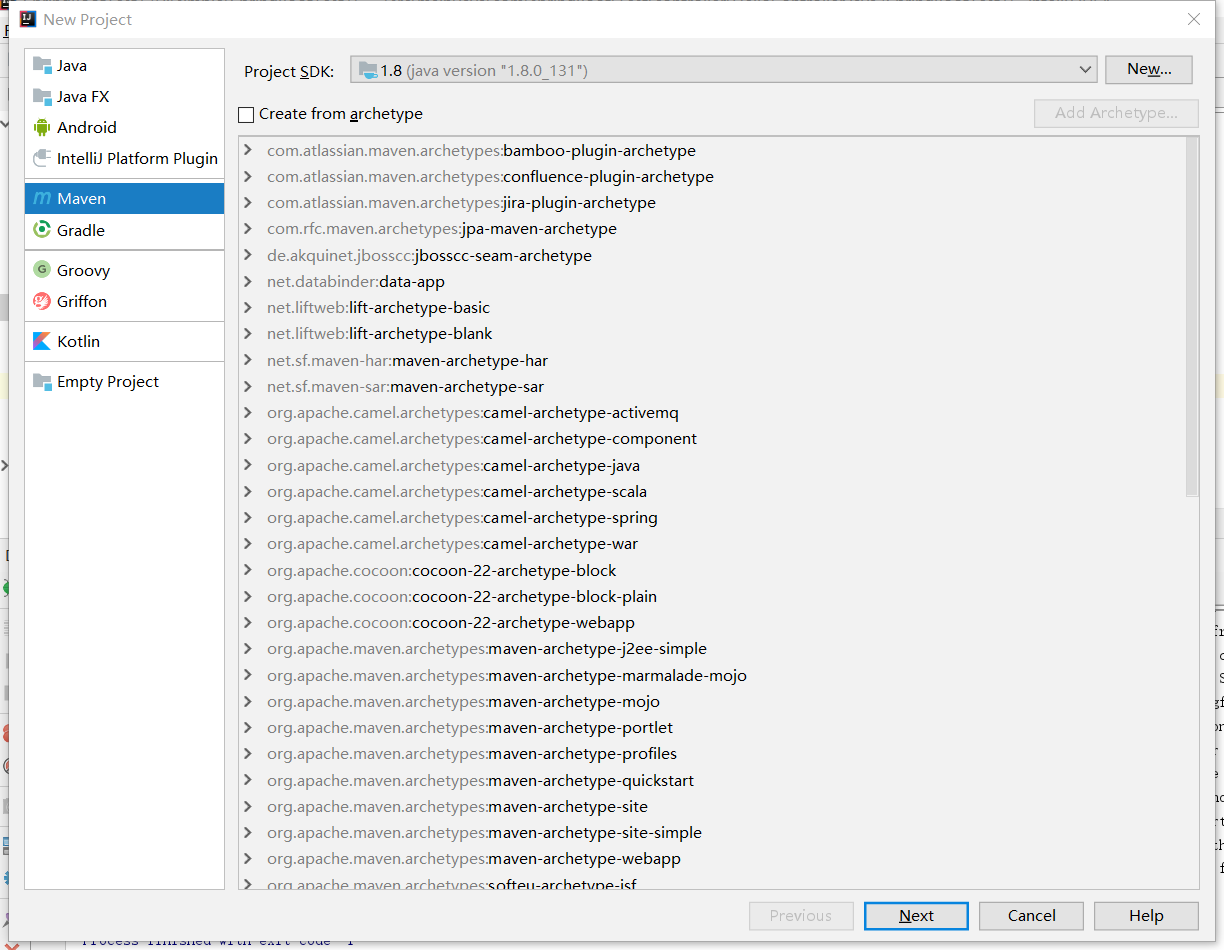
图 1-1
2、点击"Next"按钮,如下图2-1所示:

图 2-1
3、继续点击"Next"按钮,然后是"finsh",则工程即建立下来,pom.xml文件填写如下所示:
<modelVersion>4.0.0</modelVersion>

<groupId>SpringBootTest1</groupId>
<artifactId>SpringBootTest1</artifactId>
<version>1.0-SNAPSHOT</version>

<parent>
    <groupId>org.springframework.boot</groupId>
    <artifactId>spring-boot-starter-parent</artifactId>
    <version>2.0.0.RELEASE</version>
</parent>

<properties>
    <project.build.sourceEncoding>UTF-8</project.build.sourceEncoding>
</properties>
<dependencies>
    <!-- 引入Web模块 -->
    <dependency>
        <groupId>org.springframework.boot</groupId>
        <artifactId>spring-boot-starter-web</artifactId>
    </dependency>

</dependencies>

4、工程如下图4-1和图4-2所示:
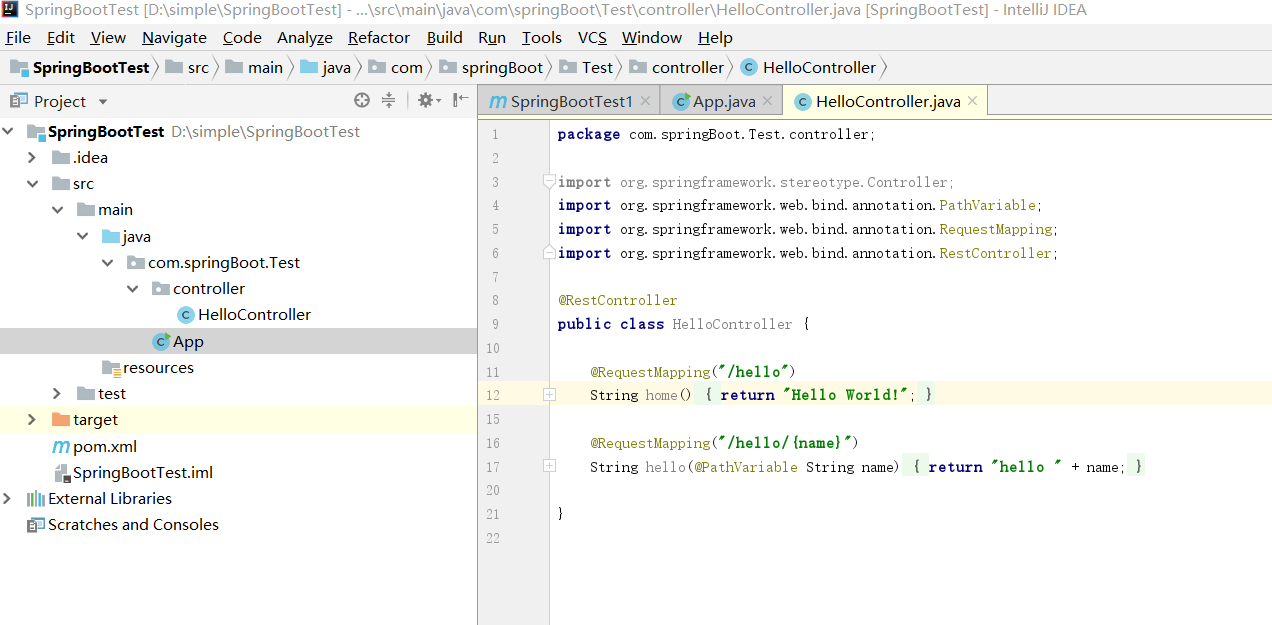
图 4-1
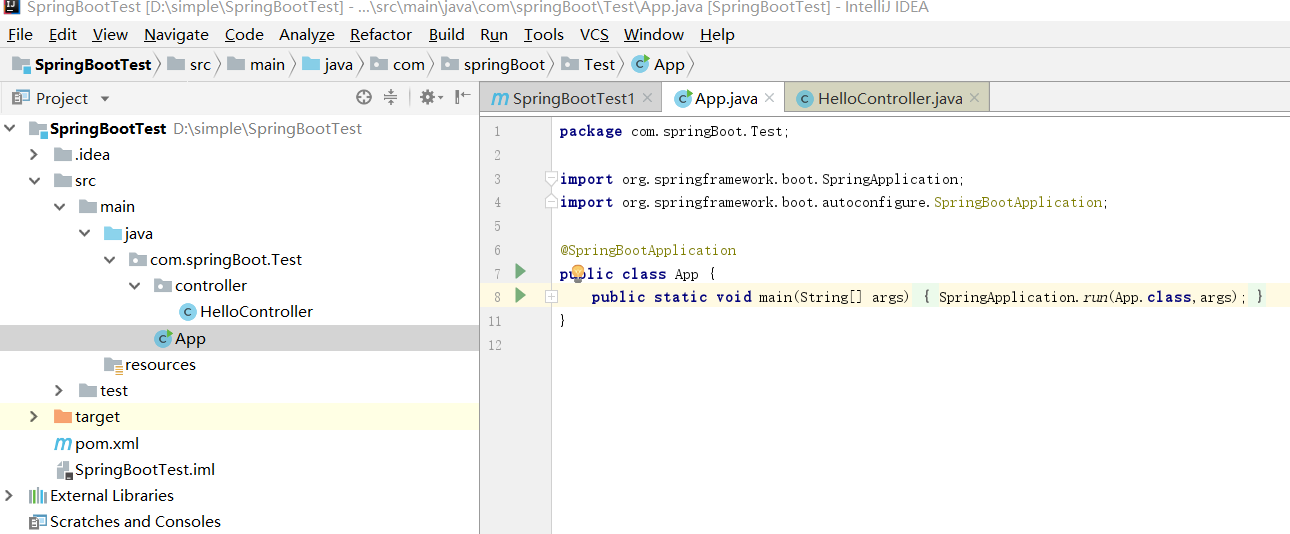
图 4-2
5、启动项目后,在地址栏中输入:http://127.0.0.1:8080/hello,如下图5-1所示:
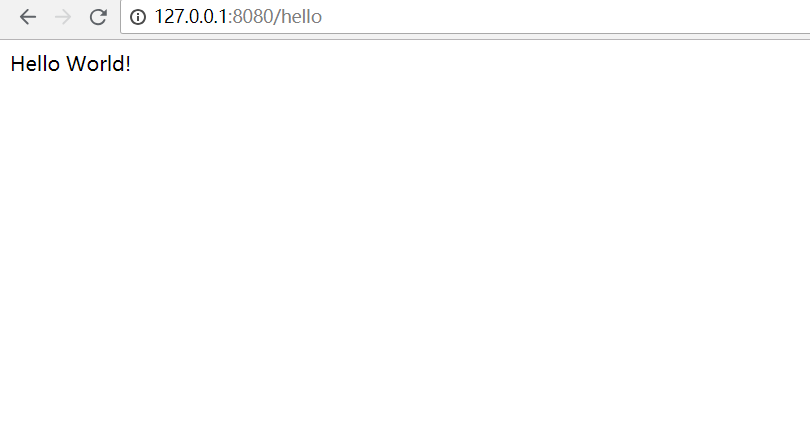
图 5-1
6、在地址栏中输入:http://127.0.0.1:8080/hello/program,如下图6-1所示:
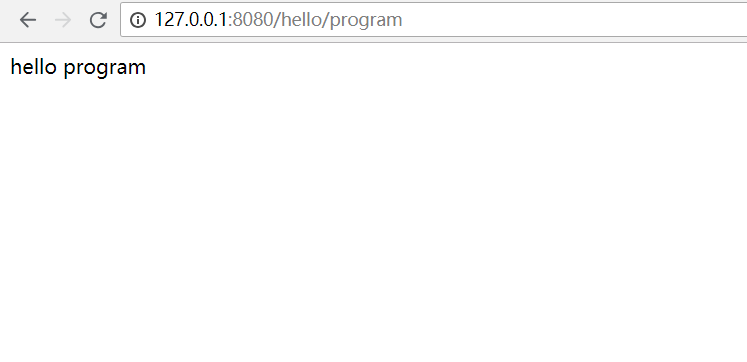
图 6-1
备注:注意 启动程序的函数,如本程序中的APP.java ,不能直接放在main/java下,否则,会报如下错误:
2018-11-04 19:20:40.721 WARN 5560 --- [ main] ConfigServletWebServerApplicationContext : Exception encountered during context initialization - cancelling refresh attempt: org.springframework.beans.factory.BeanDefinitionStoreException: Failed to read candidate component class: URL [jar:file:/D:/software/apache-maven-3.5.3/repository/org/springframework/boot/spring-boot-autoconfigure/2.0.0.RELEASE/spring-boot-autoconfigure-2.0.0.RELEASE.jar!/org/springframework/boot/autoconfigure/jdbc/DataSourceAutoConfiguration$EmbeddedDatabaseConfiguration.class]; nested exception is java.lang.IllegalStateException: Could not evaluate condition on org.springframework.boot.autoconfigure.jdbc.DataSourceAutoConfiguration$EmbeddedDatabaseConfiguration due to org/springframework/dao/DataAccessException not found. Make sure your own configuration does not rely on that class. This can also happen if you are @ComponentScanning a springframework package (e.g. if you put a @ComponentScan in the default package by mistake)
2018-11-04 19:20:40.753 ERROR 5560 --- [ main] o.s.boot.SpringApplication : Application run failed
org.springframework.beans.factory.BeanDefinitionStoreException: Failed to read candidate component class: URL [jar:file:/D:/software/apache-maven-3.5.3/repository/org/springframework/boot/spring-boot-autoconfigure/2.0.0.RELEASE/spring-boot-autoconfigure-2.0.0.RELEASE.jar!/org/springframework/boot/autoconfigure/jdbc/DataSourceAutoConfiguration$EmbeddedDatabaseConfiguration.class]; nested exception is java.lang.IllegalStateException: Could not evaluate condition on org.springframework.boot.autoconfigure.jdbc.DataSourceAutoConfiguration$EmbeddedDatabaseConfiguration due to org/springframework/dao/DataAccessException not found. Make sure your own configuration does not rely on that class. This can also happen if you are @ComponentScanning a springframework package (e.g. if you put a @ComponentScan in the default package by mistake)
at org.springframework.context.annotation.ClassPathScanningCandidateComponentProvider.scanCandidateComponents(ClassPathScanningCandidateComponentProvider.java:454) ~[spring-context-5.0.4.RELEASE.jar:5.0.4.RELEASE]
at org.springframework.context.annotation.ClassPathScanningCandidateComponentProvider.findCandidateComponents(ClassPathScanningCandidateComponentProvider.java:316) ~[spring-context-5.0.4.RELEASE.jar:5.0.4.RELEASE]
at org.springframework.context.annotation.ClassPathBeanDefinitionScanner.doScan(ClassPathBeanDefinitionScanner.java:275) ~[spring-context-5.0.4.RELEASE.jar:5.0.4.RELEASE]
at org.springframework.context.annotation.ComponentScanAnnotationParser.parse(ComponentScanAnnotationParser.java:132) ~[spring-context-5.0.4.RELEASE.jar:5.0.4.RELEASE]
at org.springframework.context.annotation.ConfigurationClassParser.doProcessConfigurationClass(ConfigurationClassParser.java:284) ~[spring-context-5.0.4.RELEASE.jar:5.0.4.RELEASE]
at org.springframework.context.annotation.ConfigurationClassParser.processConfigurationClass(ConfigurationClassParser.java:241) ~[spring-context-5.0.4.RELEASE.jar:5.0.4.RELEASE]
at org.springframework.context.annotation.ConfigurationClassParser.parse(ConfigurationClassParser.java:198) ~[spring-context-5.0.4.RELEASE.jar:5.0.4.RELEASE]
at org.springframework.context.annotation.ConfigurationClassParser.parse(ConfigurationClassParser.java:166) ~[spring-context-5.0.4.RELEASE.jar:5.0.4.RELEASE]
at org.springframework.context.annotation.ConfigurationClassPostProcessor.processConfigBeanDefinitions(ConfigurationClassPostProcessor.java:316) ~[spring-context-5.0.4.RELEASE.jar:5.0.4.RELEASE]
at org.springframework.context.annotation.ConfigurationClassPostProcessor.postProcessBeanDefinitionRegistry(ConfigurationClassPostProcessor.java:233) ~[spring-context-5.0.4.RELEASE.jar:5.0.4.RELEASE]
at org.springframework.context.support.PostProcessorRegistrationDelegate.invokeBeanDefinitionRegistryPostProcessors(PostProcessorRegistrationDelegate.java:273) ~[spring-context-5.0.4.RELEASE.jar:5.0.4.RELEASE]
at org.springframework.context.support.PostProcessorRegistrationDelegate.invokeBeanFactoryPostProcessors(PostProcessorRegistrationDelegate.java:93) ~[spring-context-5.0.4.RELEASE.jar:5.0.4.RELEASE]
at org.springframework.context.support.AbstractApplicationContext.invokeBeanFactoryPostProcessors(AbstractApplicationContext.java:693) ~[spring-context-5.0.4.RELEASE.jar:5.0.4.RELEASE]
at org.springframework.context.support.AbstractApplicationContext.refresh(AbstractApplicationContext.java:531) ~[spring-context-5.0.4.RELEASE.jar:5.0.4.RELEASE]
at org.springframework.boot.web.servlet.context.ServletWebServerApplicationContext.refresh(ServletWebServerApplicationContext.java:140) ~[spring-boot-2.0.0.RELEASE.jar:2.0.0.RELEASE]
at org.springframework.boot.SpringApplication.refresh(SpringApplication.java:752) [spring-boot-2.0.0.RELEASE.jar:2.0.0.RELEASE]
at org.springframework.boot.SpringApplication.refreshContext(SpringApplication.java:388) [spring-boot-2.0.0.RELEASE.jar:2.0.0.RELEASE]
at org.springframework.boot.SpringApplication.run(SpringApplication.java:327) [spring-boot-2.0.0.RELEASE.jar:2.0.0.RELEASE]
at org.springframework.boot.SpringApplication.run(SpringApplication.java:1246) [spring-boot-2.0.0.RELEASE.jar:2.0.0.RELEASE]
at org.springframework.boot.SpringApplication.run(SpringApplication.java:1234) [spring-boot-2.0.0.RELEASE.jar:2.0.0.RELEASE]
at App.main(App.java:7) [classes/:na]
Caused by: java.lang.IllegalStateException: Could not evaluate condition on org.springframework.boot.autoconfigure.jdbc.DataSourceAutoConfiguration$EmbeddedDatabaseConfiguration due to org/springframework/dao/DataAccessException not found. Make sure your own configuration does not rely on that class. This can also happen if you are @ComponentScanning a springframework package (e.g. if you put a @ComponentScan in the default package by mistake)
at org.springframework.boot.autoconfigure.condition.SpringBootCondition.matches(SpringBootCondition.java:55) ~[spring-boot-autoconfigure-2.0.0.RELEASE.jar:2.0.0.RELEASE]
at org.springframework.context.annotation.ConditionEvaluator.shouldSkip(ConditionEvaluator.java:109) ~[spring-context-5.0.4.RELEASE.jar:5.0.4.RELEASE]
at org.springframework.context.annotation.ConditionEvaluator.shouldSkip(ConditionEvaluator.java:88) ~[spring-context-5.0.4.RELEASE.jar:5.0.4.RELEASE]
at org.springframework.context.annotation.ConditionEvaluator.shouldSkip(ConditionEvaluator.java:71) ~[spring-context-5.0.4.RELEASE.jar:5.0.4.RELEASE]
at org.springframework.context.annotation.ClassPathScanningCandidateComponentProvider.isConditionMatch(ClassPathScanningCandidateComponentProvider.java:515) ~[spring-context-5.0.4.RELEASE.jar:5.0.4.RELEASE]
at org.springframework.context.annotation.ClassPathScanningCandidateComponentProvider.isCandidateComponent(ClassPathScanningCandidateComponentProvider.java:498) ~[spring-context-5.0.4.RELEASE.jar:5.0.4.RELEASE]
at org.springframework.context.annotation.ClassPathScanningCandidateComponentProvider.scanCandidateComponents(ClassPathScanningCandidateComponentProvider.java:431) ~[spring-context-5.0.4.RELEASE.jar:5.0.4.RELEASE]
... 20 common frames omitted
Caused by: java.lang.NoClassDefFoundError: org/springframework/dao/DataAccessException
at org.springframework.boot.autoconfigure.jdbc.DataSourceAutoConfiguration$EmbeddedDatabaseCondition.getMatchOutcome(DataSourceAutoConfiguration.java:148) ~[spring-boot-autoconfigure-2.0.0.RELEASE.jar:2.0.0.RELEASE]
at org.springframework.boot.autoconfigure.condition.SpringBootCondition.matches(SpringBootCondition.java:47) ~[spring-boot-autoconfigure-2.0.0.RELEASE.jar:2.0.0.RELEASE]
... 26 common frames omitted
Caused by: java.lang.ClassNotFoundException: org.springframework.dao.DataAccessException
at java.net.URLClassLoader.findClass(URLClassLoader.java:381) ~[na:1.8.0_131]
at java.lang.ClassLoader.loadClass(ClassLoader.java:424) ~[na:1.8.0_131]
at sun.misc.Launcher$AppClassLoader.loadClass(Launcher.java:335) ~[na:1.8.0_131]
at java.lang.ClassLoader.loadClass(ClassLoader.java:357) ~[na:1.8.0_131]
... 28 common frames omitted
Disconnected from the target VM, address: '127.0.0.1:53351', transport: 'socket'
Process finished with exit code 1
IDEA使用SpringBoot 、maven创建微服务的简单过程的更多相关文章
- springboot微服务的简单小结
springboot微服务的简单小结 近来公司用springboot微服务,所以小结一下. 基础: 什么是SpingBoot微服务? 如何创建SpringBoot微服务? 如何管理和完善SpringB ...
- SpringBoot+idea搭建微服务简化流程
作者:个人微信公众号:程序猿的月光宝盒 1.新建普通maven工程 2.在父级pom中按需修改 3.删除父级src目录 4.创建公共模块common,里面只有service接口和实体类 5.构建微服务 ...
- 基于【SpringBoot】的微服务【Jenkins】自动化部署
最近,也是抽空整理了一些在工作中积累的经验,通过博客记录下来分享给大家,希望能对大家有所帮助: 一.关于自动化部署 关于自动化部署的优点,我就不在这里赘述了:只要想想手工打包.上传.部署.重启的种种, ...
- SpringBoot 快速构建微服务体系 知识点总结
可以通过http://start.spring.io/构建一个SpringBoot的脚手架项目 一.微服务 1.SpringBoot是一个可使用Java构建微服务的微框架. 2.微服务就是要倡导大家尽 ...
- 基于spring-boot的rest微服务框架
周末在家研究spring-boot,参考github上的一些开源项目,整了一个rest微服务框架,取之于民,用之于民,在github上开源了,地址如下: https://github.com/yjmy ...
- springboot+dubbo+zookeeper微服务实践demo
微服务化越来越火,实际上是应互联网时代而生的,微服务化带来的不仅是性能上的提升,更带来了研发组织的更加便利,协作更加轻松,团队效能更高. 当然不能为了技术而技术,我们需要切合实际的对业务进行划分,降低 ...
- zooland 新开源的RPC项目,希望大家在开发的微服务的时候多一种选择,让微服务开发简单,并且容易上手。
zooland 我叫它动物园地,一个构思很长时间的一个项目.起初只是觉得各种通信框架都封装的很好了,但是就是差些兼容,防错,高可用.同时在使用上,不希望有多余的代码,像普通接口一样使用就可以了. 基于 ...
- hydra nodejs 微服务框架简单试用
hydra 是一个以来redis 的nodejs 微服务框架 安装 需要redis,使用docker 进行运行 redis docker run -d -p 6379:6379 redis 安装yo ...
- Java高可用集群架构与微服务架构简单分析
序 可能大部分读者都在想,为什么在这以 dubbo.spring cloud 为代表的微服务时代,我要还要整理这种已经"过时"高可用集群架构? 本人工作上大部分团队都是7-15人编 ...
随机推荐
- WCF分布式服务1-核心概念
参考msdn library for WCF Windows Communication Foundation (WCF) 是用于构建面向服务的应用程序的框架. 借助 WCF,可以将数据作为异步消息从 ...
- 网络编程并发 多进程 进程池,互斥锁,信号量,IO模型
进程:程序正在执行的过程,就是一个正在执行的任务,而负责执行任务的就是cpu 操作系统:操作系统就是一个协调.管理和控制计算机硬件资源和软件资源的控制程序. 操作系统的作用: 1:隐藏丑陋复杂的硬件接 ...
- Js高级 部分内容 面向对象
1.单列模式 2.工厂模式 3.构造函数 (1)类 js天生自带的类 Object基类 Function Array String Number Math Date Boolean Regex ...
- robot framework程序运行过程中,遇到点击事件之后,未出现点击之后的效果(求解)
1.click Element操作,在实际过程中偶然会出现,日志显示已点击成功,但是实际自动化页面,没有点击成功之后的操作 现象: 现象描述:程序执行到点击侧边栏的[人员信息]之后,日志显示已经点击成 ...
- pandas Dataframe 取某行
In [1]: df = DataFrame(randn(5,2),index=range(0,10,2),columns=list('AB')) In [2]: df Out[2]: A B 0 1 ...
- 开发一个简单的postgresql extension
主要是学习如何编写一个简单的pg extension,参考https://severalnines.com/blog/creating-new-modules-using-postgresql-c ...
- golang: 利用unsafe操作未导出变量
unsafe.Pointer其实就是类似C的void *,在golang中是用于各种指针相互转换的桥梁.uintptr是golang的内置类型,是能存储指针的整型,uintptr的底层类型是int,它 ...
- js实现表单
<html> <head> <title>表单页面</title> <meta http-equiv="Content- ...
- openstry lua redis实现负载均衡
需求: 通过URI地址http://10.0.0.148/test2?uuid=123的uuid参数值的第一位,去实现redis的负载均衡 若uuid第一位为1,那么去10.0.0.148的redis ...
- prettier-eslint 与 prettier-eslint-cli 区别
prettier-eslint 与 prettier-eslint-cli 区别: prettier-eslint 只能处理字符串 prettier-eslint-cli 能处理一个或多个文件 默认情 ...