
SpringBoot之使用Scheduled做定时任务
定时任务有好多开源框架比如Quartz,@Scheduled是Spring的一个定时任务注解,通过注解配置就能够轻量级的定时任务,简单方便。
一、@Scheduled注解介绍
这里先贴上@Scheduled注解。然后下面的这几个属性的介绍。
 * Copyright 2002-2018 the original author or authors.

package org.springframework.scheduling.annotation;

import java.lang.annotation.Documented;

import java.lang.annotation.ElementType;

import java.lang.annotation.Repeatable;

import java.lang.annotation.Retention;

import java.lang.annotation.RetentionPolicy;

import java.lang.annotation.Target;

/**

 * An annotation that marks a method to be scheduled. Exactly one of

 * the {@link #cron()}, {@link #fixedDelay()}, or {@link #fixedRate()}

 * attributes must be specified.

 *

 * <p>The annotated method must expect no arguments. It will typically have

 * a {@code void} return type; if not, the returned value will be ignored

 * when called through the scheduler.

 *

 * <p>Processing of {@code @Scheduled} annotations is performed by

 * registering a {@link ScheduledAnnotationBeanPostProcessor}. This can be

 * done manually or, more conveniently, through the {@code <task:annotation-driven/>}

 * element or @{@link EnableScheduling} annotation.

 *

 * <p>This annotation may be used as a <em>meta-annotation</em> to create custom

 * <em>composed annotations</em> with attribute overrides.

 *

 * @author Mark Fisher

 * @author Dave Syer

 * @author Chris Beams

 * @since 3.0

 * @see EnableScheduling

 * @see ScheduledAnnotationBeanPostProcessor

 * @see Schedules

 */

@Target({ElementType.METHOD, ElementType.ANNOTATION_TYPE})

@Retention(RetentionPolicy.RUNTIME)

@Documented

@Repeatable(Schedules.class)

public @interface Scheduled {

    /**

     * A cron-like expression, extending the usual UN*X definition to include

     * triggers on the second as well as minute, hour, day of month, month

     * and day of week.  e.g. {@code "0 * * * * MON-FRI"} means once per minute on

     * weekdays (at the top of the minute - the 0th second).

     * @return an expression that can be parsed to a cron schedule

     * @see org.springframework.scheduling.support.CronSequenceGenerator

     */

    String cron() default "";

    /**

     * A time zone for which the cron expression will be resolved. By default, this

     * attribute is the empty String (i.e. the server's local time zone will be used).

     * @return a zone id accepted by {@link java.util.TimeZone#getTimeZone(String)},

     * or an empty String to indicate the server's default time zone

     * @since 4.0

     * @see org.springframework.scheduling.support.CronTrigger#CronTrigger(String, java.util.TimeZone)

     * @see java.util.TimeZone

     */

    String zone() default "";

    /**

     * Execute the annotated method with a fixed period in milliseconds between the

     * end of the last invocation and the start of the next.

     * @return the delay in milliseconds

     */

    long fixedDelay() default -1;

    /**

     * Execute the annotated method with a fixed period in milliseconds between the

     * end of the last invocation and the start of the next.

     * @return the delay in milliseconds as a String value, e.g. a placeholder

     * or a {@link java.time.Duration#parse java.time.Duration} compliant value

     * @since 3.2.2

     */

    String fixedDelayString() default "";

    /**

     * Execute the annotated method with a fixed period in milliseconds between

     * invocations.

     * @return the period in milliseconds

     */

    long fixedRate() default -1;

    /**

     * Execute the annotated method with a fixed period in milliseconds between

     * invocations.

     * @return the period in milliseconds as a String value, e.g. a placeholder

     * or a {@link java.time.Duration#parse java.time.Duration} compliant value

     * @since 3.2.2

     */

    String fixedRateString() default "";

    /**

     * Number of milliseconds to delay before the first execution of a

     * {@link #fixedRate()} or {@link #fixedDelay()} task.

     * @return the initial delay in milliseconds

     * @since 3.2

     */

    long initialDelay() default -1;

    /**

     * Number of milliseconds to delay before the first execution of a

     * {@link #fixedRate()} or {@link #fixedDelay()} task.

     * @return the initial delay in milliseconds as a String value, e.g. a placeholder

     * or a {@link java.time.Duration#parse java.time.Duration} compliant value

     * @since 3.2.2

     */

    String initialDelayString() default "";

}
cron属性
这是一个时间表达式,可以通过简单的配置就能完成各种时间的配置,我们通过CRON表达式几乎可以完成任意的时间搭配,它包含了六或七个域:
Seconds : 可出现", - * /"四个字符,有效范围为0-59的整数
Minutes : 可出现", - * /"四个字符,有效范围为0-59的整数
Hours : 可出现", - * /"四个字符,有效范围为0-23的整数
DayofMonth : 可出现", - * / ? L W C"八个字符,有效范围为0-31的整数
Month : 可出现", - * /"四个字符,有效范围为1-12的整数或JAN-DEc
DayofWeek : 可出现", - * / ? L C #"四个字符,有效范围为1-7的整数或SUN-SAT两个范围。1表示星期天,2表示星期一, 依次类推
Year : 可出现", - * /"四个字符,有效范围为1970-2099年
"0 0 12 * * ?" 每天中午十二点触发
"0 15 10 ? * *" 每天早上10:15触发
"0 15 10 * * ?" 每天早上10:15触发
"0 15 10 * * ? *" 每天早上10:15触发
"0 15 10 * * ? 2005" 2005年的每天早上10:15触发
"0 * 14 * * ?" 每天从下午2点开始到2点59分每分钟一次触发
"0 0/5 14 * * ?" 每天从下午2点开始到2:55分结束每5分钟一次触发
"0 0/5 14,18 * * ?" 每天的下午2点至2:55和6点至6点55分两个时间段内每5分钟一次触发
"0 0-5 14 * * ?" 每天14:00至14:05每分钟一次触发
"0 10,44 14 ? 3 WED" 三月的每周三的14:10和14:44触发
"0 15 10 ? * MON-FRI" 每个周一、周二、周三、周四、周五的10:15触发
fixedRate属性
上一个调用开始后再次调用的延时(不用等待上一次调用完成),这样就会存在重复执行的问题,所以不是建议使用,但数据量如果不大时在配置的间隔时间内可以执行完也是可以使用的。
fixedDelay属性
该属性的功效与上面的fixedRate则是相反的,配置了该属性后会等到方法执行完成后延迟配置的时间再次执行该方法。
initialDelay属性
该属性跟上面的fixedDelay、fixedRate有着密切的关系,为什么这么说呢?该属性的作用是第一次执行延迟时间,只是做延迟的设定,并不会控制其他逻辑,所以要配合fixedDelay或者fixedRate来使用。
二、@Scheduled注解实例
package com.example.demo;

import java.text.SimpleDateFormat;

import java.util.Date;

import org.springframework.scheduling.annotation.Scheduled;

import org.springframework.stereotype.Component;

@Component

public class SchedulerTask {

    SimpleDateFormat dateFormat = new SimpleDateFormat("HH:mm:ss");

    @Scheduled(fixedRate = 10000)

    public void timerRate() {

        System.out.println(dateFormat.format(new Date()));

    }

    //第一次延迟1秒执行,当执行完后2秒再执行

    @Scheduled(initialDelay = 1000, fixedDelay = 2000)

    public void timerInit() {

        System.out.println("init : "+dateFormat.format(new Date()));

    }

    //每天21点41分50秒执行

    @Scheduled(cron = "50 41 21 * * ?")

    public void timerCron() {

        System.out.println("current time : "+ dateFormat.format(new Date()));

    }

}
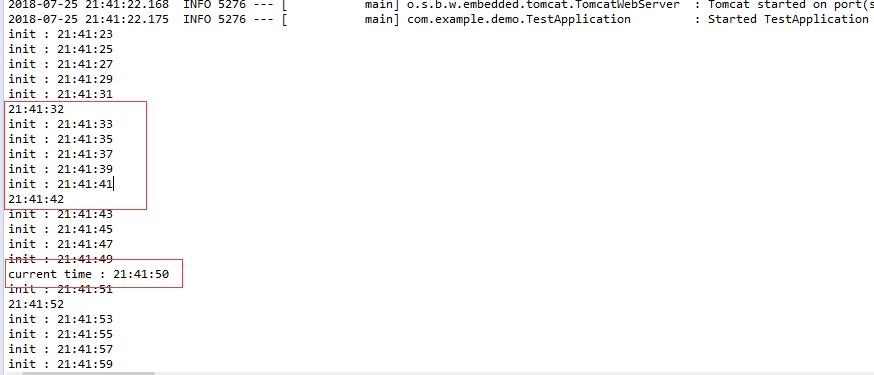
代码都使用了上了的@Scheduled属性。下图是执行打印的日志信息,timerInit方法是每隔2秒执行,timerCron设置在21点41分50秒执行,timerRate是每隔10秒执行。
三、添加@EnableScheduling注解
上面的定时任务并不能执行,还需要一步,需要设置开启定时任务,这个也很简单,只需在main方法上加上@EnableScheduling注解即可。
package com.example.demo;

import org.springframework.boot.SpringApplication;

import org.springframework.boot.autoconfigure.SpringBootApplication;

import org.springframework.scheduling.annotation.EnableScheduling;

@EnableScheduling

@SpringBootApplication

public class TestApplication {

    public static void main(String[] args) {

        SpringApplication.run(TestApplication.class, args);

    }

}
SpringBoot之使用Scheduled做定时任务的更多相关文章
- 定时任务-----Springboot中使用Scheduled做定时任务----http://www.cnblogs.com/lirenqing/p/6596557.html
Springboot中使用Scheduled做定时任务---http://www.cnblogs.com/lirenqing/p/6596557.html 已经验证的方案: pom文件加入依赖 < ...
- Springboot中使用Scheduled做定时任务
在开发中,定时任务是常见的功能,在spring boot 下开发定时任务其实很简单,具体代码如下: 1.配置依赖包pom.xml 由于默认的maven仓库经常访问不了,这里采用了阿里云的maven仓库 ...
- SpringBoot中使用@Scheduled创建定时任务
SpringBoot中使用@Scheduled创建定时任务 定时任务一般会在很多项目中都会用到,我们往往会间隔性的的去完成某些特定任务来减少服务器和数据库的压力.比较常见的就是金融服务系统推送回调,一 ...
- SpringBoot使用@Scheduled创建定时任务
定时任务一般会存在中大型企业级项目中,为了减少服务器.数据库的压力往往会采用时间段性的去完成某些业务逻辑.比较常见的就是金融服务系统推送回调,一般支付系统订单在没有收到成功的回调返回内容时会持续性的回 ...
- SpringBoot中使用task实现定时任务
定时任务实现的几种方式: Timer:这是java自带的java.util.Timer类,这个类允许你调度一个java.util.TimerTask任务.使用这种方式可以让你的程序按照某一个频度执行, ...
- spring的Scheduled(定时任务)和多线程
一.前言 在我们日常的开发中,经常用到数据同步的更新,这时我们采用的是spring的定时任务和java的多线程进行数据的更新,进行时实的服务调用. 二.实现思路 1.创建线程类 ...
- JFinal - scheduler 插件做定时任务
我在项目中遇到一个需求:服务运行期间,数据库要定期去监测某表并且更新. 正好项目是使用 jfinal 做的,于是就用了 jfinal-scheduler 插件来解决(jfinal-scheduler ...
- spring注解scheduled实现定时任务
只想说,spring注解scheduled实现定时任务使用真的非常简单. 一.配置spring.xml文件 1.在beans加入xmlns:task="http://www.springfr ...
- springboot+springmvc拦截器做登录拦截
springboot+springmvc拦截器做登录拦截 LoginInterceptor 实现 HandlerInterceptor 接口,自定义拦截器处理方法 LoginConfiguration ...
随机推荐
- MYSQL性能查看(多指标)
网上有很多的文章教怎么配置MySQL服务器,但考虑到服务器硬件配置的不同,具体应用的差别,那些文章的做法只能作为初步设置参考,我们需要根据自己的情况进行配置优化,好的做法是MySQL服务器稳定运行了一 ...
- sql pivot(行转列) 和unpivot(列转行)的用法
1.PIVOT用法(行转列) select * from Table_Score as a pivot (sum(score) for a.name in ([语文],[数学],[外语],[文综],[ ...
- JavaScript基础视频教程总结(021-030章)
<!DOCTYPE html> <html> <head> <meta charset="utf-8" /> <title&g ...
- rapidjson常见使用示例
目录 目录 1 1. 前言 2 2. Move语意 2 3. rapidjson::Document 2 4. 成员迭代器MemberIterator 3 5. 数组迭代器ValueIterator ...
- jsp页面有一个注册form表单,传值的时候后台接收到的全部是null
[页面上的传值元素一定要有name属性才可在后台接受到参数的值.切记!] 此处一定要注意,form表单里面的元素,比如input元素是否和后台的requset.getparameter();中的参数名 ...
- POJ - 1321 棋盘问题 简单搜索 dfs 格子
点这里去看题 思路:本题的难点在k<n的情况,所以我们可以另dfs中的两个参数分别代表起始行和待放棋子个数(待放棋子只能放在起始行后面的行),然后用一个c[8]来表示每一列放旗子的情况来判断列不 ...
- git 中Pull/Request 的初步
1. 目的: pull/request (简称PR) 是 项目管理者(管理者)和项目开发者(开发者)之间提交和确认工作成果的机制. 2. 流程: 开发者: 在本地创建特性分支. > git ch ...
- SDWebImage之SDWebImageCompat
SDWebImageCompat 是SDWebImage 的配置文件,里面利用条件编译对Apple 的各个平台进行了兼容.从源码中可以看到SDWebImage 支持当前的MAC/iOS/TV/WATC ...
- 技术文档生成工具:appledoc
做项目一般都会要求写技术文档,特别是提供SDK或者基础组件的.如果手写这类技术文档的话,工作量比编写代码也少不了多少.比如 Java 语言本身就自带 javadoc 命令,可以从源码中抽取文档.本篇我 ...
- Java设计模式----解释器模式
计算器中,我们输入“20 + 10 - 5”,计算器会得出结果25并返回给我们.可你有没有想过计算器是怎样完成四则运算的?或者说,计算器是怎样识别你输入的这串字符串信息,并加以解析,然后执行之,得出结 ...