
Vue(二十一)使用express模拟接口数据
1.下载express
...
2.使用vue-cli下载好项目文件
...
3.找到文件 build - webpack.dev.conf.js
'use strict'

const utils = require('./utils')

const webpack = require('webpack')

const config = require('../config')

const merge = require('webpack-merge')

const path = require('path')

const baseWebpackConfig = require('./webpack.base.conf')

const CopyWebpackPlugin = require('copy-webpack-plugin')

const HtmlWebpackPlugin = require('html-webpack-plugin')

const FriendlyErrorsPlugin = require('friendly-errors-webpack-plugin')

const portfinder = require('portfinder')

const HOST = process.env.HOST

const PORT = process.env.PORT && Number(process.env.PORT)

/**

 * 使用express框架启动一个服务器

 */

var express = require('express')

var app = express()

//1.读取数据

var appData=require('../static/json/table.json');

var businessNum=appData.businessNum;

var recruitingNum=appData.businessNum;

var customerData=appData.businessNum;

//2.使用expresss配置路由,指定接口请求

var apiRoutes=express.Router(); //定义一个路由

const devWebpackConfig = merge(baseWebpackConfig, {

  module: {

    rules: utils.styleLoaders({ sourceMap: config.dev.cssSourceMap, usePostCSS: true })

  },

  // cheap-module-eval-source-map is faster for development

  devtool: config.dev.devtool,

  // these devServer options should be customized in /config/index.js

  devServer: {

    clientLogLevel: 'warning',

    historyApiFallback: {

      rewrites: [

        { from: /.*/, to: path.posix.join(config.dev.assetsPublicPath, 'index.html') },

      ],

    },

    hot: true,

    contentBase: false, // since we use CopyWebpackPlugin.

    compress: true,

    host: HOST || config.dev.host,

    port: PORT || config.dev.port,

    open: config.dev.autoOpenBrowser,

    overlay: config.dev.errorOverlay

      ? { warnings: false, errors: true }

      : false,

    publicPath: config.dev.assetsPublicPath,

    proxy: config.dev.proxyTable,

    quiet: true, // necessary for FriendlyErrorsPlugin

    watchOptions: {

      poll: config.dev.poll,

    },

    before(apiRoutes) {

      apiRoutes.get('/api/businessNum', (req, res) => {

        res.json({

          // 这里是你的json内容

          errno: 0,

          data: businessNum

        })

      });

      apiRoutes.get('/api/recruitingNum', (req, res) => {

        res.json({

          // 这里是你的json内容

          errno: 0,

          data: recruitingNum

        })

      });

      apiRoutes.get('/api/customerData', (req, res) => {

        res.json({

          // 这里是你的json内容

          errno: 0,

          data: customerData

        })

      })

    }

  },

  plugins: [

    new webpack.DefinePlugin({

      'process.env': require('../config/dev.env')

    }),

    new webpack.HotModuleReplacementPlugin(),

    new webpack.NamedModulesPlugin(), // HMR shows correct file names in console on update.

    new webpack.NoEmitOnErrorsPlugin(),

    // https://github.com/ampedandwired/html-webpack-plugin

    new HtmlWebpackPlugin({

      filename: 'index.html',

      template: 'index.html',

      inject: true

    }),

    // copy custom static assets

    new CopyWebpackPlugin([

      {

        from: path.resolve(__dirname, '../static'),

        to: config.dev.assetsSubDirectory,

        ignore: ['.*']

      }

    ])

  ]

})

module.exports = new Promise((resolve, reject) => {

  portfinder.basePort = process.env.PORT || config.dev.port

  portfinder.getPort((err, port) => {

    if (err) {

      reject(err)

    } else {

      // publish the new Port, necessary for e2e tests

      process.env.PORT = port

      // add port to devServer config

      devWebpackConfig.devServer.port = port

      // Add FriendlyErrorsPlugin

      devWebpackConfig.plugins.push(new FriendlyErrorsPlugin({

        compilationSuccessInfo: {

          messages: [`Your application is running here: http://${devWebpackConfig.devServer.host}:${port}`],

        },

        onErrors: config.dev.notifyOnErrors

        ? utils.createNotifierCallback()

        : undefined

      }))

      resolve(devWebpackConfig)

    }

  })

})
4.在页面中发送axios请求(先在main.js中引入axios)
...

import axios from 'axios'

...

/* 全局引入axios */

Vue.prototype.$http = axios
5.在页面中请求数据
  created () {

        this.$http.get('/api/businessNum').then(response => {

            console.log(response)

        }).catch(response => {

            console.log(response)

        })

    }
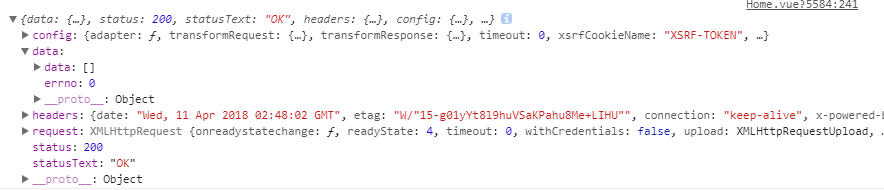
6.页面加载返回数据信息
Vue(二十一)使用express模拟接口数据的更多相关文章
- vue项目中使用mockjs模拟接口返回数据
Mock.js 是一个模拟数据生成器,利用它,可以拦截ajax请求,直接模拟返回数据,这样前后端只要约定好数据格式,前端就不需要依赖后端的接口,可以直接使用模拟的数据了. 网上介绍mock的教程也较多 ...
- vue mock 模拟接口数据
日常总结 希望能帮到大家 1 mock/sever.js //创建服务 let http=require('http') let fs=require('fs') let url=require(' ...
- vue -webpack.dev.config.js模拟后台数据接口
在const portfinder = require('portfinder')后面添加 const express = require('express') const app = express ...
- 用Vue来实现音乐播放器(二十一):歌手详情数据抓取
第一步:在api文件夹下的singer.js中抛出getSingerDetail方法 第二步:在singer-detail.vue组件中引入api文件夹下的singer.js和config.js 第三 ...
- 学习Spring Boot:(二十一)使用 EhCache 实现数据缓存
前言 当多次查询数据库影响到系统性能的时候,可以考虑使用缓存,来解决数据访问新能的问题. SpringBoot 已经为我们提供了自动配置多个 CacheManager 的实现,只要去实现使用它就可以了 ...
- 11. react 基础 使用charles 模拟接口数据
charles参考文档 charles官网 模拟数据 模拟 axios 请求的数据 eg: 1. 编写 axios 请求 axios.get('/api/xxx') .then(()=>{ale ...
- 使用http-server 模拟接口数据 mock data
首先创建文件夹 mkdir mockData&&cd mockData 安装http-server npm i http-server 创建数据文件 touch index.json ...
- 云计算设计模式(二十一)——Sharding分片模式
云计算设计模式(二十一)——Sharding分片模式 将一个数据存储到一组水平分区或碎片.存储和访问大量数据时,这个模式可以提高可扩展性. 背景和问题 由一个单一的服务器托管的数据存储区可能会受到以下 ...
- 深入浅出的webpack4构建工具---比mock模拟数据更简单的方式(二十一)
如果想要了解mock模拟数据的话,请看这篇文章(https://www.cnblogs.com/tugenhua0707/p/9813122.html) 在实际应用场景中,总感觉mock数据比较麻烦, ...
随机推荐
- 多线程外排序解决大数据排序问题2(最小堆并行k路归并)
转自:AIfred 事实证明外排序的效率主要依赖于磁盘,归并阶段采用K路归并可以显著减少IO量,最小堆并行k路归并,效率倍增. 二路归并的思路会导致非常多冗余的磁盘访问,两组两组合并确定的是当前的相对 ...
- 跳跃表Skip List的原理
1.二分查找和AVL树查找 二分查找要求元素可以随机访问,所以决定了需要把元素存储在连续内存.这样查找确实很快,但是插入和删除元素的时候,为了保证元素的有序性,就需要大量的移动元素了.如果需要的是一个 ...
- A - Points and Segments CodeForces - 429E
题解: 方法非常巧妙的一道题 首先考虑要求全部为0怎么做 发现是个欧拉回路的问题(很巧妙) 直接dfs一遍就可以了 而这道题 要求是-1,1,0 我们可以先离散化 完了之后判断每个点被奇数还是偶数条边 ...
- python之工作目录和文件引用
1.参考 如何获得Python脚本所在目录的位置 Python 相对导入与绝对导入 还没细看 2.不考虑exe打包 sys.path[0] #顶层运行脚本的绝对目录 os.path.split(os. ...
- lrzsz linix 远程文件传输工具。
安装方法 #yum install lrzsz -y 使用方法 #rz -y 上传指定文档到当前目录
- java 防止xss攻击
http://blog.csdn.net/zhengbo0/article/details/40507519 http://blog.csdn.net/ghsau/article/details/17 ...
- LAMP编译安装部分
# yum install -y apr-devel apr-util-devel pcre-devel # wget http://mirror.bit.edu.cn/apache/httpd/ht ...
- jQuery Validate自定义错误信息,自定义方法
<!DOCTYPE html> <html lang="en"> <head> <meta charset="UTF-8&quo ...
- UOJ#275. 【清华集训2016】组合数问题 数位dp
原文链接https://www.cnblogs.com/zhouzhendong/p/UOJ275.html 题解 用卢卡斯定理转化成一个 k 进制意义下的数位 dp 即可. 算答案的时候补集转化一下 ...
- LCA算法解析-Tarjan&倍增&RMQ
原文链接http://www.cnblogs.com/zhouzhendong/p/7256007.html UPD(2018-5-13) : 细节修改以及使用了Latex代码,公式更加美观.改的过程 ...