
SpringBoot------异步任务的使用
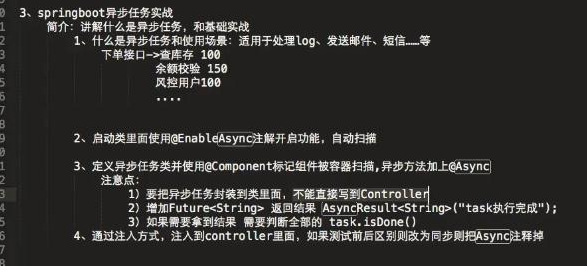
步骤,如图所示:
1.添加异步任务业务类
package top.ytheng.demo.task;

import java.util.concurrent.Future;

import org.springframework.scheduling.annotation.Async;

import org.springframework.scheduling.annotation.AsyncResult;

import org.springframework.stereotype.Component;

//异步任务业务类

@Component

//标记此类是异步类,也可在方法中标记

//不加,则类里面的方法为同步执行

@Async

public class AsyncTask {

    public void task1() throws InterruptedException {

        long begin = System.currentTimeMillis();

        Thread.sleep(1000);

        long end = System.currentTimeMillis();

        System.out.println("任务1耗时:" + (end - begin));

    }

    public void task2() throws InterruptedException {

        long begin = System.currentTimeMillis();

        Thread.sleep(2000);

        long end = System.currentTimeMillis();

        System.out.println("任务2耗时:" + (end - begin));

    }

    public void task3() throws InterruptedException {

        long begin = System.currentTimeMillis();

        Thread.sleep(3000);

        long end = System.currentTimeMillis();

        System.out.println("任务3耗时:" + (end - begin));

    }

    //测试拿到返回结果

    public Future<String> task4() throws InterruptedException {

        long begin = System.currentTimeMillis();

        Thread.sleep(1000);

        long end = System.currentTimeMillis();

        System.out.println("任务4耗时:" + (end - begin));

        return new AsyncResult<String>("任务4");

    }

    public Future<String> task5() throws InterruptedException {

        long begin = System.currentTimeMillis();

        Thread.sleep(2000);

        long end = System.currentTimeMillis();

        System.out.println("任务5耗时:" + (end - begin));

        return new AsyncResult<String>("任务5");

    }

    public Future<String> task6() throws InterruptedException {

        long begin = System.currentTimeMillis();

        Thread.sleep(3000);

        long end = System.currentTimeMillis();

        System.out.println("任务6耗时:" + (end - begin));

        return new AsyncResult<String>("任务6");

    }

}
2.添加测试控制器
package top.ytheng.demo.controller;

import java.util.concurrent.ExecutionException;

import java.util.concurrent.Future;

import org.springframework.beans.factory.annotation.Autowired;

import org.springframework.web.bind.annotation.GetMapping;

import org.springframework.web.bind.annotation.RequestMapping;

import org.springframework.web.bind.annotation.RestController;

import top.ytheng.demo.task.AsyncTask;

@RestController

@RequestMapping("api/v1/async")

public class TaskController {

    @Autowired

    private AsyncTask asyncTask;

    @GetMapping("/test")

    public Object test() throws InterruptedException, ExecutionException {

        long begin = System.currentTimeMillis();

        //asyncTask.task1();

        //asyncTask.task2();

        //asyncTask.task3();

        Future<String> result1 = asyncTask.task4();

        Future<String> result2 = asyncTask.task5();

        Future<String> result3 = asyncTask.task6();

        System.out.println("返回结果:" + result1.get() + "," + result2.get() + "," + result3.get());

        for(;;) {

            if(result1.isDone() && result2.isDone() && result3.isDone()) {

                break;

            }

        }

        long end = System.currentTimeMillis();

        long total = end - begin;

        System.out.println("总耗时:" + total);

        return "总耗时:" + total;

    }

}
3.添加启动类
package top.ytheng.demo;

import org.mybatis.spring.annotation.MapperScan;

import org.springframework.scheduling.annotation.EnableAsync;

import org.springframework.scheduling.annotation.EnableScheduling;

import org.springframework.boot.autoconfigure.SpringBootApplication;

import org.springframework.boot.web.servlet.ServletComponentScan;

@SpringBootApplication //等于下面3个

//@SpringBootConfiguration

//@EnableAutoConfiguration

//@ComponentScan

//拦截器用到

@ServletComponentScan

//MyBatis用到

@MapperScan("top.ytheng.demo.mapper")

//定时使用(开启定时任务)

@EnableScheduling

//开启异步任务

@EnableAsync

public class DemoApplication {

    public static void main(String[] args) {

        SpringApplication.run(DemoApplication.class, args);

    }

}
4.右键项目Run As启动,访问url
http://localhost:8080/api/v1/async/test
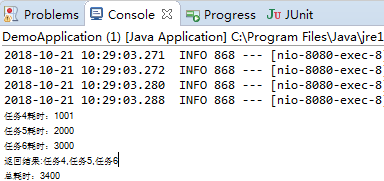
结果:
SpringBoot------异步任务的使用的更多相关文章
- 新手也能看懂的 SpringBoot 异步编程指南
本文已经收录自 springboot-guide : https://github.com/Snailclimb/springboot-guide (Spring Boot 核心知识点整理. 基于 S ...
- springboot异步线程(二)
前言 本篇文章针对上篇文章springboot异步线程,有一位大佬在评论中提出第一点是错误的,当时看到了这个问题,最近刚好有空,针对第一点的问题去搜索了不少的文章: 问题 我在文章中第一点去验证:Sc ...
- springboot异步线程
前言 最近项目中出现了一个问题,发现自己的定时器任务在线上没有执行,但是在线下测试时却能执行,最后谷歌到了这篇文章SpringBoot踩坑日记-定时任务不定时了?; 本篇文章主要以自己在项目中遇到的问 ...
- SpringBoot异步编程
异步调用:当我们执行一个方法时,假如这个方法中有多个耗时的任务需要同时去做,而且又不着急等待这个结果时可以让客户端立即返回然后,后台慢慢去计算任务.当然你也可以选择等这些任务都执行完了,再返回给客户端 ...
- SpringBoot学习笔记(七):SpringBoot使用AOP统一处理请求日志、SpringBoot定时任务@Scheduled、SpringBoot异步调用Async、自定义参数
SpringBoot使用AOP统一处理请求日志 这里就提到了我们Spring当中的AOP,也就是面向切面编程,今天我们使用AOP去对我们的所有请求进行一个统一处理.首先在pom.xml中引入我们需要的 ...
- SpringBoot 异步 定时任务 邮件
springboot异步 一: 在 MyConfiguration.java 中开启注解 @Configuration//指明当前类是一个配置类:就是来替代之前的Spring配置文件@EnableAs ...
- 带着新人学springboot的应用09(springboot+异步任务)
本来想说说检索的,不过不知道什么鬼,下载ElasticSearch太慢了,还是放一下,后面有机会再补上!今天就说个简单的东西,来说说任务. 什么叫做任务呢?其实就是类中实现了一个什么功能的方法.常见的 ...
- springboot 异步调用Async使用方法
引言: 在Java应用中,绝大多数情况下都是通过同步的方式来实现交互处理的:但是在处理与第三方系统交互的时候,容易造成响应迟缓的情况,之前大部分都是使用多线程来完成此类任务,其实,在spring 3. ...
- springboot 异步任务
Spring Boot 揭秘与实战(七) 实用技术篇 - 异步任务拓展阅读: http://www.jianshu.com/p/86e915d616c4 发表于 2017-01-06 | Spring ...
- SpringBoot 异步输出 Logback 日志
一.介绍 1.1 Logback Logback是由log4j创始人设计的另一个开源日志组件,它分为下面下个模块: logback-core:其它两个模块的基础模块 logback-classic:它 ...
随机推荐
- BeanPostProcessor出现init方法无法被调用Invocation of init method failed
是因为 返回了null,要返回object即可,arg0是bean对象本身,arg1是bean名字,即bean的id
- 批量操作数据库数据mybatis.xml
批量插入数据 <insert id="equipment_Add" parameterType="cn.wtsr.core.web.dao.vo.equipment ...
- h5本地缓存(localStorage,sessionStorage)
H5本地存储数据 localStorage,sessionStorage的区别: 相同点: 缓存数据比cookie的范围大; localStorage:关闭浏览器数据不会消失,除非手动删除数据 se ...
- 安装pytorch0.4.0
参考了官网https://pytorch.org/previous-versions/中的说明 (jj1env) [ji@dev down_python0.4.0]$ pip install http ...
- SpringMVC(2)—SpringMVC整合Spring的HelloWorld
一.这是一个SpringMVC框架的案例HelloWorld 功能:HelloWorld 二.SpringMVC运行流程 1.流程 请求-->springDispatcherServlet的ur ...
- django之Ajax续
接上篇随笔.继续介绍ajax的使用. 上篇友情连接:http://www.cnblogs.com/liluning/p/7831169.html 本篇导航: Ajax响应参数 csrf 跨站请求伪造 ...
- Drools(BRMS) 速成教程(上)
大家在日常开发中,肯定遇到过一些业务规则变来变去的需求,比如:会员积分系统(今天要新注册会员送10积分,明天要改成注册送优惠券,后天搞活动要改成注册自动变成高级会员...),此类需求,一般都是通过写i ...
- 咏南新CS三层开发框架
咏南新CS三层开发框架 咏南WEB桌面框架演示:47.106.93.126:9999 咏南WEB手机框架本地:47.106.93.126:8077 咏南CS框架下载:https://pan.baidu ...
- 20170711 通过阿里云与国家气象局合作的api读取历史辐照数据
一.概述 今天收到阿里云推送的试用通知,就迫不及待的申请了一个试用key,开始试用. 初步使用之后发现基本可用,至于最后是否适合商用还要看他的收费情况. 接口的使用 ...
- 简单理解 RPC(转载)
原文地址:http://www.syyong.com/architecture/Simple-understanding-of-RPC.html RPC(Remote Procedure Call P ...