
Vivado Design Suite用户指南之约束的使用第一部分(介绍部分)
首先来看目录部分:
首先是介绍部分:这部分讲述的是Migrating From UCF Constraints to XDC Constraints(从UCF约束迁移到XDC约束)和About XDC Constraints(讲述的是特点,属性,还有如何输入XDC文件)
这里有一些我需要的部分,就是如何输入XDC文件
下面是英文文档:
You can enter XDC constraints in several ways, at different points in the flow.
• Store the constraints in one or more XDC files.
To load the XDC file in memory, do one of the following:
° Use the read_xdc command.
° Add it to one of your project constraints sets.
XDC files only accept the set, list,and expr built-in Tcl commands. See Appendix A, Supported XDC and SDC Commands for a complete list of supported commands.
• Generate the constraints with an unmanaged Tcl script.
To execute the Tcl script, do one of the following:
° Run the source command.
° Use the read_xdc -unmanaged command.
° Add the Tcl script to one of your project constraints sets.
什么,英文看不懂,别灰心,我也不是那么明白(英语还要练啊),但只要有心,就有办法(只要思想不滑坡,办法总比困难多)
您可以在流程的不同阶段以多种方式输入XDC约束:
(1)将约束保存在一个或多个XDC文件中。
要在内存中加载XDC文件,请执行以下操作之一:
1.使用read_xdc命令。
2.将其添加到您的一个项目约束集中。XDC文件只接受set,list和expr内置Tcl命令。 有关支持的命令的完整列表,请参阅附录A,支持的XDC和SDC命令。
(2)使用非托管Tcl脚本生成约束。
要执行Tcl脚本,请执行以下操作之一:
1.运行source命令。
2.使用read_xdc -unmanaged命令。
3.将Tcl脚本添加到您的一个项目约束集中。
这部分还有一个提示和两条重要信息:
TIP: Unlike XDC files, unmanaged Tcl scripts can include any common Tcl command for selecting
design objects and defining design constraints, including conditional and looping control structures.
IMPORTANT: The Vivado Design Suite allows you to mix XDC files and Tcl scripts in the same
constraints set. Modified constraints are saved back to their original location only if they originally
came from an XDC file, and not from an unmanaged Tcl script. A constraint generated by a Tcl script is
not managed by the Vivado Design Suite and cannot be interactively modified. For more information,
see Chapter 2, Constraints Methodology.
IMPORTANT: For XDC constraints, there is a difference in behavior between the commands source
and read_xdc. The constraints imported with the source command are not saved in the checkpoint
in the same order as they are imported. The constraints imported with read_xdc are saved first and
then those imported with source. To save all the constraints in the same order as they are applied to
the design, use read_xdc -unmanaged instead of source.
与XDC文件不同,非托管Tcl脚本可以包括用于选择设计对象和定义设计约束的任何常见Tcl命令,包括条件和循环控制结构。
Vivado Design Suite允许您在相同的约束集中混合XDC文件和Tcl脚本。 仅当修改的约束最初来自XDC文件而不是来自非托管Tcl脚本时,它们才会保存回原始位置。 由Tcl脚本生成的约束不由Vivado Design Suite管理,无法进行交互式修改。 有关更多信息,请参阅第2章,约束方法。
对于XDC约束,命令source和read_xdc之间的行为存在差异。 使用source命令导入的约束不会以与导入时相同的顺序保存在检查点中。 首先保存使用read_xdc导入的约束,然后保存使用source导入的约束。 要以与应用于设计相同的顺序保存所有约束,请使用read_xdc -unmanaged而不是source。
要在将设计加载到内存后验证特定约束的语法或影响,请使用Tcl控制台和Vivado Design Suite报告功能。 这对于分析和调试时序约束和物理约束特别有用
这部分是不是感觉有些乱,这跟中国与外国的阅读习惯是有一定关系的,还有一些概念比较晦涩难懂,这又给理解增加了一些困难,不过没关系,如果第一遍不懂,就看第二遍,第二遍不懂,就看第三遍,谁说未必能解决根本问题,但无法否认的是,你对它加深了认识。

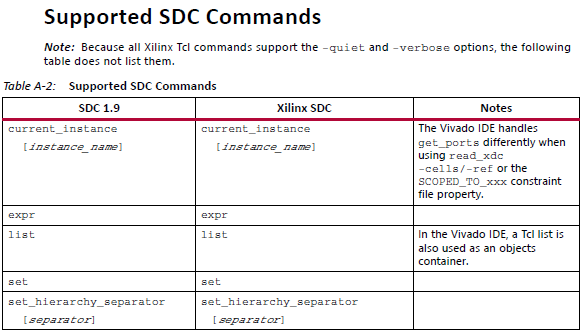
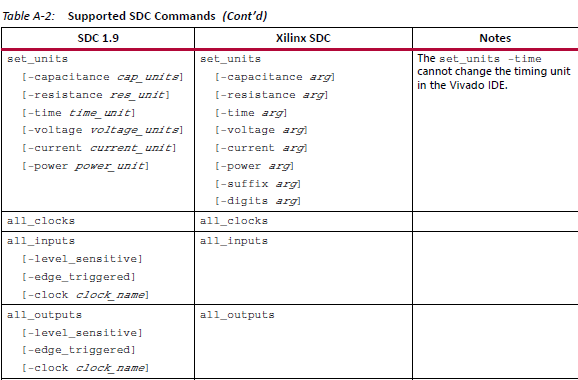
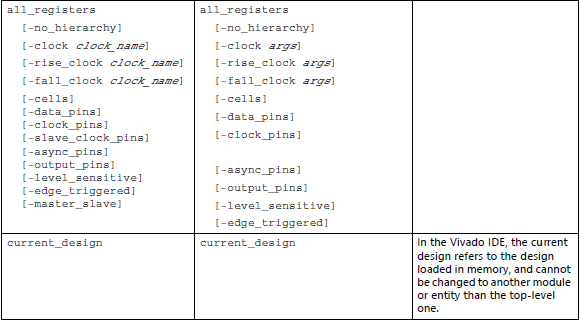
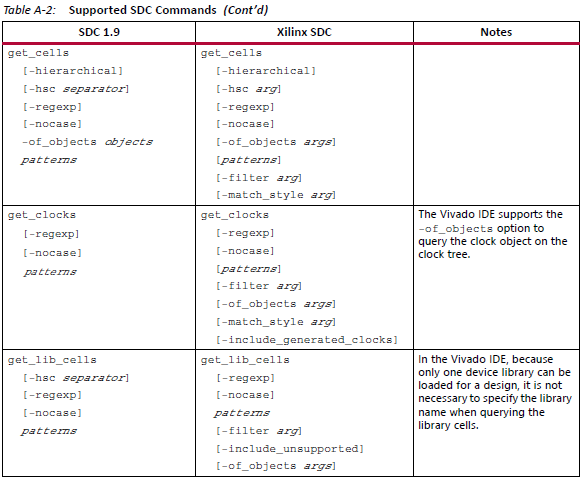
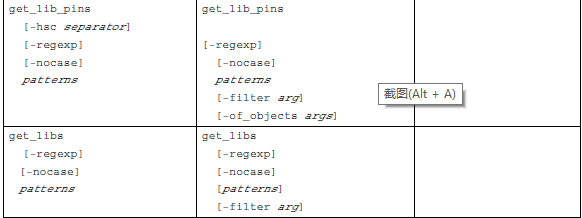
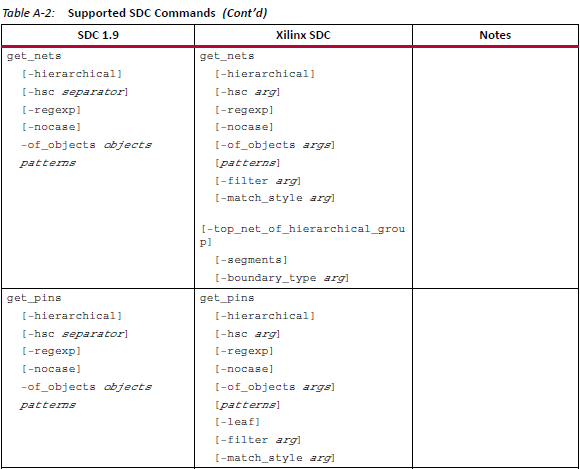
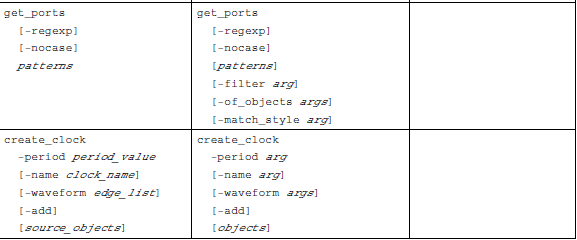

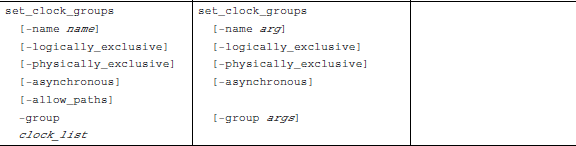
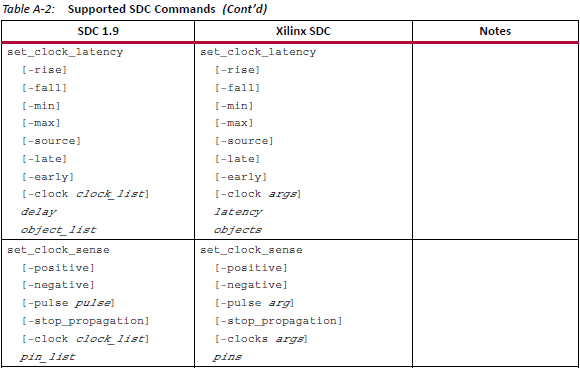
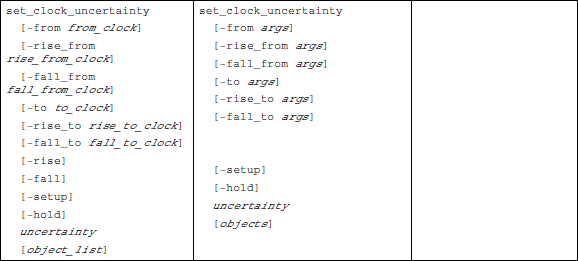
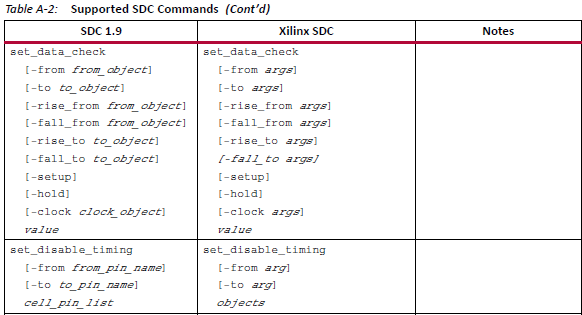
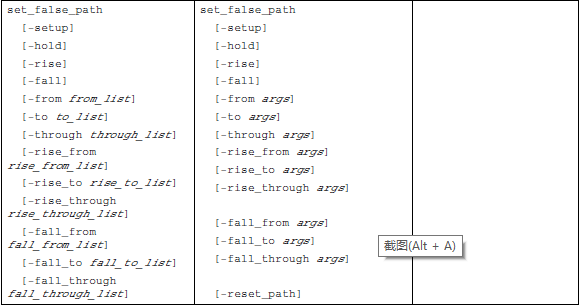

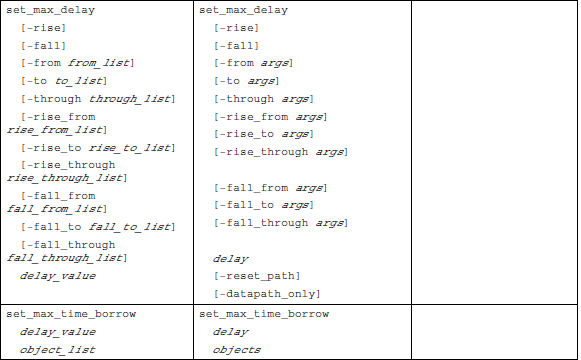
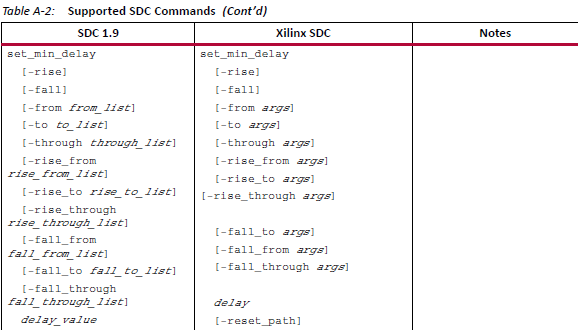
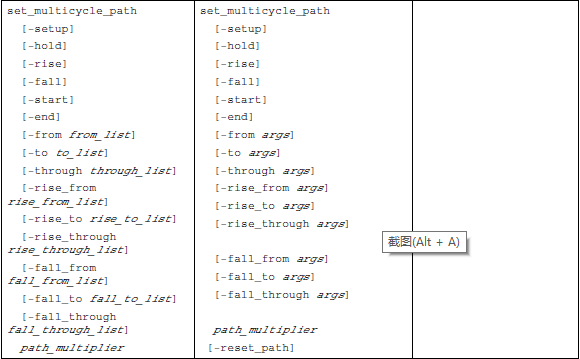
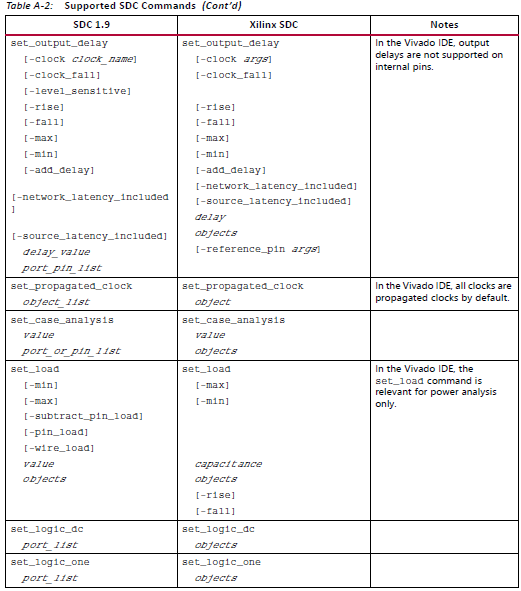
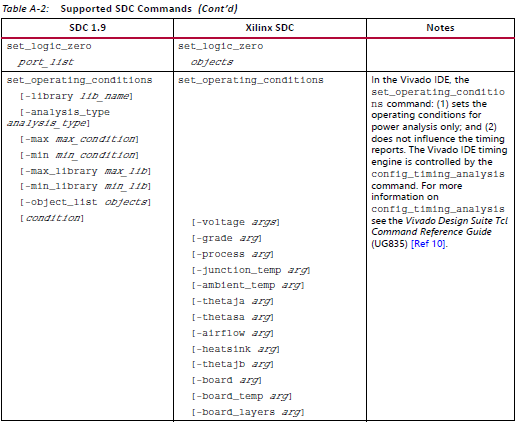
在文档里还有一些不支持的SDC命令,那就可以不用管了,反正我暂时也用不上。
Vivado Design Suite用户指南之约束的使用第一部分(介绍部分)的更多相关文章
- Vivado Design Suite用户指南之约束的使用第二部分(约束方法论)
Constraints Methodology(约束方法论) 关于约束方法论 设计约束定义了编译流程必须满足的要求,以使设计在板上起作用. 并非所有步骤都使用所有约束在编译流程中. 例如,物理约束仅在 ...
- 阅读<Vivado Design Suite Tutorial---Logic Simulation>笔记
阅读<Vivado Design Suite Tutorial---Logic Simulation>笔记 1.建工程,添加仿真文件 2.在IP Catalog里面添加IP核 Sine_h ...
- Vivado HLS初识---阅读《vivado design suite tutorial-high-level synthesis》(6)
Vivado HLS初识---阅读<vivado design suite tutorial-high-level synthesis>(6) 1.创建工程与开启GUI 2.调试 查看关于 ...
- Vivado HLS初识---阅读《vivado design suite tutorial-high-level synthesis》(5)
Vivado HLS初识---阅读<vivado design suite tutorial-high-level synthesis>(5) 1.创建工程 启动vidado HLS co ...
- Vivado HLS初识---阅读《vivado design suite tutorial-high-level synthesis》(4)
Vivado HLS初识---阅读<vivado design suite tutorial-high-level synthesis>(4) 1.老样子,首先运行tcl脚本建工程: Vi ...
- Vivado HLS初识---阅读《vivado design suite tutorial-high-level synthesis》(3)
Vivado HLS初识---阅读<vivado design suite tutorial-high-level synthesis>(3) 优化lab1 1.创建工程,开启HLS 运行 ...
- Vivado HLS初识---阅读《vivado design suite tutorial-high-level synthesis》(2)
Vivado HLS初识---阅读<vivado design suite tutorial-high-level synthesis>(2) 1.实验目的 2.启动命令行 将命令行切换 ...
- Vivado HLS初识---阅读《vivado design suite tutorial-high-level synthesis》
Vivado HLS初识---阅读<vivado design suite tutorial-high-level synthesis> 1.启动 2.创建工程 3.添加源文件 4.添加测 ...
- Ubuntu16.4安装Vivado Design Suite sdx2019.1
1:下载安装包.到Xilinx官网下载下面为网址: https://www.xilinx.com/support/download.html 2:进入安装包路径,打开终端 Ctrl+alt +t sh ...
随机推荐
- 重写父类、多线程、多进程、logging模块
1. 重写父类 1) 子类定义父类同名函数后,父类函数被覆盖: 2) 如果需要,可以在子类中调用父类方法:”父类名.方法(self)”.”父类名().方法()”.”super(子类名,self). ...
- JAVA自学笔记27
JAVA自学笔记27 1.类的加载 1)当程序要使用某个类时,如果该类还未被加载到内存中,则系统会通过加载,连接,初始化三步来实现对这个类进行初始化. ①加载:就是指将class文件读入内存,并为之创 ...
- FakeUserAgentError('Maximum amount of retries reached') 彻底解决办法
报错: FakeUserAgentError('Maximum amount of retries reached') 禁用服务器缓存: ua = UserAgent(use_cache_server ...
- SQLAlchemy——获取某列为空的数据
session.query(StockAllInfo).filter( StockAllInfo.ts_code == tsCode and StockAllInfo.py_code==None).a ...
- 实时查看docker容器日志
实时查看docker容器日志 $ sudo docker logs -f -t --tail 行数 容器名 例:实时查看docker容器名为s12的最后10行日志 $ sudo docker logs ...
- 运行Keras版本的Faster R-CNN(1)
Keras版本的Faster R-CNN源码下载地址:https://github.com/yhenon/keras-frcnn下载以后,用PyCharm打开(前提是已经安装了Tensorflow-g ...
- C#模拟客户端发送数据示例
在给一些客户端做服务器端支持时,发现他们提交上来的数据大都不是http请求格式,因而使用Request.Form获取不到内容,今天用C#做下模拟,并演示下数据接收. 1.发送文本 1).客户端发送 ...
- http范围请求
基于范围请求 可以实现 断点续传和多线程分片下载 HTTP/1.1之后才支持,需要双端都支持 服务端头信息中有 Accept-Ranges:bytes 表明服务器支持范围请求 curl -I &quo ...
- MATLAB 条形图添加多个图例
MATLAB 条形图添加多个图例: 1)只有一个图例: 2)两个图例:
- 这些APP开发技巧可少花60万!
用户需求——我偏不用干嘛要装? 随着手机的普及,大众流量的端口从电脑转移到手机,传统的商业平台从线下到电脑再到手机进行了转换.手机APP作为移动互联网的入口,众多创业者凭借一个手机APP成就了亿万财富 ...