
DoubleDQN---tensorflow实现
完整代码:https://github.com/zle1992/Reinforcement_Learning_Game

开山之作: 《Playing Atari with Deep Reinforcement Learning》(NIPS)
http://export.arxiv.org/pdf/1312.5602
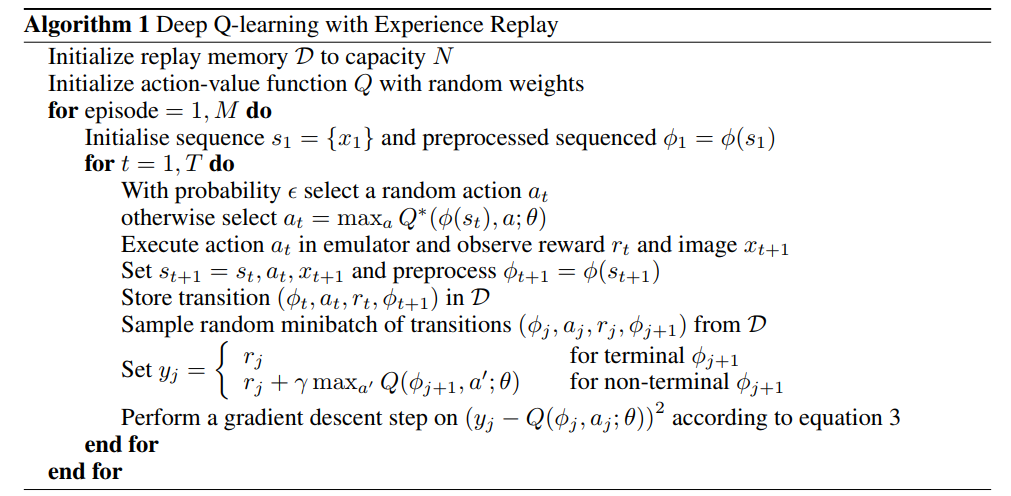
《Human-level control through deep reinforcementlearnin》 https://www.cs.swarthmore.edu/~meeden/cs63/s15/nature15b.pdf
使用2个网络,减少了相关性,每隔一定时间,替换参数。
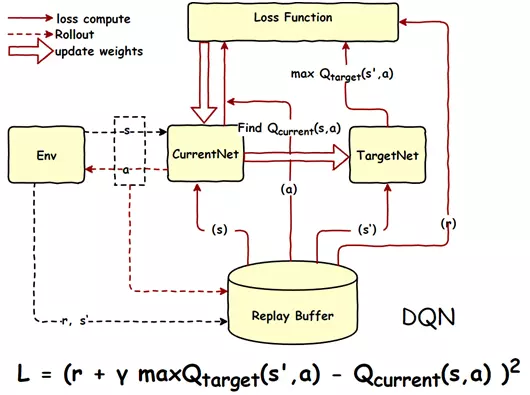
《Deep Reinforcement Learning with Double Q-learning》 https://arxiv.org/pdf/1509.06461.pdf

 import os

 import numpy as np

 import tensorflow as tf

 from abc import ABCMeta, abstractmethod

 np.random.seed(1)

 tf.set_random_seed(1)

 import logging  # 引入logging模块

 logging.basicConfig(level=logging.DEBUG,

                     format='%(asctime)s - %(filename)s[line:%(lineno)d] - %(levelname)s: %(message)s')  # logging.basicConfig函数对日志的输出格式及方式做相关配置

 # 由于日志基本配置中级别设置为DEBUG,所以一下打印信息将会全部显示在控制台上

 tfconfig = tf.ConfigProto()

 tfconfig.gpu_options.allow_growth = True

 session = tf.Session(config=tfconfig)

 class DoubleDQNet(object):

     __metaclass__ = ABCMeta

     """docstring for DeepQNetwork"""

     def __init__(self,

             n_actions,

             n_features,

             learning_rate,

             reward_decay,

             replace_target_iter,

             memory_size,

             e_greedy,

             e_greedy_increment,

             e_greedy_max,

             output_graph,

             log_dir,

             use_doubleQ ,

             model_dir,

             ):

         super(DoubleDQNet, self).__init__()

         self.n_actions = n_actions

         self.n_features = n_features

         self.learning_rate=learning_rate

         self.gamma=reward_decay

         self.replace_target_iter=replace_target_iter

         self.memory_size=memory_size

         self.epsilon=e_greedy

         self.epsilon_max=e_greedy_max

         self.epsilon_increment=e_greedy_increment

         self.output_graph=output_graph

         self.lr =learning_rate

         self.log_dir = log_dir

         self.use_doubleQ =use_doubleQ

         self.model_dir = model_dir

         # total learning step

         self.learn_step_counter = 0

         self.s = tf.placeholder(tf.float32,[None]+self.n_features,name='s')

         self.s_next = tf.placeholder(tf.float32,[None]+self.n_features,name='s_next')

         self.r = tf.placeholder(tf.float32,[None,],name='r')

         self.a = tf.placeholder(tf.int32,[None,],name='a')

         self.q_eval = self._build_q_net(self.s, scope='eval_net', trainable=True)

         self.q_next = self._build_q_net(self.s_next, scope='target_net', trainable=False)

         #self.q_eval4next  = tf.stop_gradient(self._build_q_net(self.s_next, scope='eval_net4next', trainable=True))

         self.q_eval4next  = self._build_q_net(self.s_next, scope='eval_net4next', trainable=False)

         if self.use_doubleQ:

             value_i = tf.to_int32(tf.argmax(self.q_eval4next,axis=1))

             range_i = tf.range(tf.shape(self.a)[0], dtype=tf.int32)

             index_a = tf.stack([range_i, value_i], axis=1)

             maxq =  tf.gather_nd(params=self.q_next,indices=index_a)

         else:

             maxq =  tf.reduce_max(self.q_next, axis=1, name='Qmax_s_')    # shape=(None, )

         with tf.variable_scope('q_target'):

             #只更新最大的那一列

             self.q_target = self.r + self.gamma * maxq

         with tf.variable_scope('q_eval'):

             a_indices = tf.stack([tf.range(tf.shape(self.a)[0], dtype=tf.int32), self.a], axis=1)

             self.q_eval_wrt_a = tf.gather_nd(params=self.q_eval, indices=a_indices)    # shape=(None, )

         with tf.variable_scope('loss'):

             self.loss = tf.reduce_mean(tf.squared_difference(self.q_target, self.q_eval_wrt_a, name='TD_error'))

         with tf.variable_scope('train'):

             self._train_op = tf.train.AdamOptimizer(self.lr).minimize(self.loss)

         t_params = tf.get_collection(tf.GraphKeys.GLOBAL_VARIABLES, scope='target_net')

         e_params = tf.get_collection(tf.GraphKeys.GLOBAL_VARIABLES, scope='eval_net')

         en_params = tf.get_collection(tf.GraphKeys.GLOBAL_VARIABLES, scope='eval_net4next')

         with tf.variable_scope("hard_replacement"):

             self.target_replace_op=[tf.assign(t,e) for t,e in zip(t_params,e_params)]

         with tf.variable_scope("hard_replacement2"):

             self.target_replace_op2=[tf.assign(t,e) for t,e in zip(en_params,e_params)]

         self.sess = tf.Session()

         if self.output_graph:

             tf.summary.FileWriter(self.log_dir,self.sess.graph)

         self.sess.run(tf.global_variables_initializer())

         self.cost_his =[0]

         self.cost = 0

         self.saver = tf.train.Saver()

         if not os.path.exists(self.model_dir):

             os.mkdir(self.model_dir)

         checkpoint = tf.train.get_checkpoint_state(self.model_dir)

         if checkpoint and checkpoint.model_checkpoint_path:

             self.saver.restore(self.sess, checkpoint.model_checkpoint_path)

             print ("Loading Successfully")

             self.learn_step_counter = int(checkpoint.model_checkpoint_path.split('-')[-1]) + 1

     @abstractmethod

     def _build_q_net(self,x,scope,trainable):

         raise NotImplementedError

     def learn(self,data):

         self.sess.run(self.target_replace_op2)

          # check to replace target parameters

         if self.learn_step_counter % self.replace_target_iter == 0:

             self.sess.run(self.target_replace_op)

             print('\ntarget_params_replaced\n')

         batch_memory_s = data['s']

         batch_memory_a =  data['a']

         batch_memory_r = data['r']

         batch_memory_s_ = data['s_']

         _, cost = self.sess.run(

             [self._train_op, self.loss],

             feed_dict={

                 self.s: batch_memory_s,

                 self.a: batch_memory_a,

                 self.r: batch_memory_r,

                 self.s_next: batch_memory_s_,

             })

         #self.cost_his.append(cost)

         self.cost = cost

         # increasing epsilon

         if self.epsilon < self.epsilon_max:

             self.epsilon += self.epsilon_increment

         else:

             self.epsilon = self.epsilon_max

         self.learn_step_counter += 1

             # save network every 100000 iteration

         if self.learn_step_counter % 10000 == 0:

             self.saver.save(self.sess,self.model_dir,global_step=self.learn_step_counter)

     def choose_action(self,s):

         s = s[np.newaxis,:]

         aa = np.random.uniform()

         #print("epsilon_max",self.epsilon_max)

         if aa < self.epsilon:

             action_value = self.sess.run(self.q_eval,feed_dict={self.s:s})

             action = np.argmax(action_value)

         else:

             action = np.random.randint(0,self.n_actions)

         return action
参考:
https://github.com/simoninithomas/Deep_reinforcement_learning_Course
https://github.com/spiglerg/DQN_DDQN_Dueling_and_DDPG_Tensorflow/blob/master/modules/dqn.py
DoubleDQN---tensorflow实现的更多相关文章
- Tensorflow 官方版教程中文版
2015年11月9日,Google发布人工智能系统TensorFlow并宣布开源,同日,极客学院组织在线TensorFlow中文文档翻译.一个月后,30章文档全部翻译校对完成,上线并提供电子书下载,该 ...
- tensorflow学习笔记二:入门基础
TensorFlow用张量这种数据结构来表示所有的数据.用一阶张量来表示向量,如:v = [1.2, 2.3, 3.5] ,如二阶张量表示矩阵,如:m = [[1, 2, 3], [4, 5, 6], ...
- 用Tensorflow让神经网络自动创造音乐
#————————————————————————本文禁止转载,禁止用于各类讲座及ppt中,违者必究————————————————————————# 前几天看到一个有意思的分享,大意是讲如何用Ten ...
- tensorflow 一些好的blog链接和tensorflow gpu版本安装
pading :SAME,VALID 区别 http://blog.csdn.net/mao_xiao_feng/article/details/53444333 tensorflow实现的各种算法 ...
- tensorflow中的基本概念
本文是在阅读官方文档后的一些个人理解. 官方文档地址:https://www.tensorflow.org/versions/r0.12/get_started/basic_usage.html#ba ...
- kubernetes&tensorflow
谷歌内部--Borg Google Brain跑在数十万台机器上 谷歌电商商品分类深度学习模型跑在1000+台机器上 谷歌外部--Kubernetes(https://github.com/kuber ...
- tensorflow学习
tensorflow安装时遇到gcc: error trying to exec 'as': execvp: No such file or directory. 截止到2016年11月13号,源码编 ...
- 【转】TensorFlow练习20: 使用深度学习破解字符验证码
验证码是根据随机字符生成一幅图片,然后在图片中加入干扰象素,用户必须手动填入,防止有人利用机器人自动批量注册.灌水.发垃圾广告等等 . 验证码的作用是验证用户是真人还是机器人:设计理念是对人友好,对机 ...
- 【转】机器学习教程 十四-利用tensorflow做手写数字识别
模式识别领域应用机器学习的场景非常多,手写识别就是其中一种,最简单的数字识别是一个多类分类问题,我们借这个多类分类问题来介绍一下google最新开源的tensorflow框架,后面深度学习的内容都会基 ...
- 【转】Ubuntu 16.04安装配置TensorFlow GPU版本
之前摸爬滚打总是各种坑,今天参考这篇文章终于解决了,甚是鸡冻\(≧▽≦)/,电脑不知道怎么的,安装不了16.04,就安装15.10再升级到16.04 requirements: Ubuntu 16.0 ...
随机推荐
- linux下access函数
Linux内核总是根据进程的有效用户ID和有效组ID来决定一个进程是否有权访问某个文件. 因此,在编写调整用户ID的程序时,在读写一个文件之前必须明确检查其用户是否原本就有对此文件的访问权限. 为了实 ...
- Android gradle 配置
gradle https://www.cnblogs.com/qianxudetianxia/p/4948499.html flavor https://blog.csdn.net/user11223 ...
- Failed to execute goal org.apache.maven.plugins:maven-compiler-plugin:3.8.0:compile (default-compile) on project demo: Fatal error com piling: 无效的标记: -parameters
背景:本项目使用JDK1.8 编译maven工程的时候出现如下错误: Failed to execute goal org.apache.maven.plugins:maven-compiler-pl ...
- 蜕变成蝶~Linux设备驱动之CPU与内存和I/O
那是世上最远的距离 思念让我无法去呼吸 你的一动和一举 占据我心里 陪我每个孤独无尽的夜里 用我心中盛放的画笔 描绘你微笑时的绚丽 爱让人痛彻心底 我却不怀疑 你的存在是我生命的奇迹 感受你的每一次的 ...
- CentOS安装和配置Docker和Nginx
纯粹记录下: 1 安装Docker容器: yum install docker-ce 2. 搜索官网nginx docker search nginx 3. 找到需要的版本安装: docker pul ...
- VS每次F5都重新编译代码,即使没有任何修改
遇到一个奇怪现象,不知道怎么设置了,突然工程的Release模式下,F5每次都要重新编译代码,而且是全部代码都重新编译 而Debug模式没问题 重启VS,重启机器,清理工程重新生成工程都无法解决 最后 ...
- 如何使用LinkedHashMap来实现一个LruCache
最近在看mybatis的源代码,发现了mybatis中实现的LruCache使用到了LinkedHashMap,所以就探究了一下LinkedHashMap是如何支持Lru缓存的 LinkedHashM ...
- 【CF480D】Parcels DP
[CF480D]Parcels 题意:有一个栈,有n个物品,每个物品可以选或不选.如果选了第i个物品,则获得$v_i$的收益,且第i个物品必须在$in_i$时刻入栈,$out_i$时刻出栈.每个物品还 ...
- kylin 使用RESTful API 请求
目前根据Kylin的官方文档介绍,Kylin的认证是basic authentication,加密算法是Base64,在POST的header进行用户认证我使用的用户和密码是(格式:username: ...
- Java课程寒假之开发记账本软件(网页版)之三
一.实现基础功能之一(查询)(补) 在上一篇中解释的不够详细,在本篇中补充一下指定日期查询,其实和查询没有什么区别,就是设置select下拉框来对于日期的起始与结束日期,然后就是一个简单的mysql语 ...