
使用 maven-assembly-plugin 打包项目
此种方式可避免resource节点对compile阶段的影响,compile阶段会读取resource节点的信息但是不会读取assembly的配置文件
1. pom文件
<?xml version="1.0" encoding="UTF-8"?>

<project xmlns="http://maven.apache.org/POM/4.0.0" xmlns:xsi="http://www.w3.org/2001/XMLSchema-instance"

         xsi:schemaLocation="http://maven.apache.org/POM/4.0.0 http://maven.apache.org/xsd/maven-4.0.0.xsd">

    <modelVersion>4.0.0</modelVersion>

    <parent>

        <groupId>org.springframework.boot</groupId>

        <artifactId>spring-boot-starter-parent</artifactId>

        <version>2.1.1.RELEASE</version>

        <relativePath/> <!-- lookup parent from repository -->

    </parent>

    <groupId>com.skd</groupId>

    <artifactId>client</artifactId>

    <version>1.0</version>

    <name>client</name>

    <description>client for file monitor</description>

    <properties>

        <encoding>UTF-8</encoding>

        <maven-compiler-plugin-version>3.8.0</maven-compiler-plugin-version>

        <maven-jar-plugin-version>3.1.0</maven-jar-plugin-version>

        <maven-source-plugin-version>3.0.1</maven-source-plugin-version>

        <maven-assembly-plugin-version>3.1.0</maven-assembly-plugin-version>

        <maven-dependency-plugin-version>3.1.0</maven-dependency-plugin-version>

        <maven-resources-plugin-version>3.1.0</maven-resources-plugin-version>

    </properties>

    <dependencies>

        <!--spring boot-->

        <dependency>

            <groupId>org.springframework.boot</groupId>

            <artifactId>spring-boot-starter</artifactId>

            <exclusions>

                <exclusion>

                    <groupId>org.springframework.boot</groupId>

                    <artifactId>spring-boot-starter-logging</artifactId>

                </exclusion>

            </exclusions>

        </dependency>

        <!--test-->

        <dependency>

            <groupId>org.springframework.boot</groupId>

            <artifactId>spring-boot-starter-test</artifactId>

            <scope>test</scope>

        </dependency>

        <!--log4j2-->

        <dependency>

            <groupId>org.springframework.boot</groupId>

            <artifactId>spring-boot-starter-log4j2</artifactId>

        </dependency>

        <!--http client-->

        <dependency>

            <groupId>org.apache.httpcomponents</groupId>

            <artifactId>httpmime</artifactId>

            <version>4.5.3</version>

        </dependency>

        <dependency>

            <groupId>commons-io</groupId>

            <artifactId>commons-io</artifactId>

            <version>2.4</version>

        </dependency>

        <!--json-->

        <dependency>

            <groupId>net.sf.json-lib</groupId>

            <artifactId>json-lib</artifactId>

            <version>2.2.2</version>

            <classifier>jdk15</classifier>

        </dependency>

        <!-- lombok -->

        <dependency>

            <groupId>org.projectlombok</groupId>

            <artifactId>lombok</artifactId>

        </dependency>

        <!--configuration-->

        <!-- 通过资源文件注入属性配置 -->

        <dependency>

            <groupId>org.springframework.boot</groupId>

            <artifactId>spring-boot-configuration-processor</artifactId>

            <optional>true</optional>

        </dependency>

    </dependencies>

    <build>

        <!-- 生成的项目压缩包的名字-->

        <finalName>client</finalName>

        <!--源代码路径-->

        <sourceDirectory>src/main/java</sourceDirectory>

        <!--maven-resources-plugin 插件打包resource文件时会参考此节点的配置-->

        <plugins>

            <!--编译插件-->

            <plugin>

                <groupId>org.apache.maven.plugins</groupId>

                <artifactId>maven-compiler-plugin</artifactId>

                <version>${maven-compiler-plugin-version}</version>

                <configuration>

                    <encoding>${encoding}</encoding>

                    <source>${java.version}</source>

                    <target>${java.version}</target>

                </configuration>

            </plugin>

            <!--将项目的源代码的class文件打包到一个jar包-->

            <!--jar包默认在target目录下-->

            <plugin>

                <groupId>org.apache.maven.plugins</groupId>

                <artifactId>maven-jar-plugin</artifactId>

                <version>${maven-jar-plugin-version}</version>

                <configuration>

                    <archive>

                        <!-- 生成的jar中,不要包含pom.xml和pom.properties这两个文件 -->

                        <addMavenDescriptor>true</addMavenDescriptor>

                        <manifest>

                            <!-- 是否要把第三方jar放到manifest的classpath中 -->

                            <addClasspath>true</addClasspath>

                            <!-- 生成的manifest中classpath的前缀,填写依赖jar包相对于项目jar包的路径-->

                            <!--我会把项目的jar包也打到lib目录下,所以这里使用当前目录-->

                            <classpathPrefix>./</classpathPrefix>

                            <!-- 应用的main class -->

                            <mainClass>com.skd.client.ClientApplication</mainClass>

                        </manifest>

                        <!--将资源文件目录添加到classpath中,打包后运行项目时则会在该目录下加载配置文件-->

                        <manifestEntries>

                            <!--填写配置文件相对于项目jar包的路径-->

                            <!--我的项目jar包在lib目录下,配置文件在和lib同级的conf目录下-->

                            <Class-Path>../conf/</Class-Path>

                        </manifestEntries>

                    </archive>

                    <!--项目打包为jar包时排除这些文件,如果将配置文件打到jar包,则会优先读取jar包中的配置文件,不会读取conf目录下的配置文件-->

                    <!--注意这玩意从编译结果目录开始算目录结构-->

                    <excludes>

                        <exclude>/*.yaml</exclude>

                        <exclude>/*.yml</exclude>

                        <exclude>/*.xml</exclude>

                    </excludes>

                </configuration>

            </plugin>

            <plugin>

                <groupId>org.apache.maven.plugins</groupId>

                <artifactId>maven-assembly-plugin</artifactId>

                <version>${maven-assembly-plugin-version}</version>

                <configuration>

                    <!--jar包名字是否在finalName后追加AssemblyId-->

                    <appendAssemblyId>true</appendAssemblyId>

                    <descriptors>

                        <!--xml文件中配置了打包的相关配置-->

                        <descriptor>src/main/assembly/assembly.xml</descriptor>

                    </descriptors>

                </configuration>

                <executions>

                    <execution>

                        <!--名字任意-->

                        <id>make-assembly</id>

                        <!-- 绑定到package生命周期阶段上 -->

                        <phase>package</phase>

                        <goals>

                            <!-- 只运行一次 -->

                            <goal>single</goal>

                        </goals>

                    </execution>

                </executions>

            </plugin>

        </plugins>

    </build>

</project>
2. assembly的xml配置文件
<assembly >

    <!--此处是打包名称的设置,最后是会生成一个finalName-id.format 文件在目录 target下-->

    <!--appendAssemblyId为false时则压缩包名称不追加id,默认下追加-->

    <id>assembly</id>

    <!-- 最终打包成一个用于发布的zip文件 -->

    <formats>

        <format>tar.gz</format>

    </formats>

    <dependencySets>

        <dependencySet>

            <!--是否将项目jar包打包到指定目录-->

            <useProjectArtifact>true</useProjectArtifact>

            <!--将依赖jar包打到lib目录-->

            <outputDirectory>lib</outputDirectory>

            <!--将依赖jar包不解压直接打包到目录-->

            <unpack>false</unpack>

        </dependencySet>

    </dependencySets>

    <fileSets>

        <!--通过fileSet节点可以将制定目录的指定文件打包到压缩文件的制定目录-->

        <fileSet>

            <!-- 把项目的配置文件,打包到压缩文件的conf目录 -->

            <directory>${project.basedir}/src/main/resources</directory>

            <outputDirectory>conf</outputDirectory>

        </fileSet>

        <!--打包脚本文件到根目录-->

        <fileSet>

            <directory>${project.basedir}/src/main/bin</directory>

            <outputDirectory>/</outputDirectory>

        </fileSet>

    </fileSets>

</assembly>
3. 打包后的 target 目录结构
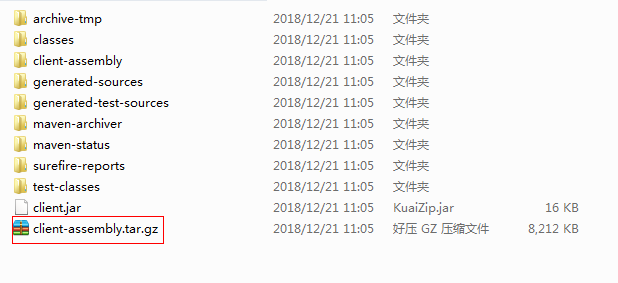
解压后目录结构如下:

项目jar包在lib目中中

4. 运行项目
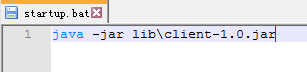
启动脚本
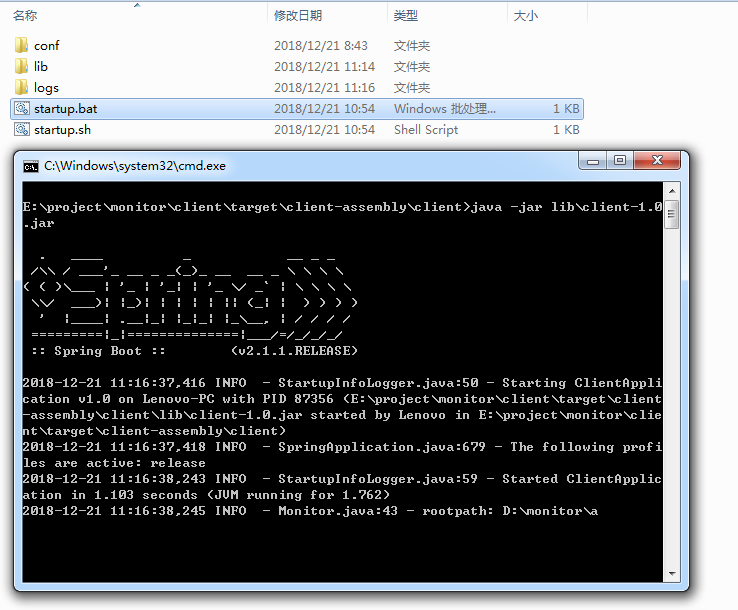
执行启动脚本
使用 maven-assembly-plugin 打包项目的更多相关文章
- 记录一次maven打包时将test目录下的类打包到jar中,Maven Assembly Plugin的使用
今天有人问我打包后找不到主类,运行的类写在test中.按照常规,test目录下的文件不会打包到jar包中.(但是我测试一个springboot工程就可以,这里之后再研究) 具体解决如下 第一步:在po ...
- maven assembly plugin使用
使用场景 在使用maven来管理项目时,项目除了web项目,还有可能为控制台程序,一般用于开发一些后台服务的程序.最近在工作中也遇到了这种场景,使用quartz开发一个任务调度程序.程序中依赖很多ja ...
- 使用Maven Assembly plugin将依赖打包进jar
一个Eclipse的工程,在pom中配置了若干依赖,需要将pom中所有的依赖全部打包进一个jar包中,可以选择的方案有maven-assembly-plugin和fatjar.以前采用fatjar进行 ...
- java工程打成jar包 - 使用maven assembly插件打包及手动打包
在java工程打包的过程中遇到过不少问题,现在总结一下.一种是典型的maven工程打包,依赖的jar包全都在pom.xml中指定,这种方式打包很方便:另一种是依赖了本机jar包(不能通过pom.xml ...
- maven mvn package 打包项目时,出现错误导致失败的解决方法
解决思路:看报错时在maven打包过程中的哪一步,然后看报错内容,解决报错内容即可,如果是实在不好解决的部分,看看能不能设置不检测,能打包出来就行. 这里是因为mybatis逆向工程插件出现异常所以中 ...
- Maven Assembly插件介绍
转自:http://blueram.iteye.com/blog/1684070 已经写得挺好的,就不用重写了. 你是否想要创建一个包含脚本.配置文件以及所有运行时所依赖的元素(jar)Assembl ...
- maven assembly 配置详解
Maven Assembly插件介绍 博客分类: 项目构建 你是否想要创建一个包含脚本.配置文件以及所有运行时所依赖的元素(jar)Assembly插件能帮你构建一个完整的发布包. Assembl ...
- maven学习(4)-本地项目打包发布到私有仓库
发布本地项目到私服仓库 在前面章节有介绍maven发布本地jar包到私服仓库,这里详细介绍一下步骤. 在项目开发中通常会引用其他的jar,怎样把自己的项目做为一个jar包的形式发布到私服仓库中,主要有 ...
- Maven Assembly打包提示[WARNING] transitive dependencies if any will not be available
maven assembly打包出现错误 [WARNING] The POM for com.flink.xxr:0.0.1-SNAPSHOT is invalid, transitive depen ...
- eclispe中使用 maven build启动maven项目和打包项目
1.右键项目2.点击run as按钮 3.点击run configurations 4.配置如下: =============================加油加油加油加油加油加油========= ...
随机推荐
- 项目(四)DHCP服务配置
DHCP是由Internet工作任务小组设计开发的,专门用于为TCP/IP网络中的计算机自动分配TCP/IP参数的协议. 使用DHCP可以减少管理员的工作量,避免IP地址冲突,当网络修改IP地址网段时 ...
- 多层josn数据 修改
var aa = { a: 1, b: { c: 1, d: 1 }, e: [{ f: 1, g: 2 }, { h: 1, i: { j: 3, k: [{ l: 55, m: [1, 2, 3, ...
- Understanding ABI Files
[Understanding ABI Files] ABI files can be generated using the eosio-cpp utility provided by eosio.c ...
- CSS3实现投影效果
Webkit引擎定义了-webkit-box-reflect属性,该属性能够实现投影效果,具体语法如下: -webkit-box-reflect: <direction> <offs ...
- python安装scrapy等库需要c++ 14.0 下载链接放这里
百度网盘下载地址:https://pan.baidu.com/s/1zZ7oKSuniABh1y7p0YahgA 或扫描二维码:
- 《CSAPP》符号和符号表
符号和符号表 每个可重定位目标模块m都有一个符号表,它包含m所定义和引用的符号的信息. 有三种不同的符号: 由m定义并能被其他模块引用的全局符号.对应非静态的C函数以及不带C static属性的全局变 ...
- PHP牛牛游戏算法
<?php namespace frontend\business; class NiuNiuGameHelper { /** * @param $card * @return int 结果 - ...
- HashMap的tableSizeFor方法解读
static final int tableSizeFor(int cap) { int n = cap - 1; n |= n >>> 1; n |= n >>> ...
- thinkphp 视图(二)变量输出、赋值和替换
view下的html文件会编译成php文件 编译的文件在runtime 下的temp目录 <p>{$email}</p> 会编译成 <?php echo $email; ...
- vue 前端框架 目录
vue 前端框架 目录 vue-目录 ES6基础语法 vue基础语法 Vue.js的组件化思想 —上 Vue.js的组件化思想 —下 Vue + Vue-Router结合开发 SublimeSer ...