
Address localhost:1099 is already in use
在 ItelliJ idea中创建了Servlet,启动tomcat时系统报错: Error running Tomcat 7.0.47: Address localhost:1099 is already in use
系统报错的端口为1099,可见8080端口已被占用;
1. 在命令提示窗口中执行命令: netstat -ano

可见,占用1099端口的进程的PID是10460。
2. 执行命令: tasklist(通过pid 10460定位)
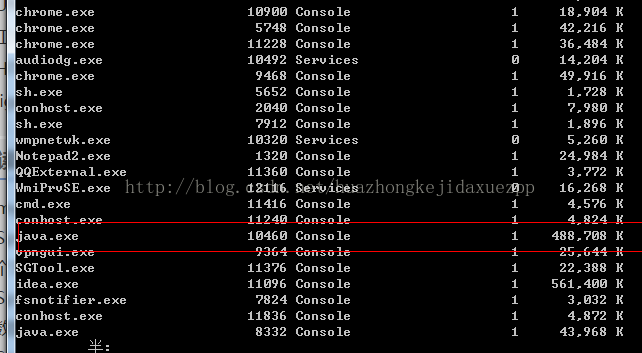
可见java.exe 占用了1099端口。同样可以查出8080端口的应用程序,然后在任务管理器中终止相应的进程即可。
本文改自:https://blog.csdn.net/huazhongkejidaxuezpp/article/details/41813683
Address localhost:1099 is already in use的更多相关文章
- Error running 'Unnamed': Address localhost:1099 is already in use
当使用idea运行项目时,出现‘Error running 'Unnamed': Address localhost:1099 is already in use’. 解决方案: 1.打开任务管理器 ...
- IntelliJ IDEA 启动tomcat服务器报Error running 'Unnamed': Address localhost:1099 is already in use错误的问题
在使用Intellij IDEA运行web项目时,出现 :Error running Tomcat8: Address localhost:1099 is already in use,使其web项目 ...
- IDEA无法启动debugger,报错Address localhost:1099 is already in use
Address localhost:1099 is already in use http://blog.csdn.net/huazhongkejidaxuezpp/article/details/4 ...
- Error running : Address localhost:1099 is already in use
运行报错: Error running : Address localhost:1099 is already in use 解决方法: 打开任务管理器,将后台的java.exe进程都关掉,再次运行 ...
- 解决Error running 'index.jsp : Address localhost:1099 is already in use的方法
晚上在idea中 启动服务器一次后 正常运行,但是改了注解配置后 报错,报错为Error running 'index.jsp : Address localhost:1099 is alread ...
- Error running Tomcat8: Address localhost:1099 is already in use 错误解决
摘要: 有时候运行web项目的时候会遇到 Error running Tomcat8: Address localhost:1099 is already in use 的错误,导致web项目无法运行 ...
- Address localhost:1099 is already in use(IDEA启动Tomcat报错1099 is already in use)
IDEA中启动Tomcat报错,Error running Tomcat7.0.52: Address localhost:1099 is already in use 或者是 java.rmi.se ...
- Error running Tomcat8: Address localhost:1099 is already in use(IDEA错误)
Error running Tomcat8: Address localhost:1099 is already in use(IDEA错误) 有时候运行web项目的时候会遇到 Error runni ...
- idea启动项目address localhost:1099 is already in use异常解决
IDEA中启动Tomcat报错,Error running Tomcat7.0.52: Address localhost:1099 is already in use 或者是 java.rmi.se ...
随机推荐
- Docker Compose 配置文件常用指令
Docker Compose 配置文件常用指令 YAML文件格式及编写注意事项 YAML是一种标记语言很直观的数据序列化格式,可读性高.类似于XML数据描述语言,语法比XML简单的很多. YAML数据 ...
- linux下磁盘查看和分区
4.1 df命令 4.2 du命令 4.3/4.4 磁盘分区 df命令df输出磁盘文件系统使用情况: [root@centos ~]# df文件系统 1K-块 已用 可用 已用% 挂载点 /dev/s ...
- 剑指offer(3)从尾到头打印链表
题目描述 输入一个链表,从尾到头打印链表每个节点的值. 题目分析 比较简单,主要注意下从尾到头,可以用栈可以用递归,我给出我比较喜欢的代码吧 代码 /* function ListNode(x){ t ...
- tomcat的Server.xml详解和Host的配置
基于以下说法的领悟: 若只配appBase,不配Context 的docBase(appBase和docBase二选一就可以了),则appBase的每个文件夹里都代表一个应用,每个应用都必须放ROOT ...
- Python3 tkinter基础 Menu add_checkbutton 多选的下拉菜单
Python : 3.7.0 OS : Ubuntu 18.04.1 LTS IDE : PyCharm 2018.2.4 Conda ...
- 【问题解决:SFL4J】启动时SLF4J报错
问题描述 启动时报错 SLF4J: Failed to load class "org.slf4j.impl.StaticLoggerBinder". SLF4J: Default ...
- 5_bash
bash及其特性:shell:外壳.用户直接接入计算机的时候所使用的外壳程序linux允许一个用户账户登录多次,而这多次登录的每一个打开的shell都是独立的互不相干的shell,它们是三个进程,每一 ...
- P1340 兽径管理
传送门 思路: 题目要求每次连边都要输出最小生成树的边权和.如果在线直接套用最小生成树模板肯定会超时,考虑离线处理.记录每一插入边的时间,在所有边都插入完成后排序一遍就可以求最小生成树(按照插入时间的 ...
- 《Blue Flke》团队项目的原型设计与开发
实验目的: 1.掌握软件原型开发技术 2.学习使用软件原型开发工具 实验过程和步骤: 任务1.针对实验六团队项目选题,采用适当的原型开发工具设计团队项目原型. 任务2.在团队博客发布博文,陈述团队项目 ...
- win平台下Path变量消失问题
解决方法:2019.01.10文章转载自 李北北:https://www.jianshu.com/p/b89f0c99867e 问题描述:修改了path变量,但是环境变量中path消失,于是想再次打开 ...