
基本MVVM 和 ICommand用法举例(转)
引言
在本贴中,我们将学习WPF Commands。 Commands 可以很好地与 MVVM 模式 (Model- View-ViewModel)结合在一起。我们也将看到,视图(view)实际上是怎样知道和怎样调用它的使用WPF 命令( Commands )的视图模型(ViewModel)。
背景
下面我们一步一步讨论而不是立即查看完整的代码,这也可以较好地帮助我们理解代码的每一部分。
让我们看一下MVVM的体系结构。
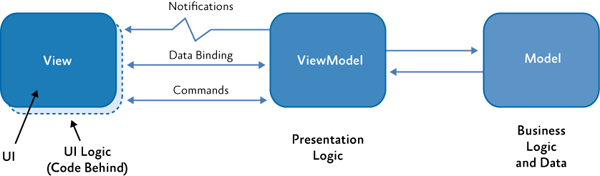
我们约定使用下列标准术语:
Views 表示后缀为view的文件名。(例如:StudentListView)ViewModels 表示后缀为ViewModel的文件。(例如:StudentListViewModel)Models 表示后缀为Model的文件。StudentModel).
使用代码
原理介绍已经足够了。下面深入代码了解一个可以工作的MVVM例子,了解怎样在MVVM使用命令。
使用 Visual Studio 建立一个新WPF项目。按照上面的约定,把文件名MainWindow更改为 MainWindowView。
接着,我们需要建立一个新的类,名字为 MainWindowViewModel ,它将担当视图MainWindowView的视图模型(ViewModel)。
我们在这里所做的是,在MVVM内,我们告诉视图,它的视图模型是什么。这可以通过为视图设置 Data Context来完成。在视图模型文件里有ViewModel,然而他们现在还不具有某些特定的视图之间的任何连接。
设置Datacontext的代码看起来是下面的样子。
打开 MainWindowView.xaml.cs并设置 data context 如下。
MainWindowView.xaml.cs
<Window x:Class="WpfExample.MainWindowView"

        xmlns="http://schemas.microsoft.com/winfx/2006/xaml/presentation"

        xmlns:x="http://schemas.microsoft.com/winfx/2006/xaml"

        Title="MainWindow" Height="350" Width="525"

        xmlns:local="clr-namespace:WpfExample">

    <Window.DataContext>

        <local:MainWindowViewModel/>

    </Window.DataContext>

    <Grid>

    </Grid>

</Window>
这里的本地命名空间别名为WpfExample。这是必要的,这样 framework知道MainWindowViewModel在哪里可以找到。
我们通过一个简单的绑定来验证这个。
让我们添加一个button查看,使用视图模型的一个实例设置button的content 。
视图
添加一个查看按钮并设置它的绑定内容如下。
MainWindowView.xaml.cs
<Window x:Class=" WpfMvvmExample.MainWindow"

        xmlns="http://schemas.microsoft.com/winfx/2006/xaml/presentation"

        xmlns:local="clr-namespace:WpfMvvmExample"

        xmlns:x="http://schemas.microsoft.com/winfx/2006/xaml"

        Title="MainWindow" Height="350" Width="525">

    <Window.DataContext>

        <local:MainWindowViewModel/>

    </Window.DataContext>

    <Grid>

        <Button Width="100"

        Height="100" Content="{Binding ButtonContent}"/>

    </Grid>

</Window>
视图模型
|
1
2
3
4
5
6
7
8
9
10
11
12
13
|
namespace WpfExample{ class MainWindowViewModel { public string ButtonContent { get { return "Click Me"; } } }} |
在上面代码中,我们告诉视图,从视图模型所呈现的ButtonContent属性获取按钮的内容。
<Button Width="100" Height="100" Content="{Binding ButtonContent}"/>
现在如果运行应用,我们可以看到按钮的内容为 字符串(string) “Click Me”.

这表明我们的MVVM可以正常工作。
现在我们转移到ICommand 接口(ICommand Interface)
现在,我们使用WPF命令为按钮添加一个点击功能。
在MVVM中,命令为通过视图更新模型提供了一种机制。
首先,我们看一下ICommand接口。
bool CanExecute(object parameter);

void Execute(object parameter);

event EventHandler CanExecuteChanged;
我们建立一个应用样板。当点击按钮时显示一个“HI"消息框,我们添加另一个按钮,切换hi按钮是否可以点击。
我们建立一个RelayCommand类,实现ICommand接口。这个类增强ICommand并分离代码作为一个独立的类。
This class acts as Enhancement for the ICommand and extracts the boiler plate code to a separate class.
public class RelayCommand : ICommand

   {

       private Action<object> execute;                     //定义成员

       private Predicate<object> canExecute;//Predicate:述语//定义成员

       private event EventHandler CanExecuteChangedInternal;//事件

       public RelayCommand(Action<object> execute)       //定义Action,CanExecute

           : this(execute, DefaultCanExecute)

       {

       }

       public RelayCommand(Action<object> execute, Predicate<object> canExecute)//定义

       {

           if (execute == null)

           {

               throw new ArgumentNullException("execute");

           }

           if (canExecute == null)

           {

               throw new ArgumentNullException("canExecute");

           }

           this.execute = execute;

           this.canExecute = canExecute;

       }

       public event EventHandler CanExecuteChanged        //CanExecuteChanged事件处理方法

       {

           add

           {

               CommandManager.RequerySuggested += value;

               this.CanExecuteChangedInternal += value;

           }

           remove

           {

               CommandManager.RequerySuggested -= value;

               this.CanExecuteChangedInternal -= value;

           }

       }

       public bool CanExecute(object parameter)            //CanExecute方法

       {

           return this.canExecute != null && this.canExecute(parameter);

       }

       public void Execute(object parameter)              //Execute方法

       {

           this.execute(parameter);

       }

       public void OnCanExecuteChanged()                //OnCanExecute方法

       {

           EventHandler handler = this.CanExecuteChangedInternal;

           if (handler != null)

           {

               //DispatcherHelper.BeginInvokeOnUIThread(() => handler.Invoke(this, EventArgs.Empty));

               handler.Invoke(this, EventArgs.Empty);

           }

       }

       public void Destroy()                          //销毁方法

       {

           this.canExecute = _ => false;

           this.execute = _ => { return; };

       }

       private static bool DefaultCanExecute(object parameter)  //DefaultCanExecute方法

       {

           return true;

       }

   }
CommandManager.RequerySuggested 负责使能和禁用 "Click to Hii" 按钮.
视图
<Window x:Class="WpfExample.MainWindowView"

        xmlns="http://schemas.microsoft.com/winfx/2006/xaml/presentation"

        xmlns:x="http://schemas.microsoft.com/winfx/2006/xaml"

        Title="MainWindow" Height="350" Width="525"

        xmlns:local="clr-namespace:WpfExample">

    <Window.DataContext>

        <local:MainWindowViewModel/>

    </Window.DataContext>

    <Grid>

        <Grid.RowDefinitions>

            <RowDefinition />

            <RowDefinition/>

        </Grid.RowDefinitions>

        <Button Grid.Row="0" Command="{Binding HiButtonCommand}"

        CommandParameter="Hai" Content="{Binding HiButtonContent}"

                Width="100"

                Height="100"  />

        <Button Grid.Row="1" Content="Toggle Can Click"

        Command="{Binding ToggleExecuteCommand}"  Width="100" Height="100"/>

    </Grid>

</Window>
视图模型
class MainWindowViewModel

    {

        private ICommand hiButtonCommand;

        private ICommand toggleExecuteCommand { get; set; }

        private bool canExecute = true;    //初始化为true

        public string HiButtonContent      //定义公开属性

        {

            get

            {

                return "click to hi";

            }

        }

        public bool CanExecute               //定义公开属性

        {

            get

            {

                return this.canExecute;

            }

            set

            {

                if (this.canExecute == value)

                {

                    return;

                }

                this.canExecute = value;

            }

        }

        public ICommand ToggleExecuteCommand      //定义接口

        {

            get

            {

                return toggleExecuteCommand;

            }

            set

            {

                toggleExecuteCommand = value;

            }

        }

        public ICommand HiButtonCommand          //定义接口

        {

            get

            {

                return hiButtonCommand;

            }

            set

            {

                hiButtonCommand = value;

            }

        }

        public MainWindowViewModel()               //构造函数

        {

            HiButtonCommand = new RelayCommand(ShowMessage, param => this.canExecute);

            toggleExecuteCommand = new RelayCommand(ChangeCanExecute);

        }

        public void ShowMessage(object obj)       //消息 方法

        {

            MessageBox.Show(obj.ToString());

        }

        public void ChangeCanExecute(object obj)  //方法

        {

            canExecute = !canExecute;

        }

    }
最后的运行结果好像是这样:

基本MVVM 和 ICommand用法举例(转)的更多相关文章
- c++ stl容器set成员函数介绍及set集合插入,遍历等用法举例
c++ stl集合set介绍 c++ stl集合(Set)是一种包含已排序对象的关联容器.set/multiset会根据待定的排序准则,自动将元素排序.两者不同在于前者不允许元素重复,而后者允许. 1 ...
- 【转】awk 里的substr函数用法举例
awk 里的substr函数用法举例: 要截取的内容:2007-08-04 04:45:03.084 - SuccessfulTradeResult(status: 1, currencyPair: ...
- 12. nc/netcat 用法举例
nc命令用法举例 什么是nc nc是netcat的简写,有着网络界的瑞士军刀美誉.因为它短小精悍.功能实用,被设计为一个简单.可靠的网络工具 nc的作用 (1)实现任意TCP/UDP端口的侦听,nc可 ...
- 线程框架Executor的用法举例
java5线程框架Executor的用法举例 Executor 是 java5 下的一个多任务并发执行框架(Doug Lea),可以建立一个类似数据库连接池的线程池来执行任务.这个框架主要由三个接口和 ...
- java8中的localdate和localtime用法举例
java8中的localdate和localtime用法举例如下:这两个方法使我们可以方便的实现将旧的日期类转换为新的日期类,具体思路都是通过Instant当中介,然后通过Instant来创建Loca ...
- sql的游标用法举例(Cursor)
sql的游标用法举例 ), ) Declare authors_cursor Cursor For Select Name,TrueName From Account Open authors_cur ...
- mysql操作查询结果case when then else end用法举例
Case具有两种格式.简单Case函数和Case搜索函数. --简单Case函数 CASE sex WHEN '1' THEN '男' WHEN '2' THEN ...
- python yield用法举例说明
1 yield基本用法 典型的例子: 斐波那契(Fibonacci)數列是一个非常简单的递归数列,除第一个和第二个数外,任意一个数都可由前两个数相加得到.1 2 3 5 8…… def fab(ma ...
- django models 中choices之用法举例
CHOICES常用做单选属性,下面举例在django models中人物性别的用法: 我们先定义一个模型,名字为Students ,这个Students 包含了名字和性别两个字段,代码如下: from ...
随机推荐
- 第七周LINUX学习笔记
HTTP的基本操作 3月17资源子网和通信子网套接字:两类 socket:IP port IP:port Ip.port unix sock:基于文 ...
- 【English】20190428
It is of paramount importance that极为重要的一点[pærəmaʊnt] strategizing around SOA围绕soa制定战略 efficient gov ...
- Followme Devops实践之路
引言 天下武功,唯快不破 想要提高开发团队效率,势必要有一套完整而成熟的开发流程方案,除了sprint迭代开发模式之外,还有近几年流行的devops流程,都是可以大幅度提高开发效率的工具. 我们团队也 ...
- 一行一行手敲webpack4配置
代码:github 一.webpack4--基本配置 这一部分通过webpack的基本配置,使用loader对图片和样式进行打包,从而了解webpack4简单的用方法,保证自己能够配置正确,提升学习动 ...
- 从壹开始微服务 [ DDD ] 之六 ║聚合 与 聚合根 (下)
前言 哈喽大家周二好,上次咱们说到了实体与值对象的简单知识,相信大家也是稍微有些了解,其实实体咱们平时用的很多了,基本可以和数据库表进行联系,只不过值对象可能不是很熟悉,值对象简单来说就是在DDD领域 ...
- 【Python篇】---Python3.5在Centoos的安装教程--超实用
一.前述 Python3在公司用的还是比较多的,但一般Centoos默认是python2的环境.所以本文就python3的安装做个总结. 二.具体 1.查看python版本python 命令即可 2. ...
- 【Android Studio安装部署系列】三十六、Android studio3.2使用过程中注意事项
版权声明:本文为HaiyuKing原创文章,转载请注明出处! 概述 Android Studio升级到3.2之后,运行旧项目的时候出现了各种情况,特此记录下. 一.打包选项多了,一般情况下选择APK即 ...
- js实现二分查找算法
二分查找:是一种搜索某个值的索引的算法. 基本条件:有序的数组. 思路:1.将数组折半,分成左右两个数组. 2.判断要查找的数和中间位置数值的大小,来判断要查找的数实在哪一半. 3.之后继续折半查找, ...
- RAC(ReactiveCocoa)概括
ReactiveCocoa(简称RAC,以下都用RAC)是github团队开源的一套基于Cocoa并且具有FRP(Functional Reactive Programming-响应式编程)特性的框架 ...
- 多态以及 LeetCode 每日一题
1 多态 1.1 多态性 Java 引用变量有两个类型:一个是编译时类型,一个是运行时类型.前者是代码中声明这个变量时的类型,后者是由实际对象的类型决定的.当编译类型和运行类型不一样时,产生多态. c ...