
Android状态栏着色
版权声明:本文为HaiyuKing原创文章,转载请注明出处!
前言
状态栏着色,也就是我们经常听到的沉浸式状态栏,关于沉浸式的称呼网上也有很多吐槽的,这里就不做过多讨论了,以下我们统称状态栏着色,这样我觉得更加容易理解。
从Android4.4开始,才可以实现状态栏着色,并且从5.0开始系统更加完善了这一功能,可直接在主题中设置<item name="colorPrimaryDark">@color/colorPrimaryDark</item>或者getWindow().setStatusBarColor(color)来实现,但毕竟4.4+的机器还有很大的占比,所以就有必要寻求其它的解决方案。
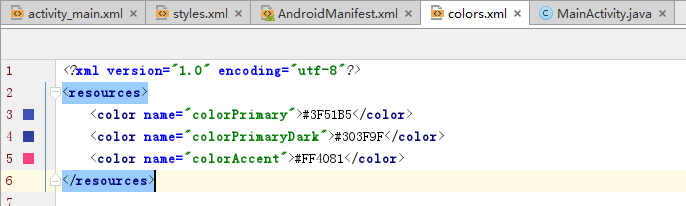
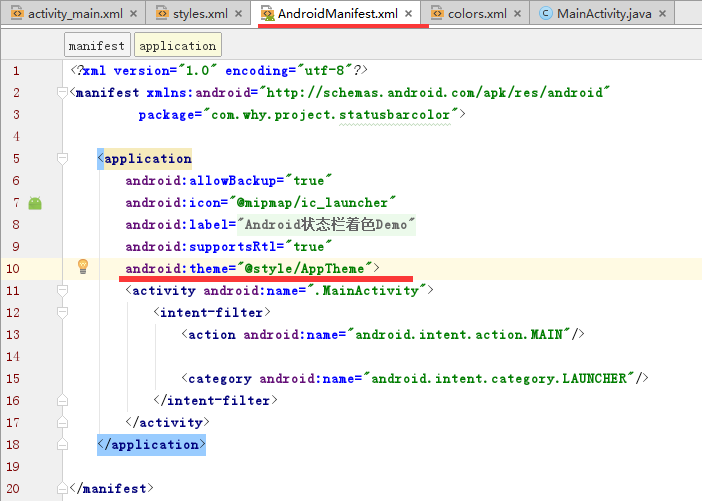
一般通过Android Studio新建项目时就实现了状态栏着色功能,不过只能在API>19的机型上正常显示。下面是通过Android studio新建项目时的默认样式代码:
styles.xml

colors.xml
AndroidManifest.xml
而本文想要实现的效果是在API>19和API<19的机型上都兼容状态栏着色效果。
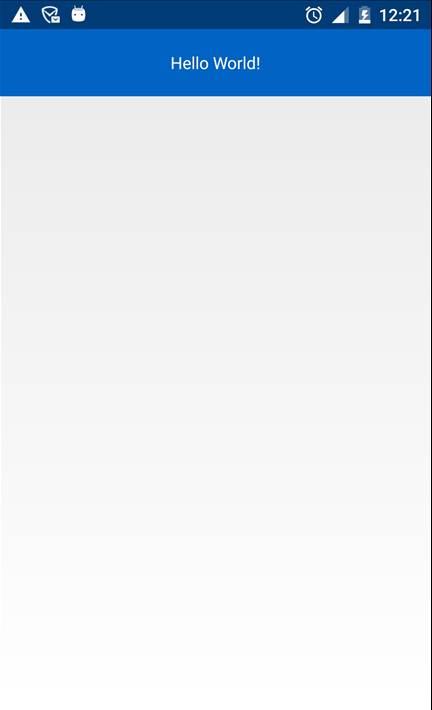
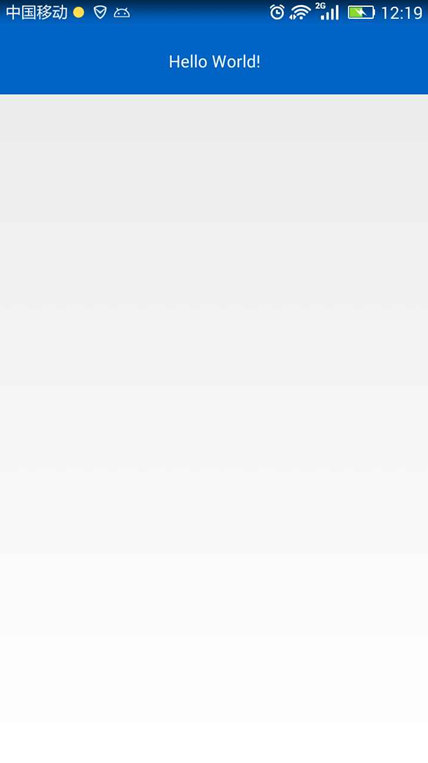
效果图
| API>19 | API =19 | API <19 |
|
|

|
代码分析
- 首先将手机手机状态栏透明化
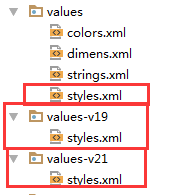
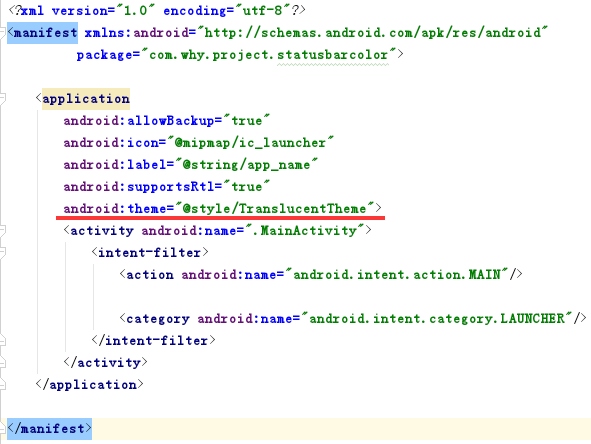
在values、values-v19、values-v21目录下分别创建相应的主题,然后在AndroidManifest.xml中给Application设置该主题。
- 在布局文件中添加
android:fitsSystemWindows="true"属性
我们使用android:fitsSystemWindows="true"属性,不让布局延伸到状态栏,这时状态栏就是透明的,然后添加一个和状态栏高、宽相同的指定颜色View来覆盖被透明化的状态栏。
- 创建View并添加到状态栏
使用步骤
一、项目组织结构图
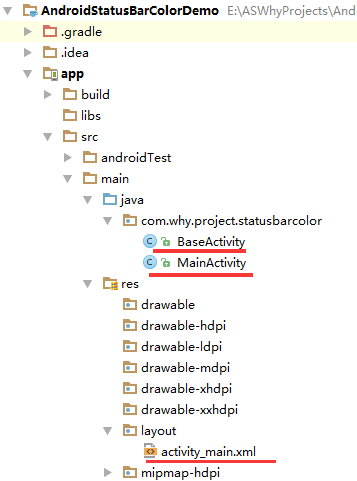

注意事项:
- 导入类文件后需要change包名以及重新import R文件路径
- values目录下的文件(strings.xml、dimens.xml、colors.xml等),如果项目中存在,则复制里面的内容,不要整个覆盖
二、使用方法
修改valus目录下的styles.xml文件【在eclipse开发环境和Android studio开发环境中建议使用不同的样式】
<resources>

    <!--

        Base application theme, dependent on API level. This theme is replaced

        by AppBaseTheme from res/values-vXX/styles.xml on newer devices.

    -->

    <!--

        Theme customizations available in newer API levels can go in

        res/values-vXX/styles.xml, while customizations related to

        backward-compatibility can go here.

    -->

    <!-- Eclipse开发环境 -->

    <!--<style name="AppBaseTheme" parent="android:Theme.Light.NoTitleBar">

    </style>-->

    <!-- Android Studio开发环境 -->

    <style name="AppBaseTheme" parent="Theme.AppCompat.Light.NoActionBar">

    </style>

    <!-- Application theme. -->

    <style name="AppTheme" parent="AppBaseTheme">

        <!-- All customizations that are NOT specific to a particular API-level can go here. -->

    </style>

    <!-- Android 状态栏着色 -->

    <style name="TranslucentTheme" parent="AppTheme">

    </style>

</resources>
添加\修改values-v19目录下的styles.xml文件【在eclipse开发环境和Android studio开发环境中建议使用不同的样式】
<resources>

    <!--

        Base application theme for API 19+. This theme completely replaces

        AppBaseTheme from BOTH res/values/styles.xml and

        res/values-v11/styles.xml on API 19+ devices.

    -->

    <!-- API 19 theme customizations can go here. -->

    <!-- Eclipse开发环境 -->

    <!--<style name="AppBaseTheme" parent="android:Theme.Light.NoTitleBar">

    </style>-->

    <!-- Android Studio开发环境 -->

    <style name="AppBaseTheme" parent="Theme.AppCompat.Light.NoActionBar">

    </style>

    <!-- Android 状态栏着色 -->

    <style name="TranslucentTheme" parent="AppTheme">

        <item name="android:windowTranslucentStatus">true</item>

        <item name="android:windowTranslucentNavigation">false</item>

    </style>

</resources>
添加\修改values-v21目录下的styles.xml文件【在eclipse开发环境和Android studio开发环境中建议使用不同的样式】
<resources>

    <!--

        Base application theme for API 21+. This theme completely replaces

        AppBaseTheme from BOTH res/values/styles.xml and

        res/values-v11/styles.xml on API 21+ devices.

    -->

    <!-- API 21 theme customizations can go here. -->

    <!-- Eclipse开发环境 -->

    <!--<style name="AppBaseTheme" parent="android:Theme.Light.NoTitleBar">

    </style>-->

    <!-- Android Studio开发环境 -->

    <style name="AppBaseTheme" parent="Theme.AppCompat.Light.NoActionBar">

    </style>

    <!-- Android 状态栏着色 -->

    <style name="TranslucentTheme" parent="AppTheme">

        <item name="android:windowTranslucentStatus">true</item>

        <item name="android:windowTranslucentNavigation">false</item>

        <item name="android:statusBarColor">@android:color/transparent</item>

    </style>

</resources>
在values目录下的colors.xml文件中添加状态栏着色的颜色值代码
<?xml version="1.0" encoding="utf-8"?>

<resources>

    <!-- Android 状态栏着色 -->

    <color name="colorPrimary">#0164C5</color>

</resources>
在AndroidManifest.xml中给Application设置TranslucentTheme主题
<?xml version="1.0" encoding="utf-8"?>

<manifest xmlns:android="http://schemas.android.com/apk/res/android"

          package="com.why.project.statusbarcolor">

    <application

        android:allowBackup="true"

        android:icon="@mipmap/ic_launcher"

        android:label="@string/app_name"

        android:supportsRtl="true"

        android:theme="@style/TranslucentTheme">

        <activity android:name=".MainActivity">

            <intent-filter>

                <action android:name="android.intent.action.MAIN"/>

                <category android:name="android.intent.category.LAUNCHER"/>

            </intent-filter>

        </activity>

    </application>

</manifest>
在activity布局文件中的根节点元素中添加android:fitsSystemWindows="true"
<?xml version="1.0" encoding="utf-8"?>

<!-- Android 状态栏着色:android:fitsSystemWindows="true" -->

<RelativeLayout

    xmlns:android="http://schemas.android.com/apk/res/android"

    xmlns:tools="http://schemas.android.com/tools"

    android:id="@+id/activity_main"

    android:layout_width="match_parent"

    android:layout_height="match_parent"

    tools:context="com.why.project.statusbarcolor.MainActivity"

    android:fitsSystemWindows="true">

    <TextView

        android:layout_width="match_parent"

        android:layout_height="56dp"

        android:text="Hello World!"

        android:textColor="#ffffff"

        android:background="@color/colorPrimary"

        android:gravity="center"/>

</RelativeLayout>
在Activity基类以及子类中添加以下标记的代码
package com.why.project.statusbarcolor;

import android.content.Context;

import android.os.Build;

import android.os.Bundle;

import android.support.annotation.Nullable;

import android.support.v4.content.ContextCompat;

import android.support.v7.app.AppCompatActivity;

import android.view.View;

import android.view.ViewGroup;

import android.widget.LinearLayout;

/**

 * Created by HaiyuKing

 * Used activity基类

 */

public class BaseActivity extends AppCompatActivity{

    @Override

    protected void onCreate(@Nullable Bundle savedInstanceState) {

        super.onCreate(savedInstanceState);

    }

    /*==========Android 状态栏着色=============*/

    public void addStatusBarView() {

        int height;

        height = getStatusBarHeight(this);

        if (height <= 0) {

            return;

        }

        View view = new View(this);

        view.setBackgroundColor(ContextCompat.getColor(this,R.color.colorPrimary));

        LinearLayout.LayoutParams params = new LinearLayout.LayoutParams(ViewGroup.LayoutParams.MATCH_PARENT, height);

        ViewGroup decorView = (ViewGroup) findViewById(android.R.id.content);

        decorView.addView(view, params);

    }

    /**

     * 获取状态栏的高度

     * 19API以上 读取到状态栏高度才有意义

     */

    public int getStatusBarHeight(Context context) {

        if (Build.VERSION.SDK_INT >= Build.VERSION_CODES.KITKAT) {

            int resourceId = context.getResources().getIdentifier("status_bar_height", "dimen", "android");

            return resourceId > 0 ? context.getResources().getDimensionPixelSize(resourceId) : 0;

        } else {

            return 0;

        }

    }

}
package com.why.project.statusbarcolor;

import android.os.Bundle;

public class MainActivity extends BaseActivity {

    @Override

    protected void onCreate(Bundle savedInstanceState) {

        super.onCreate(savedInstanceState);

        setContentView(R.layout.activity_main);

        /*==========Android 状态栏着色=============*/

        addStatusBarView();

    }

}
注意:
- Android studio新建的项目默认extends AppCompatActivity !如果是Eclipse开发环境则需要修改为extends Activity或者FragemntActivity或者自定义的activity基类。
- 如果activity布局中含有fragment布局,那么在Activity含有以上代码的基础上只需要在fragment布局文件中添加上android:fitsSystemWindows="true"即可
混淆配置
无
参考资料
项目demo下载地址
https://github.com/haiyuKing/AndroidStatusBarColorDemo
Android状态栏着色的更多相关文章
- Android 透明状态栏&着色状态栏
Android 5.0 及以上实现方式(android在5.0之后引入Material Design 实现方式相对简单) 透明状态栏,背景浸入状态栏 if (Build.VERSION.SDK_INT ...
- Android开发-状态栏着色原理和API版本号兼容处理
介绍 先上实际效果图,有三个版本号请注意区分API版本号 API>=20 API=19 API<19 watermark/2/text/aHR0cDovL2Jsb2cuY3Nkbi5uZX ...
- Android状态栏颜色修改
android状态栏颜色修改 状态栏颜色的修改在4.4和5.x环境下分别有不同的方式,低于4.4以下是不能修改的. 5.x环境下 方式一,状态栏将显示为纯净的颜色,没有渐变效果 /** * 状 ...
- Android状态栏透明(沉浸式效果)
Android状态栏透明(沉浸式效果) 默认效果 沉浸式效果 方式一 源码 下载地址(Android Studio工程):http://download.csdn.net/detail/q487880 ...
- Android如何着色字符串的特定部分
文章选自StackOverflow(简称:SOF)精选问答汇总系列文章之一,本系列文章将为读者分享国外最优质的精彩问与答,供读者学习和了解国外最新技术.本文探讨Android如何着色字符串的特定部分. ...
- android状态栏和NavigationBar的动态控制显示
项目在开发阅读器,阅读器对阅读界面的要求就是在工具栏不显示的状态下,ActionBar和NavigationBar都是不显示的,当工具栏显示时它们都出来,这就需要动态控制它们的显示与隐藏. 第一阶段: ...
- [Android] 状态栏的一些认识
前段时间遇到几个关于状态栏的问题,又了解了一下状态栏相关的知识,现在做一下记录. 本文地址:http://www.cnblogs.com/rossoneri/p/4316343.html 前戏和问题 ...
- android状态栏总结
针对状态栏的操作,只针对4.4kitKat(含)以上的机型,部分国产rom会失效,目前发现的有华为的EMUI Activity必须是noActionbar主题 本文基于StatusBarUtils略作 ...
- Translucent Bar Android状态栏自定义颜色
Android4.4 一个很重要的改变就是透明系统栏..新的系统栏是渐变透明的, 可以最大限度的允许屏幕显示更多内容, 也可以让系统栏和 Action Bar 融为一体, 仅仅留下最低限度的背景保护以 ...
随机推荐
- django(权限、认证)系统——用户Login,Logout
上面两篇文章,讲述的Django的Authentication系统的核心模型对象User API和相关的使用,本文继续深入,讨论如何在Web中使用Authentication系统. 前面说了,Djan ...
- go语言nsq源码解读一-基本介绍
简单介绍一下nsq. 参考 http://feilong.me/2013/05/nsq-realtime-message-processing-system 的介绍:NSQ是由知名短链接服务商bitl ...
- op.go
package } ) : : : ,: ,: : : ,: ,: : : ,: ,: ;; ] )} } minutes when there is no incoming events. // P ...
- Cocos.js
l SDK下载:http://cn.cocos2d-x.org/download/ l js类库:http://www.cocos2d-x.org/filecenter/jsbuilder/
- Hadoop权限管理
1.Hadoop权限管理包括以下几个模块: (1) 用户分组管理.用于按组为单位组织管理,某个用户只能向固定分组中提交作业,只能使用固定分组中配置的资源:同时可以限制每个用户提交的作业数,使用的资源量 ...
- modbus学习笔记——帧
几个需要先搞懂的概念 1.modbus的数据类型 modbus定义了四种数据类型,这四种数据类型分别叫"离散量输入""线圈""输入寄存器"& ...
- Eureka的基本功能和用法
1.基础架构 eueka按逻辑上可以划分为3个模块,eureka-server,service-provider,service-consumereureka-server:服务端,提供服务注册和发现 ...
- 干货,不小心执行了rm -f,除了跑路,如何恢复?
前言 每当我们在生产环境服务器上执行rm命令时,总是提心吊胆的,因为一不小心执行了误删,然后就要准备跑路了,毕竟人不是机器,更何况机器也有bug,呵呵. 那么如果真的删除了不该删除的文件,比如数据库. ...
- 深度学习与计算机视觉:基于Python的神经网络的实现
在前面两篇文章介绍了深度学习的一些基本概念,本文则使用Python实现一个简单的深度神经网络,并使用MNIST数据库进行测试. 神经网络的实现,包括以下内容: 神经网络权值的初始化 正向传播 误差评估 ...
- Linux挖矿病毒 khugepageds详细解决步骤
一.背景 最近公司一台虚拟机被攻击,其中一种挖矿病毒.会伪CPU数.即如果用top命令只能看到一个cpu.并且负载不高.实际上整个负载300%以上,及时定时任务关掉也不起作用. 二.言归正传开始干掉这 ...