
nginx 的基本配置
安装(mac):关于brew 的问题:http://www.cnblogs.com/adouwt/p/8042201.html
brew install nginx
启动:
brew services start nginx
重启:
brew services restart nginx
停止:
brew services stop nginx
修改配置文件:
安装成功后,会在/etc/nginx 有个 nginx.conf 文件,这里做一些反向代理的操作
http {

    include       mime.types;

    default_type  application/octet-stream;

    #log_format  main  '$remote_addr - $remote_user [$time_local] "$request" '

    #                  '$status $body_bytes_sent "$http_referer" '

    #                  '"$http_user_agent" "$http_x_forwarded_for"';

    #access_log  logs/access.log  main;

    sendfile        on;

    #tcp_nopush     on;

    #keepalive_timeout  0;

    keepalive_timeout  65;

    #gzip  on;

    server {

        listen       80;      // 监听端口

      server_name  localhost;  // 本地访问的域名

      charset utf-8;      // 编码格式

      #access_log  logs/host.access.log  main;

      root   /Users/wangtao/Desktop/my-test-files;  // 访问的根路径  这个是我本地的桌面的某个文件夹的地址

      index  iindex.html iindex.htm;
     // 默认访问的文件, 我把它改了不是 index.html 主要就是想访问的是这个文件夹,不是某个默认的文件

        # 开启目录浏览

        autoindex on;

        autoindex_exact_size off;

        autoindex_localtime on;

        #error_page  404              /404.html;

        # redirect server error pages to the static page /50x.html

        #

        error_page   500 502 503 504  /50x.html;

        location = /50x.html {

            root   html;

        }

        # proxy the PHP scripts to Apache listening on 127.0.0.1:80

        #

        #location ~ \.php$ {

        #    proxy_pass   http://127.0.0.1;

        #}

        # pass the PHP scripts to FastCGI server listening on 127.0.0.1:9000

        #

        #location ~ \.php$ {

        #    root           html;

        #    fastcgi_pass   127.0.0.1:9000;

        #    fastcgi_index  index.php;

        #    fastcgi_param  SCRIPT_FILENAME  /scripts$fastcgi_script_name;

        #    include        fastcgi_params;

        #}

        # deny access to .htaccess files, if Apache's document root

        # concurs with nginx's one

        #

        #location ~ /\.ht {

        #    deny  all;

        #}

    }

    # another virtual host using mix of IP-, name-, and port-based configuration

    #

    #server {

    #    listen       8000;

    #    listen       somename:8080;

    #    server_name  somename  alias  another.alias;

    #    location / {

    #        root   html;

    #        index  index.html index.htm;

    #    }

    #}

    # HTTPS server

    #

    #server {

    #    listen       443 ssl;

    #    server_name  localhost;

    #    ssl_certificate      cert.pem;

    #    ssl_certificate_key  cert.key;

    #    ssl_session_cache    shared:SSL:1m;

    #    ssl_session_timeout  5m;

    #    ssl_ciphers  HIGH:!aNULL:!MD5;

    #    ssl_prefer_server_ciphers  on;

    #    location / {

    #        root   html;

    #        index  index.html index.htm;

    #    }

    #}

    include vhosts/*.conf;  // 这里include 的配置  意思是 同级目录下 vhost 的文件夹下所有 .conf 的配置文件

}
知道这些简单的配置知识,我们就可以进行简单的做一些反向代理了,可以在这个 vhost 下新建我们的配置文件,当然这个文件夹是可以随便取名字的。我们新建一个文件叫myself.conf
server {

  listen ; // 反向代理的时候,基本都是这个80端口,服务启动的是那个端口就代理哪个端口

  server_name test.itlab.wang;  // 访问的域名

  location / {

    root /Users/wangtao/it-cloud-lab/www-mobile-client-phone/dist; // 访问的根目录地址,我这里是webpack 打包的一个地址

    index index.html; // 默认访问的 index.html 的文件

  }

}
修改配置文件后,需要重新加载下配置nginx文件, nginx -s reload 如果这个nginx 服务是root 权限的时候,加sudo 启动 sudo nginx -s reload ,这时候需要输入计算机密码
这个命令可以按字面意思解释: 保存并重载
启动: /usr/sbin/nginx
停止: sudo nginx -s stop
linux (阿里云服务器):
安装依赖:
yum install -y epel-*

yum install -y pcre pcre-devel

yum install -y zlib zlib-devel

yum install -y openssl openssl-devel

安装nginx
yum install nginx
安装好后就是 修改配置文件 。做一些反向代理的操作
下面的就是 将9000端口的服务代理到80端口,通过访问 csa.scampus.cn 就可以看到程序了
server {
listen 80;
server_name csa.scampus.cn;
location / {
proxy_pass http://127.0.0.1:9000;
}
}
出现问题:
nginx 配置静态文件时候 访问出现403
解决:
尝试授权:
新建的静态文件夹权限不够,授权: chmod a+x /root/static 给static文件夹授权 ,nginx 静态文件配置到static的下面的
windows 安装
一. 下载
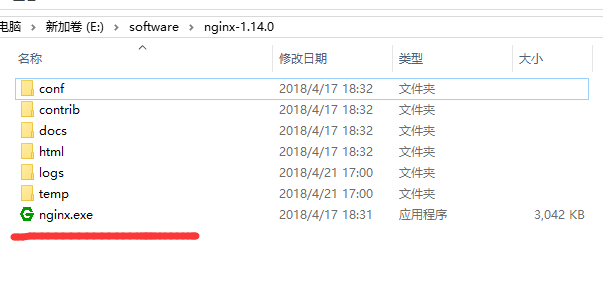
二. 修改配置文件
nginx配置文件在 nginx-1.14.0\conf\nginx.conf
#user  nobody;

worker_processes  ;

#error_log  logs/error.log;

#error_log  logs/error.log  notice;

#error_log  logs/error.log  info;

#pid        logs/nginx.pid;

events {

    worker_connections  ;

}

http {

    include       mime.types;

    default_type  application/octet-stream;

    #log_format  main  '$remote_addr - $remote_user [$time_local] "$request" '

    #                  '$status $body_bytes_sent "$http_referer" '

    #                  '"$http_user_agent" "$http_x_forwarded_for"';

    #access_log  logs/access.log  main;

    sendfile        on;

    #tcp_nopush     on;

    #keepalive_timeout  ;

    keepalive_timeout  ;

    #gzip  on;

    server {

        listen       ;

        server_name  localhost;

        #charset koi8-r;

        #access_log  logs/host.access.log  main;

        location / {

            root   E:\vue\vue-dist\dist;

            index  index.html index.htm;

        }

        #error_page                /.html;

        # redirect server error pages to the static page /50x.html

        #

        error_page        /50x.html;

        location = /50x.html {

            root   html;

        }

        # proxy the PHP scripts to Apache listening on 127.0.0.1:

        #

        #location ~ \.php$ {

        #    proxy_pass   http://127.0.0.1;

        #}

        # pass the PHP scripts to FastCGI server listening on 127.0.0.1:

        #

        #location ~ \.php$ {

        #    root           html;

        #    fastcgi_pass   127.0.0.1:;

        #    fastcgi_index  index.php;

        #    fastcgi_param  SCRIPT_FILENAME  /scripts$fastcgi_script_name;

        #    include        fastcgi_params;

        #}

        # deny access to .htaccess files, if Apache's document root

        # concurs with nginx's one

        #

        #location ~ /\.ht {

        #    deny  all;

        #}

    }

    # another virtual host using mix of IP-, name-, and port-based configuration

    #

    server {

        listen       ;

        server_name  localhost;

        location / {

            root   E:\mystatic_folder;

            index  iindex.html iindex.htm;

            autoindex on;        }

    }

    # HTTPS server

    #

    #server {

    #    listen        ssl;

    #    server_name  localhost;

    #    ssl_certificate      cert.pem;

    #    ssl_certificate_key  cert.key;

    #    ssl_session_cache    shared:SSL:1m;

    #    ssl_session_timeout  5m;

    #    ssl_ciphers  HIGH:!aNULL:!MD5;

    #    ssl_prefer_server_ciphers  on;

    #    location / {

    #        root   html;

    #        index  index.html index.htm;

    #    }

    #}

}
三. 启动
nginx -t -c /path/to/nginx.conf 测试nginx配置文件是否正确
关闭nginx:
nginx -s stop :快速停止nginx
nginx -s quit :完整有序的停止nginx
如果遇到报错:
bash: nginx: command not found
有可能是你再linux命令行环境下运行了windows命令,
如果你之前是允许 nginx -s reload报错, 试下 ./nginx -s reload
或者 用windows系统自带命令行工具运行
nginx 的基本配置的更多相关文章
- nginx + SSL优化配置
nginx + SSL优化配置: #http段添加如下配置项: http { ssl_prefer_server_ciphers on; #设置协商加密算法时,优先使用我们服务端的加密套件,而不是客户 ...
- nginx安装与配置
一.在线安装 ubuntu 安装 sudo apt-get install nginx 安装后文件结构为: 配置文件:/etc/nginx ,并且每台虚拟主机已经安排在 /etc/nginx/site ...
- windows下nginx安装、配置与使用(转载)
目前国内各大门户网站已经部署了Nginx,如新浪.网易.腾讯等:国内几个重要的视频分享网站也部署了Nginx,如六房间.酷6等.新近发现Nginx 技术在国内日趋火热,越来越多的网站开始部署Nginx ...
- 阿里云服务器Linux CentOS安装配置(八)nginx安装、配置、域名绑定
阿里云服务器Linux CentOS安装配置(八)nginx安装.配置.域名绑定 1.安装nginx yum -y install nginx 2.启动nginx service nginx star ...
- nginx入门篇----nginx服务器基础配置
1.nginx.conf文件结构... #全局块 events{ ... } http #http块{ ...
- 高流量站点NGINX与PHP-fpm配置优化(译)
使用Nginx搭配PHP已有7年的这份经历让我们学会如何为高流量站点优化NGINX和PHP-fpm配置. 以下正是这方面的一些提示和建议: 1. 将TCP切换为UNIX域套接字 UNIX域套接字相比T ...
- nginx反向代理配置及优化
nginx反向代理配置及优化前言: 由于服务器apache抗不住目前的并发.加上前端squid配置后,问题依然无法解决.而页面程序大部分是动态.无法使用fastcgi来处理.因此想使用nginx做为反 ...
- LVS + Keepalived + Nginx安装及配置
1.概述 上篇文章<架构设计:负载均衡层设计方案(6)——Nginx + Keepalived构建高可用的负载层>(http://blog.csdn.net/yinwenjie/artic ...
- windows下nginx+php简单配置
Nginx+php运行环境搭建 虽然目前nginx使用很广泛,在大陆主流的互联网站点或多或少会用到这个俄国人开发的小应用(占用资源小).但是我这个土鳖还是第一次自己独立配置,网上资料不少,但是还是遇到 ...
- nginx虚拟主机配置
nginx虚拟主机配置 虚拟主机的概念虚拟主机,就是把一台物理服务器划分成多个"虚拟"的服务器,每一个虚拟主机都可以有独立的域名和独立的目录nginx虚拟主机的配置nginx的 ...
随机推荐
- 学习customEvent
title: 认真学习customEvent tags: DOM date: 2017-7-22 23:20:57 --- 最近要实现一个模拟的select元素组件,所以好好看了这个自定义事件api, ...
- 什么是 stack?- 每天5分钟玩转 Docker 容器技术(111)
什么是 stack ?在回答这个问题之前我们先回忆一下前面部署 WordPress 应用的过程: 首先创建 secret. 然后创建 MySQL service,这是 WordPress 依赖的服务. ...
- 43.Linux调试测试输入思路
当产品要发布之前,都会进行反复的测试输入,比如:测试按键,遥控,触摸等等. 当出现bug时,就还需要不停地找规律,修改程序,直到修复成功,会显的非常麻烦 答: 可以通过之前在35.Linux-分析并制 ...
- JavaScript 中 this 的详解
this 的指向 this 是 js 中定义的关键字,它自动定义于每一个函数域内,但是它的指向却让人很迷惑.在实际应用中,this 的指向大致可以分为以下四种情况. 原文作者:林鑫,作者博客:http ...
- 数据库入门(以MySQL为例)
一.数据库中的概念 1.数据库是用户存放数据.访问数据.操作数据的存储仓库,用户的各种数据被有组织地存放在数据库中.可以随时被有权限的用户查询.统计.添加.删除.和修改.可以说,数据库是长期存储在计算 ...
- BZOJ 4819 新生舞会
第一句话:算出3.363636的孩子啊,你跑错流种了. 貌似上一篇我讲SDOI出原题?嘿还真是! 半个月前有一个叫WG的男人给我们搞过一场考试... ... 里面有一道题叫做保密... ...SDOI ...
- 利用VSTS跟Kubernetes进行CI/CD
准备VSTS管理环境 首先我们需要到www.visualstudio.com下申请好的VSTS账号,然后在账号下创建一个用Git作为代码管理的项目 创建好项目后我们就可以利用git clone将代码库 ...
- 修改Linux内核参数提高Nginx服务器并发性能
当linux下Nginx达到并发数很高,TCP TIME_WAIT套接字数量经常达到两.三万,这样服务器很容易被拖死.事实上,我们可以简单的通过修改Linux内核参数,可以减少Nginx服务器 的TI ...
- html统计
<!doctype html><html lang="en"> <head> <meta charset="UTF-8&quo ...
- awk 命令详解
作用:awk 是一种编程语言, 用于在linux/unix 下对文本和数据进行处理. 数据可以来自标准输入(stdin),一个或多个文件, 或其他命令的输出.它支持用户自定义函数和动态正则表达式等先进 ...