
Java实现office文档与pdf文档的在线预览功能
最近项目有个需求要java实现office文档与pdf文档的在线预览功能,刚刚接到的时候就觉得有点难,以自己的水平难以在三四天做完。压力略大。后面查找百度资料、以及在同事与网友的帮助下,四天多把它做完。查找资料发现我们要实现的过程就是把office转换成pdf,当然pdf就不用转换了。然后在pdf转换为swf文件,在浏览器实现预览swf文件。整个过程就是这样,看起来很简单,实际操作起来会出现各种问题。下面我就把自己写的这一小功能记录下来。
1、首先我们需要找到可以把office转换成pdf的方法,查找资料发现有openoffice这一软件可以把office转换成pdf,这一软件先下载下来,然后记住自己安装的在那个位置。然后在cmd环境下进入安装目录的program目录,输入打开openoffice的命令:
soffice -headless -accept="socket,host=127.0.0.1,port=8100;urp;" -nofirststartwizard
输入完成之后在任务管理器可以看见soffice.bin的进程在任务管理器,这一服务就启动成功。当然在代码中转换office2pdf我们还需要一些架包。下载jodconverter-2.2.2架包,然后复制到lib目录下,引入架包就可以了。这个架包有如下包: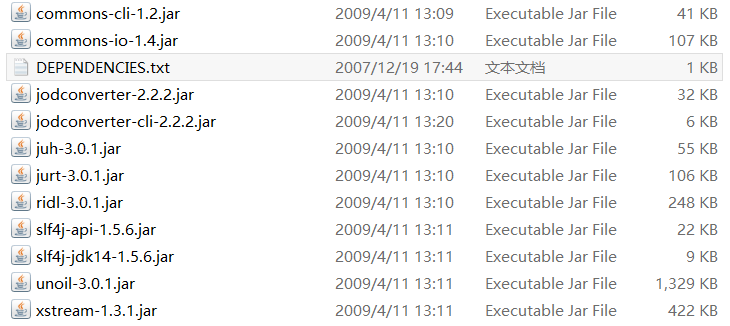
有一些项目重复的可以删除,根据实际情况自己处理。
2、我们需要找到转换pdf2swf的方法。查找资料发现swftools这个软件可以把pdf转换成swf文件。把它下下来安装好就可以了。
3、我们需要一个展示swf文件的容器,发现有flexpaper这个插件。而且展示效果还不错。所以我们需要下载这个插件。使用这个插件需要有三个js文件。分别是:jquery.js、flexpaper_flash.js、flexpaper_flash_debug.js。插件的名字是FlexPaperViewer.swf。
整个项目结如下:
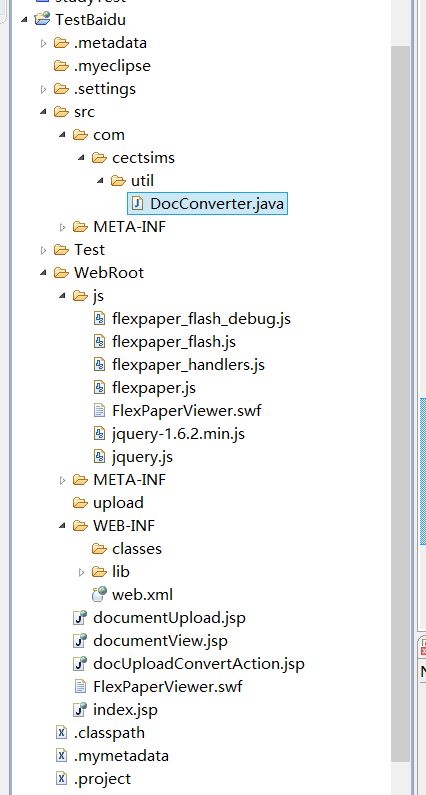
准备工作完成下面开始编码.
转换类为DocConverter 的代码:
package com.cectsims.util;

import java.io.BufferedInputStream;

import java.io.File;

import java.io.IOException;

import java.io.InputStream;

import com.artofsolving.jodconverter.DocumentConverter;

import com.artofsolving.jodconverter.openoffice.connection.OpenOfficeConnection;

import com.artofsolving.jodconverter.openoffice.connection.SocketOpenOfficeConnection;

import com.artofsolving.jodconverter.openoffice.converter.OpenOfficeDocumentConverter;

/**

 * doc docx格式转换

 */

public class DocConverter {

	private static final int environment = 1;// 环境 1:Windows 2:Linux

	private String fileString;// (只涉及PDF2swf路径问题)

	private String outputPath = "";// 输入路径 ,如果不设置就输出在默认 的位置

	private String fileName;

	private File pdfFile;

	private File swfFile;

	private File docFile;

	public DocConverter(String fileString) {

		ini(fileString);

		System.out.println("文件路径"+fileString);

	}

	/**

	 * * 重新设置file

	 *

	 * @param fileString

	 *            32.

	 */

	public void setFile(String fileString) {

		ini(fileString);

	}

	/**

	 *  * 初始化

	 *

	 * @param fileString

	 *

	 */

	private void ini(String fileString) {

		this.fileString = fileString;

		fileName = fileString.substring(0, fileString.lastIndexOf("."));

		docFile = new File(fileString);

		pdfFile = new File(fileName+ ".pdf");

		swfFile = new File(fileName+ ".swf");

	}

	/**

	 *  转为PDF

	 *

	 * @param file

	 *

	 */

	private void doc2pdf() throws Exception {

		if (docFile.exists()) {

			if (!pdfFile.exists()) {

				OpenOfficeConnection connection = new SocketOpenOfficeConnection(8100);

				try {

					connection.connect();

					DocumentConverter converter = new OpenOfficeDocumentConverter(

							connection);

					converter.convert(docFile, pdfFile);

					// close the connection

					connection.disconnect();

					System.out.println("****pdf转换成功,PDF输出: "+ pdfFile.getPath() + "****");

				} catch (java.net.ConnectException e) {

					e.printStackTrace();

					System.out.println("****swf转换器异常,openoffice 服务未启动!****");

					throw e;

				} catch (com.artofsolving.jodconverter.openoffice.connection.OpenOfficeException e) {

					e.printStackTrace();

					System.out.println("****swf转换器异常,读取转换文件 失败****");

					throw e;

				} catch (Exception e) {

					e.printStackTrace();

					throw e;

				}

			} else {

				System.out.println("****已经转换为pdf,不需要再进行转化 ****");

			}

		} else {

			System.out.println("****swf转换器异常,需要转换的文档不存在, 无法转换****");

		}

	}

	/** * 转换成 swf */

	@SuppressWarnings("unused")

	private void pdf2swf() throws Exception {

		Runtime r = Runtime.getRuntime();

		if (!swfFile.exists()) {

			if (pdfFile.exists()) {

				if (environment == 1) {// windows环境处理

					try {

						Process p = r.exec("D:/Program/swfttools/pdf2swf.exe "+ pdfFile.getPath() + " -o "+ swfFile.getPath() + " -T 9");

						 System.out.print(loadStream(p.getInputStream()));

						 System.err.print(loadStream(p.getErrorStream()));

						 System.out.print(loadStream(p.getInputStream()));

						 System.err.println("****swf转换成功,文件输出: "+swfFile.getPath() + "****");

						if (pdfFile.exists()){

							pdfFile.delete();

						}

					} catch (IOException e) {

						e.printStackTrace();

						throw e;

					}

				} else if (environment == 2) {// linux环境处理

					try {

						Process p = r.exec("pdf2swf" + pdfFile.getPath()+ " -o " + swfFile.getPath() + " -T 9");

					     System.out.print(loadStream(p.getInputStream()));

						 System.err.print(loadStream(p.getErrorStream()));

						 System.err.println("****swf转换成功,文件输出: "+ swfFile.getPath() + "****");

						if (pdfFile.exists()) {

							pdfFile.delete();

						}

					} catch (Exception e) {

						e.printStackTrace();

						throw e;

					}

				}

			} else {

				System.out.println("****pdf不存在,无法转换****");

			}

		} else {

			System.out.println("****swf已经存在不需要转换****");

		}

	}

	static String loadStream(InputStream in) throws IOException {

		int ptr = 0;

		in = new BufferedInputStream(in);

		StringBuffer buffer = new StringBuffer();

		while ((ptr = in.read()) != -1) {

			buffer.append((char) ptr);

		}

		return buffer.toString();

	}

	/**

	 * * 转换主方法

	 */

	@SuppressWarnings("unused")

	public boolean conver() {

		if (swfFile.exists()) {

			System.out.println("****swf转换器开始工作,该文件已经转换为 swf****");

			return true;

		}

		if (environment == 1) {

			System.out.println("****swf转换器开始工作,当前设置运行环境 windows****");

		} else {

			System.out.println("****swf转换器开始工作,当前设置运行环境 linux****");

		}

		try {

			doc2pdf();

			pdf2swf();

		} catch (Exception e) {

			  e.printStackTrace();

			  return false;

		}

		System.out.println("文件存在吗?"+swfFile);

		if (swfFile.exists()) {

			System.out.println("存在");

			return true;

		} else {

			System.out.println("不存在");

			return false;

		}

	}

	/**

	 *返回文件路径

	 * @param

	 */

	public String getswfPath(){

		if (this.swfFile.exists()){

			String tempString = swfFile.getPath();

			tempString = tempString.replaceAll("\\\\", "/");

			System.out.println("最后文件路径为"+tempString);

			return tempString;

		} else {

			return "文件不存在";

		}

	}

	/**

	 * 设置输出路径

	 *

	 * @param outputPath

	 */

	public void setOutputPath(String outputPath){

		this.outputPath = outputPath;

		if (!outputPath.equals("")) {

			String realName = fileName.substring(fileName.lastIndexOf("/"),

					fileName.lastIndexOf("."));

			if (outputPath.charAt(outputPath.length()) == '/') {

				swfFile = new File(outputPath + realName + ".swf");

			} else {

				swfFile = new File(outputPath + realName + ".swf");

			}

		}

	}

}
调用转换类只需要传word、ptt、excel、pdf文件所在的路径参数就可以了。
展示在线预览的jsp代码如下:
<%@page language="java" contentType="text/html; charset=UTF-8" pageEncoding="UTF-8"%>

<%

   String swfFilePath=session.getAttribute("swfpath").toString();

   System.out.println("展示路径"+swfFilePath);

 %>

<!DOCTYPE HTML PUBLIC "-//W3C//DTD HTML 4.01 Transitional//EN">

<html>

<head>

<meta content="text/html;charset=UTF-8" http-equiv="Content-Type">

<script type="text/javascript" src="js/jquery.js"></script>

<script type="text/javascript" src="js/flexpaper_flash.js"></script>

<script type="text/javascript" src="js/flexpaper_flash_debug.js"></script>

<!--  <script type="text/javascript" src="js/jquery-1.6.2.min.js"></script>

<script type="text/javascript" src="js/flexpaper.js"></script>

<script type="text/javascript" src="js/flexpaper_handlers.js"></script>-->

<style type="text/css" media="screen">

html,body{

        height: 100%;

}

body{

        margin: 0;

        padding: 0;

        overflow: auto;

}

#flashContent{

       display: none;

}

</style>

<title>在线文档预览</title>

</head>

<body>

   <div style="position: absolute; left:50px;top:10px;">

        <a id="viewerPlaceHolder" style="width: 820px;height: 650px;display: block;"></a>

          <script type="text/javascript">

           var fp=new FlexPaperViewer('FlexPaperViewer','viewerPlaceHolder',{config:{SwfFile:escape('<%=swfFilePath%>'),Scale:1.2,

            ZoomTransition:'easeOut',ZoomTime:0.5,ZoomInterval:0.2,FitPageOnLoad:false,FitWidthOnload:false,

            FullScreenAsMaxWindow:false,ProgressiveLoading:false,MinZoomSize:0.2,MaxZoomSize:5,SearchMatchAll:false,

            InitViewMode:'SinglePage',RenderingOrder : 'flash',ViewModeToolsVisible:true,ZoomToolsVisible:true,NavToolsVisible:true,CursorToolsVisible:true,

            SearchToolsVisible:true,localeChain:'en_US'}});

          </script>

   </div>

</body>

</html>
其中可能会出现在线预览只能实现10页的情况,需要把RenderingOrder : 'flash',设置为flash才可以实现超过10页的在线预览。swfFilePat为转换后的文件所在路径。
转换后面的效果如下:
注意问题:
1、发现错误一般是openoffice服务没有开启。
2、Linux环境下会存在中文乱码的问题,是linux下不像windows支持那么多字体,需要安装多的字体,并且把字体所在位置链接到flexpaper所在位置。在使用pdf2swf加上参数-s languagedir=/usr/local/xpdf-chinese-simplified/。具体的一些参数请百度。
源代码已经在我的github上了,可以访问https://github.com/liaowp/OnlinePreview,也可以点击我博客的github标签。
如果有问题可以加QQ群咨询。178737461
Java实现office文档与pdf文档的在线预览功能的更多相关文章
- Java实现在线预览功能
java实现在线预览功能,需要用到 jacob.dll jacob.jar 预览pdf所需js pdfobject.min.js 将上传文件转为pdf保存. <div class=&qu ...
- pdf.js实现图片在线预览
项目需求 前段时间项目中遇到了一个模块,是关于在线预览word文档(PDF文件)的,所以,找了很多插件,例如,pdf.js,pdfobject.js框架,但是pdfobject.js框架对于IE浏览器 ...
- pdf word excel ppt 在线预览方案收集
https://www.idocv.com/docs.html http://www.cnblogs.com/wolf-sun/p/3569960.html http://coolwanglu.git ...
- pc或者微信上用pdf.js在线预览pdf和word
最近项目要求pdf和word可以在线预览功能,pc端还好解决,但是微信端就有点坑了,pc端原来的思路是将文件转成base64,然后用html格式显示 ,但是微信端不支持, 这种方式就pass掉了,谷歌 ...
- word文档在线预览解决方案
花了一整天在网上翻关于 “word文档在线预览解决方案” 相关的资料,感觉实现难度比较大还是用PDF来解决好了.. 下面列一下比较好的参考资料吧 参考资料 前端实现在线预览pdf.word.xls.p ...
- 基于CA认证(结合文档在线预览)的电子签章解决方案
分享一个基于CA认证(结合文档在线预览)的电子签章实现思路,恰巧是最近项目中遇到的,欢迎大家一起讨论. 一. 项目背景 在公司业务系统中,按照传统的签章方式,存在以下痛点: 1.成本高,体现在纸质合同 ...
- 浏览器在线预览pdf、txt、office文件
//使用文件预览的原因是:TMD微信浏览器屏蔽掉文件下载链接,只好折中使用文件在线预览功能//要点:1.office文件用微软的插件打开 http://view.officeapps.live.com ...
- java实现在线预览--poi实现word、excel、ppt转html
java实现在线预览 - -之poi实现word.excel.ppt转html 简介 java实现在线预览功能是一个大家在工作中也许会遇到的需求,如果公司有钱,直接使用付费的第三方软件或者云在线预览服 ...
- java实现在线预览 - -之poi实现word、excel、ppt转html
简介 java实现在线预览功能是一个大家在工作中也许会遇到的需求,如果公司有钱,直接使用付费的第三方软件或者云在线预览服务就可以了,例如永中office.office web 365(http://w ...
随机推荐
- Email系列(QQ邮箱 + 含附件的邮箱案例 + 项目实战)
平台之大势何人能挡? 带着你的Net飞奔吧! http://www.cnblogs.com/dunitian/p/4822808.html 邮箱系列:https://github.com/duniti ...
- 从零开始编写自己的C#框架(19)——Web层后端权限模块
不知不觉本系统写了快三个月了,最近写页面的具体功能时感觉到有点吃力,很多地方如果张嘴来讲的话可以说得很细,很全面,可写成文字的话,就不太会写了,有些地方想讲得清晰的话,得用多几倍的文字+实例+变化中的 ...
- es6学习笔记一数组(上)
最近公司没什么事情,我们老大让我看看es6,小颖就练习了下数组的各个方法,今天先给大家分享一部分.嘻嘻,希望对大家有所帮助. every方法: 概述: every() 方法测试数组的所有元素是否 ...
- Windows下构建ASP.NET Core+Code First+Docker
背景介绍 本文将会示范如何在Windows系统下基于ASP.NET Core构建跨平台服务,并通过Docker容器运行发布. 首先说一下为什么选择这一套组合: 我本人和我们Code4Thought团队 ...
- asp.net MVC 应用程序的生命周期
下面这篇文章总结了 asp.net MVC 框架程序的生命周期.觉得写得不错,故转载一下. 转载自:http://www.cnblogs.com/yplong/p/5582576.html ...
- Spring 实现数据库读写分离
随着互联网的大型网站系统访问量的增高,数据库访问压力方面不断的显现而出,所以许多公司在数据库层面采用读写分离技术,也就是一个master,多个slave.master负责数据的实时更新或实时查询,而s ...
- Oracle Blob数据保存为文件
好久不写文,最近得空写一点.Oracle数据库国内用户量主要在企业上,其中有一种byte的存储称为Blob,并不能直接看. 有时候为了调试需要,可以通过: ,)) ; 这种sql去转为字符串查看,但是 ...
- Struts 原理
今天开始接触公司的框架,叫YNA,三个字母应该是雅马哈的缩写,这个框架听公司前辈说功能很强大,但实际上我看不懂.哈哈...... 其中整合了SSH框架,接下来我说下Struts的一些原理 其实这张图就 ...
- Jquery 页面间传值(非QuerryString)
实现原理: 实现方式不是很复杂,父页面A打开一个子页面 A1,并同时写一个带参数的接收数据函数Receive(result),在A1页面进行逻辑操作,然后调用父页面A的Receive(result)函 ...
- LightGallery.js – 功能齐全的 Javascript Lightbox
Lightgallery是一个轻量级的模块化.响应式的灯箱画廊,它允许您创建美丽的图像和视频画廊.借助缩略图插件的帮助,Lightgallery 允许您创建缩略图画廊.它支持触摸屏设备上滑动导航以及桌 ...